
Travel connectivity guide
Olomouc eSIM for mobile internet
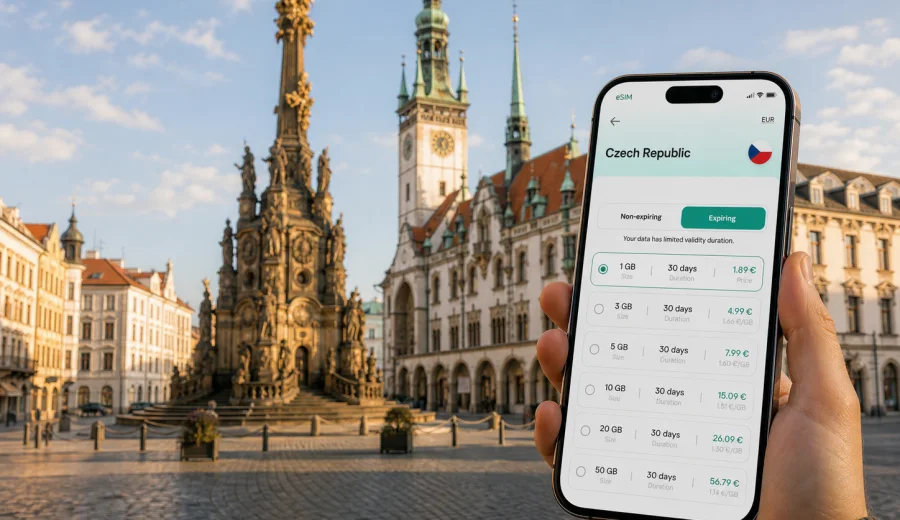
Olomouc eSIM: mobile connection and internet for your city trip
Olomouc is a city where mobile internet quickly becomes part of the trip, not a separate technical detail. You may arrive by train after landing in Prague, Brno, Ostrava, Vienna, or Krakow; you may come for a university visit, a business meeting, a stopover in Moravia, or a weekend around the historic center. In each case, the first practical question is simple: how will you use maps, transport information, hotel messages, tickets, payments, and calls through messengers before you find stable Wi-Fi?
An eSIM can make that first hour easier. Instead of looking for a physical SIM card after arrival, you can prepare a digital SIM profile on a compatible smartphone and use a selected data plan for mobile internet during your trip to the Czech Republic. Kaspersky eSIM Store is an app and website where you can choose, set up, and activate an eSIM with a suitable data plan for travel abroad. It is not a mobile operator and does not replace a local phone number, but it can simplify the way you prepare internet access for Olomouc.
This guide is focused on Olomouc itself: arrival routes, local movement, the compact center, hotels, university areas, business travel, short stays, and side trips across Moravia. It also explains how to estimate data needs, what to check before buying a plan, and how to avoid common mistakes with eSIM setup.
Why eSIM is useful in Olomouc
Olomouc is walkable in the center, but travelers often connect several small tasks: finding the right platform at the main railway station, checking tram connections, confirming an apartment entry code, navigating to a hotel near Horní náměstí, or ordering a ride after a late arrival. Public Wi-Fi may be available in hotels, cafes, universities, and offices, but it is not always available at the exact moment you need it.
With a travel eSIM, mobile data can support the parts of the trip that happen between fixed Wi-Fi points:
| Travel moment in Olomouc | Why mobile internet helps |
|---|---|
| Arrival at Olomouc hlavní nádraží | Check tram routes, walking directions, hotel messages, and taxi apps. |
| First walk to the center | Use maps around the old town, Upper Square, and side streets without stopping to ask for directions. |
| Hotel or apartment check-in | Open booking details, entry instructions, email confirmations, or messenger chats. |
| Business visit | Keep access to calendars, cloud files, and video-call links while moving between meetings. |
| Weekend sightseeing | Navigate to the Holy Trinity Column, churches, fountains, parks, museums, and restaurants. |
| Trips from Olomouc | Check trains and buses to Brno, Prague, Ostrava, Kroměříž, Litomyšl, or nearby towns. |
Olomouc is not a huge capital city, and that is exactly why reliable mobile internet can be useful. Many routes are short, but they require timing. A missed tram, a changed platform, or a delayed message from your host can cost more attention than expected when you do not have data.
Arrival scenarios: when you need data first
Most international visitors do not fly directly into Olomouc. The city is usually reached by train, bus, or car after landing elsewhere. That makes preparation more important, because your first use of mobile internet may happen before you reach the city.
Common routes include:
- Prague to Olomouc by train: useful data tasks include checking the departure platform, ticket QR code, delay notices, and onward tram route from Olomouc main station.
- Brno to Olomouc by train or bus: mobile internet helps with connections if you arrive through Brno airport or combine the trip with meetings in South Moravia.
- Ostrava to Olomouc: useful for travelers coming through the northeast of the Czech Republic or continuing to Moravian destinations.
- Vienna or Krakow to Olomouc: cross-border routes often involve several operators, transfer points, and ticket apps, so continuous access to maps and messages is helpful.
- Car rental route: data supports navigation, parking research, hotel arrival instructions, and route changes when you enter the city.
If you install an eSIM before departure, you do not need to solve mobile data at a station kiosk or depend on a cafe network during the first transfer. You can land, switch to the prepared data profile when appropriate, and keep your primary SIM for calls or messages if your device supports dual SIM use.
Local movement: trams, walking routes, and taxis
Olomouc has a practical public transport network for a city of its size. Many visitors use trams and buses for the main station, university buildings, residential districts, hospitals, business addresses, and the historic center. The old town itself is best explored on foot, but you may still need data for real-time route checks.
Mobile internet is especially useful for:
- checking the next tram or bus before leaving a hotel;
- finding the correct stop after arriving at the main railway station;
- comparing a short tram ride with a walk through the center;
- saving a route when streets around the old town are busy or unfamiliar;
- opening digital tickets, passes, or booking confirmations;
- coordinating with colleagues, hosts, or friends while moving between districts.
For a short city stay, the most common data pattern is not heavy streaming. It is repeated light use: map checks, messenger notifications, email, restaurant searches, weather, translation, and ticket apps. This makes it important to choose a plan by duration and expected usage rather than only by the largest data amount.
How much data do you need for Olomouc?
Your data needs depend on how you travel, whether your hotel Wi-Fi is reliable, and how often you use video or cloud apps. For most visitors, the right plan is the one that covers the whole stay comfortably without encouraging waste.
| Trip type | Typical length | Practical data estimate | Notes |
|---|---|---|---|
| Stopover or one business night | 1-2 days | 1-3 GB | Enough for maps, messages, email, tickets, and light browsing. |
| Weekend in Olomouc | 2-4 days | 3-5 GB | Good for navigation, restaurant research, photo sharing, and transport apps. |
| University visit or conference | 4-7 days | 5-10 GB | Useful if you often use cloud files, calls through messengers, or hotspot mode. |
| Longer Moravia route | 7-14 days | 10 GB or more | Consider extra data if you travel to several Czech cities and rely on maps daily. |
These are planning estimates, not guarantees. Video streaming, video calls, cloud backups, social media uploads, navigation with satellite view, and hotspot sharing can use data much faster. If you expect to work from trains, send large files, or use your phone as a modem for a laptop, choose more data and check whether hotspot use is allowed by the selected plan.
Choosing an eSIM plan for a trip to Olomouc
For a city article, the country still matters because the plan is usually selected for the destination country, not for a single neighborhood or square. Olomouc is in the Czech Republic, so you should look for a plan that covers the Czech Republic for the dates and route of your stay.
Before choosing, check five points:
1. Destination coverage: the plan should match the Czech Republic, or a regional option if your route crosses several countries.
2. Validity period: the plan should stay active for the full trip, including arrival and departure days.
3. Data volume: choose enough for maps, transport, booking apps, messaging, and work needs.
4. Activation rules: check when the validity period starts and whether activation requires being in the destination network.
5. Device support: make sure your smartphone or tablet supports eSIM and is not locked by an operator.
If your route is Prague - Olomouc - Brno, a Czech Republic plan can be more straightforward than thinking of Olomouc separately. If your route includes Vienna, Bratislava, Krakow, or another country, compare a country plan with a regional plan and choose the option that matches your full itinerary.
When you are ready to compare options, you can use Kaspersky eSIM Store to choose a data plan for your trip to Olomouc in the Czech Republic. The store lets you review plan details such as data volume, duration, destination, and cost before you proceed.
Best city situations for eSIM in Olomouc
First hour after arrival
The first hour often includes several small decisions: which exit to use, whether to take a tram, how long the walk is, where the hotel entrance is, and whether your host has sent a new message. A prepared eSIM helps because you can use maps and messages without searching for a Wi-Fi network at the station.
Historic center and sightseeing
The main sights are concentrated around the old town, but side streets can still be confusing if you are new to the city. Mobile data helps with walking routes around Upper Square, Lower Square, the Holy Trinity Column, churches, fountains, museums, cafes, and viewpoints. It also helps when you want to check opening hours from within the city rather than planning everything at the hotel.
Business trips and university visits
Olomouc has a strong university and medical presence, and many trips are connected with meetings, lectures, conferences, research, or hospital visits. In these situations, mobile data is less about tourism and more about continuity: calendar updates, shared files, taxi routes, messenger calls, and backup access if guest Wi-Fi is unavailable or requires local registration.
Hotel, apartment, and late check-in
Accommodation in Olomouc can range from central hotels to apartments on quieter streets. If you arrive late, mobile internet helps you open the check-in code, contact the host, translate instructions, and confirm the exact address. If the building entrance is in a courtyard or side lane, maps and messages can save time.
Side trips from Olomouc
Olomouc is a practical base for other Moravian destinations. Travelers may go to Brno, Ostrava, Kroměříž, Litomyšl, Bouzov Castle, or smaller towns in the region. Data helps with train schedules, bus changes, taxi pickup points, weather, and updated return times. If you travel beyond the Czech Republic, recheck whether your chosen plan supports the whole route.
Before buying: device and account checklist
Do this before you buy any eSIM plan, not after:
- Check your device for eSIM support.
- Make sure the device is not locked to one mobile operator.
- Confirm that you can access email or the Kaspersky eSIM Store account where setup details will appear.
- Update your device software if it is far behind.
- Keep your primary SIM active if you need your regular number for banking codes or calls.
- Check whether your phone can use one SIM for calls and another for mobile data.
- Read the selected plan conditions, including validity, destination, data volume, and activation rules.
An eSIM is mainly for mobile data. It usually does not include a regular local phone number, voice calls, or SMS unless the specific plan says otherwise. For calls and messages, many travelers use internet-based messengers over mobile data.
How to install an eSIM for Olomouc
The exact steps depend on your device and operating system, but the practical flow is usually simple:
1. Choose the Czech Republic or the relevant route destination in Kaspersky eSIM Store.
2. Select a data plan by volume and duration.
3. Complete the order and open the eSIM details in your profile or app.
4. Install the eSIM by following the on-screen steps or using the QR code when provided.
5. Name the profile clearly, for example "Travel Czechia" or "Olomouc data".
6. When appropriate, set the eSIM as the mobile data line.
7. If the plan or device requires it, enable data roaming for the eSIM profile.
8. Test basic access and keep Wi-Fi available during installation when possible.
For device-specific setup, use the Android installation guide or the iOS installation guide. Install the eSIM while you still have a stable connection, such as home Wi-Fi or hotel Wi-Fi, so you are not trying to complete setup during a transfer.
Do not delete the eSIM profile unless you are sure you no longer need it. In many cases, an activated eSIM cannot simply be moved to another device. If you change phones before the trip, check the plan conditions and support options first.
Practical setup for dual SIM use
Many travelers want to keep their usual number active while using eSIM for data. This is often possible on compatible devices, but settings matter.
Use this simple arrangement:
- keep your primary SIM for calls, SMS, and bank messages if needed;
- set the travel eSIM as the mobile data line during the trip;
- disable data roaming on your primary SIM if you want to avoid accidental roaming charges;
- enable data roaming only for the eSIM profile if the plan instructions require it;
- check which line is used before sending an SMS or making a regular phone call.
This setup is useful in Olomouc because you may need your normal number for hotel verification, work calls, or banking, while using travel data for maps and apps. Take a screenshot of the final settings before the trip if you are not used to switching SIM profiles.
Data-saving tips while staying in Olomouc
Even a comfortable plan can run down quickly if your phone starts syncing everything over mobile data. A few settings help you keep data for the moments when you actually need it.
Download offline maps for Olomouc and nearby Moravian routes, turn off cloud photo backup on mobile data, limit app updates to Wi-Fi, and use hotel or office Wi-Fi for long video calls. If you use hotspot mode for a laptop, watch the data balance closely: tethering can use several gigabytes much faster than maps or messages.
For a weekend, the biggest savings usually come from offline maps and avoiding video on mobile data. For business travel, the largest hidden use is often cloud sync, email attachments, and laptop hotspot sessions. Prepare these settings before leaving the hotel, not when you are already trying to catch a tram.
Quick answers about eSIM in Olomouc
Can I use eSIM for Olomouc only?
You usually choose a plan for the Czech Republic or for a wider region, not only for Olomouc. Since Olomouc is in the Czech Republic, choose a plan that covers the Czech Republic for your travel dates.
Do I need a physical SIM card in Olomouc if I use eSIM?
Not for mobile data on a compatible device. You can use an eSIM profile for data while keeping your regular SIM if your device supports that setup.
Will an eSIM give me a Czech phone number?
Travel eSIM plans are usually focused on mobile data and may not include a local number, voice calls, or SMS. Check the conditions of the selected plan.
Should I install eSIM before arriving in the Czech Republic?
It is often more convenient to install it before departure while you have stable Wi-Fi. Activation rules vary by plan, so read the instructions before the trip.
Final preparation before your Olomouc trip
Before you leave, make the mobile internet part of your travel checklist. Confirm your device supports eSIM, choose the right destination, select a data volume that matches your stay, install the profile over stable Wi-Fi, and keep your primary SIM settings under control. For Olomouc, this preparation is especially useful because many travelers arrive through another city and need data during the transfer before they reach their hotel.
Kaspersky eSIM Store helps you prepare an eSIM with a suitable data plan for mobile internet in a foreign trip. For Olomouc, choose the Czech Republic as the destination, review the plan duration and data volume, then install and activate the eSIM according to your device instructions.
To get ready for maps, transport, hotel check-in, work messages, and side trips from Olomouc, choose an eSIM data plan for the Czech Republic before your journey.