Travel connectivity guide
Olveston eSIM: Mobile Internet in Montserrat
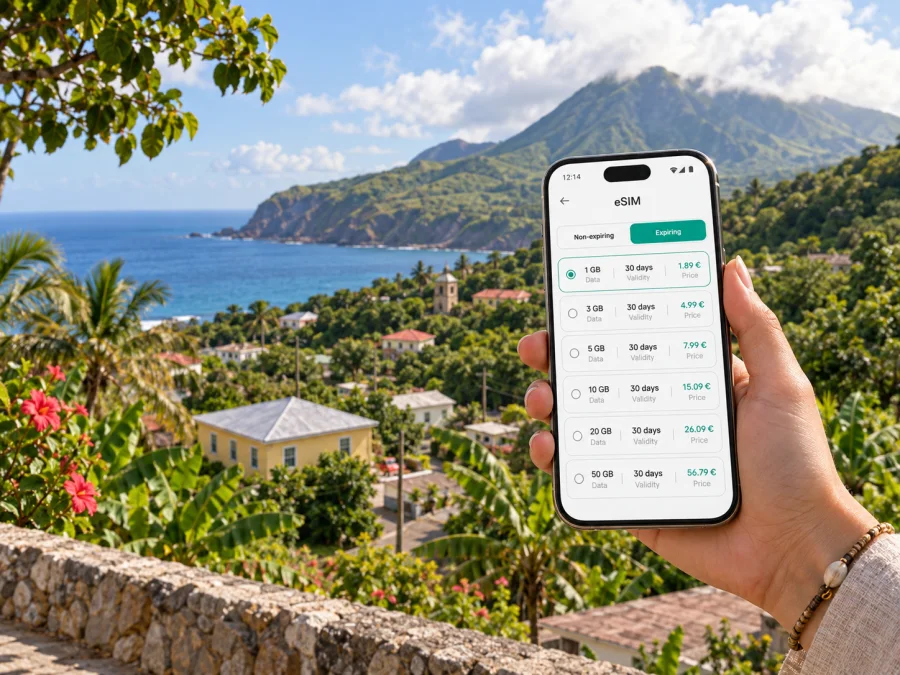
Olveston eSIM: mobile connection and internet for your Montserrat trip
Olveston is a small hillside settlement on the green, northwestern side of Montserrat. It is a quiet base for looking out toward the Caribbean Sea and exploring the island, rather than a dense city with a transit hub on every corner. Mobile internet can help with the practical details: confirming a pickup, checking a route, messaging your host and keeping travel information close at hand.
An eSIM is a digital SIM profile for mobile data, so you can prepare a travel plan without inserting another physical card. The right choice depends on your route, device, length of stay and expected use of maps, messages, email and internet calls. This guide focuses on how those decisions fit a stay in Olveston and travel around Montserrat.
What to expect in Olveston
Olveston is not a large urban centre with a station or continuous commercial district. Accommodation, dining and services are spread across the island, and a short-looking map route can involve a hilly road, a turnoff or a pickup that should be agreed in advance. Treat your lodging as the anchor of your local plan: save its exact address or location pin, confirm how your host describes the approach and keep contact details available offline as well as online.
Olveston has places to stay and eat, including Olveston House and Watermelon Cottage. Brades, Salem and Little Bay are among the other communities you may visit for services, a meal or an outing. Opening times and availability can change, so confirm directly with a venue or your host before making a special trip. A map helps you orient yourself, but local confirmation is useful for the final turn and current arrangements.
Montserrat’s road network is compact compared with a large country, but the terrain changes quickly. The main road links communities, while smaller lanes branch toward homes, viewpoints and accommodation. Distance alone is a poor guide to journey time: a steep section, road conditions, a stop for a view or a driver’s schedule can matter more than the kilometres shown on a screen.
| Trip moment | How data may help | What to prepare |
|---|---|---|
| Before departure | Check bookings and message your accommodation | Save the address, arrival instructions and a contact number |
| On arrival | Coordinate a pickup and review travel messages | Agree on the pickup point and what to do if delayed |
| In Olveston | Open a map, contact your host and check plans | Keep a saved pin and written address available |
| On an island outing | Look up details and share an updated plan | Download useful information before leaving |
Service depends on the local network, terrain, device and plan; keep key details accessible offline.
Arriving in Montserrat and reaching Olveston
Many visitors travel to Montserrat with a connection through Antigua. The final leg may be by air, arriving at John A. Osborne Airport in Gerald’s on the island’s northern side. Routes and schedules change, so confirm your itinerary with the carrier before departure. If a sea connection is operating for your dates, check its terminal and transfer arrangements separately rather than relying on an old timetable.
Before the last leg, make sure you can retrieve your lodging details without searching through a weak connection. Save the booking confirmation, host’s phone number, meeting point and a map pin. If a driver is meeting you, agree on a recognizable location and what to do if your flight is delayed. A brief message before boarding or after landing can prevent confusion.
Taxis can be arranged at the airport, and your accommodation may be able to book one ahead. Confirm the fare and pickup plan before setting off, especially if you arrive late or have several bags. Public minibuses operate along the main road and can be hailed, but they may not suit an airport transfer with tight timing, luggage or an unfamiliar arrival. Ask locally about current routes, fares and service before depending on a minibus for a connection.
Keep this short arrival note on your phone and, if practical, on paper:
- your accommodation name and the village, Olveston;
- its exact address or a pin supplied by your host;
- the host’s preferred contact method and number;
- your arrival details and agreed pickup time;
- a backup plan if your timing changes.
A mobile connection is useful for coordination, not a substitute for arranging transport. You can message a driver or let your host know you have landed, then compare a map suggestion with the directions they provided. For the final approach, follow local directions when they differ from a generic route suggestion.
Getting around from Olveston
Montserrat drives on the left. Local travel is easier when you name your destination clearly, check that a driver knows the specific property or entrance, and arrange a return plan before starting an outing. A saved pin can mark the centre of a place rather than the door of a villa or guesthouse.
Choose transport around the day you have planned:
- Pre-arranged taxi: useful after a flight, with luggage, for an evening return or when you have a fixed appointment. Ask your host to help arrange pickup and agree on timing.
- Public minibus: a flexible option along the main road when you have time to ask about direction and current service. Confirm your destination with the driver before boarding; it may not follow the rhythm of a city bus network.
- Rental car: gives flexibility for several stops. Check the local visitor permit and rental requirements in advance, and consider left-side driving and hilly roads.
- Walking: suitable for a short, familiar stretch when road conditions make it comfortable. Heat, slopes, limited shoulders and visibility can make a route less walkable than it appears on a map.
For a day with several stops, plan the return leg at the same time as the outward journey. Save your driver’s number, agree on a meeting point and ask how much notice a pickup needs. A phone can help you communicate, but it cannot guarantee a vehicle will be available at a remote stop.
A useful navigation routine is simple: open the destination while connected, check the route with your host or driver, save the place, then put the phone away while travelling. If directions need checking, stop somewhere safe first. Use navigation to support local advice, not to distract the driver or depend on live data for every turn.
Mobile internet for an Olveston stay
A data connection can reduce small points of friction. Message a host when you are on the way, check a restaurant’s latest information, send a changed meeting time or use a translation tool. For work, it can support email, calendars, documents and internet calls, subject to the connection and your employer’s requirements.
Think about where you will use data. A quiet day at your accommodation may involve messages and occasional map checks; an island-wide day out can mean more navigation and lookups. If you plan to work remotely, check your accommodation’s internet arrangements separately. A travel eSIM can be useful away from Wi‑Fi, but it should not be treated as a guarantee of speed, indoor signal or an uninterrupted video call.
Estimate your data needs from your own activities rather than choosing an arbitrary maximum. Messaging and text browsing usually use less than frequent video, large file transfers or backing up a camera roll. Repeatedly loading maps, images and search results can add up; downloading useful map areas over Wi‑Fi before an outing can reduce that need.
| Likely use | Planning approach |
|---|---|
| Messages, email and occasional searches | Consider your trip length and normal habits |
| Frequent navigation and venue lookups | Allow room for maps and repeated searches |
| Photos and social apps | Check automatic cloud backup and autoplay settings |
| Remote work | Estimate calls and file use separately; arrange a fallback for essential calls |
| Sharing data with another device | Check whether tethering is supported by the device and plan |
Compare the plan’s data allowance, validity period, destination and usage conditions. Price alone does not show whether a plan fits your dates. Consider what you will use over Wi‑Fi at your accommodation and what you need while away. Kaspersky eSIM Store is an app and website where you can choose, purchase and activate an eSIM with a suitable plan for mobile data while travelling abroad. Select Montserrat and review the plan details before deciding; you can review eSIM plan options for Montserrat once your travel dates and likely use are clear.
Planning trips beyond Olveston
A stay in Olveston may include trips to nearby communities or other parts of Montserrat. Brades is an important service and government centre; Little Bay is a coastal area, and Salem and other settlements may feature in dining, accommodation or activity plans. The island also has coastal viewpoints, beaches and guided experiences. Check current access and transport with a local operator or your host before setting out, especially for a guided visit or an area with controlled access.
Plymouth, the former capital affected by Soufrière Hills volcanic activity, is not an ordinary stop to approach independently. Visits into restricted areas require current local guidance and, where applicable, an authorized guide. Check present access arrangements before planning a visit; a map pin or old travel post is not permission to enter.
For each outing, keep a lightweight plan:
- Save the destination and a nearby meeting point.
- Confirm whether access is open and a guide or booking is required.
- Arrange transport both ways, including a return time or contact procedure.
- Download tickets, confirmations and directions while connected.
- Tell your accommodation where you are going if plans may change.
Mobile data can help you check information and keep in touch, while downloaded directions, an agreed driver, a charged phone and time to adapt provide practical backups.
Choosing and setting up an eSIM
An eSIM is a digital SIM profile installed on a compatible device. In this travel context, it is intended for mobile internet; it does not automatically provide a standard local phone number, ordinary voice calls or SMS unless the plan says otherwise. Internet calling and messaging apps can work over data. Keep your usual number and its settings in mind if you need verification messages or calls during the trip.
Before choosing a plan, check that your device supports eSIM and is not restricted by a carrier lock. Capability can vary by model and region of sale, so verify the exact model. Check whether your device supports eSIM before purchase.
Installation checklist
- Check the device. Confirm eSIM support and unlocked status; have a stable internet connection for setup.
- Choose a plan. Select Montserrat and compare the allowance and validity with your dates and likely use.
- Read activation details. Check when validity begins, how to install the profile and whether a setting is required.
- Install the profile. Follow the steps for your operating system: Android eSIM installation instructions or iOS eSIM installation instructions.
- Set data deliberately. Label the line, select it for mobile data when you want to use it and check your usual SIM’s roaming settings to avoid unintended charges.
- Activate as instructed. Follow the plan’s timing and connection guidance. Some devices or plans may require data roaming for the travel eSIM.
Do not delete an installed profile to troubleshoot unless the instructions or support team advise it; reinstallation may not be available on every plan. If a connection does not appear, check that the correct line is enabled, selected for data and active, then follow the guidance for your device and plan.
Keep your plan predictable
Turn off automatic backups or updates over mobile data if you want to conserve the allowance. Save offline maps and trip details, check which SIM is selected for mobile data, and keep your phone charged. Review plan usage in the app or account instead of estimating from the signal icon.
Frequently asked questions
Can I depend on an eSIM everywhere on Montserrat?
No plan should be assumed to work in every building or remote spot. Service depends on local network availability, terrain, device settings and plan terms. Download key information and agree on transport in advance.
Do I need to rent a car?
Not for every stay. Taxis, minibuses and pre-arranged rides may suit a simple itinerary; a rental car can help with multiple stops. Consider left-side driving, road conditions and local permit requirements, and confirm current options before deciding.
Prepare for the trip, not just the map
For Olveston, useful preparation combines digital tools with local arrangements. Save the exact lodging location, agree on how you will travel from the airport, confirm return rides for outings and keep key details accessible offline. Use mobile data for messages, route checks and work tasks, while treating coverage and transport availability as conditions to verify rather than guarantees.
Kaspersky eSIM Store helps you choose, purchase and activate an eSIM with a suitable mobile data plan for an overseas trip. Once your dates and expected use are clear, choose an eSIM plan for Montserrat, review its terms and follow the setup instructions for your device. With practical details arranged ahead of time, you can spend less of your Olveston stay sorting out logistics and more of it enjoying the island.


