
Travel connectivity guide
eSIM for Oman: mobile internet guide
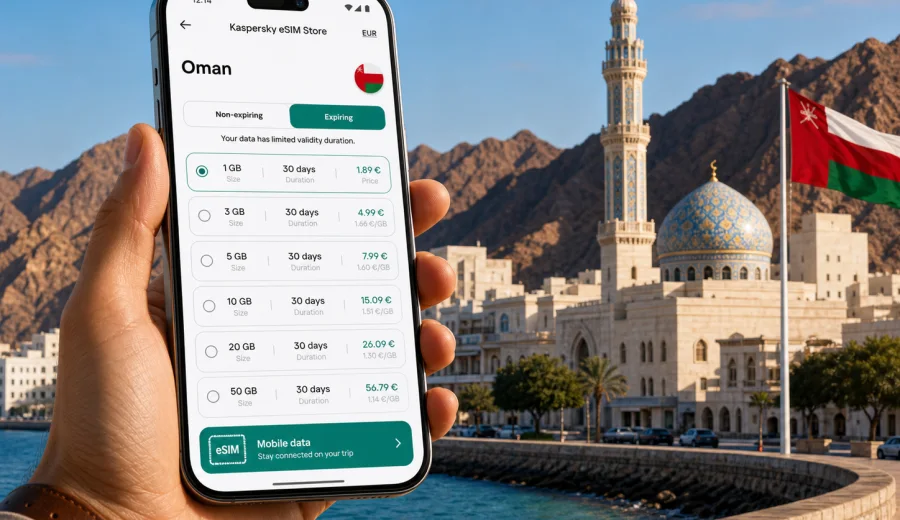
eSIM for Oman: mobile connection and internet for your trip
Oman is a country where mobile internet can make a trip easier from the first hour. You may land in Muscat, drive toward Nizwa and Jebel Akhdar, spend a weekend in Salalah, or follow the coast toward Sur and Ras Al Jinz. In each case, your phone becomes the tool for maps, hotel messages, ride apps, banking confirmations, restaurant searches, weather checks and calls through messengers.
An eSIM is a practical way to prepare mobile data before you travel. Instead of looking for a physical SIM card after arrival, you install a digital SIM profile on a compatible phone, choose a suitable data package and use mobile internet during the trip according to the terms of the selected tariff. Kaspersky eSIM Store is an app and website where you can quickly choose, arrange and activate an eSIM with a suitable data plan for mobile internet abroad.
Why mobile internet matters in Oman
Oman is comfortable for independent travel, but distances can be longer than they look on a map. A day can include a hotel in Muscat, a mountain road, a fort visit, a wadi stop and a late drive back. Mobile data helps you keep the day flexible without depending only on hotel Wi-Fi or public networks.
Typical mobile internet tasks in Oman include:
- navigation between Muscat International Airport, hotels, beaches and mountain routes;
- messaging with hotels, hosts, drivers, guides and tour desks;
- checking opening hours for forts, museums, souqs and restaurants;
- translating menus, road signs and short messages;
- using banking apps, airline apps and travel documents;
- sharing photos from Mutrah Corniche, Jebel Shams or Salalah;
- ordering rides or coordinating pickup points;
- checking weather before coastal, desert or mountain trips.
For many travelers, the main value of eSIM is control. You can prepare mobile internet before departure, see the tariff conditions in advance and avoid spending your first hour in Oman searching for a shop or changing a plastic SIM card at the airport.
What an eSIM gives you during a trip
An eSIM is built into supported smartphones and tablets. You install a mobile data profile digitally, usually by scanning a QR code or following an in-app setup flow. Your regular SIM can often stay in the phone.
For Oman, that is useful when you want:
- mobile data soon after arrival;
- a prepaid data package with clear limits;
- no physical SIM card to collect, insert or store;
- the ability to keep your main number active for important messages;
- a travel setup you can prepare before the trip.
An eSIM for travel is usually focused on internet access. It does not normally include a local phone number, voice calls or SMS unless those features are stated in the selected tariff conditions. For calls and messages, travelers often use internet-based apps.
Oman travel scenarios where eSIM is especially useful
Different Oman trips create different data habits. A short business trip to Muscat is not the same as a road trip through the interior or a long stay in Dhofar.
| Trip scenario | Why mobile data helps | Data use tendency |
|---|---|---|
| Muscat city break | Maps, taxis, restaurant searches, hotel messages, photo sharing | Low to medium |
| Business travel | Email, calendar, messenger calls, document access, banking confirmations | Medium |
| Road trip to Nizwa, Jebel Shams or Sur | Navigation, route changes, weather, emergency contacts, offline map updates | Medium to high |
| Family holiday | Shared logistics, attraction searches, food delivery, entertainment for children | Medium to high |
| Salalah and Dhofar trip | Maps, weather, beach and mountain routes, hotel communication | Medium |
| Long stay | Repeated daily use, video calls, work tasks, cloud backups if not controlled | High |
The key is not to buy data by instinct. Estimate the number of days, the apps you rely on and whether you will stream video or mostly use maps and messaging.
How much data do you need for Oman?
Data use depends on habits, not only on trip length. A traveler who downloads offline maps and uses hotel Wi-Fi for video can use little data. A traveler who uploads videos, joins video calls and streams music on mobile data will need more.
Use this rough guide before choosing:
| Expected use | Typical activities | Practical data range |
|---|---|---|
| Light | Messaging, maps, email, occasional searches | 1-3 GB for a short trip |
| Standard | Maps, social media, travel apps, photo sharing, messenger calls | 3-10 GB for a week |
| Heavy | Frequent uploads, video calls, tethering, streaming, work files | 10 GB or more |
For a weekend in Muscat, a small package may be enough if you avoid video streaming on mobile data. For a 7-10 day trip with Muscat, Nizwa, desert camps and coastal routes, a mid-size plan is usually more comfortable. For remote work, consider a larger package and check whether hotspot use is allowed.
Short takeaway: choose data by use case. Maps and messengers are light. Video, cloud backup and hotspot use consume data quickly.
Before you buy: compatibility and phone settings
Before choosing an eSIM tariff, confirm that your device can use eSIM and is not locked to one mobile operator. Setup depends on the phone model, region, software version and operator restrictions. You can check your device before you make a purchase.
Your pre-trip checklist:
- confirm that your phone supports eSIM;
- check that the phone is unlocked for mobile networks;
- update the operating system if an update is pending;
- keep a stable internet connection for installation;
- save the installation instructions where you can access them;
- understand when the selected tariff becomes active;
- check whether data roaming must be enabled for the eSIM profile;
- keep your primary SIM settings unchanged unless you intentionally change them.
If you use a dual-SIM phone, name the travel eSIM clearly, for example "Oman data". This makes it easier to choose the correct line for mobile data.
When to install and activate your eSIM
The safest approach is to review the setup instructions before departure, then install the eSIM while you still have stable internet. Depending on the selected tariff, the validity period may start at installation, at first network connection, or by another condition shown in the tariff details.
For setup guidance, use the official installation pages for your device type: Android setup instructions and iOS setup instructions. Keep them open until you have finished installation and selected the right line for mobile data.
A practical setup sequence looks like this:
1. Choose Oman as your destination.
2. Select a data package by size and validity period.
3. Check device compatibility and tariff conditions.
4. Install the eSIM profile on a stable Wi-Fi connection.
5. Give the eSIM a clear label in phone settings.
6. On arrival, select the eSIM for mobile data.
7. Enable data roaming for the eSIM if required.
8. Test a map or browser page before leaving the airport or hotel.
Do not delete the eSIM profile after installation unless you are sure you no longer need it. Some profiles cannot simply be moved or reinstalled after activation.
Choosing an eSIM tariff for Oman
A good tariff is the one that fits your route, length of stay and data habits. For Oman, think about three questions:
- How many days will you be in the country?
- Will you stay mostly in Muscat, or travel between regions?
- Will you use mobile data only for travel tasks, or also for work and entertainment?
If you want to prepare before your trip, you can use Kaspersky eSIM Store to choose an eSIM tariff for Oman and compare available options by data volume, validity period and price. The chosen tariff terms should guide the final decision.
For a short stay, prioritize enough data for maps, messages and travel apps. For a week or more, a mid-size package gives more room for photo sharing and messenger calls. For a work-heavy trip, review larger data volumes and hotspot conditions.
Practical data planning for different routes
Oman is often explored by car, and route style affects data use. In Muscat, you may be near hotel Wi-Fi and city infrastructure. In mountain and desert areas, you should prepare offline resources and use mobile data for updates, messages and route checks.
| Route | Useful preparation |
|---|---|
| Muscat | Save your hotel location, ride app login details and Wi-Fi downloads. |
| Nizwa, Jebel Akhdar and Jebel Shams | Download offline maps, save contacts and check weather before leaving. |
| Sur, Wadi Shab and Ras Al Jinz | Save meeting points and keep a power bank ready. |
| Salalah and Dhofar | Check weather during khareef season and choose enough validity days. |
Good preparation reduces pressure on mobile data. Offline maps, saved documents and Wi-Fi downloads let your eSIM package focus on the tasks that matter while you are moving.
eSIM compared with roaming, public Wi-Fi and local SIM cards
There is no single best option for every traveler. Each approach has trade-offs.
| Option | Strengths | Points to check |
|---|---|---|
| eSIM travel data | Can be prepared before arrival, no physical SIM card, prepaid data limits | Device compatibility, tariff validity, data-only terms |
| Home roaming | Keeps your familiar SIM active, no new setup in some cases | Price, daily fees, data limits, throttling rules |
| Public Wi-Fi | Useful at hotels, airports and cafes | Availability, speed, login friction, privacy expectations |
| Local physical SIM | May suit longer stays or local-number needs | Shop location, registration rules, opening hours, language, SIM slot availability |
An eSIM is convenient when you want to land with a plan already prepared. Roaming may be simpler for very short use if your home operator has favorable terms. Public Wi-Fi is useful, but it rarely covers the full day. A local physical SIM can suit longer stays, but it adds arrival-time tasks.
How to avoid wasting data
A few phone settings can make a small or mid-size eSIM package last longer.
Data-saving checklist:
- download offline maps for Oman before departure;
- disable mobile data for cloud photo backup;
- turn off automatic app updates on mobile data;
- use lower quality for music or video if streaming is necessary;
- send compressed photos in messengers where possible;
- use hotel Wi-Fi for large downloads;
- monitor data use in phone settings;
- keep hotspot off unless you intentionally need it;
- close navigation routes when you no longer need active directions.
Video is usually the biggest data drain. Upload travel clips from hotel Wi-Fi, and choose a larger data package if video calls are part of the trip.
Arrival checklist for Oman
When you arrive, you want your phone setup to be calm and predictable. Before leaving the airport or hotel, take two minutes to confirm the basics.
1. Open mobile network settings.
2. Select the Oman eSIM as the mobile data line.
3. Keep your primary SIM available only if you need it for calls or SMS.
4. Enable data roaming on the eSIM line if required.
5. Open a map, browser page or messenger to test data.
6. Check that cloud backup and app updates are not using mobile data.
7. Save your accommodation address offline.
If the phone does not connect immediately, wait a short time, check the selected data line, restart the device if needed and review the installation instructions.
What to know about calls and SMS
Travel eSIM tariffs are commonly built for mobile data. They may not include a regular phone number, voice calls or SMS. If you need bank messages or airline notifications on your home number, keep your primary SIM active for SMS while using the eSIM for data, and check your home operator's roaming charges. For everyday communication in Oman, mobile data usually supports messengers, email, shared location and booking changes, but you should read the selected tariff conditions before relying on any feature.
FAQ about eSIM and mobile internet in Oman
Can I use eSIM in Oman for maps and messengers?
Yes, if your device supports eSIM, the profile is installed correctly and the selected tariff is active according to its conditions. Maps, messengers, email and travel apps are typical mobile data use cases.
Should I install the eSIM before flying to Oman?
It is often convenient to install it before departure while you have stable Wi-Fi. Before doing so, check when the validity period starts for the selected tariff. Some plans may begin at installation, while others may begin when the eSIM first connects to a supported network.
Is eSIM enough for a road trip in Oman?
It can be a useful part of your setup, but you should still download offline maps and save key contacts. Mountain, desert and coastal routes can include areas where continuous mobile signal should not be assumed.
Final preparation before your Oman trip
The best mobile internet setup is the one you barely need to think about after arrival. Check your device, choose a data package that matches your route, install the eSIM on a stable connection and keep offline maps ready. With that done, your phone is ready for finding your hotel, changing a booking, calling through a messenger, checking a route and staying in touch.
Kaspersky eSIM Store helps you prepare this setup through an app or website where you can choose, arrange and activate an eSIM with a suitable tariff for mobile internet abroad. Before you leave, prepare an eSIM tariff for your trip to Oman and review the data volume, validity period and activation conditions so your mobile connection is ready when you need it.