Travel connectivity guide
OnePlus 13R 256GB eSIM Compatibility & Setup
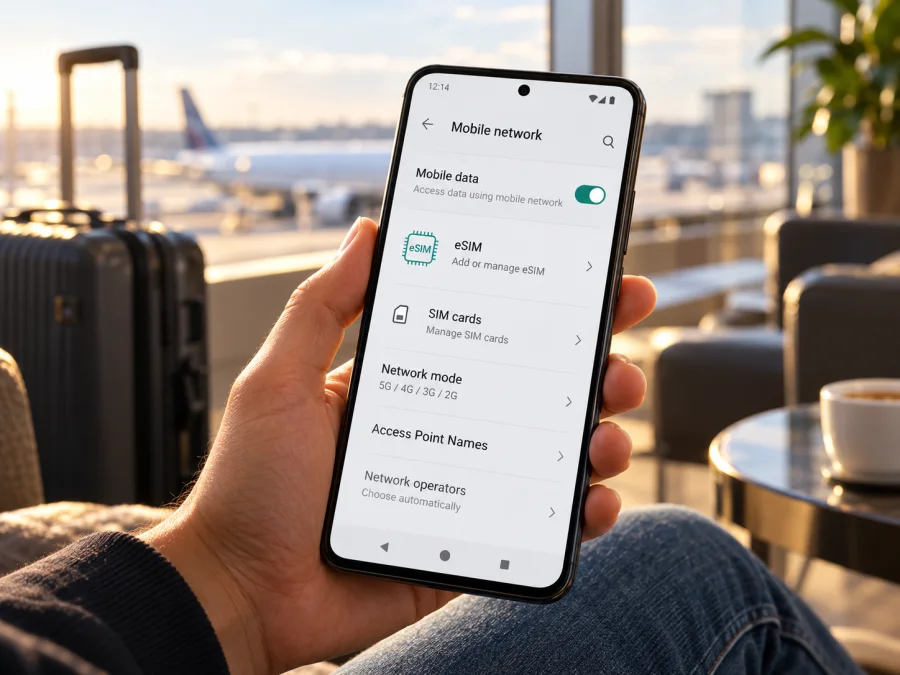
OnePlus 13R 256GB eSIM: compatibility and setup
If you are checking whether the OnePlus 13R 256GB can use an eSIM, the safest answer is: do not assume that it can. OnePlus’s published specifications for the US and UK versions list a dual nano-SIM slot and do not list eSIM support. The India specifications also list physical SIM slots without confirming eSIM. Because “256GB” identifies storage capacity rather than a complete regional model number, verify the exact phone in its settings before purchasing an eSIM plan. If there is no eSIM management or add-eSIM option and no EID, treat that phone as incompatible.
This guide explains what the manufacturer information establishes, how to check your unit, and what to do if eSIM is available on its regional build. Settings names can differ by OxygenOS version and market. Use also depends on an unlocked phone, a valid destination plan, and local network access.
OnePlus 13R 256GB at a glance
| Item | What to know |
|---|---|
| Device in this guide | OnePlus 13R 256GB |
| Storage variant | The 256GB designation describes storage; regional configurations may pair it with different memory configurations. |
| Officially documented SIM hardware | OnePlus’s US and UK specification pages list a dual nano-SIM slot. The India page also lists a dual nano-SIM slot. |
| eSIM status | Not confirmed in those regional specification pages. OnePlus’s general eSIM help says availability depends on the device, country or region, and mobile operator. |
| Practical recommendation | Check the exact phone’s EID and SIM settings. If eSIM management is missing, plan on using a physical SIM or another compatible device. |
| Best time to check | Before buying an eSIM plan, while you still have access to the seller’s exact model number and return terms. |
Manufacturer specifications are the most useful starting point, but a marketing name alone does not prove that every unit sold under that name has identical network hardware or software. OnePlus publishes market-specific product pages. Those pages may describe the same named phone with different memory configurations or other market details. The US and UK pages list 12GB RAM and 256GB storage, while India lists multiple memory and storage configurations. The SIM slot is listed as dual nano-SIM on all three pages checked for this guide.
This is evidence against assuming eSIM support, but it does not identify every carrier-issued or later revised unit. The task name omits the model code, country of sale, carrier, and software build, so the exact regional variant cannot be inferred from “OnePlus 13R 256GB.” Check the phone itself.
Does OnePlus 13R 256GB support eSIM?
The public OnePlus specifications reviewed for the US, UK, and India do not confirm eSIM support for the OnePlus 13R. They list a dual nano-SIM slot. Unless your own handset displays an EID and an eSIM-management option, assume that it cannot install a travel eSIM. A physical dual-SIM tray is not the same thing as an eSIM, and 5G capability does not imply eSIM capability.
OnePlus’s general support guidance says that eSIM availability varies with the mobile operator, country or region, and device. Its suggested on-device check is to open the SIM settings and look for “Manage eSIM Card.” The exact wording and menu location can differ by software version. This guidance is useful for confirming a phone that supports eSIM, but it does not by itself establish that this specific 256GB variant has eSIM hardware enabled.
There are three separate questions to answer:
- Does the phone have eSIM capability? Check for an EID and an eSIM-management control. These are stronger signs than the device name or a seller’s generic listing.
- Is the phone unlocked? An eSIM profile may install but fail to register if the handset is restricted to a different operator. Ask the original carrier or seller to confirm the lock status.
- Will the plan work at the destination? Confirm the country or region, the plan’s data allowance and validity, and supported network conditions before checkout.
A seller may describe a unit as “global,” “unlocked,” or “dual SIM.” Those labels do not prove eSIM capability. “Dual SIM” can mean two physical nano-SIMs. Ask for the full model number and a screenshot of the SIM management screen from the actual unit. If eSIM is important to your trip, obtain confirmation for that exact device rather than relying on a listing title or an answer about another OnePlus model.
Regional versions and carrier conditions
The US, UK, and India OnePlus specification pages checked here all list a dual nano-SIM slot and do not document eSIM. The task name does not give a model code or country of sale, so it cannot identify every imported, carrier-issued, or later revised unit. Regional hardware, firmware, local certification, and carrier provisioning can differ. A software update may change a menu, but should not be assumed to add eSIM capability to hardware that lacks it. Ask the seller or OnePlus to verify the exact model code; “global,” “unlocked,” and “dual SIM” do not prove eSIM support. A carrier lock is a separate restriction that can prevent a compatible phone from registering another provider’s profile.
Check compatibility before buying
Use this checklist before you order an eSIM plan:
- [ ] Open Settings and search for eSIM, Manage eSIM, or Add eSIM. On some OnePlus builds, SIM controls are under Mobile network or SIM card & mobile data.
- [ ] Open the phone dialler and enter
*#06#. If an EID appears alongside IMEI numbers, the phone has an eSIM identity. Do not share the EID publicly. - [ ] Check Settings → About device → Status or SIM status for EID information. The path varies by OxygenOS build.
- [ ] Confirm the full model number and country of sale with the seller. Ask them to verify eSIM for that exact unit, not only the OnePlus 13R family name.
- [ ] Confirm that the phone is not carrier-locked. If it was purchased through an operator, ask that operator whether another provider’s eSIM can be added.
- [ ] Update OxygenOS using the normal system update menu, restart, and check the SIM settings again. An update can correct a menu or provisioning issue, but it should not be treated as proof that unsupported hardware has gained eSIM.
- [ ] Check the eSIM plan’s destination, validity start, data allowance, supported network, and any device requirements.
- [ ] Keep a reliable Wi-Fi connection available for installation, and do not delete a successfully installed eSIM unless the plan provider tells you to. Many QR codes are single-use.
Check your device before choosing a plan. If the phone has an EID but no add-eSIM control, or if the menu is present but the EID is absent, contact OnePlus or the carrier with the full model code. Do not pay for a plan until you know that the handset can install an eSIM profile.
How to check for an EID or eSIM option
Start with the settings search field. Search for “eSIM” and inspect any result such as Manage eSIM, Add eSIM, Download a SIM, or Add mobile plan. On OnePlus phones the settings path may be Settings → Mobile network → eSIM, Settings → SIM card & mobile data → Manage eSIM Card, or a similar route. Names vary by language, carrier build, and OxygenOS version. If the controls are not obvious, look under the SIM section for a plus sign or an option to download a SIM.
You can also open the phone dialler and enter *#06#. Many phones that support eSIM show an EID in the device identifiers list. The EID is a long identifier for the embedded SIM; it is different from an IMEI. A visible EID is a useful indicator, but it is still sensible to confirm that the eSIM menu is available and the handset is not locked. If the code does not open a screen on your software version, use Settings instead. Never post a screenshot containing your EID or IMEI in a public forum.
If neither an EID nor an eSIM setting appears, restart the phone and check again after installing the latest official system update available to it. If both remain absent, the practical conclusion is that eSIM is unavailable on that unit. Ask OnePlus support or the seller to confirm using the full model code. A missing menu is not fixed by repeatedly scanning a QR code: the device must support downloading an eSIM profile before a QR activation can work.
If eSIM is available on your unit: install it safely
The steps below are conditional. Follow them only if the specific OnePlus 13R 256GB you own shows eSIM management and the seller or manufacturer confirms compatibility. OnePlus settings can change between versions. The Android guide linked here is a general reference and its on-screen labels may differ from OxygenOS.
Before installation, connect to stable Wi-Fi, update the phone, and have the activation details ready. Check whether the plan provider expects immediate installation or activation closer to the trip. A QR code may be usable only once, so keep the email or in-app instructions until the line is working. If the code is displayed on the same phone, use the provider’s manual-entry option or display the QR on another device where supported.
- Open Settings and go to Mobile network or SIM card & mobile data.
- Select Manage eSIM, Add eSIM, or the matching option shown by your software. If these options are absent, stop and recheck compatibility instead of continuing.
- Choose Download a SIM or Add mobile plan, then select Scan QR code if that is the method supplied with your plan.
- Scan the activation QR code from another screen or printed copy. If offered, use manual activation details exactly as provided by the plan provider.
- Review the plan label and confirm the download. Keep Wi-Fi connected while the profile is fetched. Do not restart repeatedly or scan the same one-time code again if installation appears to be in progress.
- When the profile appears in SIM settings, enable it when appropriate. Give it a clear label such as Travel data so it is easy to distinguish from your home SIM.
- Set Mobile data to the travel eSIM when you want to use it. Keep your regular number as the default for calls and texts if you still need it, while checking your home operator’s roaming terms.
- Enable Data roaming for the travel eSIM only if the plan instructions require it. This setting permits the eSIM to register on a partner network; it does not change which SIM is selected for data.
- If the plan instructions provide an APN, enter it exactly as written. Leave other network settings unchanged unless support asks you to adjust them.
- After arrival, turn off airplane mode, allow a few minutes for network registration, and check that the eSIM is selected for mobile data. Test a web page with Wi-Fi switched off.
For more general steps, see the Android eSIM installation instructions or the iOS eSIM installation instructions. The iOS page is for Apple devices, so it is not an installation path for the OnePlus 13R. The Android instructions are written for a different Android interface and should be treated as a guide to the overall process, not an exact OnePlus menu map.
Before you travel
Install the profile over Wi-Fi when you have time to troubleshoot. Check the plan’s activation conditions: installation, enabling the profile, first network connection, and the start of validity may be separate events. If advance or scheduled activation is offered, follow the selected plan’s terms. Do not delete a working profile to restart the process unless support confirms that it can be installed again. Keep setup instructions and any required APN available offline. If the OnePlus 13R fails compatibility checks, arrange another option before departure, such as a destination physical SIM or a compatible second phone.
Use a travel eSIM for mobile data
If your phone supports the profile, the important setting is the line selected for mobile data. In Settings → Mobile network or the corresponding SIM menu, turn on the travel eSIM and select it as the data SIM. Your home SIM can remain enabled for incoming calls or messages if your operator allows it, but roaming charges may apply to that line. Check its roaming terms and disable mobile data on it if you want to avoid accidental data use.
Some travel plans require data roaming to be on for the eSIM. Enable it only for the travel profile when the plan instructions say to do so. If the phone offers automatic data switching between SIMs, turn that off if you want to keep data on the selected travel eSIM. Menu names may vary, so verify the active data SIM rather than assuming that switching on a second line automatically selects it.
For a weekend city break, for example, install a confirmed-compatible travel profile on Wi-Fi, then select it for mobile data after landing and check a map with Wi-Fi off. Keep your home SIM for calls only if its roaming terms suit you. A data-only eSIM does not usually provide a phone number for standard calls or SMS; check plan terms and use messaging apps through data.
Kaspersky eSIM Store is an app and website where you can choose, arrange, and activate an eSIM with a mobile-data plan for an international trip. Check the destination, data allowance, validity and activation conditions shown for the plan. The service is not a mobile network operator, and the phone still needs compatible hardware and access to a supported local network.
Common problems and what to check
No eSIM menu or EID
Search Settings for “eSIM,” “Manage eSIM,” and “Add mobile plan”; check SIM settings and dial *#06# for an EID. Restart, install available official updates, and verify the full model code with OnePlus or the seller. If there is no EID and no eSIM control, a QR code cannot add eSIM support. That result is consistent with the regional OnePlus specifications reviewed here, which list dual nano-SIM hardware without confirming eSIM.
QR code will not scan or profile download fails
Connect to stable Wi-Fi, make sure you selected the eSIM setup screen, and use a second display or manual entry if the provider offers it. Check whether the code has expired or already been used; many codes are single-use. Confirm device compatibility and unlock status before retrying. If installation remains pending, restart once and contact the provider with the exact error and model code. Do not share the QR code or EID publicly, and do not delete a profile unless support confirms it can be installed again.
Profile installed but no service or data
Confirm the profile is enabled and selected for mobile data, airplane mode is off, and the plan is valid in your current country. Enable data roaming for the eSIM if required; enter the supplied APN exactly as provided. Allow a few minutes for network registration, then restart. Check data allowance and plan validity. Signal, local outages, frequency support, and local network access can affect service even when installation succeeds.
Wrong SIM is used or the phone is locked
Choose the travel eSIM explicitly for mobile data and disable automatic data switching if present. The default line for calls and texts is separate. Check your home operator’s roaming terms, and ask the original carrier whether the phone is unlocked; accepting two physical SIM cards does not prove that another provider’s eSIM is permitted.
Frequently asked questions
Is the OnePlus 13R 256GB eSIM compatible?
The US, UK, and India OnePlus specification pages checked for this guide list dual nano-SIM slots and do not confirm eSIM. Treat your unit as unsupported unless it shows an EID and eSIM-management option and OnePlus or the seller confirms its exact model code. Storage capacity alone does not identify a regional version.
Does 5G mean the phone supports eSIM?
No. 5G is a mobile-network generation; eSIM is a way to store and download a SIM profile. A 5G phone with two physical SIMs may have no eSIM capability.
Can an update add eSIM?
An official update may change settings or provisioning. Install it before checking again, but do not assume software can add eSIM to unsupported hardware. If EID and eSIM controls remain absent, ask OnePlus for a model-specific answer.
Can I install a travel profile before departure?
If the phone is compatible and the plan permits advance installation, use Wi-Fi to download it before travelling. Check when validity starts: installation, activation, and first data use may be separate events. Follow the selected plan’s terms.
Final check before choosing a plan
For the OnePlus 13R 256GB, the available regional OnePlus specifications support a cautious answer: they document two physical nano-SIM slots but do not confirm eSIM. Check the actual phone for an EID and an eSIM-management menu, confirm the exact model code and unlock status, and get confirmation from OnePlus or the seller if eSIM is essential. If those checks fail, plan around a physical SIM or a second compatible device.
Once compatibility is clear, choose an eSIM plan for the countries on your itinerary and compare the listed data allowance, validity, activation timing, and network conditions. You can browse destinations and current plan details on the Kaspersky eSIM Store website. The app and website help you select, arrange, and activate an eSIM plan for mobile data while travelling; the plan’s own terms determine where and when it can be used. Check your device first, then set up the travel data line before you leave so you have time to resolve any installation issue.


