Travel connectivity guide
Oppo Find X9 Ultra 5G eSIM: Setup & Compatibility
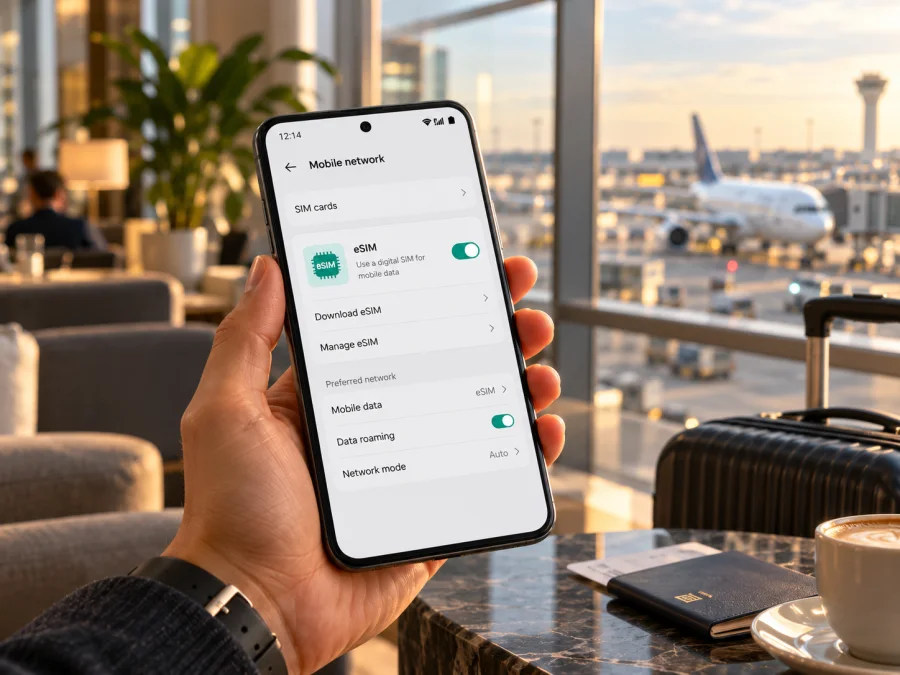
Oppo Find X9 Ultra 5G eSIM: compatibility and setup guide
Short answer: eSIM is supported on the international Oppo Find X9 Ultra 5G variant identified by OPPO as CPH2841 in its regional specifications. OPPO’s mainland China specification page identifies the phone as PMA110 and lists nano-SIM card types and dual-SIM operation, but does not list eSIM. Treat the two regional versions as different for this feature: do not assume that a handset sold in one market, or a Chinese handset with different software installed, has the same eSIM hardware and provisioning. Check the exact model and the phone itself before choosing a travel plan.
The name in this guide is kept as supplied: Oppo Find X9 Ultra 5G. OPPO may style its product name as “OPPO Find X9 Ultra” and may omit “5G” in page headings.
Oppo Find X9 Ultra 5G eSIM compatibility at a glance
| Check | What to know |
|---|---|
| Requested device name | Oppo Find X9 Ultra 5G |
| Official international model code shown by OPPO | CPH2841 |
| International eSIM listing | OPPO’s regional specifications say eSIM is supported |
| Mainland China model code | PMA110 |
| China-market eSIM information | The official China specification lists nano-SIM / nano-USIM and dual-SIM operation, but does not list eSIM |
| Practical verdict | Yes for the international CPH2841 version when the eSIM controls are present and the device is unlocked; unconfirmed for PMA110 and imported, modified or carrier-customized units until checked individually |
| Main checks before purchase | Model code, EID or an Add eSIM option, carrier unlock, provider requirements and plan destination |
OPPO’s Singapore and Russia product specifications identify CPH2841 and explicitly mark eSIM as supported. The international listing also shows support for a second SIM and names nano-SIM/nano-USIM cards. OPPO’s China product page uses a different model identifier, PMA110, and its cellular section describes two physical SIM cards without an eSIM entry. These official pages support a regional distinction, but they do not provide a complete public list of every country’s SKU or every carrier firmware build. A shop listing that says “global ROM” is not enough evidence: software language and the ability to install Google services do not demonstrate the presence of an eSIM component.
That distinction is useful before buying both the phone and a travel data plan. A supported international variant can still be restricted by a carrier lock, an old or customized firmware build, a local activation rule, or a plan that does not accept the device. Conversely, seeing two physical SIM positions does not on its own prove eSIM is unavailable: a physical SIM tray and eSIM can share the phone’s cellular configuration. Check the settings menu and EID, then ask the seller or carrier to confirm the exact SKU if either is missing.
Does the international model support eSIM?
For the international CPH2841 listed on OPPO regional sites, the answer is yes: OPPO’s current specifications explicitly state “eSIM supported.” OPPO’s China product page uses a different identifier, PMA110, and lists nano-SIM/nano-USIM cards and dual-SIM operation without an eSIM entry. Treat the China-market version as unconfirmed unless the handset shows an EID or eSIM-add option and OPPO or the seller confirms support for that exact unit.
This is a regional distinction, not a guarantee for every phone sold under a similar name. A carrier-supplied model, imported handset or reseller-modified device may have different firmware, carrier restrictions or network configuration. A “global ROM” listing does not prove that the eSIM hardware is present. Ask for the code in Settings, the original sales market and confirmation that the phone is unlocked. OPPO’s published specifications do not give a complete list of every market and carrier build, so use the device checks below before buying a plan.
“eSIM supported” describes device capability; it does not mean that every operator, tariff, country or 5G service will work. The profile must be issued for a supported destination and accepted by the local provider. Network registration and available service also depend on the operator’s live network, its bands and the plan’s terms.
How to check eSIM on your own phone
Do these checks on the handset you will actually travel with. Menu names can vary slightly with ColorOS version, language and regional firmware.
- Find the model code. Open Settings → About device (sometimes About phone) and look for the model or model number. Compare the code with the seller’s invoice, packaging and the relevant OPPO regional support page. CPH2841 is the code shown on international OPPO specifications; PMA110 appears on the China-market specifications.
- Look for EID. In Settings, open About device → Status or search Settings for “EID”. On some Android builds, the value is under Settings → About phone → Status information. An EID is the identifier associated with an embedded SIM. If Settings search does not find it, inspect the SIM-management screen as well.
- Open SIM settings. Go to Settings → Mobile network or Mobile network → SIM management. Look for Add eSIM, Download a SIM, Add mobile plan, or a similarly named option. Menu wording differs, so use Settings search for “eSIM” if necessary.
- Check both signals. The presence of an EID and an add/download eSIM option are useful signs. If neither appears, restart the phone, install available official system updates, search Settings again, and confirm the exact model code with OPPO or the seller. A missing menu is not fixed by scanning a QR code repeatedly.
- Confirm it is unlocked. Ask the original carrier or seller whether the phone is network-unlocked. If possible, test with a SIM from a different provider before travelling. An eSIM-capable phone can still reject a profile when it is carrier-locked.
- Check the intended profile. Before purchase, compare the eSIM provider’s requirements with the model, software version, destination and intended use. Ask the provider to confirm compatibility if the model code or market is unclear.
A QR code is not an eSIM compatibility test. It is a way to download a profile after the device supports eSIM and the provider has issued a valid installation method. Do not buy a plan solely because an online checker recognizes “Oppo Find X9 Ultra 5G”; check the actual device and model code first.
Quick compatibility checklist
- [ ] The handset’s Settings page shows the model code, and it matches the version the seller says they are supplying.
- [ ] The device shows an EID or an eSIM addition/download option.
- [ ] The original carrier confirms that the phone is unlocked for another provider’s eSIM.
- [ ] The operating system is current and the device has been restarted after updates.
- [ ] The eSIM provider accepts this phone and its software for the selected destination.
- [ ] The plan covers every country on the route and its validity and data allowance suit the trip.
- [ ] You have a reliable internet connection available for downloading the profile.
Check whether your device is compatible before selecting a travel eSIM. If the exact version is unclear, wait to purchase until the seller, OPPO support or the intended eSIM provider confirms it.
Preparing for a trip with an eSIM
Choose when to install the profile only after reading its activation conditions. If permitted, installing at home or in a hotel with stable Wi-Fi can reduce setup after landing. Installation, activation, the first network connection and the start of validity may be separate events; do not assume the plan begins at installation unless its terms say so.
Kaspersky eSIM Store is an app and website where you can choose, arrange and activate an eSIM with a plan for mobile data on an international trip. Review the destination, allowance, validity and instructions. For a multi-country route, check that every stop is explicitly covered. Browse the Kaspersky eSIM Store to check current options for your destination; this is a general homepage, not a specific country plan.
Travel data eSIMs do not necessarily include a conventional phone number, voice calls or SMS; rely on those only if the plan terms say they are included. Messaging and internet calls can use data through apps. You may keep a home SIM active if the phone and plan allow it, but check roaming charges with your home carrier.
How to install and activate an eSIM
Follow the steps issued by the plan provider. On the Oppo Find X9 Ultra 5G, the exact names and order of menus may vary by market and ColorOS build. Keep the QR code or activation details private: anyone who can use an unconsumed activation code may be able to install the profile, and many providers restrict how often it can be downloaded.
- Check the requirements before starting. Confirm the phone is an eSIM-supporting version, is unlocked, is connected to Wi-Fi, and has enough battery. Read whether installation should happen before travel or only after arrival, when the validity period begins, and whether the provider supplies a QR code or manual activation details.
- Open mobile network settings. On the phone, go to Settings → Mobile network and choose SIM management, Add eSIM or Download eSIM. If you do not see the option, stop and revisit the model and compatibility checks rather than searching for a hidden QR scanner.
- Add the profile. Scan the QR code shown by the provider using the phone’s eSIM setup flow. If QR scanning is unavailable, enter the activation details manually only if the provider supplies that method. Some phones cannot scan a QR code displayed on the same screen; open it on another device or use manual entry when offered.
- Review and download. Follow the on-screen confirmation to download the eSIM profile. Keep the phone online and do not close the setup screen or remove the profile while it is installing. A profile download can take a short time, and provider instructions take precedence over general steps.
- Name the line. Give it a clear label such as “Travel data” so you can distinguish it from your home SIM. A label is only for convenience and does not change where the plan works.
- Choose mobile data settings. Select the travel eSIM for mobile data when you want to use it. Decide whether the home SIM should remain on for calls or messages, and check its roaming settings to avoid unwanted charges. Dual-SIM behavior and simultaneous use can depend on the handset and carrier.
- Activate according to the plan. Turn on the eSIM line when the provider’s instructions say to do so. If required for that plan, enable data roaming for the travel eSIM; do not turn it on for another line by mistake. Select a network automatically first unless the provider gives a specific manual network instruction.
- Confirm service. After arrival in a covered destination, allow the phone a few minutes to register. Verify that mobile data is assigned to the travel eSIM, airplane mode is off, the line is enabled, and the provider’s activation conditions are met. Open a simple webpage to test data.
- Keep the profile until finished. Do not delete an eSIM as a troubleshooting shortcut. Many profiles cannot be reinstalled after deletion or have limited downloads. Contact the provider before removing or transferring it.
For device-specific background, see the Android eSIM installation instructions and the iOS eSIM installation instructions. The Android guide is relevant to this Oppo phone; the iOS guide is included for travellers who are setting up another Apple device. Use the instructions supplied with your own plan if their activation sequence differs.
Using the travel eSIM for mobile data
After arrival, open Settings → Mobile network and confirm that the travel profile is enabled and selected for mobile data. Keep calls and SMS on the line you prefer if the phone supports that configuration. To avoid unexpected charges, turn off data roaming on the home SIM or disable that line if you do not need it; confirm the selected data line before browsing.
Some plans require data roaming on the travel eSIM. Enable it only for that profile and only when the provider’s instructions call for it. Start with automatic network selection unless the provider specifies a network or automatic registration fails. Allow a few minutes for the phone to register after landing.
For a short trip, a data-only eSIM can support maps, bookings, email and messaging. On a multi-country route, verify every stop and expect that registration may take time at a border. Monitor usage in Android settings and, where available, the provider’s account. Streaming, cloud backups and hotspot use can consume data quickly; schedule backups and app updates for Wi-Fi if you want to conserve the allowance.
Save key bookings and maps for offline use as a backup. OPPO’s published frequency bands do not guarantee service everywhere: local coverage, operator deployment, plan terms and phone configuration affect connectivity. A 5G label does not promise 5G availability on every network.
Common problems and what to check
“Add eSIM” is missing. Confirm the model code and search Settings for “EID,” “eSIM” and “SIM management.” Restart after official system updates. The China-market PMA110 specification does not list eSIM. If no EID or add option appears, ask OPPO or the seller to confirm the unit before purchasing a plan; a changed ROM cannot prove that eSIM hardware is present.
The QR code will not scan or download. Use stable Wi-Fi, display the entire code on another screen, or use manual activation if the provider offers it. Check whether the code expired, was already used or is limited to another device. Do not delete a partly installed profile without advice from the provider.
The profile installs but there is no service. Confirm the destination is covered, the eSIM line is on and selected for mobile data, and the plan’s activation conditions are met. Toggle airplane mode, restart and allow registration time. Enable roaming for that eSIM only if required. Confirm the handset is unlocked; use manual network selection only according to provider instructions.
Data is connected but apps do not load. Check remaining allowance and validity, turn Wi-Fi off briefly to test cellular data, and confirm the travel eSIM—not the home line—is selected. Enter an APN only if the provider supplies one; do not guess.
The connection is slower than expected. 5G availability depends on the destination operator, coverage, supported bands and plan. Test in an area with stronger signal and ask the provider about supported networks. LTE may still be sufficient for maps and messaging.
Calls or texts do not work, or you want to transfer the eSIM. Many travel plans are data-only. Check the plan terms for voice and SMS. Before deleting, resetting or moving a profile, contact the provider: some profiles are restricted to one device or cannot be reinstalled.
Frequently asked questions
Is Oppo Find X9 Ultra 5G eSIM compatible?
OPPO lists eSIM support for the international CPH2841. Its China-market PMA110 specifications list physical SIM cards but not eSIM. Confirm the exact code and phone settings; a “global ROM” claim is insufficient.
Does 5G in the name prove eSIM support?
No. 5G and eSIM are separate features. The international specifications list both for CPH2841, but the name alone does not prove eSIM support or 5G service on a particular operator.
Where can I find the EID, and can I install before travel?
Search Settings for “EID” or check About phone / Status and SIM management. If eSIM is supported, installation before travel may be possible over Wi-Fi, but follow the plan’s timing and validity rules.
Should I enable data roaming?
Only for the travel eSIM if its provider requires it. Keep the home SIM’s roaming setting in mind to avoid charges.
Can the travel eSIM handle calls and SMS?
Only if the specific plan says so. Many travel plans provide data without a regular number, voice or SMS; apps can make calls and send messages over data.
What if the phone is imported or has custom software?
Check the actual model code, EID and eSIM menu, and ask OPPO or the seller to confirm the exact SKU. Software language or a reseller ROM does not establish hardware support.
Final check before choosing a travel eSIM
For Oppo Find X9 Ultra 5G, the clearest verified answer is version-specific: the international CPH2841 is listed by OPPO as eSIM-compatible; the PMA110 China listing does not document eSIM, so treat that version as unconfirmed unless the exact handset shows EID or an eSIM-add option and OPPO or the seller confirms it. Check the phone before buying, verify that it is unlocked, and confirm that the plan is valid for your destination and intended travel dates.
Once compatibility is clear, compare the plan’s destination coverage, data allowance, validity and activation terms. Install the profile using the provider’s instructions, assign it to mobile data when appropriate, and enable roaming for that eSIM only if required. Kaspersky eSIM Store’s app and website let you browse, arrange and activate an eSIM with a plan for mobile data on an international trip. Check current options for your route, and keep your home carrier’s line and roaming terms in mind when you decide which SIM will handle calls, messages and data.


