Travel connectivity guide
Oppo Reno 6 Pro 5G 128GB eSIM Compatibility
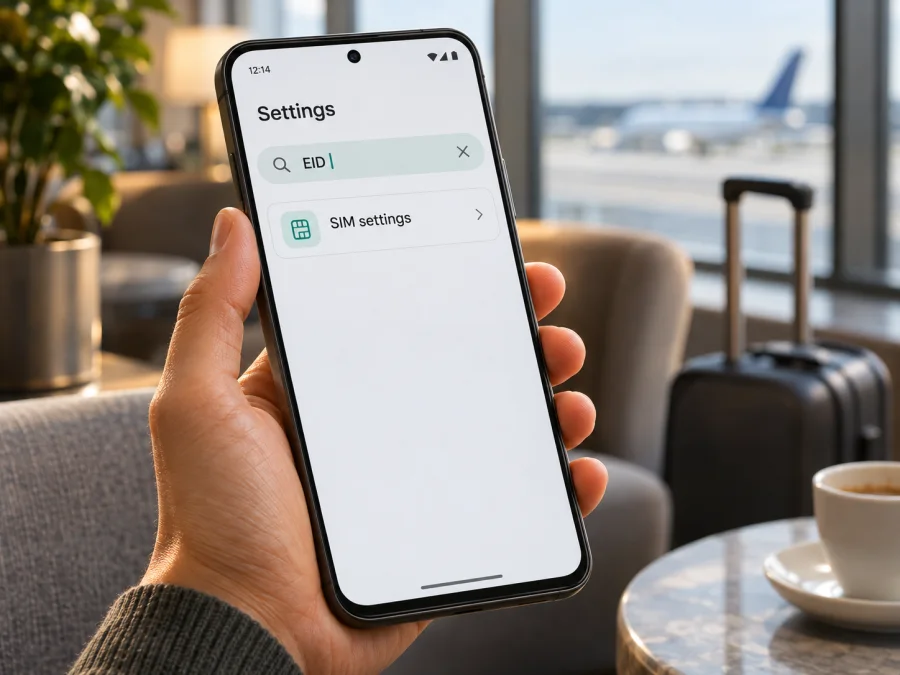
Oppo Reno 6 Pro 5G 128GB eSIM: compatibility and setup guide
Short answer: eSIM support is not confirmed for the exact Oppo Reno 6 Pro 5G 128GB variant. OPPO’s published specifications for the Reno6 Pro 5G describe physical SIM 1 and SIM 2 slots and do not list an eSIM or EID. The 128GB configuration also does not appear in the official specification pages reviewed, which show other memory configurations for their respective markets. Treat this phone as not eSIM-compatible unless the handset itself shows an EID and an option to add an eSIM. Storage size and 5G connectivity do not establish eSIM support.
That distinction matters before buying a travel data plan. The Reno6 Pro name covers devices sold in different markets, and listings can omit a regional code or describe a used or imported unit loosely. The settings on your exact phone, its model number, software build and carrier-lock status are the practical checks to make before you pay for a plan. This guide explains what is documented, what is still uncertain about the 128GB listing, and how to verify the handset without assuming that a QR code will work.
Does Oppo Reno 6 Pro 5G 128GB support eSIM?
There is no reliable official confirmation that this exact storage variant supports eSIM. OPPO’s public Reno6 Pro 5G specifications list two physical SIM positions, with SIM card type and mobile-network bands, but do not identify an embedded SIM, EID or eSIM setup option. The official regional pages reviewed likewise describe physical SIM 1 and SIM 2. As a result, the safe practical answer is no confirmed eSIM support. Do not purchase an eSIM plan for this phone based on the “5G” label, the 128GB storage description, or a retailer’s broad “dual SIM” claim.
The best-supported conclusion is that Reno6 Pro 5G versions documented by OPPO use two physical nano-SIM cards. That is different from saying that every phone advertised under a similar name has been conclusively checked: an import, refurbished unit, seller-specific listing or software variant may carry incomplete or inaccurate details. The exact “128GB” configuration needs particular care because the official specification pages found during verification list market-specific memory options that do not match that exact description. A seller may be describing a different regional configuration, combining storage with another variant, or using shorthand. Ask for the complete model code and inspect the handset directly.
| Item | What can be established | What it means for eSIM |
|---|---|---|
| Device name in this guide | Oppo Reno 6 Pro 5G 128GB | The full input name is retained; no other Reno model is substituted. |
| 5G | The Reno6 Pro 5G specifications list 5G network bands | 5G is a radio-network capability, not proof of eSIM hardware. |
| SIM arrangement in OPPO specifications | SIM card 1 and SIM card 2 are listed as physical SIM positions | The documented configuration points to dual physical SIM use. |
| EID or embedded SIM | Not stated on the manufacturer specification pages reviewed | The model-level evidence does not confirm eSIM support. |
| 128GB storage variant | Not matched to the exact official regional configuration found | Verify the model code and the actual software menus on the handset. |
| Purchase decision | Exact variant remains unverified for eSIM | Do not buy a plan unless the phone passes the EID and add-eSIM checks below. |
Why regional versions matter
A phone’s commercial name is not always enough to identify its internal configuration. Manufacturers can sell regional variants with different network bands, SIM trays, firmware, memory choices and carrier settings. The country where a handset is used also affects which local mobile networks it can access, but it does not turn a physical SIM slot into an eSIM. A phone may support 5G in one market and still have no eSIM hardware or software.
For the Reno6 Pro 5G, OPPO’s global and regional specification pages list two SIM positions and regional differences in supported bands and memory. The official pages reviewed do not present a separate eSIM-enabled regional Reno6 Pro 5G variant. This is a meaningful indicator, but an online product page is not a substitute for checking the individual handset, especially when the listing says “128GB” without a model code. Before purchasing a second-hand or imported phone, ask the seller to provide the full model number from Settings → About device and a screenshot of the SIM or mobile-network settings. Confirm that the screenshot belongs to the unit being sold, not a different Reno phone.
An operator may also restrict a phone that it sold or subsidised. That is called a network or carrier lock. A carrier lock is separate from eSIM capability: an unlocked phone can still lack eSIM, while a phone with eSIM hardware may be unable to activate another provider’s profile until it is unlocked. Check both questions independently with the seller or original carrier.
How to check this exact phone before buying a plan
Use the handset itself as the final check. Menu names can vary between ColorOS versions, Android releases and regional firmware, so use Settings search if a label differs. Do not rely on a tutorial for a newer OPPO model as evidence that this Reno6 Pro variant supports eSIM.
Check for an EID
An EID is a long identifier associated with an eSIM-capable device. It is not the same as an IMEI, serial number, SIM-card number or the phone’s storage capacity.
- Open Settings.
- Use the search field and search for EID. If search is unavailable, open About device or Status and look through the device identifiers.
- If an EID is displayed, note that this is evidence worth checking, but still confirm that the phone offers eSIM setup and is not carrier-locked.
- If there is no EID, that is a strong sign the handset cannot download an eSIM profile. Recheck the full model code with OPPO support or the seller before proceeding.
Some Android phones do not show every identifier in the same menu, and a hidden EID alone should not be taken as proof either way. A physical SIM’s IMEI or ICCID does not substitute for an EID. If the interface offers Show EID or a similar option, use it only as a read-only device-information check; you do not need to share the full identifier publicly.
Look for an add-eSIM control
- Open Settings and search for SIM, eSIM or mobile network.
- Open SIM card & mobile data, Mobile network or the closest matching menu.
- Look for an action such as Add eSIM, Download a SIM, Add mobile plan or Set up an eSIM.
- If the screen only lets you manage SIM 1 and SIM 2 and shows no eSIM action, assume the phone is not ready to install an eSIM.
- If an add-eSIM action appears, continue only after checking the EID, model code and carrier status. A menu entry can be disabled by firmware, a carrier restriction or a regional configuration.
The menu and EID should tell a consistent story. If the phone shows neither an EID nor an eSIM setup option, do not scan or buy a QR profile hoping that the function will appear later. Contact OPPO support with the full model code, the market where it was sold and the software version. If the seller cannot confirm the variant, choose a device whose manufacturer explicitly lists eSIM for its exact regional model.
Compatibility checklist
- [ ] The full model number and sales region are known.
- [ ] Settings shows an EID.
- [ ] Mobile-network settings include an enabled option to add or download an eSIM.
- [ ] The handset is unlocked for use with another provider’s eSIM.
- [ ] The operating system is up to date and the phone can connect to Wi-Fi for installation.
- [ ] The chosen plan supports the destination and the required mobile-data use.
If any of the first four checks fails or cannot be confirmed, pause before checkout. Check whether your device is compatible before choosing a travel plan. For this specific 128GB listing, the model-level evidence currently points to physical SIM cards rather than confirmed eSIM capability.
When a travel eSIM could be useful
A travel eSIM can be useful when a compatible phone needs mobile data abroad without swapping out the physical SIM used at home. It can help with maps, ride-hailing, translation, messaging, email and other internet-based services after arrival. A data-only plan generally does not provide an ordinary mobile number, voice calls or SMS unless the plan terms explicitly say otherwise. You can keep using messaging or calling apps over data where their own requirements allow.
Before selecting a plan, check the destination, coverage description, data allowance, validity period, supported network access and activation rules shown for that plan. Estimate how you use data: navigation and chat may need less than frequent video calls, large downloads or hotspot use. Review whether tethering is permitted and whether the plan starts when installed, when first connected in the destination, or on another stated activation event. Those details vary by plan and should not be assumed from the phone model.
Kaspersky eSIM Store is an app and website where you can choose, arrange and activate an eSIM with a mobile-data plan for an international trip. The plan itself is intended for mobile data abroad; it should not be treated as a replacement for your home number. Check device compatibility first, then compare the destination and plan terms. The first step is not checkout: it is confirming that this exact handset can install an eSIM profile.
A practical travel sequence
Before departure: Verify compatibility and read the destination plan’s validity and activation terms. Keep your home SIM for calls or verification messages if needed, and check its roaming charges with your carrier.
At installation: Use stable Wi-Fi and show the QR code on another screen or printout. Some activation codes are single-use, so do not repeatedly scan or delete the profile if setup stalls.
After arrival: Select the travel eSIM for mobile data once its plan is active. Keep the home SIM for calls and texts if required. Check roaming settings on each line separately; the travel plan may require data roaming, while the home line may incur charges.
During the trip: Monitor remaining data and validity. For connection issues, check the selected data line, plan status, roaming setting and local network. Do not delete the profile unless the plan instructions or support advise it.
How to install and activate an eSIM if the phone passes the checks
These steps apply only if this individual phone shows an EID and working add-eSIM control. OPPO’s specifications do not confirm eSIM for this model, so stop if the option is absent. Menu labels vary by ColorOS version. See the Android eSIM installation instructions; the iOS eSIM installation instructions apply to Apple devices, not this Oppo phone.
- Confirm compatibility. Check the model code, EID, add-eSIM option, carrier-unlock status and plan destination.
- Connect to Wi-Fi. Keep the phone charged; internet access is usually needed to download the profile.
- Open eSIM setup. In Settings, open the SIM or mobile-network menu and tap Add eSIM. If the option is missing, stop; a QR code cannot add eSIM hardware.
- Scan the code. Scan the plan’s QR code or enter details manually if that option is provided. Keep activation details private.
- Download the profile. Follow the prompts and wait for completion. Do not restart, remove the profile or rescan while processing.
- Name and schedule the line. Label it Travel data. Follow the plan’s activation timing; installation and start of validity may be separate events.
- Set mobile data. Select the travel eSIM for data and keep the home SIM for calls or texts if desired. Enable roaming for the eSIM only if the plan requires it.
- Test service. When the plan should be active, briefly turn off Wi-Fi and open a webpage. If it fails, restore Wi-Fi and check settings before deleting the profile.
Installing an eSIM profile and using it are separate steps. The profile may be present before its service period begins, and a phone may show the line as active while it is not yet connected to a supported local network. Use the activation timing and network instructions provided with the selected plan.
Common problems and checks
There is no eSIM option in Settings
Search for EID and Add eSIM, then check the model number and region. OPPO lists physical SIM 1 and SIM 2 for documented Reno6 Pro 5G versions. If eSIM is still absent, treat the phone as incompatible and ask OPPO or the seller to confirm the model; a software update cannot add missing eSIM hardware.
The QR code will not scan
Increase the QR display brightness, clean the camera lens and show the full, unexpired code. Display it on another screen or use manual entry only if supplied. If there is no add-eSIM workflow, return to the compatibility check; another code will not change that.
The profile download fails
Check Wi-Fi access and confirm that the activation code is unused and valid for this device. A restart may clear a temporary issue. Do not delete an existing profile unless the plan allows reinstallation.
The eSIM installs but shows no service
Check plan activation timing, switch on the correct line, assign mobile data to the travel eSIM and enable roaming if required. Toggle airplane mode once, then allow the phone to register. If service remains unavailable, check local coverage and network instructions with plan support.
Mobile data does not work after connection
Confirm mobile data uses the travel eSIM and that the plan is active, has data remaining and has not expired. Set an APN only if the plan instructions provide one. Test a basic webpage with Wi-Fi off; if some apps work, the issue may be app-specific.
The home SIM loses service or receives unexpected charges
Check which line is selected for data, calls and texts, and review roaming separately for each SIM. Ask your home carrier about charges for incoming verification messages while abroad.
The phone is carrier-locked
A lock can prevent another provider’s profile from registering. Ask the original carrier about unlocking. The phone must be both eSIM-capable and unlocked; ask the seller to confirm both before purchase.
Frequently asked questions
Does Oppo Reno 6 Pro 5G 128GB support eSIM?
There is no official confirmation for this exact 128GB variant in the specifications reviewed. OPPO lists physical SIM 1 and SIM 2 for Reno6 Pro 5G versions and does not list an EID or eSIM. Treat it as not confirmed and do not buy a plan unless the individual phone shows an EID and an add-eSIM option.
Does 5G mean that the phone can use eSIM?
No. 5G describes a mobile-network generation. eSIM describes a way to provision a SIM profile. A phone can support 5G and use only physical SIM cards.
Does 128GB storage determine SIM compatibility?
No. Storage capacity does not show whether a handset has eSIM hardware. The exact 128GB description should be matched to a full model code and regional specification, then checked in Settings.
Can I install a travel eSIM by scanning a QR code?
Only if the phone supports eSIM and provides an eSIM setup option. A QR code carries activation details; it cannot create missing eSIM hardware or bypass a carrier lock.
Can a travel eSIM replace my normal phone number?
Usually not. Data-focused travel plans provide internet access and do not include an ordinary phone number, calls or SMS unless the plan explicitly states otherwise. You can typically keep your home SIM for those services, subject to your carrier’s terms and settings.
What if the phone has no EID?
If no EID and no add-eSIM setting appear after checking the device information and mobile-network menus, assume it cannot install an eSIM. Confirm the model code with OPPO or the seller. Consider a compatible device or a physical SIM option instead.
Is the iOS guide relevant to this Oppo phone?
No. Oppo Reno 6 Pro 5G runs Android-based ColorOS, so use the Android guide if the handset passes compatibility checks. The iOS guide is only for Apple devices.
Check the phone first, then choose a travel eSIM
For Oppo Reno 6 Pro 5G 128GB, the evidence currently available supports a cautious conclusion: OPPO’s published Reno6 Pro 5G specifications show two physical SIM positions and do not confirm eSIM or EID support, while the exact 128GB configuration was not matched to the official regional listings reviewed. That is not enough evidence to promise that this variant can install a digital SIM. Use the actual phone’s EID and add-eSIM screen as the final check, and verify its full model code and carrier-unlock status with the seller or OPPO if anything is unclear.
If the phone passes all checks, compare the destination, data amount, validity period and activation rules before selecting a plan. Kaspersky eSIM Store’s app and website help you choose, arrange and activate an eSIM with a mobile-data plan for an international trip. If the handset does not show an EID or eSIM setup option, do not purchase a plan for it: use a compatible phone or check whether a physical SIM meets your travel needs. A few minutes spent verifying the device before checkout can prevent a failed installation after you arrive.


