Travel connectivity guide
Orchard Road eSIM: Mobile Internet in Singapore
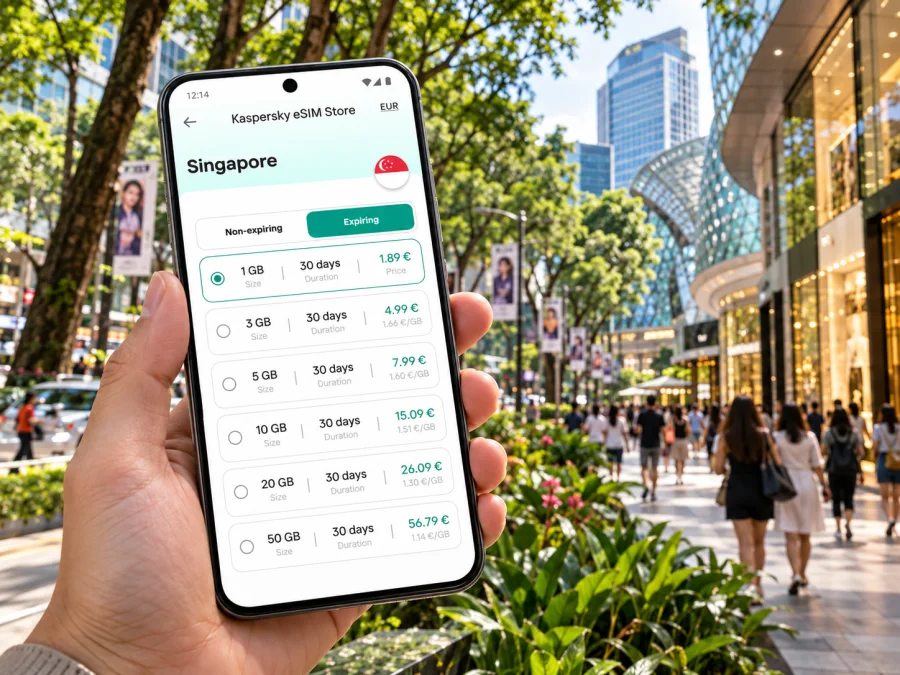
Orchard Road eSIM: Mobile Connection and Internet for Your Singapore Visit
Orchard Road is a lively shopping and hotel district in Singapore, not a separate city or administrative destination. If your hotel, meeting, or first day of exploring is here, mobile internet can help with the practical transitions: leaving Changi Airport, finding the right MRT exit, checking a booking, and navigating between malls, cafés, and nearby neighbourhoods. An eSIM lets you prepare a digital mobile plan for Singapore without replacing your physical SIM card.
The useful question is not simply whether your phone shows signal. It is whether the plan you choose matches your stay, device, and route. Orchard Road is a dense urban corridor with several MRT stations and large indoor complexes; the airport is elsewhere on the island, and a trip across the border to Malaysia is a separate connectivity requirement. This guide focuses on those real travel decisions.
Orchard Road in context: where you are going
“Orchard Road” commonly refers both to a major road and to the surrounding shopping district in central Singapore. It is a place within the city-state of Singapore, not another city or a region with its own mobile market. The corridor runs through a cluster of shopping, dining, hotel, and entertainment destinations. Singapore’s visitor information groups Orchard, Somerset, and Dhoby Ghaut as connected points for exploring the area.
That geography matters when you select an eSIM. For a stay based around Orchard Road, the destination to check in the plan is Singapore. A city name in a hotel address does not mean that a separate Orchard-only plan is required. Conversely, a plan for Singapore should not be assumed to include service in neighbouring countries just because they are close by.
The district is easy to explore in sections rather than as one single mall. Around Orchard station, ION Orchard, Orchard Turn, and the northern stretch of the shopping belt are convenient reference points. Moving south and east brings you toward Somerset, Orchard Central, 313@somerset, and the lanes around Emerald Hill. Dhoby Ghaut is the eastern end of the main Orchard shopping corridor and a useful interchange for onward trips. If you are staying nearer Tanglin, the western end is closer to the Botanic Gardens than to Dhoby Ghaut.
A practical mental map is: Orchard for the central malls and hotels; Somerset for the middle stretch and evening dining; Dhoby Ghaut for the eastern end and onward connections. These are orientation cues, not precise walking-time promises. Large buildings, crossings, weather, mobility needs, and the particular entrance you need can all change how long a short-looking route takes.
When mobile internet helps around Orchard Road
A data connection can help you check the hotel address after landing, confirm a transit route, find the right building entrance, retrieve a booking, or message colleagues when a meeting changes. Around Orchard Road, stations and malls have multiple exits and entrances, so directions to the exact venue are more useful than a general district pin.
For a short layover, check the time needed to return to Changi before deciding to travel into town. Mobile data helps with live route changes, but it does not replace checking service notices, opening hours, or your airline’s check-in requirements. Save your hotel address and essential tickets offline as a backup.
Getting from Changi Airport to Orchard Road
Changi Airport connects to Singapore’s MRT system. Its route information describes taking the train to Tanah Merah and transferring to the East-West Line toward the city, or travelling via Expo and changing to the Downtown Line. Neither is a single direct train to Orchard station. Enter your hotel’s exact address in a current journey planner; the best interchange depends on the destination and service conditions.
The airport’s general taxi estimate to the city is about 30 minutes, but traffic and the precise destination affect the trip. Public transport does not run throughout the night, so check service hours after a late arrival. Taxis and private-hire cars are listed as available around the clock from the terminals. Confirm current fares and pickup details on arrival.
Before leaving the airport, confirm the eSIM’s Singapore destination and validity rules, then check the route to your actual hotel. Keep its address and a route screenshot available offline. Orchard station is served by the North-South and Thomson-East Coast lines; Somerset is on the North-South Line, and Dhoby Ghaut connects with the North-South, North-East, and Circle lines. Choose the station and exit closest to your building rather than assuming Orchard is always the best stop.
Choosing a Singapore eSIM plan for an Orchard stay
Start with the shape of your trip, then compare the tariff details available for Singapore. A one-day shopping stop, a five-day conference, and a two-week stay do not have the same data needs. The right allowance depends on your habits, not on the district itself.
| Your travel pattern | What to check in the plan |
|---|---|
| Short visit focused on Orchard Road | Validity period, included data, and whether the validity starts at purchase, installation, or first network use |
| Work meetings and video calls | Data allowance, tethering or hotspot terms, and the reliability of your own meeting locations’ Wi-Fi |
| Maps, messaging, and bookings | How much data is included and whether background app updates can use it unexpectedly |
| Singapore plus Malaysia or another country | Whether the plan explicitly includes each country and what data allowance applies there |
| Keeping your home SIM active | Dual-SIM settings, which line handles data, and possible roaming charges on your home line |
Singapore is a compact city-state, but travel plans can cross an international border. A Singapore-only eSIM plan should be treated as a Singapore plan unless its conditions specifically include other destinations. If you plan a day trip to Johor Bahru or continue to Malaysia, check whether the tariff supports roaming there or choose an option that explicitly covers the full route. Do not infer regional coverage from the word “Asia” in a product name; read the country list and the amount of data available in each destination.
Singapore’s mobile market includes local operators such as Singtel, StarHub, M1, and SIMBA. That describes the country’s operator landscape; it does not identify which network a particular travel eSIM uses. The provider and network arrangement for an eSIM depend on the selected plan. Review its coverage information, supported destination, network details where supplied, validity, data cap, and any fair-use or hotspot conditions before purchase. Coverage, indoor reception, and speeds can vary by building and local conditions, so no plan should be read as a guarantee of identical performance in every Orchard mall, basement, hotel room, or station.
To prepare for a single-city visit, choose an eSIM plan for Singapore and compare its allowance and validity with your dates. Kaspersky eSIM Store is the app and website where you can choose, arrange, and activate an eSIM with a suitable tariff for mobile internet on an international trip. The service helps you prepare the eSIM; the mobile service itself follows the conditions and network arrangement of the selected tariff.
Estimate how much data you may use
There is no universal data figure for an Orchard Road visit. Maps, messaging, and reservations use data differently from video calls, streaming, or large uploads, and app settings matter. List the activities you expect to do, note what can be handled on hotel Wi-Fi or downloaded in advance, then compare your estimate with the plan’s stated allowance and validity.
A visitor who mostly checks maps and messages may use a different amount from a colleague joining several video meetings. A laptop hotspot can also use data quickly; check whether tethering is allowed and whether it draws from the same allowance. Do not assume “unlimited” means unrestricted high-speed data. Setting large updates and photo backups to Wi-Fi can help preserve data and battery.
Device compatibility: exact model and region matter
Before selecting a plan, confirm that your specific phone supports eSIM and is not locked to a carrier. A product family name or similar-looking model is not enough: specifications can differ by model number and sales region. Singapore’s actual location does not change a phone’s hardware, and the availability of eSIM on one regional version does not prove that another version supports it.
As one concrete example of regional variation, Singtel’s published eSIM device list notes that iPhones purchased from mainland China, Hong Kong, and Macao are dual-SIM models without eSIM. That is a device-variant note from an operator compatibility list; it is not a statement that eSIM is unavailable in Singapore or that all phones from those places lack support. Check the exact model’s manufacturer specifications and the compatibility information for the plan you intend to use. Check whether your device is compatible before paying.
Also check that the phone is unlocked. A device that supports eSIM in principle may still be unable to use another provider’s profile while carrier-restricted. If you use two lines, decide which one will handle mobile data and whether data roaming should be enabled for the travel eSIM. Keep your home line’s roaming settings in mind to avoid unintended charges.
Install and activate before you leave
If possible, prepare the eSIM while you have a reliable internet connection and enough time to read the on-screen instructions. Installation and activation are separate steps: adding a profile to your phone does not always mean that the data package starts at that moment. The selected tariff controls the validity start, so check its terms before installing early.
A careful setup sequence is:
- Confirm that the device supports eSIM, is unlocked, and can connect to Wi-Fi during setup.
- Read the plan’s supported destination, data amount, validity period, and activation conditions.
- Follow the installation steps for your operating system: Android eSIM installation instructions or iOS eSIM installation instructions.
- Label the new line clearly, such as “Singapore travel,” so it is easy to identify beside your usual SIM.
- Before departure, confirm that your home number remains selected for calls and messages if you need it, and select the travel eSIM for mobile data when appropriate.
- On arrival, enable the travel line and follow the plan’s instructions for data roaming or network selection if required.
Keep the installation email or activation details until the profile is working. Do not delete an eSIM profile as a troubleshooting shortcut unless the plan’s instructions or support team tells you to do so; some profiles cannot simply be installed again. If the line does not connect, check that the eSIM is enabled, the correct line is selected for data, airplane mode is off, and the plan is active. Then restart the phone or follow the provider’s troubleshooting steps.
Travel eSIM plans are commonly focused on data. They may not provide a regular Singapore phone number, voice calls, or SMS unless those features are clearly included in the selected tariff. You can use internet-based messaging and calling apps over data, but retain your normal number if you need bank verification texts or calls. Confirm the tariff’s inclusions before relying on it for one-time codes or local calls.
Moving around the district without losing your bearings
Orchard is walkable in parts, but it is not one continuous indoor complex. Malls and stations have multiple entrances, and a short-looking route may involve a road crossing or a change of level. Use the venue’s exact entrance when meeting someone.
- Orchard to Somerset: check the street route or connected passages for the entrances you need.
- Somerset to Dhoby Ghaut: take the MRT if you have bags or are continuing farther; for a walk, check pedestrian directions and weather.
- Orchard to the Botanic Gardens: treat it as a separate outing at the western edge of the district and confirm the destination entrance.
- Hotel to a meeting: save the full building name and address; large complexes can have several towers or lobbies.
Keep your phone charged during a full day of maps, tickets, photos, and messages. Download what you can in advance, especially if you expect to visit basement levels or large indoor venues.
Practical scenarios
First afternoon after a long flight
Prepare the eSIM before departure if its timing rules allow it. At Changi, check the current route to your hotel and choose the MRT or a car based on luggage, arrival time, and destination. Save the hotel address and next day’s route offline.
A conference near Orchard Road
Check the venue’s nearest station and exact entrance. If you plan to use a laptop hotspot, check tethering terms and allow for heavier data use. Keep meeting details available offline and leave time for the station walk and building access.
A weekend of shopping and food
Save the names of malls and restaurants, then use maps to adjust plans as you go. Agree on a named entrance or information counter as a meeting point in crowded places.
A Singapore–Malaysia itinerary
Treat the border crossing as a separate leg. Verify that Malaysia is included in the tariff and check its roaming allowance. If the plan covers Singapore only, arrange another suitable option before crossing.
Quick pre-trip checklist
- [ ] Orchard Road is the destination area; Singapore is the country to select for a city-only plan.
- [ ] The exact phone model and regional variant support eSIM, and the phone is carrier-unlocked.
- [ ] Data allowance and validity match the dates and expected activities.
- [ ] The plan’s coverage terms match Singapore and any other country on your itinerary.
- [ ] You know when validity starts and whether the profile can be installed before travel.
- [ ] Your home SIM remains configured for any calls, messages, or verification codes you need.
- [ ] Airport transit and late-night service hours are checked for your arrival time.
- [ ] Hotel and meeting addresses are saved for offline access.
- [ ] You know how to reach support if installation or activation does not work.
Frequently asked questions
Is Orchard Road a separate city from Singapore?
No. Orchard Road is a road and surrounding district in Singapore. For a trip based there, check that your eSIM tariff covers Singapore; there is no separate country destination for Orchard Road.
Which MRT station should I use for Orchard Road?
Orchard, Somerset, and Dhoby Ghaut serve different parts of the corridor. Orchard station connects the North-South and Thomson-East Coast lines; Somerset is on the North-South Line; Dhoby Ghaut is an interchange. Use the stop and exit closest to your exact address.
Can I use a Singapore eSIM in Malaysia?
Only if the selected tariff explicitly includes Malaysia or its roaming terms cover it. A Singapore-only plan should not be assumed to work across the border.
Does every phone with the same model name support eSIM?
No. Support can vary by exact model and sales region, and a phone may also be carrier-locked. Check the manufacturer’s specifications and the compatibility details for your selected plan before purchase.
Does an eSIM always include a Singapore phone number?
No. Travel eSIMs may be data-only. Voice calls, SMS, and a local number depend on the particular tariff, so check its inclusions. Keep your regular SIM available if you need your existing number.
When should I install the eSIM?
You can often install it before travel over Wi-Fi, but check the plan’s activation and validity rules first. Installation may not start the data period, but the tariff conditions determine when use begins.
Prepare your Orchard Road connection
For a visit centred on Orchard Road, choose a Singapore plan that fits your dates, data habits, device, and any onward travel. Review the tariff details, install the eSIM using the relevant setup instructions, and keep your hotel and transit information accessible. Kaspersky eSIM Store helps you choose, arrange, and activate an eSIM for mobile internet during an international trip.
Choose an eSIM plan for Singapore before you travel, then follow the selected plan’s activation instructions when you are ready to connect.


