
Travel connectivity guide
Oruro eSIM for mobile internet in Bolivia
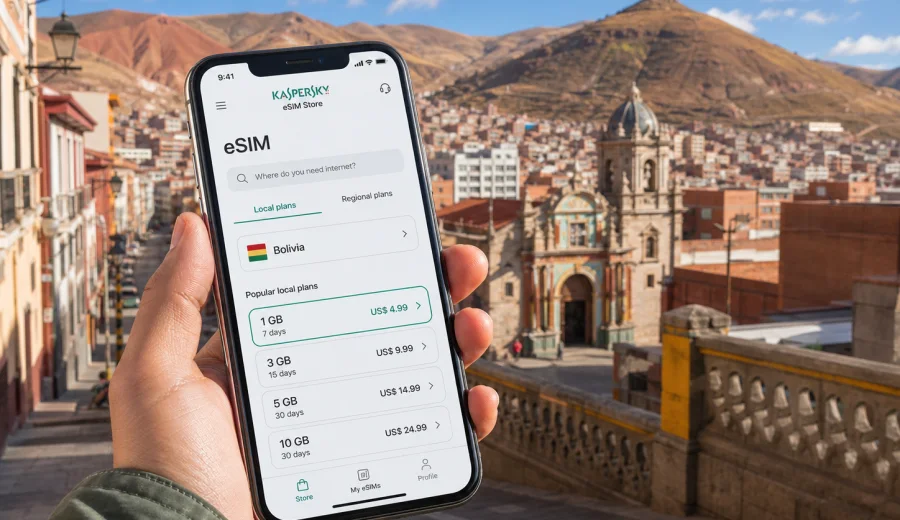
Oruro eSIM: mobile connection and internet for your trip
Oruro is a practical Bolivian city to plan carefully: it sits high on the Altiplano, connects important routes between La Paz, Cochabamba, Potosi and Uyuni, and becomes one of South America's busiest cultural destinations during Carnival season. For travelers, that means mobile internet is not just a convenience. It helps you confirm bus times, find your hotel after a long ride, coordinate with a driver, translate local details, pay attention to altitude and weather changes, and keep maps ready when streets are crowded or unfamiliar.
An eSIM can make that planning easier because you can prepare mobile data before you arrive in Bolivia or set it up shortly after landing in the country. You do not need to search for a physical SIM card kiosk in Oruro before you can message your hotel, open a map or check a route. With Kaspersky eSIM Store, you can use the app or website to choose, order and activate an eSIM with a suitable data plan for your trip, while still checking the exact plan conditions before you pay.
This guide is focused on Oruro, not just Bolivia in general. It explains where mobile data is useful in the city, how much data different travel styles may need, what to check before buying an eSIM, and how to avoid common connectivity surprises during transfers, stopovers and short business trips.
Why mobile internet matters in Oruro
Oruro is compact compared with La Paz or Santa Cruz, but it is not a city where every travel detail is obvious on arrival. Many visitors reach it by long-distance bus or train, often after several hours on the road. Others come for the Carnival of Oruro, when hotels, streets, restaurants and transport patterns can change quickly. A reliable data connection helps you handle the small decisions that make the trip smoother.
Typical uses for mobile internet in Oruro include:
- opening offline and online maps around the bus terminal, Plaza 10 de Febrero and the Santuario del Socavon area;
- messaging your hotel before arrival, especially if you arrive late or during a festival period;
- checking bus routes onward to La Paz, Cochabamba, Potosi or Uyuni;
- using translation tools for transport, restaurant and hotel conversations;
- sharing live location with a travel companion or driver;
- checking weather and altitude-related recommendations before walking longer distances;
- using ride, taxi or local transfer apps if available for your route;
- joining video calls or work chats during a business stay.
Oruro's altitude is part of the travel experience. The city is roughly 3,700 meters above sea level, so many visitors move more slowly on the first day. Mobile data helps you avoid unnecessary backtracking: check your route, confirm opening hours when available, and choose a nearby cafe, pharmacy, bank or taxi point before you start walking.
Arrival scenarios: where an eSIM helps first
Many Oruro trips begin outside the city. You may arrive after landing in La Paz or Cochabamba, then continue by bus or private transfer. Some travelers approach from Uyuni or Potosi as part of a longer Altiplano route. Flight availability to Oruro can be limited and should be checked for your travel dates, so ground transport is often the realistic planning base.
| Arrival situation | Why data helps | Practical action |
|---|---|---|
| Bus arrival in Oruro | You may need directions, hotel contact and onward timetable checks | Activate data before the last part of the trip or immediately on arrival |
| Late evening arrival | Streets are less familiar and hotel reception may need updates | Message the hotel, share your location and keep a map open |
| Carnival arrival | Crowds and street closures can affect walking and driving routes | Save hotel address, meeting point and route alternatives |
| Transfer from La Paz or Cochabamba | Long roads make schedule changes possible | Keep confirmation messages and transport contacts available |
| Business visit | You may need email, calls through internet apps and document access | Choose a data amount that supports work tasks, not only maps |
If you are using an eSIM, install it while you have stable Wi-Fi, for example at home, in your first hotel in Bolivia or at the airport before leaving for Oruro. Activation rules depend on the selected tariff, so read the conditions in the plan screen before you start the trip.
Oruro neighborhoods and travel moments that use data
Oruro is easy to underestimate because many visitors treat it as a stop between larger destinations. In practice, mobile data supports several very different city moments.
The central area around Plaza 10 de Febrero is the easiest reference point for hotels, banks, cafes and errands. Data helps you compare walking routes, find a nearby ATM and coordinate with local contacts.
The Santuario del Socavon and nearby cultural areas are important for first-time visitors. During Carnival, this part of the city can become dense with people and temporary route changes. Keep your hotel location, meeting point and backup route available.
The bus terminal area is practical but can feel busy after a long ride. Data is useful for checking onward buses, translating transport details and sending your arrival status.
If you are visiting for work, mobile data is mainly about reliability: maps, email, messaging, cloud documents and quick coordination.
How much data to consider for Oruro
There is no single correct data amount for every traveler. The right choice depends on trip length, whether you use hotel Wi-Fi, how much media you upload, and whether Oruro is one stop in a wider Bolivia itinerary.
| Travel style | Typical use | Data planning idea |
|---|---|---|
| One-day stopover | Maps, messaging, a few searches, transport checks | A smaller data package may be enough |
| Two to four days in Oruro | Maps, translation, restaurant searches, photos, work messages | Choose a moderate package with a validity period that covers all city days |
| Carnival visit | Heavy messaging, uploads, navigation, group coordination | Consider more data than for an ordinary weekend |
| Business trip | Email, files, calls through internet apps, maps | Choose a package that can handle work without relying only on hotel Wi-Fi |
| Bolivia route with Oruro included | Oruro plus La Paz, Uyuni, Potosi or Cochabamba | Match the package to the full Bolivia itinerary, not just one city |
As a simple rule, maps and text messaging are light. Photo uploads, video calls, cloud backups and social media stories use more data. If you are traveling during Carnival, the combination of photos, group chats and navigation can consume data faster than expected.
Before you buy: compatibility and plan conditions
Before choosing any eSIM plan, check that your phone or tablet supports eSIM and is not locked by a mobile operator in a way that blocks another mobile data profile. This is especially important if you bought the device through a carrier or use an older model.
Check your device before purchase, then review the selected tariff conditions. Look at data volume, validity period, destination, price and activation rules. eSIM plans for travel usually focus on mobile data. They may not include a local phone number, standard voice calls or SMS unless the plan terms explicitly say so. For calls and messages, you can usually use internet-based apps once mobile data is active.
You should also check whether data roaming needs to be enabled for the eSIM profile. Some travel eSIM profiles require this setting to use the partner network correctly. This does not mean you are using your home SIM roaming; it is a device setting for the eSIM profile.
Planning mobile internet before the Oruro leg
The most comfortable moment to prepare an eSIM is before the day you travel to Oruro. Long-distance transfers in Bolivia can be tiring, and you may not want to solve mobile setup after several hours on a bus. If your first stop is La Paz, Cochabamba or Santa Cruz, use stable Wi-Fi there to install the eSIM profile and confirm when the plan becomes active.
For an Oruro-focused trip, use this checklist:
- confirm that your device supports eSIM;
- keep your primary SIM active if you need banking SMS or calls from home;
- install the eSIM while connected to reliable Wi-Fi;
- label the eSIM profile clearly, for example "Bolivia data";
- turn off heavy cloud backups on mobile data unless you need them;
- download an offline map of Oruro as a backup;
- save your hotel address in Spanish and English;
- keep transport confirmations available offline as screenshots.
When you are ready to prepare mobile internet for the country leg that includes Oruro, you can choose an eSIM plan for Bolivia through Kaspersky eSIM Store and review the available data amounts and validity periods before ordering.
Installing an eSIM for an Oruro trip
The exact installation flow depends on your device, but the basic idea is the same: you add a new eSIM profile, choose it for mobile data, and keep your usual SIM for calls or messages if needed. Use a stable Wi-Fi connection for installation, and do not delete the eSIM profile after activation unless you are sure you no longer need it.
For device-specific steps, follow the Android installation guide or the iOS installation guide. After installation, check which SIM is selected for mobile data. If your phone has dual SIM settings, give each line a clear name so you do not confuse your home SIM with your Bolivia data eSIM.
Before leaving your hotel Wi-Fi, open a map, load your hotel address, and test a simple webpage or message app. If the plan has not started yet because of its activation rules, keep the instructions and QR details accessible until you are ready to activate.
Smart data habits in Oruro
Even with a comfortable data package, good habits help you avoid wasting traffic. Oruro travel often includes long transfers, crowded events and hotel Wi-Fi that may vary in quality. Use mobile data while moving, and use Wi-Fi for heavy downloads when it is reliable.
Practical data-saving steps:
1. Download offline maps for Oruro and the next city on your route.
2. Disable automatic video playback in social apps.
3. Pause photo and video cloud backups on mobile data.
4. Use lower video quality for calls when the connection is limited.
5. Keep important addresses and tickets as screenshots.
6. Check the data balance in your eSIM app or profile area.
7. Close navigation when you are no longer moving.
These steps are especially useful if your Oruro visit is part of a longer Bolivia itinerary. A package that feels generous for one city can disappear quickly if you upload large videos from Carnival, use video calls every evening, and stream music during intercity rides.
Carnival, festivals and crowded days
The Carnival of Oruro is a major reason travelers visit the city. It also changes the way you should think about mobile internet. Streets can be crowded, routes can shift, and meeting friends near a landmark may be harder than it sounds.
Prepare a simple festival communication plan:
- choose one meeting point near your hotel and one backup point farther from the crowd;
- share your hotel location with your group before leaving;
- keep battery power for navigation and messages, not only photos;
- use short messages instead of long video calls in crowded areas;
- save the address of your accommodation offline;
- agree on what to do if someone loses connection for a while.
Do not assume that public Wi-Fi will solve these moments. In busy periods, the most useful connection is the one already working on your phone as you move.
Hotels, cafes and business trips
Hotel Wi-Fi in Oruro can be useful for uploads, laptop work and video meetings, but travelers should avoid making it their only plan. Wi-Fi quality can vary by room, floor, time of day and hotel category. If you arrive late, leave early or need to work between appointments, mobile data is the practical backup.
For business travel, an eSIM is helpful in several common situations:
- checking email while moving between meetings;
- joining a short call from a taxi or hotel lobby;
- opening cloud documents when a local contact changes the plan;
- using maps to estimate arrival time;
- messaging colleagues in another time zone;
- keeping travel documents accessible if hotel Wi-Fi is slow.
If the trip includes confidential work, follow your organization's security rules. An eSIM gives you mobile data, but it is not a VPN or an anonymizer. Use your approved security tools when your company requires them.
Moving from Oruro to other Bolivian destinations
Oruro is often a route city. Many travelers continue to Uyuni, La Paz, Cochabamba, Potosi or Sucre. Mobile data helps during this movement because you can confirm schedules, keep maps open and coordinate with drivers or accommodation on the next leg.
For a multi-city route, plan data around the full chain:
| Route idea | Mobile data use |
|---|---|
| La Paz - Oruro - Uyuni | Bus updates, altitude planning, hotel messages, early departures |
| Cochabamba - Oruro - La Paz | Transfer timing, map checks, work messages between cities |
| Oruro - Potosi - Sucre | Navigation between terminals, accommodation confirmations |
| Oruro festival weekend | Group coordination, photos, restaurant searches, taxi details |
If you use one Bolivia eSIM plan across the route, choose validity that covers arrival day, Oruro days and the next transfer. A plan that expires too early can be inconvenient on the exact day you need route updates.
Quick comparison: eSIM, roaming, local SIM and Wi-Fi
Different connectivity options can work in Oruro, but they solve different problems.
| Option | Strong point | Limitation to remember |
|---|---|---|
| Travel eSIM | Can be prepared before or during the trip, no physical SIM swap | Requires a compatible unlocked device and plan checks |
| Home roaming | Uses your existing mobile number and familiar operator settings | Pricing and data limits may be less predictable abroad |
| Local physical SIM | May suit longer stays if you want a local SIM arrangement | Requires time, a shop visit and local purchase steps |
| Public or hotel Wi-Fi | Useful for heavy downloads and laptop work | Not available everywhere, quality may vary |
For many visitors, the best approach is mixed: use eSIM mobile data while moving around Oruro, and use hotel Wi-Fi for large uploads or laptop work when it is stable.
Practical scenarios
Short stopover: You arrive by bus, spend one night near the center and leave for Uyuni the next day. Mobile data is mainly for maps, messaging, hotel contact and onward transport.
Carnival weekend: You stay several days and move through crowded streets. Data is useful for group coordination, live location, translation, restaurant searches and photo sharing. Battery management matters as much as data volume.
Business visit: You spend most of the trip between meetings, hotel and transport points. Choose enough data for messaging, email, navigation and occasional internet calls.
Altiplano route: Oruro is one stop between La Paz, Uyuni and Potosi. Choose validity and data volume for the whole route. Download offline maps because long road sections may have variable signal.
FAQ about eSIM and mobile internet in Oruro
Can I use an eSIM only for Oruro?
Yes, if your trip is only to Oruro, choose a Bolivia plan that fits your city stay. If Oruro is part of a longer route, choose data and validity for all Bolivia travel days.
Will an eSIM give me a Bolivian phone number?
Usually travel eSIM plans focus on mobile data. A phone number, voice calls or SMS are included only if the selected plan conditions say so. Use internet-based apps for calls and messages when data is active.
Should I install the eSIM before arriving in Oruro?
It is usually more convenient. Install it on reliable Wi-Fi before the Oruro leg, then follow the plan's activation rules. This avoids setup pressure at the bus terminal or after a late arrival.
Is public Wi-Fi enough in Oruro?
It can help in hotels or cafes, but it is not enough for movement around the city, transport changes or crowded event days. Mobile data is more useful when you are between fixed Wi-Fi spots.
What should I do before buying?
Check device compatibility, confirm your phone is not locked, read the plan's data volume and validity, and understand whether activation starts immediately or under specific conditions.
Final preparation before you travel
Before your Oruro trip, prepare connectivity the same way you prepare transport and accommodation. Check that your device supports eSIM, choose a data plan that matches your Bolivia route, install the profile on stable Wi-Fi, and keep your hotel address and transport confirmations available offline.
Kaspersky eSIM Store helps you use the app or website to select, order and activate an eSIM with a suitable data plan for mobile internet abroad. For an Oruro itinerary, review the available options and prepare an eSIM plan for your Bolivia trip before the day you need it most.