Travel connectivity guide
Osaka eSIM: Mobile Data for City Travel
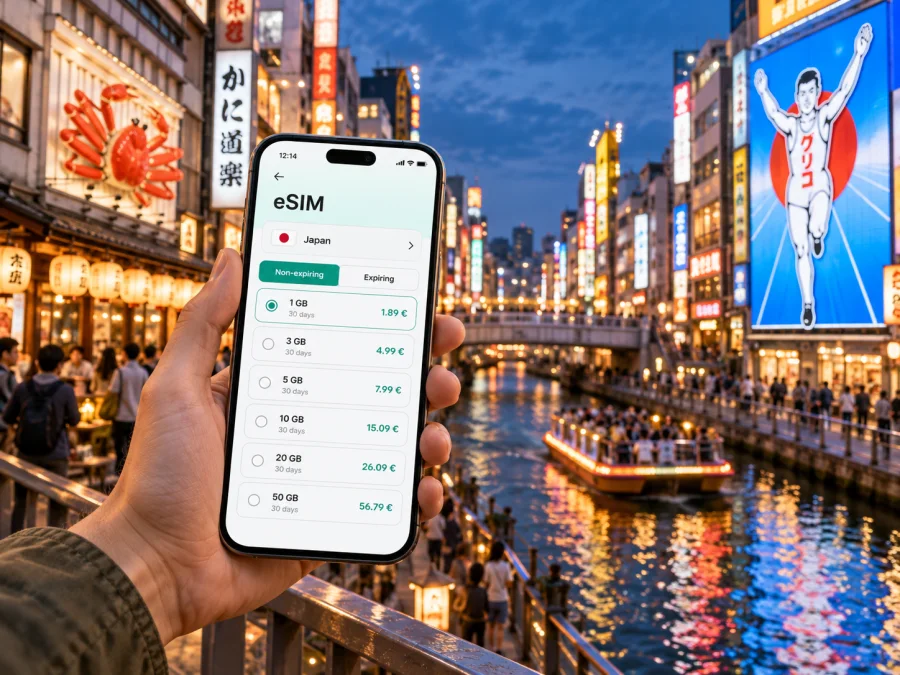
Osaka eSIM: mobile connection and internet for city travel
Osaka is a city where a day can move from an airport train to a hotel, a covered shopping street, a riverside walk, and a late dinner in a different neighborhood. A dependable mobile connection helps you join those pieces without stopping to search for directions, check a station exit, or message your host. An eSIM can keep mobile data available on a compatible phone while you explore, using a digital profile instead of a physical travel SIM.
This guide focuses on the practical details of using mobile internet in Osaka: arriving from Kansai International Airport, getting around by rail and metro, choosing where to stay, planning a short visit, and preparing data for day trips. Coverage and plan conditions depend on the selected tariff and local network, so check the details before you travel.
Before you leave: prepare for Osaka
A little preparation at home can make the first hour in the city easier. Save your hotel name and address in Japanese and English, download the area around your accommodation for offline reference, and keep your first route accessible even if you have not connected yet. If you are meeting someone, agree on a station exit or a landmark rather than relying on “I’m nearby”; large stations have many corridors and entrances.
An eSIM is a digital SIM profile installed on a compatible, unlocked device. It is useful when you want mobile data for maps, transit searches, translation, messaging, and reservations without removing your usual SIM. Many travel eSIM tariffs are data-only; calls and SMS may remain tied to your regular number, and the exact inclusions depend on the tariff. Confirm the plan’s destination, data allowance, validity period, activation conditions, and any restrictions before purchase.
A practical pre-trip checklist
- Check that your phone supports eSIM and is not locked to a carrier. Check your device.
- Confirm the tariff covers Japan, and read when its validity begins: at installation, activation, or first network connection can differ by product.
- Estimate how you use data. Maps and messaging usually need less than frequent video calls, cloud backups, or streaming.
- Install the profile over a reliable connection and keep the setup instructions available. If the plan allows later activation, follow its stated timing rather than guessing.
- Keep your regular SIM settings clear. Decide which line should handle calls and texts and which line should use mobile data.
- Carry a small power bank if you expect a long arrival day; navigation, translation, photos, and transit searches can keep the screen active.
Do not delete an eSIM profile simply because the connection is not immediately available. First check the device’s line selection, data settings, and the plan instructions. Some profiles cannot be reinstalled after removal.
Landing at Kansai International Airport
Kansai International Airport (KIX) is the main international gateway commonly used for trips to Osaka. It stands on an island in Osaka Bay, so the onward journey includes a rail or road transfer toward the city. Airport rail services connect with major parts of the Osaka area; the best choice depends on your destination, luggage, and whether you are continuing to another city. Check the current route and service information close to departure, as schedules and operating conditions can change.
Before leaving the airport, use your connection to confirm the hotel address, the route to the nearest station, and any check-in instructions. Search for the station name as well as the neighborhood: a hotel described as being in “Namba,” for example, may be more convenient from one station or exit than another. A map pin can be helpful, but compare it with the written address and the hotel’s own directions.
If you arrive at Osaka International Airport (Itami, ITM), you are using a different airport that primarily handles domestic flights. Build the transfer into your plan and confirm the onward route from the airport to your accommodation. Do not assume that the two airports are interchangeable simply because both serve Osaka.
Getting around: rail, metro, and station navigation
Osaka’s rail and subway network makes it practical to combine districts without relying on a car. Several railway companies and Osaka Metro serve different routes, and a journey may involve a transfer between operators. Use a route search shortly before departure to compare the full trip, including the station names and walking connections. The fastest result is not always the easiest when you are carrying luggage or changing at a large station.
Mobile internet is useful for checking which entrance to use, finding a platform, and comparing an alternative route after a delay. Keep in mind that a map’s walking estimate does not account for every station corridor, lift, crowd, or wait. Follow station signs as well as the map, and allow extra time for your first journey through a major interchange.
| Where you are going | Useful planning cue | Why data helps |
|---|---|---|
| Namba and Dotonbori | Check which Namba-area station matches your route and hotel | Compare exits, walking directions, and meeting points |
| Umeda and Osaka Station | Allow time for a large, multi-level station area | Recheck transfers and the final walk to a building |
| Shin-Osaka | Confirm the station name for your onward Shinkansen journey | Keep the next leg and ticket details accessible |
| Tennoji | Match the destination to the specific rail or metro stop | Coordinate a visit with nearby sights or accommodation |
| Osaka Castle area | Check the closest station for the gate or park entrance you plan to use | Navigate the final walk across the grounds |
Pick a base that fits your plans
Osaka’s districts feel distinct, and the right base depends on how you expect to spend the day. Namba is convenient for many visitors who want restaurants, shopping streets, and evening walks around Dotonbori. Umeda is a major commercial and transport area with department stores, offices, and connections across the region. Tennoji offers another useful base for visitors interested in southern Osaka and nearby attractions. These are broad orientation points, not a substitute for checking a specific hotel’s address and nearest station.
For a business trip, proximity to the meeting location can matter more than being close to a famous sight. Search the morning route at a realistic departure time and account for the walk from the station to the building. If you need to share a live arrival time, upload a presentation, or join a call from the hotel, estimate those data uses as well as sightseeing needs.
For a family stay, look at the complete door-to-door route with luggage, not just the train segment. A property can be near a station in straight-line distance while still requiring a long walk through underground passages or busy streets. Save the accommodation pin and its written address before setting out.
Using mobile internet through a full day
In Osaka, data is useful for checking platforms, translating menus, locating entrances, and confirming meeting points. To conserve an allowance, turn off automatic photo and video backups over mobile data and download large files over Wi-Fi.
If you want to review available options before departure, you can choose a Japan eSIM tariff for your Osaka trip. Kaspersky eSIM Store is an app and website that lets travelers choose, arrange, and activate an eSIM tariff for mobile data abroad. Compare the listed data allowance, validity, price, and activation terms with your itinerary; coverage depends on the plan and local network.
Short stays, stopovers, and onward journeys
A short visit rewards a compact plan. Pick one or two areas, save the routes between them, and avoid crossing the city repeatedly just to fit in a long checklist. If you have only a few hours between flights or trains, first confirm the transfer time, luggage arrangements, and the distance back to your departure point. A city visit is only practical when you can return with enough margin for check-in and security procedures.
Shin-Osaka is the principal Shinkansen station for journeys continuing by bullet train. It is not the same place as Osaka Station in Umeda, so check the station name printed on your ticket and route plan. If you are traveling onward to Kyoto, Kobe, Nara, or another destination, verify the correct rail service, departure station, and ticket before leaving your hotel. These nearby trips can make Osaka a base for a broader Kansai itinerary, but each route has its own operator and fare details.
For a day trip, download or save the return directions before you leave. Confirm the last part of the journey, not just the outward route, and keep your accommodation address available. When the day includes several stops, store them in a list or map so you can decide what to skip if weather, queues, or fatigue change the schedule.
Install and activate your eSIM
Follow the steps shown for your device and for the selected tariff. The profile can often be installed before travel, while the right activation time depends on the plan’s terms. Avoid starting setup in a station queue or just before boarding when you are rushed.
- Connect to reliable Wi-Fi and open the purchase or installation instructions.
- Add the eSIM profile using the method offered for your device, such as an activation code or QR code.
- Label the line so you can recognize it alongside your regular SIM.
- Set the travel eSIM as the mobile data line when appropriate, and keep voice and SMS settings aligned with your needs.
- When you reach the covered destination and the plan is ready to use, follow its activation steps. Some devices or tariffs may require data roaming to be enabled for that eSIM; use the plan instructions.
- Check that mobile data works before depending on it for an important route, while keeping Wi-Fi or offline details as a backup.
For device-specific steps, see the Android eSIM installation instructions or the iOS eSIM installation instructions. Menu names vary by operating system version. Follow the on-screen prompts and the tariff instructions if they differ from a general guide.
If the eSIM does not connect, check that the profile is installed and enabled, the correct line is selected for data, and the device has restarted its network connection. Review whether the tariff is active and whether its destination and validity conditions match your location and timing. If the issue continues, use the support route provided with your purchase rather than deleting the profile or repeatedly changing settings.
What to check before relying on the connection
A travel eSIM is one part of trip preparation. Its performance depends on the selected plan, local network, device, and where you are using it. Signal can be less predictable inside underground stations, lifts, large buildings, or crowded areas. Save essential information offline and keep access to your usual number if you need account verification or calls.
Before buying, review these details in the plan description:
- Destination: Japan should be included for your Osaka visit.
- Data amount: choose with navigation, messaging, browsing, and any video use in mind.
- Validity: compare its duration and start condition with your arrival and departure dates.
- Network and coverage notes: read the stated information for the tariff; no plan should be assumed to work identically in every place.
- Device requirements: check eSIM support and carrier lock status before purchase.
- Calls and messages: confirm whether the plan includes them; many travel options focus on data.
- Installation and activation: keep the exact instructions and any restrictions at hand.
Frequently asked questions
Will an eSIM work everywhere in Osaka?
No connection should be assumed to work identically in every location. Service depends on the selected tariff, its local network, the device, and the surroundings. Review the coverage information and keep offline access to addresses and essential directions.
Can I keep my usual number?
In many cases, you can leave your regular SIM active for calls and messages while selecting the travel eSIM for mobile data. The available combinations depend on your device and carrier. Check roaming settings and possible charges with your regular provider before departure.
Does the eSIM include voice calls or SMS?
Many travel eSIM tariffs are designed for data, and calls or SMS may not be included. Check the specific tariff. Internet-based messaging and calls can work through apps when data is available, subject to the app and recipient.
How much data will a weekend in Osaka use?
There is no single amount that suits everyone. Map searches, messaging, and browsing usually consume less than streaming, video calls, and automatic media backups. Estimate by your own habits, then compare that estimate with the plan’s allowance and validity.
A connected Osaka trip starts with a clear plan
Before departure, save your accommodation details, choose a sensible first route, and decide how you will use data across maps, messages, work, and day trips. In the city, check the full rail journey, station exit, and final walk, especially when traveling with luggage or crossing a large interchange. For trips beyond Osaka, verify the departure station and service before setting out.
When you are ready, use Kaspersky eSIM Store to compare the available Japan options, review their terms, and prepare an eSIM for mobile data in your trip. Choose an eSIM tariff for Osaka and Japan, then follow the device and plan instructions for installation and activation.


