
Travel connectivity guide
Otepaa eSIM for mobile internet in Estonia
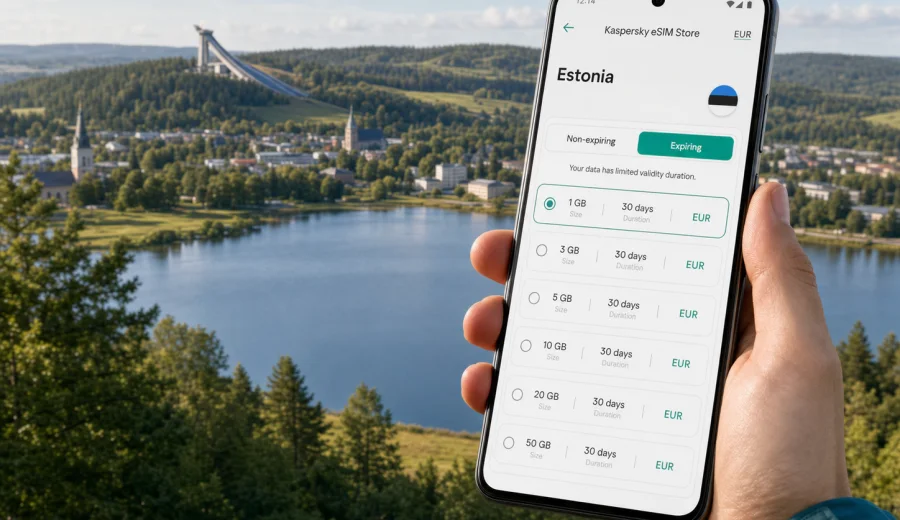
Otepaa eSIM: mobile connection and internet for a practical Estonia trip
Otepaa is a compact destination, but it is not the kind of place where you want to improvise mobile internet after arrival. The town is known for forested hills, Lake Puhajarv, ski tracks, sports events, spa hotels, weekend cottages, and road trips through southern Estonia. Many visits are short, active, and spread across places where you move between hotels, trails, restaurants, viewpoints, and nearby towns rather than staying in one walkable center all day.
That makes a working mobile connection useful from the first hour. You may need maps to find your guesthouse after dark, messaging to coordinate a ski lesson or business pickup, mobile data for a rental car route, or translation when a small local service desk does not match your language. An eSIM helps you prepare that part of the trip before you reach Otepaa, without depending on a physical SIM card counter, hotel Wi-Fi, or roaming that you have not checked in advance.
This guide explains how to think about eSIM use in Otepaa: arrival, local movement, hotels, outdoor routes, business travel, stopovers, and trips from town.
Why Otepaa needs a different mobile internet plan than a big city
Otepaa is often visited for nature and sport rather than for a dense urban itinerary. The practical consequence is simple: you may use mobile data in many small moments, not just while sitting in cafes or walking between museums.
Typical data moments in Otepaa include:
- checking the route from Tartu, Tallinn, Valga, or Riga;
- calling a ride, host, hotel reception, or event contact through a messenger;
- using navigation around Lake Puhajarv and the surrounding roads;
- finding ski tracks, hiking paths, parking areas, sports venues, and viewpoints;
- sharing location with family or colleagues;
- using a translation app in small service situations;
- managing ticket confirmations, boarding passes, and digital payments.
In a larger capital city, you can often recover from a data problem by walking into a mall, a transit hub, or a public Wi-Fi zone. In Otepaa, your day may start from a lakeside hotel, a trailhead, a sports center, or a rental cottage.
Arrival routes: where eSIM helps before you reach Otepaa
Most travelers do not arrive in Otepaa directly by international flight. They usually enter Estonia through a larger city, then continue by car, bus, taxi, private transfer, or a mix of public transport and local pickup.
Common arrival patterns:
| Route style | What you may need mobile data for |
|---|---|
| Tallinn to Otepaa | Long-distance navigation, route checks, fuel stops, hotel arrival messages |
| Tartu to Otepaa | Shorter road transfer, bus timing checks, local map search |
| Riga or southern border route | Cross-border route planning, data continuity after entering Estonia |
| Business or sports group transfer | Messenger coordination, live location sharing, timetable changes |
| Rental car itinerary | Navigation, parking search, weather checks, fuel planning |
If you install an eSIM before the trip, you can switch it on when the tariff terms allow and use mobile internet soon after arrival. That is useful if your first task is finding accommodation, meeting a host, collecting sports equipment, or joining an event schedule.
Local movement in Otepaa: small town, spread-out plans
Otepaa is manageable in size, yet many useful places are not concentrated on one street. A weekend can include the town center, Lake Puhajarv, Tehvandi sports area, cafes, hotels, spa facilities, forest paths, ski routes, and nearby villages. In warm months, the same pattern applies to cycling, hiking, lakeside walks, and road trips.
Mobile internet is useful because the exact plan often changes. Weather, daylight, snow conditions, event traffic, and restaurant availability can all affect what you do next.
For local movement, think about data in three layers:
1. Navigation data: maps, route recalculation, parking, and walking directions.
2. Coordination data: messengers, email, calls through apps, hotel or host communication.
3. Backup data: confirmations, ticket files, payment apps, translation, weather, and emergency information.
You may not need a large amount of data for each task, but you do need consistent access. Offline maps help, yet they do not replace live information when a meeting point changes.
Otepaa districts and stay types: how your location affects data use
Otepaa travel is often accommodation-led. Some travelers stay close to the center, some choose spa hotels near the lake, and others book cottages or guesthouses outside town. Each option changes how you use mobile internet.
| Stay type | Mobile internet considerations |
|---|---|
| Town center hotel | Easy for restaurants and shops, useful data for walking routes and daily planning |
| Lakeside hotel or spa | More map use between the lake, town, trails, and transport pickup points |
| Guesthouse or cottage | Stronger need for arrival navigation and host communication |
| Sports accommodation | Event schedules, route updates, team chats, and equipment logistics |
| Business stay | Video calls, email, document access, and backup data if Wi-Fi is overloaded |
Do not assume that hotel Wi-Fi will cover every need. It may work in your room and still be unavailable at a parking area, sports venue, trail, bus stop, or restaurant terrace.
How much mobile data do you need in Otepaa?
The right data amount depends on your habits, not just the number of days. A winter sports weekend with route checks can use less data than a family trip with video sharing. A business traveler using cloud files may need a larger allowance even for a short stay.
Use this planning guide:
| Trip profile | Typical data use | What to watch |
|---|---|---|
| 1-2 day stopover | Low to moderate | Maps, messaging, taxi or transfer coordination |
| 3-4 day leisure break | Moderate | Photos, restaurant search, route planning, weather apps |
| Sports weekend | Moderate | Event updates, team chats, maps, live weather |
| Family trip | Moderate to high | Multiple devices, video, entertainment, shared hotspot use |
| Remote work stay | High | Cloud documents, calls, backups, laptop tethering |
Practical rule: keep heavy video uploads, system updates, and cloud photo backups for trusted Wi-Fi. Save eSIM data for navigation, communication, tickets, payments, and quick searches.
At this stage of planning, compare available options and choose an eSIM plan for your trip to Estonia before you lock in transfers and daily activities. That gives you time to read the conditions and prepare installation.
Before buying: check device compatibility and setup rules
An eSIM works only on devices that support eSIM and are not restricted by a carrier lock that prevents adding another mobile plan. Before you choose a tariff, check your device and confirm that it can add and activate an eSIM profile.
Also check these points:
- your phone supports eSIM for the region you are visiting;
- the device is unlocked for adding another mobile plan;
- you have stable internet when installing the eSIM profile;
- you understand when the plan validity starts;
- you know whether data roaming must be enabled for the eSIM line;
- you keep your primary SIM settings under control, especially for calls and SMS.
Install the eSIM while you still have reliable Wi-Fi, then activate or use it according to the selected tariff conditions. Do not delete the eSIM profile after installation unless you are sure the tariff rules allow reinstallation.
Installing an eSIM before an Otepaa trip
The installation flow is usually straightforward, but it is worth doing it calmly before travel day. Choose a destination and data package, follow the setup steps, and add the eSIM profile to your device. If your phone asks for a label, use a clear name such as "Estonia data".
For setup details, use the official Kaspersky eSIM Store guides: Android installation instructions and iOS installation instructions. Keep Wi-Fi available during installation, and avoid starting the process while boarding, driving, or rushing between connections.
After installation, review:
- which SIM line is used for mobile data;
- whether your primary SIM remains active for calls or SMS if you need it;
- whether data roaming is required for the eSIM plan;
- how to monitor remaining data and validity;
- how to contact support if the setup does not behave as expected.
This is useful for Otepaa because your first local step may be a transfer, a late hotel check-in, or a drive to a lakeside property.
Choosing an eSIM tariff for Estonia when Otepaa is your base
When your itinerary is centered on Otepaa, choose a plan for Estonia rather than searching for a city-only option. The city belongs to Estonia, and the country destination is the relevant level for plan selection. The right choice depends on how long you will stay, whether you will leave town, and whether you will use mobile data only on a phone or also as a hotspot.
For a short leisure visit, a smaller package can be enough if you use offline maps and hotel Wi-Fi for heavy tasks. For a sports camp, remote-work stay, or family trip, choose more data and a validity period that covers arrival and departure days.
Mobile internet checklist for Otepaa
Before departure:
- Confirm that your phone supports eSIM and can add another mobile plan.
- Choose a data package that covers Estonia and your full travel window.
- Install the eSIM while you have stable Wi-Fi.
- Save hotel, cottage, venue, and transfer details offline.
- Download offline maps for Otepaa and southern Estonia.
- Keep installation instructions accessible before you travel.
On arrival:
- Select the eSIM line for mobile data if required.
- Check whether data roaming needs to be enabled for the eSIM line.
- Test a simple page or map search before leaving the airport, station, or city.
- Monitor data balance during the first day so you understand your usage pattern.
During the trip:
- Use Wi-Fi for video, large downloads, and system updates.
- Keep mobile data for maps, messages, confirmations, payments, and urgent searches.
- Save important addresses as favorites in your map app.
- Avoid deleting the eSIM profile until the trip is complete.
eSIM versus roaming, local SIM, and public Wi-Fi in Otepaa
Different connection options can work, but they solve different problems.
| Option | Advantages | Limitations |
|---|---|---|
| eSIM | Can be prepared before arrival; no physical SIM swap; useful for short trips | Requires compatible device and correct setup |
| Home roaming | Keeps your usual SIM active; simple if rates are acceptable | Costs and data limits may be less predictable |
| Local physical SIM | Familiar option for some travelers | Requires time, store access, and a physical SIM slot |
| Public Wi-Fi | Useful for heavy downloads at hotels or cafes | Not available everywhere and not ideal as your only connection |
For Otepaa, eSIM is often attractive because the destination is smaller and more spread out. You can arrive prepared, keep your usual SIM in the phone, and use mobile internet for the gaps between Wi-Fi zones.
Trips from Otepaa: why country-level coverage matters
Many visitors treat Otepaa as a base for southern Estonia rather than a single-town stay. You might drive to Tartu, explore smaller lakes and villages, continue toward Valga, or use Otepaa as part of a wider Baltic route.
Plan data for the full movement pattern:
- arrival city plus transfer to Otepaa;
- Otepaa town center and Lake Puhajarv area;
- sports venues and outdoor routes;
- day trips to nearby towns;
- return transfer and airport or station navigation.
If the trip crosses into another country, check whether your selected plan covers only Estonia or a wider region before you rely on mobile data for border-area driving.
Quick answers about eSIM in Otepaa
Is eSIM useful for a small town like Otepaa?
Yes. In a smaller destination, mobile internet is often most useful between Wi-Fi points: on transfer routes, at trailheads, near sports venues, in parking areas, and while finding accommodation.
Should I install the eSIM before I travel or after arrival?
Install it before travel if possible, while you have reliable Wi-Fi. Then activate or use it according to the tariff conditions. This reduces pressure when you arrive in Estonia.
Can I use eSIM for normal phone calls and SMS?
Do not assume that. Travel eSIM tariffs are usually built for mobile data. Use messengers for calls when appropriate, and keep your primary SIM active if you need SMS on your usual number.
Do I need a separate plan for Otepaa?
No. For a city article, the relevant destination is the country the city belongs to. Choose an Estonia plan and make sure its data amount and validity match your full route.
Can I rely only on hotel Wi-Fi?
Hotel Wi-Fi may be enough for evening tasks, but it will not help during transfers, walks, sports activities, parking, or day trips.
What is the biggest setup mistake?
Buying or installing in a hurry without checking device compatibility, plan validity, and mobile data settings. Take a few minutes to check those points before departure.
Final preparation before your Otepaa trip
Otepaa is easy to enjoy when the basics are ready: a route to your accommodation, offline copies of key details, a charged phone, and mobile internet that does not depend on finding Wi-Fi at the right moment. An eSIM can make that preparation cleaner because you can keep your physical SIM in place and add a data plan for the trip.
Before you leave, check compatibility, pick a data amount that covers arrival and departure days, install the eSIM with stable Wi-Fi, and review the activation rules. If your plans include Lake Puhajarv, sports venues, cottages, forest routes, or day trips, leave a data margin.
When you are ready to prepare mobile internet for Estonia, select an eSIM plan for your Otepaa trip through Kaspersky eSIM Store and set it up before travel day.