
Travel connectivity guide
Ottawa eSIM: mobile internet for your trip
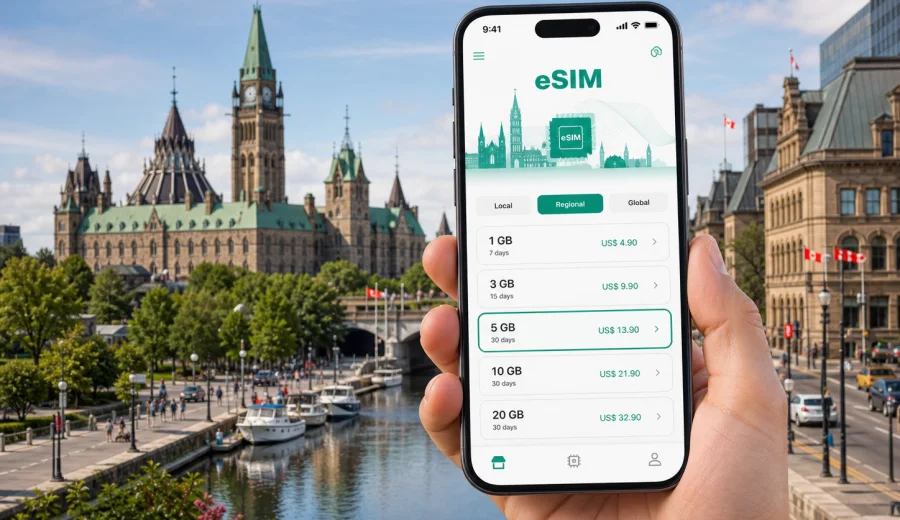
Ottawa eSIM: mobile connection and internet for your trip
Ottawa is a city where mobile internet becomes useful immediately: at the airport, on the way to a hotel, around Parliament Hill, in ByWard Market, during meetings in government and business districts, and on short trips across the river to Gatineau. If you are visiting Canada's capital for work, study, tourism, a conference, or a short stopover, an eSIM can help you stay online without looking for a physical SIM card after arrival.
An eSIM is a digital SIM profile for mobile data. With a compatible phone or tablet, you can prepare it before travel, activate it when the trip starts, and use mobile internet for maps, ride apps, messaging, bookings, translation, tickets, and work tools. Kaspersky eSIM Store is an app and website where you can choose, order, install, and activate an eSIM with a suitable data plan for an international trip.
This guide focuses on Ottawa, not Canada in general. It explains where mobile connection matters in the city, how to estimate data for a capital-city itinerary, what to check before buying a plan, and how to prepare your phone before you land.
Why mobile internet matters in Ottawa
Ottawa is easy to navigate, but many practical moments still depend on a reliable data connection. You may need mobile internet to open a hotel reservation, confirm a meeting address, check public transport times, use a rideshare pickup point, or find the correct entrance to a museum or office building.
Typical Ottawa scenarios where an eSIM can help:
- arriving at Ottawa International Airport and checking transfer options;
- using maps between Centretown, Downtown, Parliament Hill, the Glebe, and ByWard Market;
- coordinating meetings near federal offices, embassies, universities, and conference venues;
- checking OC Transpo route updates before boarding a bus or the O-Train;
- using mobile tickets, restaurant bookings, and museum reservations;
- staying in touch with family or colleagues through messengers;
- planning a day trip to Gatineau, Wakefield, Montreal, or other parts of Ontario and Quebec.
Public Wi-Fi may be available in airports, hotels, cafes, offices, and some public places, but it is not a full travel plan. You may need internet while walking between areas, waiting for a ride, crossing from Ottawa into Gatineau, or moving between hotel check-in and evening plans. An eSIM gives you a mobile data option that does not depend on finding a Wi-Fi network first.
Arrival in Ottawa: the first hour after landing
Many visitors arrive through Ottawa International Airport. The first hour is often when mobile connection is most useful: you are checking messages, confirming transport, opening maps, and deciding whether to take a taxi, rideshare, bus, or rental car. If your eSIM is already installed before the flight, you can switch mobile data to the eSIM profile after landing and avoid searching for a SIM card kiosk.
Useful first-hour tasks:
1. Turn off airplane mode after the aircraft reaches the gate.
2. Choose the eSIM profile for mobile data in your phone settings.
3. Check that data roaming is enabled for the eSIM if the plan instructions require it.
4. Open your map app and save the hotel or meeting address.
5. Confirm transport details before leaving the terminal.
Do not remove your primary SIM if you still need it for calls, bank confirmation messages, or account recovery. Many phones can keep your usual SIM active for calls and messages while the eSIM is used for mobile data. Exact settings depend on the device, so check them before departure.
Ottawa travel situations where eSIM is practical
Ottawa combines compact central districts with routes that can quickly move into residential areas, business parks, university zones, and nearby Quebec. A city eSIM article should answer a simple question: when will you actually use data?
| Travel situation | Why mobile data helps | Practical tip |
|---|---|---|
| Airport transfer | Maps, ride pickup details, hotel address, delay messages | Install eSIM before departure so you can activate it after landing |
| Downtown walks | Navigation between Parliament Hill, Sparks Street, museums, and ByWard Market | Download offline maps too, but keep data for live route changes |
| Public transport | Timetables, route changes, payment or ticket information | Check the route before leaving the hotel or office |
| Business trip | Calendar updates, email, messenger calls, document links | Choose a plan with enough data for tethering if your device and plan allow it |
| Winter visit | Route checks, weather updates, taxi apps, indoor alternatives | Keep your phone charged; cold weather can reduce battery life |
| Cross-river plans | Navigation between Ottawa and Gatineau | Confirm that your chosen plan covers Canada as the destination |
Ottawa is also a city of appointments: visa visits, university meetings, government consultations, conferences, hospital visits, and short professional stays. In these situations, the value of mobile internet is not only entertainment. It is the ability to open a map, respond to a message, or change plans without waiting for the next Wi-Fi network.
Choosing data volume for an Ottawa trip
The best plan depends on trip length and behavior. A two-day conference visitor who mostly uses hotel and office Wi-Fi needs less data than a traveler who streams video, uploads many photos, uses video calls, or works from a laptop hotspot. Avoid choosing only by the lowest price; check data volume, validity period, destination, and whether the plan terms match your trip.
Use this simple estimate:
- 1-3 GB can be enough for a short stopover with maps, messaging, email, and light browsing.
- 3-5 GB suits a weekend or conference trip with regular navigation, social apps, and some photo uploads.
- 5-10 GB is safer for a week with frequent maps, messaging, tickets, browsing, and moderate media.
- 10 GB or more may be useful for remote work, frequent tethering, cloud documents, or longer stays.
These are planning ranges, not guarantees. Video streaming, video calls, cloud backups, app updates, and social media uploads can use data quickly. Before traveling, turn off automatic cloud backup and large app updates on mobile data if you want the plan to last longer.
Ottawa districts and mobile connection needs
Different parts of the city create different data habits. In the central area, you may use short navigation sessions many times a day. In business zones, you may rely more on email, calendar tools, and messenger calls. In residential or university areas, you may need transit information and route changes.
Central Ottawa and Parliament Hill: you may use mobile internet for walking routes, museum tickets, public event changes, restaurant bookings, and sharing your location with travel companions. Streets can be busy during events, road closures, or ceremonies, so live maps are useful.
ByWard Market and Rideau: this area is practical for food, nightlife, hotels, shopping, and galleries. Mobile data helps with reservations, directions, ride pickup points, and messaging when groups split up.
Centretown and the Glebe: these areas often combine hotels, local cafes, offices, and event venues. You may use data for meetings, restaurant searches, and public transport checks.
Kanata and business parks: if your trip includes technology offices or meetings outside central Ottawa, data helps with rides, route planning, and work communications. Travel times can vary, so live navigation is useful.
Gatineau and the Quebec side: many visitors cross the river for museums, parks, hotels, or meetings. For a city trip centered on Ottawa, choose a plan for Canada and check the plan conditions before relying on it across your route.
If Ottawa is the main stop in your itinerary, you can choose an eSIM plan for a trip to Canada through Kaspersky eSIM Store and review the data amount, validity period, destination coverage, and activation notes before you travel.
When to set up your eSIM
The calmest time to install an eSIM is before you leave home, while you still have stable Wi-Fi and time to check settings. Activation timing can depend on the plan, so read the instructions carefully. In many cases, you can install the eSIM before travel and switch it on when you need mobile data at the destination.
Before buying, check your device to make sure it supports eSIM and is not locked by your carrier. Some phone models vary by region of sale, and some carrier-locked devices may not accept another mobile profile. This check is more important than the destination itself: even the right country plan will not help if the device cannot add an eSIM.
If you need setup guidance, use the Android installation instructions or the iOS installation instructions. Keep your phone connected to Wi-Fi during installation, follow the QR code or in-app steps, and wait a few minutes for the profile to be added. On some devices, you may need to enable data roaming for the eSIM profile according to the plan instructions.
A practical eSIM checklist before Ottawa
Run through this checklist before the trip, preferably the day before departure:
- Check that your phone or tablet supports eSIM.
- Confirm that the device is not locked to one carrier.
- Choose Canada as the destination for an Ottawa trip.
- Match the validity period to your arrival and departure dates.
- Choose data volume based on maps, messaging, work, photos, and hotspot needs.
- Install the eSIM on Wi-Fi before travel if the instructions allow it.
- Save installation details, QR code access, and support information.
- Decide which SIM line will handle mobile data and which will handle calls or SMS.
- Turn off large app updates and cloud backup on mobile data.
- Keep a charger or power bank ready for long days outside.
Business travel and conferences in Ottawa
Ottawa business trips often involve structured schedules: government meetings, embassy visits, university events, technology offices, conferences, and client appointments. Mobile internet can support the parts of the day that happen between fixed locations: finding the next address, messaging a colleague, opening an agenda, joining a call, or changing a ride pickup point.
For a business trip, pay attention to three details:
1. Data volume. Email and messaging are light, but video calls, cloud files, and laptop tethering can be heavy.
2. Validity period. A plan should cover the full stay, including arrival evening and departure day.
3. Device setup. Install the eSIM before travel so you are not troubleshooting settings minutes before a meeting.
If you may use your phone as a hotspot, check whether the selected plan and device allow tethering. Also keep essential documents available offline. Mobile data is helpful, but a professional trip should not rely on a single connection method for critical files.
Short stopovers and one-night stays
Ottawa is not only a long-stay destination. You may spend one night in the city between flights, arrive for a single appointment, or add Ottawa to a longer Canada itinerary. For a short visit, an eSIM is mainly about reducing friction: directions from the airport, hotel check-in, ride apps, dinner bookings, and messaging.
A short-stay data plan can be modest if you avoid streaming and large uploads. The priority is timing: have the eSIM installed before arrival, understand when the validity period starts, and switch data to the eSIM only when you want to use it. If your trip continues to Montreal, Toronto, Quebec City, or another Canadian destination, confirm that the same Canada plan fits the full route.
Tourism, museums, and walking routes
Ottawa has many visitor routes where mobile internet is useful in small, repeated moments. You might start near Parliament Hill, walk to the National Gallery area, continue into ByWard Market, cross toward the river, or take transit to a museum or park. Each transition may involve a map check, a ticket confirmation, a weather update, or a message to someone traveling with you.
For tourism, use mobile data deliberately:
- Save key places in your map app before you leave the hotel.
- Download an offline map for central Ottawa as a backup.
- Use mobile data for live transit, walking route updates, and bookings.
- Upload photos on Wi-Fi when possible if your data plan is limited.
- Keep messenger calls short or use audio instead of video when data is tight.
Winter trips need extra planning. Cold weather can affect battery life, and you may switch between indoor and outdoor routes more often. A working data connection helps you find nearby cafes, museums, indoor walkways, or transport alternatives.
Hotels, apartments, and remote work
Hotel Wi-Fi may handle large downloads, video calls, and long work sessions, but it is not always available when you need it. You may still need mobile data during check-in, in a taxi, at a cafe, or while moving between appointments.
If work is part of the trip, prepare these settings:
- set the eSIM as the mobile data line only when needed;
- disable automatic video autoplay in social and news apps;
- pause cloud photo and file backup on mobile data;
- keep large software updates on Wi-Fi only;
- check whether your plan allows hotspot use before relying on it for a laptop.
Remember that eSIM plans for travel are usually designed for mobile internet. They may not include a local phone number, standard voice calls, or SMS unless the selected plan specifically says so. Use internet-based calling and messaging apps when suitable, and keep your primary SIM available if you expect bank, airline, or workplace verification messages.
How to reduce data use in Ottawa
Small settings can make a plan last longer:
1. Download offline maps for Ottawa before travel.
2. Save hotel, venue, airport, and meeting addresses.
3. Turn off automatic cloud photo backup on mobile data.
4. Set app stores to update only on Wi-Fi.
5. Use compressed or low-data modes in apps that support them.
6. Avoid long video calls on mobile data unless your plan has enough allowance.
7. Use hotel or office Wi-Fi for large files.
Common mistakes to avoid
The most common eSIM problems are not city-specific. They usually come from device compatibility, setup timing, or plan mismatch.
- Buying before checking whether the device supports eSIM.
- Installing the eSIM on a phone locked to another carrier.
- Choosing the wrong country or region for the trip.
- Waiting until arrival to read installation instructions.
- Forgetting to set the eSIM as the mobile data line.
- Leaving heavy background updates enabled.
- Expecting a data eSIM to include a normal phone number.
- Assuming public Wi-Fi will be available during every transfer.
FAQ about eSIM for Ottawa
Do I need a Canada eSIM for Ottawa?
Yes, for an Ottawa trip you should choose a plan that covers Canada. Ottawa is in Ontario, and many city routes also cross into nearby Gatineau in Quebec, so check that your selected plan matches your full Canadian itinerary.
Can I install the eSIM before I fly?
In many cases, yes. Install the eSIM while you have stable Wi-Fi and follow the plan instructions for activation timing. Some plans start validity at activation or first network connection, so read the conditions before turning it on.
Will an eSIM give me a Canadian phone number?
Usually no. Travel eSIM plans for mobile internet often provide data only and do not include a standard local phone number, voice calls, or SMS unless this is stated in the plan conditions. Use internet-based messaging and calling apps when appropriate.
Can I keep my normal SIM active?
On many dual-SIM phones, yes. You can often keep your physical SIM or primary eSIM active for calls and messages while using the travel eSIM for mobile data. Settings vary by device, so configure this before travel.
Is eSIM useful if my hotel has Wi-Fi?
Yes, because hotel Wi-Fi only helps when you are in or near the hotel. Mobile data is useful during transfers, walking routes, restaurant plans, public transport, ride pickups, and meetings away from the hotel.
What if the eSIM does not activate immediately?
Check that the eSIM profile is installed, mobile data is assigned to the correct line, data roaming is enabled if required, and the device is not in airplane mode. Connection can take a few minutes and depends on the device, settings, and local network conditions. If the issue continues, contact support through the available service channel.
Final preparation before you travel
For Ottawa, the best mobile internet setup is the one you prepare before the trip: a compatible device, the correct Canada destination, a data volume that fits your route, and clear installation steps. That preparation makes the first day easier, whether you are heading from the airport to a hotel, walking around Parliament Hill, crossing to Gatineau, or moving between business meetings.
Before departure, choose an eSIM plan for Canada in Kaspersky eSIM Store, check the plan details, install the eSIM on a compatible device, and keep the setup instructions available. Then use mobile data for the parts of Ottawa travel where it matters most: navigation, transport, bookings, messages, and staying organized throughout the trip.