
Travel connectivity guide
Ouarzazate eSIM for Mobile Internet
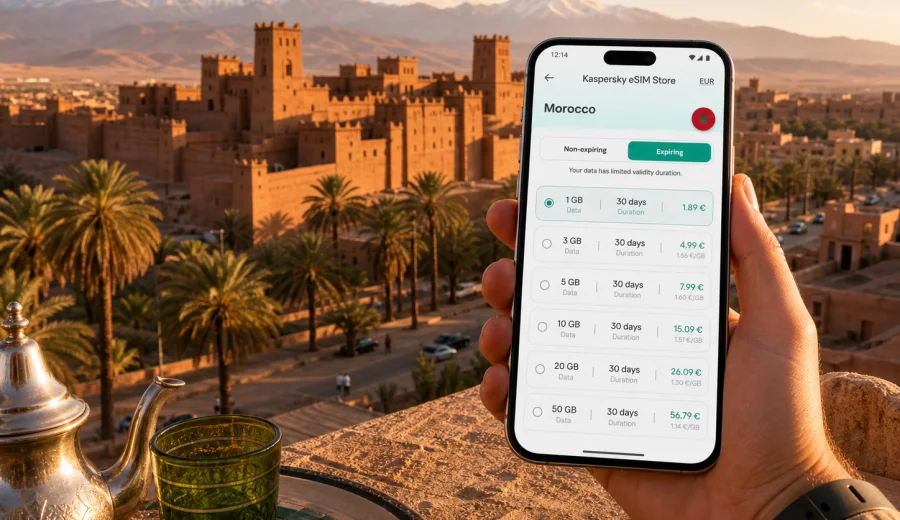
Ouarzazate eSIM: mobile connection and internet for a practical city trip
Ouarzazate is one of the most useful bases in southern Morocco: compact enough for a short stay, close to desert routes, and well placed for travelers moving between Marrakech, the Dades Valley, Skoura, Zagora, and the film locations around Ait Ben Haddou. That mix makes mobile internet more than a convenience. You may need it for airport pickup, hotel messages, map navigation, roadside stops, tour coordination, translation, and last-minute route changes.
An eSIM helps you prepare mobile data before you start moving around Ouarzazate. Instead of looking for a physical SIM card after arrival or depending on hotel Wi-Fi, you can set up a digital SIM profile on a compatible phone and use a prepaid data plan during the trip. Kaspersky eSIM Store is an app and website where you can choose, arrange, and activate an eSIM with a suitable data plan for international travel.
This guide focuses on Ouarzazate as a city destination: arrival, local transport, districts, hotels, business trips, stopovers, and day trips from the city. Morocco is the country context for choosing the right plan, but the practical questions here are city-level questions: where you will need internet, when data use may increase, and what to check before you rely on eSIM during the trip.
Why mobile internet matters in Ouarzazate
Ouarzazate does not work like a large coastal city where every step is covered by dense public transport, major shopping streets, and constant Wi-Fi access. Many useful places are spread out: the airport, hotels on the edge of town, Kasbah Taourirt, the cinema studios, the road to Ait Ben Haddou, the palm groves around Skoura, and the routes toward the valleys and desert.
With mobile data ready on your phone, you can:
- confirm your pickup after landing at Ouarzazate Airport;
- share your live location with a driver, guide, colleague, or hotel;
- check walking and driving routes around the city center;
- use translation when discussing prices, meeting points, or hotel details;
- message a tour operator if a departure time changes;
- keep maps available on the road to Ait Ben Haddou, Skoura, or Dades;
- use banking, ride coordination, and travel apps without waiting for Wi-Fi.
The key point is not heavy streaming. In Ouarzazate, the most valuable data is practical data: maps, messages, confirmations, small uploads, and travel documents. A well-chosen eSIM plan can cover these needs without forcing you to search for connectivity at the least convenient moment.
Typical arrival scenarios
Many visitors reach Ouarzazate by air, by private transfer from Marrakech, by intercity bus, or as part of a longer route through southern Morocco. Each arrival has a different connectivity risk.
| Arrival route | Where mobile data helps | Practical note |
|---|---|---|
| Ouarzazate Airport | Pickup messages, hotel address, maps | The airport is close to the city, but you may still need to coordinate transport quickly. |
| Road from Marrakech | route checks, delay messages, offline map backup | The mountain road can make timing less predictable, so messaging is useful. |
| Intercity bus | hotel check-in time, walking route, driver contact | Bus arrival points may not match your hotel area. |
| Tour transfer | guide coordination, document sharing, group chat | Data helps if the group splits for food, photos, or hotel check-in. |
If you install your eSIM before the trip, you can avoid doing setup while tired, offline, or dealing with bags. Some travelers prefer to install the eSIM profile at home and activate data after arrival. Others wait until the hotel Wi-Fi is stable. The right timing depends on the plan rules, so always read the activation and validity details before you travel.
Where you will use data inside the city
Ouarzazate is easy to understand once you are there, but the useful places are not always within one short walk. You may move between the airport side, hotels, the area around Avenue Mohammed V, restaurants, Kasbah Taourirt, the film studio areas, and the roads leaving town.
Mobile internet is especially useful in these city situations:
- finding your hotel entrance if the map pin is not exact;
- calling or messaging reception when you arrive late;
- checking restaurant opening times and walking routes;
- comparing taxi pickup points with your current location;
- translating short phrases in shops or at transport stops;
- confirming whether a tour starts from your hotel or another meeting point;
- checking weather before a desert road or valley route.
Public Wi-Fi can be helpful at hotels and some cafes, but it is not a complete travel strategy. It may require passwords, may be slow in busy periods, and will not help when you are already outside, in a taxi, or waiting for a pickup. Treat Wi-Fi as a supplement and mobile data as the tool that keeps the trip moving.
How much data to consider for Ouarzazate
Data use depends on your habits, but city travel in Ouarzazate often uses less data than a business trip in a major financial center and more data than a fully guided package tour where someone else handles every route.
Use this rough planning guide:
| Trip style | Likely data needs | What uses the most data |
|---|---|---|
| 1-2 day stopover | low to moderate | maps, messaging, hotel coordination |
| 3-4 day city base | moderate | navigation, photo uploads, restaurant searches |
| Business stay | moderate to high | email attachments, video calls, file sharing |
| Desert and valley route | moderate | maps, group chats, cloud photo backup |
| Content-heavy travel | high | video uploads, social media, cloud sync |
For most travelers, maps and messaging are light. Video calls, streaming, automatic cloud backup, and large photo uploads can use data quickly. Before you leave the hotel, turn off automatic cloud sync on mobile data if you want to keep the plan for navigation and essential communication.
Device compatibility before you travel
Before choosing any eSIM plan, check that your phone or tablet supports eSIM and is not locked to a carrier in a way that prevents adding another mobile plan. This is worth doing before you pay for a trip, because compatibility is a device condition, not a city condition.
Use the compatibility check before purchase: Check your device.
Also check these points:
- your device supports eSIM profiles;
- your operating system is updated enough to add a new mobile plan;
- the phone is not carrier-locked;
- you know where the SIM or cellular settings menu is;
- you have stable Wi-Fi available for installation if the plan requires it;
- you understand when the plan validity starts.
An eSIM plan for travel usually provides mobile data. It does not automatically include a regular local phone number, voice calls, or SMS unless those conditions are clearly stated in the selected plan. For calls and messages, many travelers use internet-based apps over mobile data.
A practical Ouarzazate data setup
A simple setup works best. Before your flight or road transfer, save the hotel address, download an offline map for the Ouarzazate area, and prepare the eSIM on your compatible device. Keep your primary SIM active if you need banking messages, but choose the eSIM as the data line once you are ready to use mobile internet in Morocco.
For a city trip, the setup checklist is:
1. Confirm your phone supports eSIM.
2. Choose Morocco as the destination for the data plan.
3. Select a data amount and validity period that match your stay.
4. Install the eSIM profile while you have reliable Wi-Fi.
5. Keep the installation instructions available offline.
6. After arrival, switch mobile data to the eSIM line.
7. Enable data roaming for the eSIM if the plan instructions require it.
8. Test maps and messaging before leaving the airport, hotel, or pickup point.
For Ouarzazate, it is better to solve connectivity before you begin a day trip. Once you leave the city for Ait Ben Haddou, Skoura, Dades, or Zagora, you may spend long periods in a vehicle, at viewpoints, or in small settlements where you do not want to troubleshoot settings for the first time.
Choosing a Morocco eSIM plan for Ouarzazate
Ouarzazate city travel usually rewards a plan that matches time, not just data volume. A short stopover may need only enough data for transport, maps, and messages. A week based in Ouarzazate with day trips may need more headroom, especially if you upload photos or coordinate with drivers and guides every day.
When you compare options, look at:
- data allowance in GB;
- validity period;
- destination coverage;
- activation rules;
- whether top-up is available;
- whether hotspot use is allowed;
- the device and installation requirements.
If Ouarzazate is your main base in Morocco, you can prepare an eSIM plan for Morocco before your trip and choose the data amount that fits your route, length of stay, and phone habits.
Do not choose only by the largest number on the screen. A plan should fit how you travel. If you use your phone mostly for maps and messages, a moderate data package can be enough. If you work from the hotel, upload video, or use hotspot for a laptop, plan more carefully and read the conditions before activation.
How to install the eSIM
Installation is usually a short process, but do it while you are calm and online. You may need to scan a QR code, enter an activation code, or follow in-app steps depending on your device and the selected plan. Keep your primary SIM and travel eSIM clearly named in your phone settings so you do not mix up data lines.
For step-by-step setup, use the official guides:
After installation, check three settings before you rely on the plan:
- the eSIM is installed and visible in cellular settings;
- mobile data is assigned to the eSIM line when you want to use it;
- data roaming is enabled for that line if the plan instructions say it is needed.
Do not delete the eSIM profile unless you are sure you no longer need it. In many cases, an eSIM profile cannot simply be moved to another device after activation. If something looks wrong, check the plan instructions or contact support through the product channel before removing the profile.
Transport around Ouarzazate
Ouarzazate is not a city where a metro map solves everything. Travelers usually combine walking, taxis, hotel transfers, rental cars, private drivers, and organized tours. Mobile data helps you keep those movements predictable.
For taxis and local transfers, keep the hotel name, address, and map pin ready. If your accommodation is a riad-style guesthouse, a desert route hotel, or a place outside the center, the entrance may be less obvious than the map suggests. A working data connection lets you call or message the property from the street.
For rental cars, mobile internet is useful for navigation, but do not depend on live maps alone. Download offline maps for Ouarzazate and the surrounding route before you leave. Live data helps with rerouting and communication, while offline maps protect you if the signal becomes weaker outside the city.
For guided trips, data helps with group coordination: meeting points, departure times, photo stops, restaurant choices, and return updates. It is common for a day to include several pauses, so messaging is often more useful than calling.
Hotels, riads, business visits, and short stopovers
Ouarzazate accommodation ranges from city hotels to guesthouses, kasbah-style stays, and properties on roads leading out of town. Save the hotel address, map pin, booking screenshot, check-in time, and contact number before arrival. Hotel Wi-Fi may be enough in the evening, but mobile data is still useful for late check-in, driver messages, dinner plans, and finding an entrance that is not obvious from the street.
Business and production trips have a different rhythm. You may need email, calendar updates, documents, team chats, driver coordination, or backup connectivity if venue Wi-Fi is unstable. Check hotspot rules before assuming you can connect a laptop through your phone. For important video calls, use stable Wi-Fi where possible and keep mobile data for urgent updates and fallback communication.
If Ouarzazate is only a one-night stop between Marrakech and the desert, keep the setup simple: eSIM installed, offline map downloaded, hotel contact saved, next-day departure confirmed, and mobile data ready for transport updates. A short stay leaves little time for troubleshooting.
Day trips from Ouarzazate
Many travelers use Ouarzazate as a base for trips beyond the city. These routes are exactly where prepared mobile data becomes practical.
| Trip from Ouarzazate | Why data helps | Preparation tip |
|---|---|---|
| Ait Ben Haddou | pickup coordination, walking route, photo sharing | Download maps before leaving town. |
| Skoura | guesthouse directions, palm grove navigation | Save accommodation and route details offline. |
| Dades Valley | driver messages, weather checks, long-route planning | Keep battery and power bank ready. |
| Todra Gorge route | route timing, hotel updates | Do not rely only on live navigation. |
| Zagora route | group communication, stop planning | Keep essential contacts saved offline. |
The further you move from the city, the more you should combine tools: offline maps, saved screenshots, a charged phone, and mobile data for live updates. eSIM is useful, but it should be part of a prepared travel setup, not the only copy of your route.
Managing data during the trip
Good data habits make a travel plan last longer. Ouarzazate is photogenic, and it is easy to use more data than expected through automatic photo backup or video sharing. Decide what needs mobile data and what can wait for Wi-Fi.
Use these settings before you leave the hotel:
- disable automatic cloud backup on mobile data;
- download offline maps for Ouarzazate and your next route;
- keep messaging apps allowed on mobile data;
- limit video autoplay in social apps;
- download translation languages if your app supports it;
- keep important documents available offline.
If you are traveling with family or colleagues, agree on one main messaging channel. Group coordination becomes easier when everyone knows where updates will appear. If only one person has reliable data, share offline meeting points as a backup.
Quick recommendations by traveler type
| Traveler type | Best approach |
|---|---|
| First-time visitor | Install eSIM before arrival, download offline maps, keep hotel contact saved. |
| Business traveler | Choose enough data for email and backup use, confirm hotspot rules if needed. |
| Family trip | Prepare one primary connected phone and offline copies of bookings on all devices. |
| Photographer or creator | Disable auto-backup on mobile data and upload large files over Wi-Fi. |
| Desert-route traveler | Combine eSIM data with offline maps, screenshots, and a power bank. |
| Short stopover | Keep setup simple: maps, messages, hotel coordination, next-day transfer. |
Frequently asked questions
Is an eSIM useful if my hotel has Wi-Fi?
Yes. Wi-Fi helps indoors, while mobile data helps during airport pickup, taxi coordination, walking routes, restaurant searches, day trips, and messages from drivers or guides.
Should I choose a Morocco plan or an Ouarzazate plan?
Choose by country. Ouarzazate is the travel use case, while Morocco is the destination used for the eSIM data plan.
Can I use eSIM for calls and SMS?
Travel eSIM plans usually focus on mobile data. A regular phone number, voice calls, and SMS are not included unless the selected plan clearly says so. You can use internet-based calling and messaging apps over data.
Do I still need offline maps?
Yes. Offline maps are a smart backup for Ouarzazate and routes outside the city. Mobile data is useful for live updates, messages, and rerouting, but offline maps keep you prepared if the signal is weaker on a road section.
Final checklist before you arrive in Ouarzazate
Before departure, make sure you have:
- checked eSIM compatibility for your phone;
- selected a Morocco data plan that matches your trip length;
- installed the eSIM profile with reliable Wi-Fi;
- saved installation instructions and booking details offline;
- downloaded Ouarzazate and regional maps;
- saved hotel, driver, and tour contacts;
- reviewed whether data roaming must be enabled for the eSIM line;
- planned how to manage photo backup and video uploads.
Ouarzazate is easier to enjoy when your phone is already ready for the practical parts of the trip: arrival, maps, hotel messages, transport, and routes into the surrounding region. Before you travel, use Kaspersky eSIM Store to choose a suitable eSIM plan for Morocco and prepare mobile internet for your stay in Ouarzazate.