Travel connectivity guide
Oulu eSIM: Mobile Data for Your Finland Trip
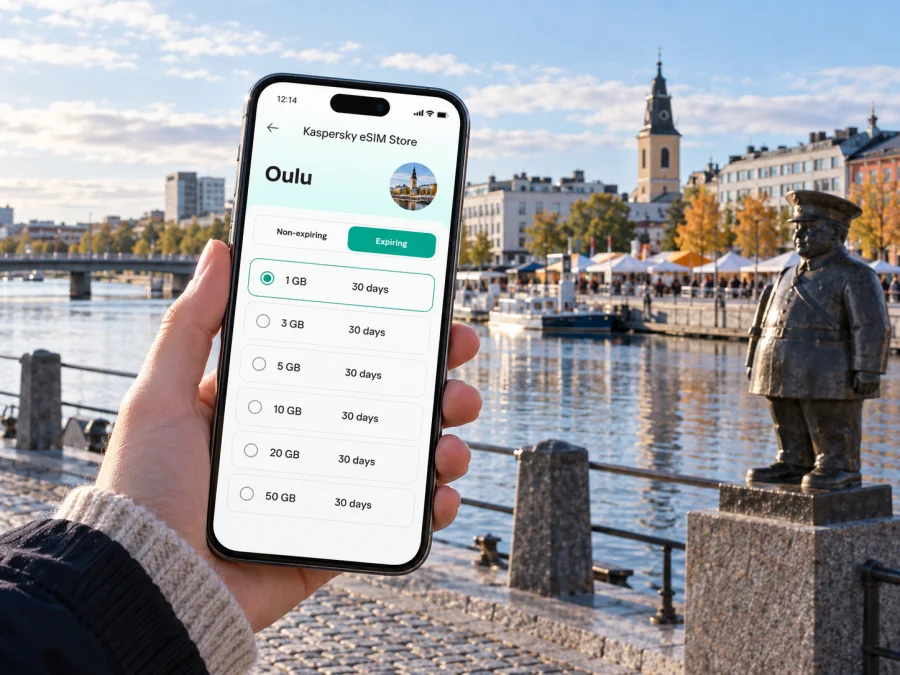
Oulu eSIM: a reliable mobile connection and internet for your city trip
Oulu is a practical northern Finland destination for a weekend break, work visit or stop on a longer journey. Mobile data can help with the first tasks after landing: finding your airport transfer, messaging your host, locating a meeting place or adjusting a walk along the waterfront.
An eSIM adds a digital mobile profile to a compatible phone without a plastic SIM. Kaspersky eSIM Store is an app and website where you can select, purchase and activate an eSIM with a suitable data plan for an international trip. In Oulu, consider where you will use it: the airport, centre, hotel, campus or coast around Nallikari.
Getting connected when you arrive in Oulu
Oulu Airport serves the city and the wider northern region. Once you land, you may need to check the latest route into town, arrange a taxi, message your host or confirm a pick-up point. Airport bus services and timetables can change, so check the current departure information for your arrival time rather than relying on a saved screenshot from an earlier trip. Taxis are available at the terminal; if you have a late arrival, luggage or a tight connection, decide in advance which option suits you.
Keep the airport-to-hotel journey simple:
- Before flying, save your hotel name and address in a notes app and download any map area you may need offline.
- After landing, compare the live public-transport information with your arrival time and destination.
- If you take a taxi, confirm the destination and pickup point before leaving the terminal.
- Once you reach your accommodation, check the route for the next part of the day while you have time to adjust it.
Maps and messages are useful, but check current transport details. Seasonal services and flight times can affect the best choice, so keep a second option if a bus does not line up with your landing.
Finding your way around the centre
Oulu’s central area is compact enough for many visitors to combine walking with short public-transport trips. The railway station and the city centre are useful orientation points; from the centre, you can plan visits to the Market Square, the waterfront and the pedestrian streets around Rotuaari. A map helps you see which places are close together, while live directions are helpful when you are carrying a bag, travelling in unfamiliar weather or trying to arrive at a specific entrance.
The Market Square is a useful first-walk reference. The nearby waterfront and Market Hall give the area a distinct character, while the Toripolliisi statue is a clear meeting point. From there, continue along the riverfront or head toward the central shopping streets. Check your route before setting off and share both a map pin and a visible landmark when meeting someone. In winter allow for weather and footing; in brighter months you may want to extend the walk along the water.
Choose transport around the day you have planned
Oulu travel is easier when you decide which journeys deserve a timetable check and which are better handled on foot. The city bus network connects central areas with destinations further out, including the airport. For routes and tickets, use the current local transport information: service numbers, departure times and ticket conditions can change. A mobile connection helps you compare a route in real time, but keep a backup plan for a low battery or an unexpected delay.
| Trip in Oulu | What to check before leaving | Why mobile data helps |
|---|---|---|
| Airport to accommodation | Current bus departure or taxi arrangements | Recheck timing after landing and share arrival updates |
| Centre to a meeting | Correct building entrance and walking route | Adjust the route if the meeting point changes |
| Centre to Nallikari | Current public-transport option and return time | Check the way back before you leave the central area |
| Hotel to station | Departure time, platform or stop details | Keep itinerary messages and maps available |
| Day trip outside the centre | Connection times and return options | Compare legs without relying on one saved route |
If you will use buses repeatedly, review ticket options and payment before your first ride. If driving, follow road signs and local rules; do not check directions while moving.
Match data use to a city visit
Your phone’s data use depends on settings, apps and habits. Navigation can use data as you request routes and updates; video calls, automatic photo backups and high-resolution streaming can use much more. Before travelling, review app updates and cloud backups so that they do not run unexpectedly over mobile data. You can also set a data warning on your device and check usage during the trip.
| Your travel pattern | Likely data priorities | A useful preparation step |
|---|---|---|
| One-night stopover | Arrival messages, maps, hotel details | Save the address and the next departure information |
| Weekend in the centre | Walking routes, restaurant searches, photos | Download a map area and review automatic backups |
| Work visit | Email, calendar, calls in work apps, document access | Test work logins before departure and keep key files available offline |
| Oulu plus regional travel | Route changes, tickets, messages between stops | Check that the chosen plan applies to every destination on your route |
Use this as a planning guide, not a fixed data estimate. Compare your usual use over a similar number of days with the plan’s allowance, validity and destination conditions.
Choose an eSIM plan for your Oulu itinerary
A short break and a longer journey create different data needs. Estimate how often you will use maps, messages, photos, video calls or large uploads, including time outside hotel Wi-Fi. Kaspersky eSIM Store lets you review Finland options by stated data allowance and validity. Review eSIM options for a trip to Finland and compare the conditions with your itinerary. Coverage depends on the selected plan and local network conditions. Check when validity begins before installing; do not assume it starts at purchase.
Hotels, meetings and working while travelling
Staying in or near the centre can simplify access to restaurants, transport and meetings; a hotel closer to a campus, workplace or coast may suit a focused visit. Compare the exact address with your itinerary instead of relying on a district name alone.
On a business trip, data helps in the gaps between appointments: confirm an entrance, message a host about a delay or check the next meeting point. Download documents in advance and leave a buffer between addresses. If colleagues arrive separately, agree on a precise meeting point such as the station entrance or Market Square.
A coastal detour to Nallikari
Nallikari is a seaside area with a beach and visitor services, a worthwhile detour if you have time beyond the centre. Check current transport and the return option before setting out; seasonal services and opening hours can vary. Use your phone to review the route and weather, then leave enough time to get back if you have dinner, a train or flight. The beach, central square and riverfront are different settings, so choose the order around daylight and transport.
A short stopover without overplanning
With only a few hours, choose one compact walk through the central streets, Market Square and nearby waterfront. Check your onward departure before leaving the station area and set a reminder to return in time. Save ticket and accommodation details offline as a backup; a current connection can confirm changes, while a charged phone or power bank keeps maps available.
If the stopover includes an onward trip beyond Oulu, check that the eSIM plan you select is valid for all destinations on your itinerary. A Finland plan may fit travel within Finland according to its terms, but do not assume that it covers a neighbouring country or every leg of a multi-country journey. Review the destination list before purchase.
Day trips from Oulu
Oulu can also be a base for exploring nearby places in Northern Finland. A day trip may involve a train, coach, car or a combination of services, depending on where you are going. Check the full outward and return journey before you commit, including the last practical connection back to your accommodation. If you are travelling to an island or a smaller community, seasonal timetables and service arrangements matter; verify them for the date you plan to go.
Before a regional day out, save the route and accommodation address, decide when to turn back and identify a fallback if a connection is missed. Keep enough battery for navigation. If the route crosses a border, check that the plan covers the other country. Save tickets offline and leave some flexibility in the schedule.
Before you buy: a practical checklist
Review these points before choosing an eSIM for Oulu:
- Destination: Confirm that Finland is included in the plan and check any other countries on your itinerary.
- Data allowance: Consider maps, messages, work tasks, uploads and video use separately.
- Validity: Read when the plan starts and how long it remains active.
- Device: Check whether your device supports eSIM and confirm that it is not carrier-locked. Model support can vary by device and market.
- Existing SIM: Decide which line will handle mobile data and whether you need to keep your regular number available for calls or messages.
- Power and access: Keep your phone charged and retain access to the email or account used during setup.
A travel data eSIM does not necessarily include a regular number, calls or SMS; check the plan details. Your usual number may remain available if your provider and settings allow it, but home-provider charges may apply. Messaging apps can work over data.
Install and activate before you need directions
Set up your eSIM when you have a reliable Wi-Fi connection and enough time to follow each step. Keep the purchase or activation instructions available, and do not delete the eSIM profile after installation unless the plan instructions tell you to. The exact menu names vary across phone models and operating system versions.
- Confirm that the plan is for Finland and that its data allowance and validity suit your visit.
- Follow the on-screen setup steps to add the eSIM profile, using the QR code or other method provided for that purchase.
- Label the new line clearly, such as “Finland data,” so you can identify it in your mobile settings.
- Choose the eSIM for mobile data when you want to use the travel plan. Keep your home line settings appropriate for your needs.
- If the plan requires it, enable data roaming for the eSIM. Follow the plan’s instructions, since settings differ by device and provider.
- After arrival, allow the phone time to register and check that mobile data is assigned to the intended line.
Use the relevant step-by-step guide if you need help: eSIM installation instructions for Android and eSIM installation instructions for iOS. Keep a copy of your setup details until the profile is working. If a connection does not appear, check the selected data line, the plan’s destination and activation conditions, and the device settings before trying again.
When the connection is slower than expected
Slow loading does not automatically mean the eSIM was installed incorrectly. Check that the travel eSIM is selected for data and the plan is active. Then try again from a place with a clearer signal; buildings, local conditions and device settings can affect service.
- Check that airplane mode is off and mobile data is enabled for the travel eSIM.
- Review the plan’s validity and remaining allowance.
- If the setup instructions require it, enable data roaming for that eSIM only.
- Restart the phone if the plan instructions recommend it, then allow time to reconnect.
Keep tickets, accommodation details and addresses available offline. If the issue continues after checking the plan and settings, contact Kaspersky eSIM Store support with your device model and a brief description.
Common questions about eSIM in Oulu
Will an eSIM help me get from Oulu Airport to the centre?
It can help you check current transport information, navigate and contact your accommodation. Check bus times or taxi arrangements for your arrival; an eSIM does not reserve a ride.
Can I use one eSIM in Oulu and other Finnish cities?
That depends on the plan. Review its destination and validity conditions before purchase, especially if your trip continues beyond Oulu.
Does a travel eSIM replace my regular phone number?
A data eSIM usually does not include a standard number, calls or SMS unless the plan says otherwise. Your regular line may remain available, subject to your provider’s charges and device settings.
Should I install the eSIM before I arrive?
You can install it in advance if the plan instructions allow it. Check when validity begins and follow the activation steps for your chosen plan.
Is a data plan useful if my hotel has Wi-Fi?
It can help while travelling between the hotel and the places you visit, including airport arrival, bus stops and meetings. Use Wi-Fi for larger tasks when it is available and appropriate.
A connected Oulu visit starts with a simple plan
Save your hotel address, check the airport transfer and mark the central places you want to see. Add Nallikari or a regional trip after reviewing the route and return options. Choose a data allowance and validity period that fit your schedule, then install the eSIM using the supplied instructions.
Kaspersky eSIM Store is an app and website for selecting, purchasing and activating an eSIM with a suitable plan for mobile data abroad. When ready, choose an eSIM plan for your visit to Finland and review its conditions before your first journey around Oulu.


