
Travel connectivity guide
Oxford eSIM Guide for Mobile Internet
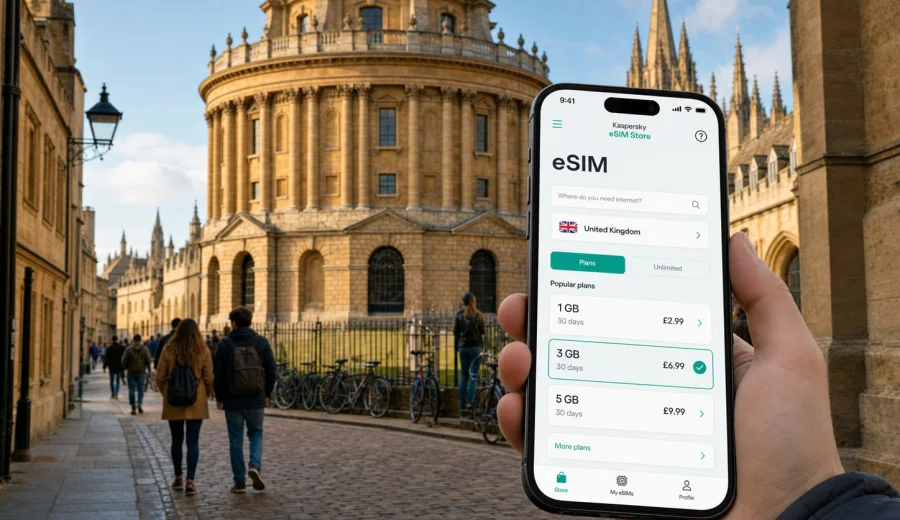
Oxford eSIM guide: mobile connection and internet for a United Kingdom trip
Oxford is compact, historic, and easy to explore on foot, but a trip here still depends on mobile internet at many small moments. You may arrive by train with luggage, take a coach from a London airport, find a hotel near Gloucester Green, walk between colleges, check a digital ticket at a museum, or continue to London, Bath, the Cotswolds, or another United Kingdom destination. In each case, a reliable mobile connection helps you make decisions without stopping to search for Wi-Fi.
An eSIM is useful because it lets you prepare mobile data before you travel. With Kaspersky eSIM Store, you can use the app or website to choose a destination, review the data allowance and validity period, install an eSIM on a compatible device, and activate it for your trip. For Oxford, choose the United Kingdom as the destination, then select a plan that fits your route, travel dates, and expected data use.
Why mobile internet matters in Oxford
Oxford looks simple on a map, but the practical details can be surprisingly specific. College entrances are not always where visitors expect, some streets in the centre are narrow or restricted, and the best route for walking is often different from the best route for buses, taxis, or bikes. Mobile data helps you handle these details in real time.
Typical uses include:
- following walking routes between the Radcliffe Camera, Bodleian Library, Covered Market, Christ Church, Magdalen Bridge, and the Ashmolean Museum;
- checking train platforms at Oxford station or Oxford Parkway;
- opening digital tickets for rail, coach, attractions, and walking tours;
- messaging a hotel, host, colleague, or driver when arrival time changes;
- using payment, banking, translation, and travel apps away from hotel Wi-Fi;
- sharing location when meeting someone near Broad Street, High Street, St Giles', Jericho, or Cowley Road;
- planning day trips to Blenheim Palace, Woodstock, Bicester Village, the Cotswolds, or London.
The city also has a rhythm that makes data useful throughout the day. You might arrive at the station, leave luggage, join a tour, check a restaurant booking, photograph the colleges, and then find a bus or taxi after dark. A prepared eSIM gives you a separate travel data line for those transitions.
eSIM basics for Oxford visitors
An eSIM is a digital SIM profile installed on a compatible phone or tablet. In travel use, it is usually focused on mobile data. Most travel eSIM plans do not include a regular local phone number, voice calls, or SMS unless the selected plan says so. For calls and messages, travellers usually use internet-based apps.
For an Oxford city article, the country context matters because the mobile data plan is selected for the United Kingdom. The same UK plan can support your arrival route, city stay, and onward travel, depending on the plan terms and local network conditions. Always review the plan details before payment: destination, data amount, validity period, activation rules, price, and whether hotspot use is supported if you need it.
Quick fit table
| Travel situation | Oxford example | What to check |
|---|---|---|
| Weekend break | Maps, tickets, restaurants, messages | Modest data and validity for arrival and departure days |
| University visit | Colleges, departments, libraries, family calls | Enough data for maps, email, and occasional uploads |
| Business trip | Meetings, calendar, work messages, laptop hotspot | Larger allowance and tethering conditions |
| Airport stopover | Coach or rail from Heathrow, Gatwick, or London | Activation timing and data for the transfer route |
| Wider UK route | Oxford plus London, Bath, Cambridge, or the Cotswolds | Validity for the full route, not only Oxford |
Prepare before you arrive
The best time to prepare an eSIM is before you are standing outside a station, hotel, or college gate. Install the eSIM while you still have reliable Wi-Fi at home, at the airport, or at your accommodation. Activation rules vary, so check whether the validity period starts at installation, at first network connection, or after another step shown in the instructions.
Before choosing a plan, check your device. Your phone or tablet must support eSIM, and it must not be locked in a way that prevents adding another cellular plan. This is especially important if the device was bought through a mobile operator contract. Also make sure your operating system is up to date and that you know where to change mobile data settings.
Use this short checklist:
- confirm that your device supports eSIM and is not carrier-locked;
- keep your regular SIM active if you need your usual number for banking or two-factor authentication;
- install the eSIM while connected to stable Wi-Fi;
- save your hotel address, station route, and booking details offline;
- check whether your plan supports hotspot use if you need a laptop connection;
- keep enough battery for arrival, navigation, and ticket checks.
Arrival scenarios in Oxford
Many visitors reach Oxford by rail, coach, or car rather than by flying directly into the city. That makes the first hour of data especially useful.
If you arrive at Oxford station, mobile internet helps you choose between walking, bus, taxi, or ride-hailing. The station is close to the city centre, but with luggage, rain, or a late arrival, a live route is easier than guessing from signs.
If you arrive at Oxford Parkway, you may need onward transport toward the centre, Summertown, north Oxford, or your hotel. Data helps you check routes before you commit to the wrong platform, bus stop, or taxi pickup point.
If you arrive by airport coach, Gloucester Green is a common central arrival point. From there, mobile data helps with hotel directions, messages to reception, bus connections, and last-minute changes if the coach is delayed.
Drivers may use Park & Ride sites, hotel parking, or paid city-centre parking. Oxford is not a city where most visitors want to improvise by car: restricted streets, cyclists, bus gates, and limited parking make live navigation and parking information valuable.
Choosing data for an Oxford trip
Oxford itself does not require a huge amount of data for basic navigation, but total use can grow when maps, ticket apps, photos, cloud sync, messaging, and work tools run together. Choose for the whole trip, not just for the hours spent near the Radcliffe Camera.
| Use pattern | Practical data approach |
|---|---|
| Light sightseeing | Small allowance if you use hotel Wi-Fi for uploads and video |
| Long weekend | Leave margin for repeated navigation, restaurant search, and photo sharing |
| Work-focused visit | Choose more data and check hotspot support |
| Multi-city UK itinerary | Match validity and data volume to the full route |
| Group organiser | Keep extra data because one phone often becomes the ticket and route hub |
If you want to prepare before arrival, you can choose a data plan for your Oxford trip in the United Kingdom through Kaspersky eSIM Store and review options by allowance and validity. The right plan is the one that fits your route and usage, not simply the largest package.
Getting around Oxford with mobile data
Oxford rewards walking, yet live navigation is still useful. The historic centre has small lanes, courtyards, college entrances, and streets where the shortest route is not always the clearest route. A connection can help you find the correct entrance, check opening times, or adjust a walk when the weather changes.
Buses are helpful for Headington, Cowley, Summertown, Jericho, Botley, and other areas outside the immediate centre. Mobile internet helps you check stops, route numbers, and changes without relying only on timetable boards. This matters if you are staying near hospitals, university departments, business parks, or guesthouses outside the old city.
Cycling is common in Oxford. If you use a bike, data can help with safer routing, docking points, and repair searches. The best cycle route is often different from the best pedestrian or car route.
For taxis and ride-hailing, data lets you set a precise pickup point, track the car, contact the driver, and share your trip details. In a city with narrow streets and restricted areas, that can save time.
Districts and practical use cases
Historic centre: Around High Street, Broad Street, Radcliffe Square, Cornmarket Street, and the Covered Market, data use is mostly maps, tickets, restaurant search, and messages. A lighter plan can work if hotel Wi-Fi handles uploads.
Jericho: Useful for restaurants, cinema, canal walks, and guesthouses. Mobile data helps with evening routes and transport back to your accommodation.
Cowley Road and East Oxford: A lively area for food, music, student life, and local shops. Data is helpful for buses, venue locations, and late-evening travel.
Headington: Visitors often come for hospitals, university departments, or accommodation. Buses, taxis, email, and appointment messages may matter more than sightseeing apps.
Summertown and north Oxford: Common for longer stays and quieter accommodation. Data helps with routes into the centre and onward travel from Oxford Parkway.
Conference or business locations: If your meeting is outside the tourist centre, choose enough data for calendars, email, documents, and possible hotspot use.
Hotels, rentals, and Wi-Fi gaps
Hotel Wi-Fi helps, but it does not cover the whole trip. You usually need internet before check-in, after checkout, while walking, on buses, in taxis, and during day trips. A hotel network can also be slow in the evening, require repeated sign-in, or work poorly in some rooms.
An eSIM prepared in advance helps when you need to:
- message reception about late arrival;
- open a booking confirmation at the desk;
- find the correct entrance to a serviced apartment;
- call through a messenger if a door code does not work;
- check train or coach changes after checkout;
- use maps while carrying luggage.
For serviced apartments and rentals, save essential instructions offline, but keep mobile data available for anything that changes after you leave Wi-Fi.
Installing and activating an eSIM
The exact steps depend on your device and selected plan. In general, you choose the destination and plan, install the eSIM profile, set it as the line for mobile data when appropriate, and activate it according to the plan rules. For device-specific help, use the Android installation instructions or the iOS installation instructions.
Practical installation steps:
1. Install the eSIM while connected to reliable Wi-Fi.
2. Keep your primary SIM available if you need your usual number.
3. Label the travel line clearly, for example "UK travel".
4. Set the eSIM as the mobile data line when you are ready to use it.
5. Turn on data roaming for the eSIM if the plan instructions require it.
6. Avoid deleting the eSIM profile unless you are sure you no longer need it.
Do not wait until you are outside the station with a low battery. Oxford is manageable, but travel problems are easier to solve when the phone is already prepared.
Business trips and university visits
Oxford attracts conferences, research visits, interviews, hospital appointments, supplier meetings, and university events. These trips often depend on mobile data in a different way from leisure travel. The question is not only whether you can open maps, but whether you can work if the schedule changes.
For a work-focused visit, check:
- data volume for email, documents, calendars, and messaging;
- hotspot support if you need a laptop connection;
- whether your hotel, college room, or meeting venue has reliable Wi-Fi;
- whether you need data immediately on arrival;
- whether video calls can wait for Wi-Fi;
- whether key documents are available offline.
University visitors should plan for movement between buildings. Oxford departments, colleges, libraries, and event venues are spread across the city, and the correct entrance may not be the landmark you recognise. Mobile maps and messages reduce the risk of losing time between appointments.
Stopovers and day trips
Oxford can be a day stop between London and the Cotswolds, a coach break after an airport arrival, or a short overnight visit on a wider UK route. In a stopover, mobile data is valuable because there is little time to recover from mistakes.
A practical stopover plan:
- save arrival and departure points before travelling;
- keep luggage storage or hotel details available offline;
- use mobile data for walking routes between the station, centre, and departure point;
- check return train or coach updates before a long walk or restaurant booking;
- keep enough battery for the final leg.
Many visitors also use Oxford as a base for Blenheim Palace, Woodstock, Bicester Village, the Cotswolds, Stratford-upon-Avon, Bath, or London. For these trips, choose validity that covers the whole connected part of your journey. Rural and intercity conditions can vary by location, so keep essential addresses and tickets offline as a backup.
Data-saving habits that work
| Habit | Why it helps |
|---|---|
| Download offline maps for Oxford and your wider route | Navigation remains possible if signal is weak or you want to save data |
| Use Wi-Fi for photo backups and app updates | Uploads and updates can consume more data than maps |
| Disable automatic cloud sync on mobile data | Prevents background use while walking or travelling |
| Send compressed media in messengers | Saves data during group trips |
| Keep streaming for Wi-Fi | Video usually uses data fastest |
| Check app permissions | Some apps use mobile data in the background unless restricted |
For most visitors, maps, messages, email, and web search are manageable. Video, cloud backup, high-resolution uploads, and laptop hotspot use are what change the calculation.
Common mistakes to avoid
The first mistake is preparing too late. If you wait until you need the connection, you may depend on station Wi-Fi, a hotel lobby network, or a public hotspot.
The second mistake is ignoring compatibility. eSIM support depends on the device model, region, and sometimes operator lock status. Checking this before payment is faster than solving it after arrival.
The third mistake is forgetting that a travel eSIM is usually for data, not a full local phone plan. If a hotel, restaurant, taxi service, bank, or airline needs to contact your regular number, keep that line available.
The fourth mistake is choosing only for Oxford city centre. If your UK trip includes airport transfers, London, the Cotswolds, or another city, choose a validity period and data allowance that cover the full route.
FAQ: eSIM and mobile internet in Oxford
Do I need a separate Oxford eSIM?
No. Choose a United Kingdom destination plan. Oxford is the city focus of your trip, but the plan should match the country coverage shown in the plan details.
Can I install the eSIM before travelling?
In many cases, yes. It is often better to install while you have reliable Wi-Fi. Check the activation rules so you know when validity begins.
Will an eSIM give me a UK phone number?
Usually travel eSIM plans are for mobile data and do not include a regular phone number, voice calls, or SMS unless the plan terms say otherwise. You can use internet-based calling and messaging apps over data.
Should I keep my regular SIM active?
Yes, if you need your normal number for calls, SMS, bank verification, or account security. Many travellers use the eSIM for mobile data while keeping their regular line available, depending on the device.
Is public Wi-Fi enough in Oxford?
Public and hotel Wi-Fi can help, but it is not available at every point in your route. Mobile data is useful for arrivals, buses, taxis, tickets, maps, and last-minute changes.
How much data should I choose?
For light maps and messaging, a smaller allowance may be enough. For work, hotspot use, frequent uploads, or a multi-city UK trip, choose more data and validity for the full journey.
Final preparation for Oxford
Oxford is easier when the practical details are ready: key bookings, college opening times, train or coach information, hotel instructions, and mobile internet. An eSIM does not replace good planning, but it removes one common source of friction: searching for a physical SIM card or depending only on Wi-Fi when you are already moving.
Before departure, confirm that your device supports eSIM, choose a plan with suitable data and validity, install it over Wi-Fi, and keep the activation instructions available. For a city break, business visit, university appointment, stopover, or wider UK itinerary, you can prepare an eSIM plan for travel in the United Kingdom with Kaspersky eSIM Store and arrive in Oxford ready to use maps, messages, tickets, and travel apps from the start.