
Travel connectivity guide
Pacific Harbour eSIM for mobile internet
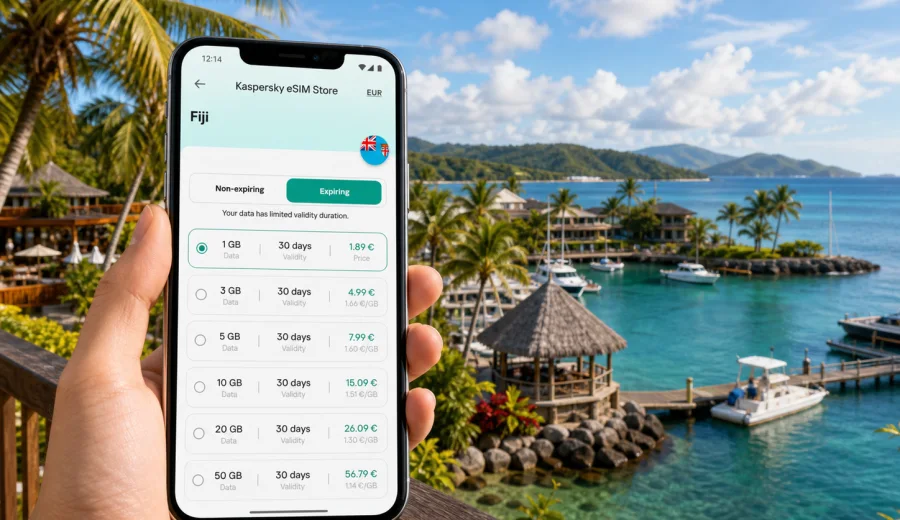
Pacific Harbour eSIM: mobile connection and internet for a Fiji trip
Pacific Harbour is a coastal base on the south side of Viti Levu, but the travel logistics around it are not always simple. You may arrive through Nadi, continue by road along Queens Road, check in at a resort, meet a boat operator, join a Navua River excursion, dive near Beqa Lagoon, or continue toward Suva. In each of these moments, mobile connection and internet access help you keep the trip moving without depending only on hotel Wi-Fi.
An eSIM is useful here because Pacific Harbour is not a dense city where every service is around one central square. Resorts, villas, restaurants, activity desks, marina points, roadside pickups, and beaches can sit apart. You may be online in your room, then lose Wi-Fi as soon as you walk to a jetty, wait for a transfer, or go out for dinner.
This guide is about Pacific Harbour specifically. Fiji provides the country context and the correct eSIM destination, but the practical focus stays on arrival, local movement, resorts, activities, business stays, stopovers, and trips from Pacific Harbour to nearby places.
Why mobile internet matters in Pacific Harbour
Pacific Harbour travel often depends on timing. A driver may need to confirm your arrival, an activity operator may adjust a meeting point, or a resort may ask for a check-in update while you are still on the road.
Mobile internet is especially useful for:
- transfer messages after landing in Nadi or Nausori;
- maps on the road between Nadi, Pacific Harbour, Navua, and Suva;
- hotel booking details at reception;
- weather checks before boat, river, or outdoor activities;
- messaging dive, lagoon, cultural, or transport operators;
- restaurant searches and route checks after dark;
- work email, calls, and documents during a resort-based business stay;
- internet calling and messaging if the eSIM tariff is data-only.
The main benefit is having a practical way to manage travel tasks when you are away from the lobby or moving between pickup points.
Arrival routes: Nadi, Suva, and the road to the resort area
Many international visitors arrive at Nadi International Airport and travel by road to Pacific Harbour. Others arrive through Suva or Nausori for meetings or regional connections. In both cases, the first useful online moment can happen before you reach the hotel.
After landing, mobile data helps you:
1. message your driver or host;
2. open the hotel address and booking reference;
3. check whether the route or pickup point has changed;
4. tell the resort if your arrival time shifts;
5. keep family or colleagues updated during the transfer.
Before departure, save essential details offline: hotel name, booking number, driver contact, activity confirmations, and the address of your first stop. Then use eSIM data as the live layer for updates and navigation. This combination works better than relying only on either offline notes or a live connection.
Pacific Harbour travel moments that need data
| Travel moment | Why mobile data helps | Useful preparation |
|---|---|---|
| Airport transfer | You may need to find or message a driver | Save contact details and keep data ready after landing |
| Resort check-in | Booking emails or payment confirmations may be requested | Keep key documents downloaded and searchable |
| Activity pickup | Meeting points can be at a lobby, jetty, roadside point, or marina | Confirm the exact pickup place before leaving Wi-Fi |
| Lagoon or river trip | Operators may update timing because of weather or logistics | Check messages in the morning |
| Dinner outside the resort | Taxis, directions, and opening times may matter | Keep enough battery and data for the return |
| Work from Pacific Harbour | Calls, files, and email need predictable access | Choose a larger data allowance if hotspot use is needed |
| Route to Suva or the Coral Coast | You may need maps and travel updates between towns | Match the tariff validity to the whole Fiji route |
This is where eSIM preparation pays off. Pacific Harbour is calm, but the calmest travel days still include small coordination tasks. If your mobile data line is ready, you can manage them without changing your plan around Wi-Fi availability.
How much data to choose for Pacific Harbour
The right data volume depends on how you travel. Messaging and maps use relatively little data. Video calls, hotspot use, social media uploads, cloud backup, and streaming use much more. A diving or adventure trip can also create large photo and video files, so it is better to upload them on Wi-Fi unless you selected a generous data package.
| Trip style | Typical use | Data approach |
|---|---|---|
| Short resort stay | Messaging, maps, restaurant searches | A smaller package may be enough |
| Activity-focused holiday | Transfers, operators, weather, photo sharing | Choose a medium package with extra margin |
| Diving or adventure trip | Frequent media, route checks, group messages | Use Wi-Fi for uploads and keep mobile data for movement |
| Business stay | Email, calls, files, possible hotspot | Choose more data and check hotspot conditions |
| Multi-stop Fiji route | Pacific Harbour plus Suva, Navua, Nadi, or the Coral Coast | Match validity to the full itinerary |
Validity is as important as volume. A plan with enough gigabytes but too short a validity period may not cover departure day. A longer-validity plan with too little data may be uncomfortable if you use maps, calls, and media every day. Compare both before you decide.
Choosing an eSIM plan for a Pacific Harbour stay
For a city article, the correct destination is the country that contains the city. Pacific Harbour is in Fiji, so you should choose a Fiji eSIM tariff rather than looking for a separate city plan. Kaspersky eSIM Store is an app and website where you can quickly choose, arrange, and activate an eSIM with a suitable mobile data tariff for an international trip.
Before selecting a tariff, check:
- destination coverage for Fiji;
- data allowance and validity period;
- when the validity period starts;
- whether the tariff is data-only or includes other services;
- whether hotspot use is allowed if you need it;
- whether your device supports eSIM and is not carrier-locked.
If you want the mobile data line ready before the busiest travel moments, you can choose an eSIM plan for your trip to Pacific Harbour and select a Fiji tariff that matches your route, stay length, and expected data use.
Device compatibility and installation
Check compatibility before you buy any eSIM tariff. This matters if your phone is older, was bought through a mobile operator, or has never used eSIM before. You can check your device before continuing.
Install the eSIM while you have a stable internet connection, read the activation conditions, and avoid deleting the eSIM profile after installation unless the tariff terms clearly allow reinstallation. For setup steps, use the Android installation guide or iOS installation guide.
Use this setup checklist:
- install the eSIM before departure or before leaving reliable Wi-Fi;
- give the line a clear name, such as Fiji data;
- select the eSIM as the mobile data line when you arrive;
- keep your home SIM active only if you need calls, SMS, or banking messages;
- turn off data roaming on the home SIM if you want to avoid accidental roaming use;
- enable data roaming for the eSIM only if the instructions or tariff require it;
- pause cloud backup and automatic app updates on mobile data.
Many travel eSIM tariffs are intended for mobile internet and may not include a standard local phone number, voice calls, or SMS unless the tariff conditions say so. For calls and messages, travelers often use internet-based apps over the data connection.
Moving around Pacific Harbour
Local movement in Pacific Harbour can involve resort shuttles, taxis, private drivers, rental cars, hotel-arranged transfers, activity pickups, or buses on Queens Road. Because the area is spread out, data is useful for coordination rather than only navigation.
Before leaving your resort, confirm the exact pickup description. A meeting point may be a lobby, gate, beach access, jetty, roadside stop, or operator desk. If a driver or operator asks where you are, sending a short message or live location can prevent delays.
Mobile data helps most when:
- you need to find the correct entrance to a resort or activity area;
- a driver is waiting near Queens Road rather than inside the hotel;
- weather affects a boat or river excursion;
- you split from travel companions and need to regroup;
- you are returning after dinner and want directions or transport updates.
Do not rely on live maps alone. Save names, landmarks, and phone numbers in notes. Pacific Harbour is easier when offline preparation and mobile data work together.
Resorts, hotels, and business trips
Hotel Wi-Fi can be useful, but it may not be equally strong in every room, villa, garden, beach area, or jetty. Treat Wi-Fi as the best option for heavy uploads, system updates, streaming, and large work files. Use eSIM data for maps, transport, messengers, banking apps, email checks, and quick document access when you leave the strongest Wi-Fi area.
Business travelers should choose more data than leisure travelers with the same number of nights. Video meetings and laptop hotspot sessions can use data quickly. If you expect to work from Pacific Harbour, test your connection early, keep a charger nearby, and have an audio-only backup plan for calls.
Activities around Pacific Harbour
Pacific Harbour is a base for lagoon, river, cultural, and adventure activities. You may spend part of the day away from your room and away from predictable Wi-Fi. The best habit is to use data before the activity starts: check the meeting time, confirm the pickup point, download tickets or vouchers, and message the operator if anything is unclear.
For boat, lagoon, or river days:
1. check weather and messages before breakfast;
2. save the meeting point offline;
3. keep the phone protected from water;
4. turn off automatic photo backup;
5. preserve enough battery for the return journey.
For cultural visits, dining, or short local trips, keep the data routine simple: maps, messages, reservation details, and return transport. You do not need constant streaming to make the eSIM useful.
Trips from Pacific Harbour
Pacific Harbour often fits into a wider Fiji itinerary. You may continue east to Suva, west along the Coral Coast, toward Navua, or back to Nadi for departure. If your trip includes several stops, choose a tariff that covers the whole Fiji route and remains valid through the final travel day. Data is most valuable on movement days, so make sure the plan still has allowance when you need to leave.
Data-saving tips for Pacific Harbour
You can stay connected without wasting data. A few settings make a noticeable difference:
- download offline maps before the trip;
- use hotel Wi-Fi for app updates and large uploads;
- disable cloud backup on mobile data;
- lower video quality when streaming is necessary;
- send compressed photos in messengers;
- close navigation after you understand the route;
- monitor data use in your phone settings;
- avoid using a laptop hotspot unless your plan and allowance fit the task.
Families and groups should also agree who handles maps and transport messages. Shared planning helps a small allowance last longer.
Quick checklist before you leave
- Confirm your hotel, transfer, and activity bookings.
- Check that your phone supports eSIM.
- Choose a Fiji tariff with enough data and validity.
- Install the eSIM while you have reliable Wi-Fi.
- Save key contacts and addresses offline.
- Download maps for Pacific Harbour, Navua, Suva, and your transfer route.
- Turn off heavy background data use.
- Pack a charger, cable, and power bank.
FAQ: eSIM and mobile internet in Pacific Harbour
Is eSIM useful if my Pacific Harbour resort has Wi-Fi?
Yes. Resort Wi-Fi helps inside the property, but eSIM data helps during transfers, activity pickups, walks, restaurant trips, and travel beyond town.
Should I install the eSIM before arriving in Fiji?
Usually, installing before travel is more convenient if the tariff conditions allow it. Use a stable connection and follow the setup guide.
Does a travel eSIM include calls and SMS?
Many travel eSIM tariffs are data-only unless the plan says otherwise. Use internet-based calling and messaging apps if you need voice or chat over mobile data.
How much data do I need for Pacific Harbour?
Light users may need only maps and messaging. Activity-heavy travelers, business visitors, and anyone using hotspot or video calls should choose more data and watch background usage.
Can one Fiji eSIM cover Pacific Harbour and other towns?
Choose the Fiji destination and check the tariff coverage, data volume, and validity. If the selected tariff fits your route, it can support travel beyond Pacific Harbour.
Prepare mobile internet before your Pacific Harbour trip
Pacific Harbour is easy to enjoy when the practical details are already handled. With an eSIM prepared in advance, you can move from the airport to the resort, from the resort to an activity, and from Pacific Harbour to the rest of Viti Levu with fewer connection gaps.
Before you travel, choose a Fiji eSIM tariff through Kaspersky eSIM Store, check the conditions, install it on a compatible device, and keep it ready as your travel data line. You can prepare mobile internet for your Pacific Harbour trip by selecting the Fiji destination and choosing the data volume and validity period that fit your plans.