
Travel connectivity guide
Pago Pago eSIM: Mobile Internet Guide
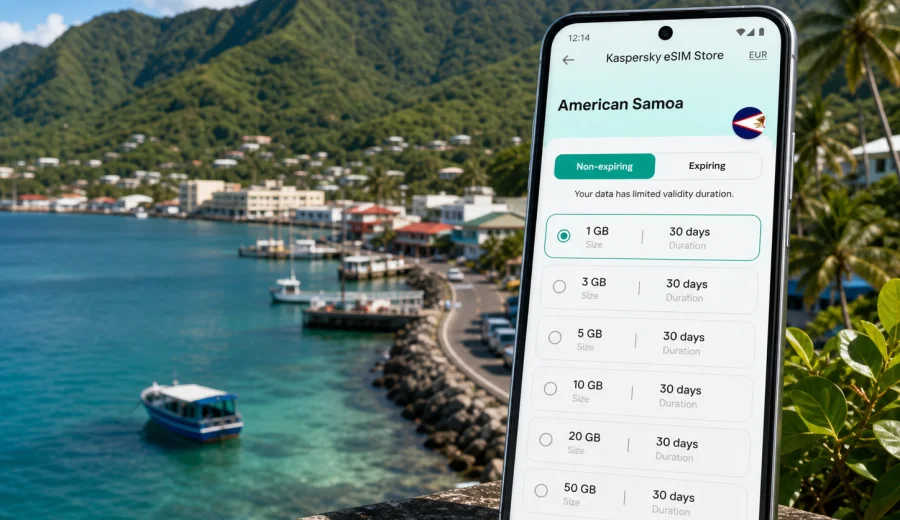
Pago Pago eSIM: mobile connection and internet guide for American Samoa
Pago Pago is the kind of city where mobile internet becomes useful before you have fully unpacked. The harbor sits between steep green ridges, the main roads follow the coastline, and many practical travel decisions happen on the move: checking your hotel address, confirming a transfer, opening a map, messaging a host, or looking up ferry and taxi options after landing. If you arrive with an eSIM already prepared, you can start your trip with fewer small connectivity problems.
This guide focuses on Pago Pago, not on American Samoa in general. It is written for travelers who need reliable mobile data for arrival, local movement, business trips, hotel stays, stopovers, and short routes from the capital area. The goal is simple: understand when an eSIM is useful, how to choose a suitable data package, what to check before purchase, and how to avoid depending on public Wi-Fi for every basic task.
An eSIM is a digital SIM profile that can be installed on a compatible phone or tablet. For a trip to Pago Pago, it is mainly a practical tool for mobile internet abroad: maps, ride coordination, messaging apps, online check-in, email, translation, reservations, banking confirmations, and travel updates. Unless the conditions of a specific tariff say otherwise, eSIM tariffs for travel usually provide data and do not include a standard local phone number, voice calls, or SMS.
Why mobile internet matters in Pago Pago
Pago Pago is compact, but it is not a city where every point of interest sits in one walkable grid. The harbor, government and business areas, hotels, villages around the bay, coastal roads, and nearby natural sites are spread along the shoreline and hills. Mobile data helps you connect these pieces without constantly searching for Wi-Fi.
Typical situations where an eSIM can help:
- opening maps after arrival and finding the correct road around Pago Pago Harbor;
- messaging a hotel, host, colleague, or driver when plans change;
- checking business email between meetings in Fagatogo, Utulei, or near the port;
- using translation, weather, and local search while moving around town;
- confirming bookings for hotels, tours, rental cars, or inter-island travel;
- keeping family or colleagues updated through messengers;
- using mobile data when hotel Wi-Fi is slow, limited, or unavailable in public areas.
Pago Pago is also a place where weather, road conditions, and timing can affect plans. A short delay, a rain shower, or a change in pickup point is easier to handle when your phone is online. You do not need mobile internet every minute, but you will want it at the moments when decisions have to be made quickly.
Arrival in Pago Pago: the first hour online
Most international travelers arrive through Pago Pago International Airport near Tafuna, then continue toward the harbor area, hotels, business addresses, or villages along the coast. The airport is not in the middle of the harbor, so your first online tasks may happen before you reach central Pago Pago.
During the first hour, mobile data is useful for:
1. Opening your saved hotel or meeting location.
2. Checking whether your driver or contact has sent a new message.
3. Confirming the route into Pago Pago or to another village.
4. Looking up store, restaurant, or service hours.
5. Sharing your arrival status with family or colleagues.
If you depend only on airport or hotel Wi-Fi, the first gap in connection may appear exactly when you need directions. With an eSIM installed in advance, you can usually switch mobile data to the eSIM profile after arrival and continue from the airport without buying a physical SIM card immediately.
Keep one important detail in mind: eSIM setup still requires a compatible device and a working internet connection for installation. If you plan to install it only after landing, make sure you have access to Wi-Fi for the setup step. Many travelers prefer installing the eSIM profile before departure and activating mobile data after arrival, depending on the tariff conditions.
Local movement around the harbor
Pago Pago is shaped by its harbor. The road network follows the water, curves around villages, and runs below steep slopes. Even short trips can involve checking the correct direction, confirming a pickup point, or estimating travel time around the bay. Mobile internet helps when you are moving between the airport area, central Pago Pago, Fagatogo, Utulei, hotels, the port, and nearby viewpoints.
For a city stay, your data usage will often come from small but frequent actions:
| Travel task in Pago Pago | Why mobile data helps |
|---|---|
| Navigation | Map routes can change depending on where you start along the harbor road. |
| Hotel coordination | You can message reception or a host without waiting for Wi-Fi. |
| Business movement | Email, documents, and calendar updates remain accessible between meetings. |
| Short sightseeing | You can check routes, opening times, weather, and photo backup settings. |
| Family updates | Messengers work without needing a local phone number if data is active. |
If you plan to walk, use taxis, arrange private transfers, or drive, an eSIM can make the city feel easier to manage. It is especially useful when addresses are described by landmarks rather than a familiar street grid, or when a pickup point is easier to share through a map pin.
How much data to consider for Pago Pago
The right data amount depends less on the city itself and more on your habits. Pago Pago trips can be short and practical, but mobile data can disappear quickly if you stream video, upload large photo sets, use cloud backup, or keep maps and messaging active all day.
Use this simple planning table as a starting point:
| Trip style | Typical data needs | Practical note |
|---|---|---|
| Stopover or 1-2 days | Low to moderate | Maps, messaging, hotel coordination, and light browsing. |
| 3-5 day city stay | Moderate | Navigation, email, reservations, weather, local search, and messengers. |
| Business trip | Moderate to high | Add video calls, file access, and hotspot use if allowed by the tariff. |
| Photo-heavy leisure trip | High | Disable automatic cloud backup on mobile data if you want to save traffic. |
| Multi-day island route | Moderate to high | More navigation, messaging, and offline-plan adjustments outside the city. |
For most travelers, the best approach is to choose a tariff by three details: destination, data volume, and validity period. Check that American Samoa is included, choose enough data for the length of your stay, and confirm when the validity period starts. If your trip includes nearby destinations outside American Samoa, compare whether a country, regional, or broader travel tariff fits the route better.
Choosing an eSIM tariff for a Pago Pago trip
For a Pago Pago city article, the correct destination is American Samoa. You do not need a separate city tariff; you need a tariff that covers the country or region where Pago Pago is located. In Kaspersky eSIM Store, you can choose the destination, review available data volumes and validity periods, and prepare an eSIM for a compatible device before or during the trip.
When comparing options, check:
- destination coverage: American Samoa or a relevant regional option;
- data volume: enough for maps, messengers, email, and browsing;
- validity period: aligned with your arrival and departure dates;
- activation rules: when the tariff starts and whether it starts on installation or first network connection;
- hotspot or tethering conditions, if you plan to share data with a laptop;
- top-up options and what happens when the data package is used up.
If you already know that your stay is centered on Pago Pago, choose a package for the actual length of your city visit rather than a larger option by default. If Pago Pago is only the start of a wider route, think about the full itinerary before buying. A business traveler who stays near the harbor for three days may need less data than a traveler who uses navigation, uploads photos, and checks routes across several parts of Tutuila.
For a straightforward setup, you can choose a mobile internet option for American Samoa before your Pago Pago trip and review the available eSIM tariffs for the destination. This is the main country page to use for a city stay in Pago Pago.
What to check before you buy
The most important step is device compatibility. Not every phone or tablet supports eSIM, and some devices can be locked by the mobile operator. Before purchasing a tariff, check your device and make sure it supports eSIM profiles for travel.
Also check these details:
- Your phone is unlocked and can use mobile data with another SIM profile.
- You can access the internet during installation, either before departure or on arrival.
- You understand whether the tariff includes data only or also other services.
- You know whether data roaming must be enabled for the eSIM profile.
- You have saved the QR code or installation details where you can reach them.
- You have turned off heavy background data use if your package is limited.
For a Pago Pago trip, these checks are more practical than they may sound. If you land tired, need to find a transfer, and discover that your phone does not support eSIM, the issue is harder to fix at the airport. Spending two minutes on compatibility before purchase is the simplest way to avoid that problem.
Installing an eSIM before Pago Pago
The installation flow depends on your device, but the travel logic is usually the same: choose a tariff, install the eSIM profile, set it as the mobile data line when appropriate, and activate it according to the tariff conditions. Kaspersky eSIM Store provides installation guidance after purchase, and you can also use the dedicated setup pages for Android installation and iOS installation.
A practical setup sequence:
1. Confirm that your phone supports eSIM and is not operator-locked.
2. Choose American Samoa as the destination for a Pago Pago stay.
3. Select a data volume and validity period that match your itinerary.
4. Install the eSIM profile while you still have stable internet.
5. Keep your primary SIM active if you need your usual number for banking or messages.
6. After arrival, switch mobile data to the eSIM profile and follow the activation rules.
7. Monitor data use during the trip, especially if you use maps, uploads, or hotspot mode.
Do not delete the eSIM profile unless you are sure you no longer need it. Some eSIM profiles cannot be reinstalled or transferred after activation, depending on the tariff conditions.
Pago Pago scenarios: who benefits most
Different travelers use mobile data in different ways. The city is small enough that you can plan many things in advance, but online access still helps when your day changes.
Short stopover. If Pago Pago is a brief stop, you mainly need maps, messaging, and access to booking details. A smaller data package may be enough if you avoid streaming and large uploads.
Business trip. Meetings around the harbor, government offices, port areas, hotels, or local partners can require constant email and calendar access. Mobile data is useful between Wi-Fi networks, especially when you need to send documents or join a call from a quiet corner.
Hotel-based stay. Even if your hotel has Wi-Fi, an eSIM helps outside the room: arrival, taxis, restaurant searches, messages, and route changes. It also gives you a backup if the hotel connection is not strong enough for work.
Nature and viewpoint visits. Pago Pago is close to scenic coastal roads and green slopes. Mobile data helps with route checks and weather updates, but download important maps or details in advance if you expect to move through areas with weaker signal.
Family travel. A connected phone makes it easier to coordinate pickup points, share locations, and manage bookings. If several people travel together, decide whether everyone needs their own eSIM or whether one connected device is enough for coordination.
Data-saving tips for the city
You can make a limited data package last longer with a few small settings:
- Download offline map areas before departure.
- Turn off automatic photo and video backup on mobile data.
- Disable app updates over mobile data.
- Use hotel Wi-Fi for large downloads when it is available and trusted.
- Keep video streaming for Wi-Fi, not mobile data.
- Use low-data mode in messaging and social apps.
- Check your data balance regularly in the app or profile.
These habits matter in Pago Pago because many travel tasks are light, but background app behavior can be heavy. A map search uses little data; a phone that uploads hundreds of photos can use far more.
eSIM, roaming, local SIM, and Wi-Fi in Pago Pago
There is no single best connection method for every traveler. The right choice depends on timing, device support, budget, and how much flexibility you want.
| Option | Good for | What to consider |
|---|---|---|
| Travel eSIM | Preparing mobile data before arrival and avoiding a physical SIM purchase. | Requires eSIM-compatible, unlocked device. |
| Home roaming | Keeping your usual carrier setup simple. | Costs and conditions can vary significantly. |
| Local physical SIM | Longer stays or travelers who prefer local retail setup. | Requires time, availability, and a compatible SIM slot. |
| Public or hotel Wi-Fi | Large downloads and work from one place. | Not always available during transfers or city movement. |
For many visitors, an eSIM is useful because it fills the gap between landing and reaching stable Wi-Fi. It can also remain the main data line for the whole stay if the selected tariff fits your usage.
Common mistakes to avoid
The most common eSIM problems are not city-specific; they happen because setup details are missed before travel.
Avoid these mistakes:
- buying before checking that your device supports eSIM;
- choosing the wrong destination or a tariff that does not match your route;
- installing only after arrival without access to Wi-Fi;
- deleting the eSIM profile too early;
- assuming that a data-only eSIM includes a local phone number;
- leaving cloud backup and app updates active on mobile data;
- forgetting that the tariff validity period may start based on specific activation conditions.
If you are traveling for work, also test your essential apps before relying on them: email, calendar, messaging, authentication apps, cloud storage, and video meeting tools. An eSIM helps with mobile internet, but it does not replace your account access, passwords, or business security requirements.
Quick checklist before departure
Use this checklist a day or two before flying to Pago Pago:
- Passport, tickets, hotel address, and booking confirmations are saved offline.
- Your phone supports eSIM and is not operator-locked.
- The eSIM tariff destination matches American Samoa.
- Installation instructions are saved or accessible.
- The eSIM profile is installed if the tariff conditions allow pre-trip installation.
- Mobile data switching is understood: primary SIM for calls, eSIM for data if needed.
- Offline maps for Pago Pago and the airport area are downloaded.
- Background data-heavy apps are limited.
- Your bank and travel apps are working before departure.
This preparation gives you a cleaner arrival. You can focus on baggage, transfer, and hotel check-in instead of trying to solve connectivity under time pressure.
FAQ: eSIM for Pago Pago
Do I need a Pago Pago-specific eSIM?
No. For a city stay, choose an eSIM tariff that covers American Samoa, because Pago Pago is the city within that destination.
Can I install the eSIM after landing?
You can if you have internet access for installation, usually through Wi-Fi. Many travelers install the profile before departure and activate mobile data after arrival, depending on the tariff rules.
Will an eSIM give me a local phone number in Pago Pago?
Usually travel eSIM tariffs are for mobile data. Voice calls and SMS are not included unless the conditions of a specific tariff say so. You can use messengers and calling apps over mobile data.
Can I keep my regular SIM active?
In many dual-SIM phones, yes. You can often keep your usual number for calls or verification messages and use the eSIM profile for mobile data. Device settings vary, so check before travel.
Is public Wi-Fi enough for Pago Pago?
It may be enough for some hotel-based tasks, but it is less convenient during arrival, transfers, walking routes, taxi coordination, and quick changes of plan.
What if I travel outside Pago Pago?
Check the tariff destination and coverage rules before purchase. If your route stays within American Samoa, a country tariff may be suitable. If your trip includes other countries or regions, compare broader options.
Prepare mobile internet for Pago Pago
Pago Pago is easier to navigate when your phone is ready before the first transfer, hotel message, or map search. An eSIM can help you use mobile internet without buying a physical SIM card on arrival, while keeping the setup focused on the data volume, validity period, and destination you actually need.
Before you travel, check device compatibility, choose a tariff that covers American Samoa, install the eSIM while you have a stable connection, and review the activation conditions. For a city stay, you can prepare an eSIM tariff for your Pago Pago trip through Kaspersky eSIM Store and keep your arrival, local movement, and daily planning simpler.