
Travel connectivity guide
Pakistan eSIM: mobile internet for travel
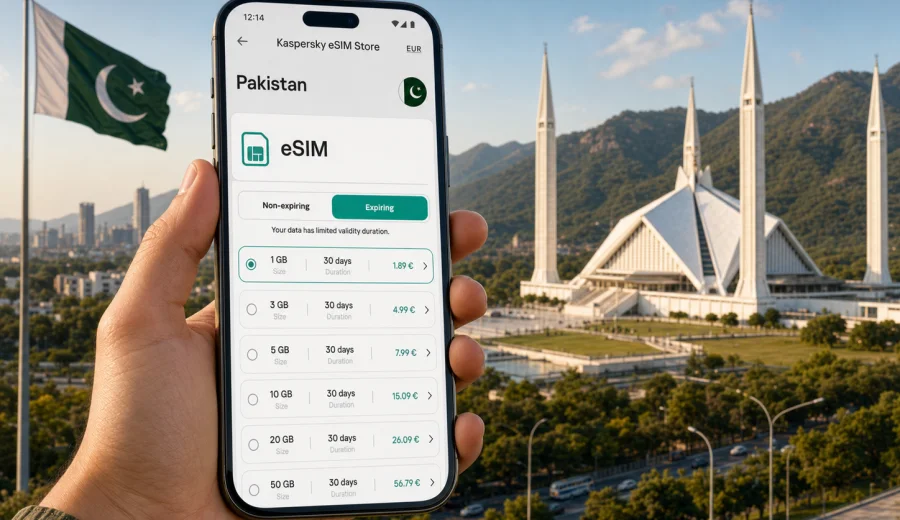
eSIM for Pakistan: mobile connection and internet for your trip
Pakistan is a country where mobile internet can quickly become part of almost every travel decision. You may need maps after landing in Islamabad, a ride-hailing app in Lahore, train updates on the way to Rawalpindi, hotel messages in Karachi, or translation tools while moving through markets, stations, and mountain routes. An eSIM helps you prepare that online access before the trip, without looking for a physical SIM card counter as soon as you arrive.
This guide explains how to use eSIM for Pakistan: what to check before buying, how to estimate data, when to activate the profile, and how Kaspersky eSIM Store can help you choose, set up, and manage a suitable tariff for mobile internet.
Why mobile internet matters in Pakistan
Pakistan rewards planning. Distances can be long, traffic can change quickly, and travel often combines several types of transport: airport transfers, intercity buses, trains, domestic flights, taxis, private drivers, and walking routes inside old city districts. A working data connection helps you keep those pieces together.
Common online tasks during a trip include:
- checking hotel addresses and booking messages;
- using maps in Lahore, Islamabad, Rawalpindi, Karachi, Peshawar, Multan, or Faisalabad;
- coordinating airport pickups and local transport;
- paying for services where digital payment is accepted;
- translating signs, menus, and short conversations;
- sending photos and updates to family or colleagues;
- checking weather before mountain, desert, or coastal routes;
- using messengers for calls over the internet.
Public Wi-Fi can help in hotels, cafes, airports, and business venues, but it is not a dependable plan for moving around. A prepared eSIM gives you a separate mobile data option on a compatible device.
What an eSIM gives you for a Pakistan trip
An eSIM is a digital SIM profile installed on a compatible phone or tablet. For travel, it is usually used for mobile data: you choose a destination and a tariff, install the eSIM profile, and turn it on when you need data abroad. In most cases, travel eSIM tariffs are prepaid, so you can see the included data volume, validity period, destination, and price before you choose.
For Pakistan, that can be useful if you want to:
- arrange mobile internet before departure;
- avoid changing your main physical SIM card;
- keep your usual number active for bank codes or important calls, if your device supports dual SIM use;
- separate travel data from your home mobile plan;
- reduce dependence on standard roaming packages;
- avoid spending your first hour in the country comparing local SIM options.
An eSIM is not the same as a full local phone subscription. It usually focuses on mobile internet, and voice calls or SMS are not included unless the selected tariff explicitly says otherwise. For everyday communication, many travelers use messengers, email, video calls, and app-based services over data.
Where eSIM is especially useful in Pakistan
Pakistan travel can mean very different scenarios. One traveler may spend three days in Islamabad for meetings; another may arrive in Lahore for culture and food; another may combine Karachi, Multan, and northern routes. The right data setup depends on how you move.
| Travel scenario | Why mobile data helps | Practical note |
|---|---|---|
| Airport arrival | Maps, messages, transport apps, hotel contact | Install the eSIM before travel, then activate data when needed |
| City break | Navigation, translation, restaurant searches, ride updates | A moderate data package is often enough if hotel Wi-Fi is reliable |
| Business trip | Email, calls over messengers, calendar changes, document access | Choose a tariff with enough data for tethering if you expect laptop use |
| Family visit | Messaging, video calls, shared location, local coordination | Check validity period, not only gigabytes |
| Multi-city route | Transport updates, maps, bookings, weather, backup communication | Consider a larger package so you do not monitor every megabyte |
| Mountain or remote travel | Offline maps plus occasional mobile data where available | Download essential maps and documents in advance |
The key point is control. Know what your mobile data plan is for: arrival support, daily navigation, business communication, or heavier use across several cities.
Before you choose an eSIM tariff
Start with three checks: device compatibility, trip length, and likely data use.
First, confirm that your phone or tablet supports eSIM and is not locked to one mobile operator. Many recent iPhone, Samsung Galaxy, Google Pixel, and other flagship or upper mid-range models support eSIM, but exact support varies by market and device version. Before you buy, check your device and make sure the model can add and use an eSIM profile.
Second, match the validity period to your itinerary. A 7-day trip, a 15-day route, and a one-month stay are different decisions. A tariff with too short a validity period may expire before your return; a tariff with much more time than you need may be unnecessary.
Third, estimate your data habits honestly. Maps and messages use far less data than video streaming, cloud backups, social video uploads, and laptop tethering. If you are going to post high-resolution videos from Lahore Fort, take video calls from a hotel room, or share a hotspot with a laptop, choose more data than you would for simple navigation and chat.
How much data might you need?
There is no single correct number, but the table below gives a practical starting point.
| Trip style | Typical use | Possible data range |
|---|---|---|
| Light | Maps, messaging, occasional browsing, email | 1-3 GB for a short trip |
| Standard | Daily maps, ride apps, social media, photo sharing | 3-10 GB depending on trip length |
| Heavy | Video calls, frequent uploads, streaming, hotspot use | 10 GB or more |
| Work-focused | Email, files, cloud apps, messaging, occasional tethering | Depends on file size and meeting habits |
To keep data use predictable:
- download offline maps before departure;
- disable automatic photo and video backups on mobile data;
- update apps over Wi-Fi before the trip;
- reduce video streaming quality when using mobile data;
- use hotel Wi-Fi for large downloads;
- monitor remaining data in the eSIM service interface or your device settings.
If your trip includes long road transfers or mountain areas, offline preparation matters even more. Mobile coverage can vary by location, terrain, weather, and local network conditions. Keep essential addresses, tickets, booking confirmations, and emergency contacts available offline.
When to install and activate your eSIM
Many travelers prefer to install the eSIM before leaving home, while they still have stable Wi-Fi and time to check settings. Activation behavior can depend on the selected tariff, so read the conditions carefully before turning on data roaming for the eSIM profile.
A practical sequence looks like this:
1. Check that your device supports eSIM and is unlocked.
2. Choose Pakistan as your destination and select a tariff by data volume and validity period.
3. Complete the purchase flow in the app or on the website.
4. Install the eSIM profile using the provided instructions.
5. Keep your primary SIM active only if you need it for calls, SMS, or bank verification.
6. On arrival, select the eSIM for mobile data and enable the required settings.
7. Check that data works before leaving the airport or your first Wi-Fi location.
If you need installation details, follow the official Android eSIM instructions or iOS eSIM instructions. The exact names of settings can vary by device model and operating system version, so it is worth reading the guide before you are in a hurry.
Choosing a Pakistan eSIM through Kaspersky eSIM Store
Kaspersky eSIM Store is an app and website where you can quickly choose, arrange, and activate an eSIM with a suitable mobile data tariff for an international trip. It is useful when you want to compare the essential conditions in one place: destination, data volume, validity, and price.
For a trip focused on Pakistan, you can review options and choose an eSIM tariff for Pakistan before departure or during your journey if you still have Wi-Fi access.
When comparing tariffs, do not look only at the number of gigabytes. Check:
- whether Pakistan is included in the destination;
- how long the tariff remains valid;
- when the validity period starts;
- whether top-up is available;
- whether hotspot or tethering use is allowed by the selected tariff and device settings;
- what support options are available if setup is unclear.
The goal is not to pick the biggest package automatically. The goal is to choose a tariff that fits your trip: enough data, enough time, and clear setup steps.
Practical routes in Pakistan
Islamabad and Rawalpindi often need reliable data for airport transfers, meetings, ride coordination, and route changes. Lahore makes mobile internet useful for maps around the Walled City, restaurant searches, translation, and photo sharing. Karachi is spread out, so data helps with longer drives and hotel communication. For Gilgit-Baltistan, Hunza, Skardu, and mountain valleys, prepare offline maps and key contacts because terrain and local conditions can affect availability.
eSIM, roaming, local SIM, and Wi-Fi
Different travelers solve mobile internet in different ways. Roaming uses your current mobile plan, but conditions depend on your home operator. A local physical SIM may suit long stays or local call needs, but it takes time and requires a physical SIM slot. Public Wi-Fi helps in hotels, airports, offices, and cafes, but not while moving. For many short and medium trips, an eSIM works well as a practical data layer alongside hotel Wi-Fi and your regular SIM.
Device settings that reduce problems
Use this checklist:
- confirm your device supports eSIM;
- make sure the phone is not locked to a single operator;
- install the eSIM while connected to stable Wi-Fi;
- label the eSIM profile clearly, for example “Pakistan data”;
- choose which SIM is used for mobile data;
- keep your main SIM for calls only if needed;
- enable data roaming for the eSIM profile if the tariff instructions require it;
- test basic browsing and messaging after activation.
Do not delete the eSIM profile unless you are sure you no longer need it. Some profiles cannot simply be reinstalled after activation, and conditions can vary by tariff.
Common mistakes to avoid
The most common problems are usually preventable:
- choosing only by price;
- forgetting that eSIM support depends on the exact device model;
- activating before reading when validity starts;
- expecting voice calls and SMS by default;
- relying only on mobile data for remote routes;
- using a laptop hotspot without allowing for extra data use.
Quick answers about eSIM for Pakistan
Can I install an eSIM before arriving in Pakistan?
Yes, in many cases you can install the eSIM profile before departure using Wi-Fi. Activation timing depends on the selected tariff.
Do I need a compatible phone?
Yes. Your phone or tablet must support eSIM and be unlocked for eSIM use. Check compatibility before choosing a tariff.
Will an eSIM give me a local phone number?
Usually, travel eSIM tariffs are designed for mobile data. A phone number, voice calls, or SMS are included only if the specific tariff says so.
Can I keep my regular SIM active?
On many dual SIM devices, yes. You can often keep your regular SIM for calls or SMS and use the eSIM for mobile data.
Is eSIM useful if my hotel has Wi-Fi?
Yes, because hotel Wi-Fi helps only when you are there. Mobile data is useful between the airport and hotel, in taxis, on walking routes, and during day trips.
What should I do if data does not work immediately?
Check that the eSIM is selected for mobile data, data roaming is enabled if required, and airplane mode is off. If the issue continues, contact support through the service you used to arrange the eSIM.
A simple data plan for different trip lengths
For a weekend or short business visit, focus on arrival, maps, messages, and email. For a one-week route, choose enough data for daily navigation, ride apps, restaurant searches, messaging, and moderate photo sharing. For two weeks or more, or for work travel, leave a margin for changed bookings, weather checks, cloud files, and communication with drivers or hosts.
Final preparation checklist
Before leaving for Pakistan, make sure you have:
- a compatible, unlocked eSIM device;
- booking details, key addresses, and offline maps saved;
- a selected eSIM tariff with enough data and validity;
- installation instructions saved on your device;
- your main SIM settings reviewed;
- backup Wi-Fi access for setup;
- support contact options available.
This preparation takes a short time, but it can make arrival smoother. Instead of searching for a SIM counter or depending only on public Wi-Fi, you can focus on transport, check-in, or meetings.
Prepare your eSIM for Pakistan
If you want mobile internet ready for your journey, Kaspersky eSIM Store can help you choose, arrange, and activate an eSIM with a suitable data tariff for Pakistan. Review the data volume, validity period, and setup steps, then prepare the profile before departure or while you still have reliable Wi-Fi.
Before you travel, choose an eSIM tariff for Pakistan and keep the installation instructions close at hand. A little preparation gives you a clearer mobile connection plan from arrival through the rest of your route.