
Travel connectivity guide
Palapye eSIM for mobile internet in Botswana
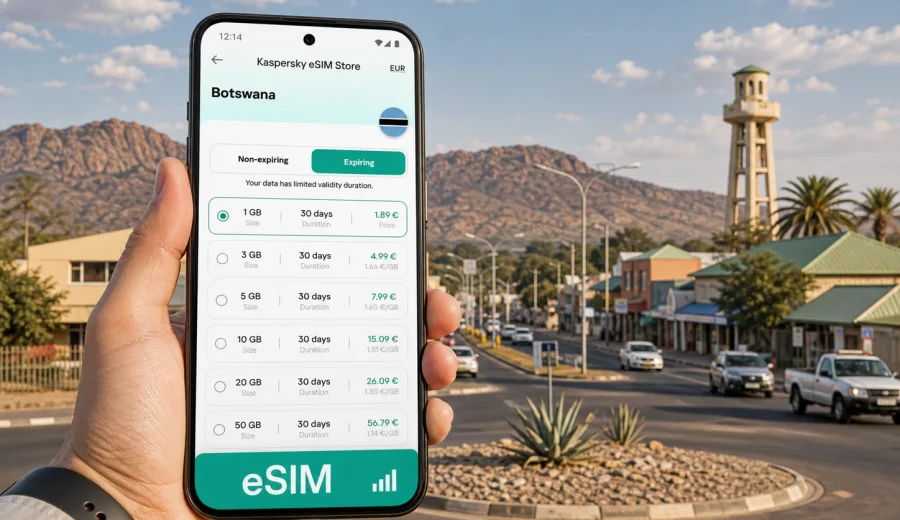
Palapye eSIM: mobile connection and internet for a practical trip to Botswana
Palapye is one of Botswana's most useful travel crossroads. It sits on the main route between Gaborone and Francistown, close to Serowe, the Tswapong Hills, industrial sites, campuses, lodges, guesthouses, and the long-distance road network that carries many visitors through central Botswana. For travelers, that makes mobile internet less of a luxury and more of a planning tool: you may need maps for a highway transfer, messages for a guesthouse check-in, route updates for a work visit, or a reliable way to coordinate a stop before continuing north.
An eSIM can make that preparation simpler. Instead of waiting to look for a physical SIM card after arrival, you can set up a digital SIM profile on a compatible phone and choose a data plan for the trip. In Palapye, this is useful because many practical moments happen away from a hotel desk: finding a lodge entrance after sunset, checking the next fuel stop, sharing your location with a driver, or confirming meeting details while moving between the bus rank, campus areas, and nearby towns.
This guide focuses on Palapye rather than Botswana in general. It looks at arrival scenarios, local movement, business trips, stopovers, hotels, day trips, and the small details that affect how much data you may need while using an eSIM for mobile internet.
Why mobile internet matters in Palapye
Palapye is not a city where every traveler follows one predictable route. Some people arrive by road from Gaborone, some continue toward Francistown, some come for work connected with energy, education, construction, logistics, or nearby institutions, and others use Palapye as a base for Serowe, Moremi Gorge, or the Tswapong area. Because plans can change quickly, having mobile data ready helps you stay flexible.
Common online tasks in Palapye include:
- checking a map before leaving the main road;
- confirming a guesthouse, lodge, or apartment address;
- messaging a driver, colleague, host, or tour contact;
- using ride coordination and navigation apps where available;
- checking banking, booking, and email notifications;
- translating addresses, signs, or service messages;
- sharing your live location during a pickup;
- managing onward travel to Serowe, Francistown, Maun, or Gaborone.
Public Wi-Fi can help in hotels, cafes, offices, or campuses, but it is not a complete travel plan. You may need data while walking from a bus stop, sitting in a vehicle, or finding an entrance on a side road. An eSIM gives you a way to prepare mobile internet before you need it, provided your phone supports eSIM and the selected plan covers your destination.
Arrival: when to set up your eSIM before reaching Palapye
Many visitors reach Palapye after first entering Botswana through Gaborone, Francistown, or a land border. The town itself is usually part of a larger itinerary, so the best time to prepare mobile data is before the day becomes busy.
If you fly into Gaborone and drive to Palapye, install your eSIM profile while you still have stable Wi-Fi, then activate the data plan according to the plan instructions. The road distance is long enough that you may want maps, fuel stop searches, music, messaging, and arrival updates during the transfer. If you arrive through Francistown, the same logic applies: prepare the eSIM before leaving the airport, hotel, or office Wi-Fi.
If you enter Botswana by road, an eSIM is useful because border days often involve forms, delays, route changes, and messages to people waiting at the next stop. A data plan will not replace travel documents or local requirements, but it can reduce dependence on finding Wi-Fi immediately after crossing.
For a short Palapye stopover, the key is to keep setup simple:
1. Check that your phone supports eSIM before buying a plan.
2. Choose a data allowance that covers maps, messages, and booking apps.
3. Install the eSIM profile while you have Wi-Fi.
4. Keep your primary SIM active if you need your usual phone number for calls or SMS.
5. Set the eSIM as the line for mobile data when you are ready to use it.
Palapye travel scenarios and data needs
Different Palapye trips use data in different ways. A traveler staying one night near the A1 road needs a different plan from someone working locally for a week.
| Trip style | Typical Palapye use | Data priority |
|---|---|---|
| Overnight road stop | Maps, messages, hotel check-in, weather, banking alerts | Small to medium data plan |
| Business visit | Email, calls through messaging apps, shared documents, maps between meetings | Medium data plan |
| Campus or training trip | Messaging, research, cloud documents, video calls on Wi-Fi when possible | Medium to larger data plan |
| Tswapong Hills or Serowe side trip | Navigation, route checks, photo backup when Wi-Fi is available | Medium data plan |
| Long Botswana route | Navigation, bookings, messaging across several towns | Larger or regional plan |
The biggest data users are usually video, cloud backups, social media uploads, and long app updates. Navigation and messaging use less, but they are the services you are most likely to need at the exact moment Wi-Fi is unavailable. Before leaving for Palapye, pause automatic app updates and photo backups on mobile data unless you have chosen a plan that comfortably supports them.
Getting around Palapye with an eSIM
Palapye is spread out enough that location accuracy matters. Main roads, service stations, shopping areas, guesthouses, industrial zones, and residential areas may not be clustered in one compact tourist center. A working mobile connection helps you move with more confidence, especially when you are arriving for the first time.
Use mobile data for:
- turn-by-turn navigation from the A1 route to your accommodation;
- checking whether a destination is closer to Palapye, Serowe, or another nearby settlement;
- sharing your arrival time with a host or driver;
- comparing walking distance with driving distance;
- finding supermarkets, pharmacies, fuel, and ATMs;
- saving offline maps for stretches where mobile coverage may vary.
Offline preparation still matters. Download key map areas before the trip, save your hotel address in plain text, and keep screenshots of booking confirmations. eSIM data is a practical tool, but travel planning should not depend on a single app being available at all times.
Where Palapye visitors commonly need internet
Mobile internet is useful in Palapye because the town combines local daily life with transit and business travel. You may need connection in several different settings in one day.
| Place or moment | Why data helps | Practical tip |
|---|---|---|
| Guesthouse arrival | Contacting reception, sending arrival time, confirming gate or entrance | Save the phone number and address before leaving Wi-Fi |
| Bus rank or transfer point | Coordinating pickup and checking onward plans | Keep a small data reserve for messages |
| Roadside stop | Maps, fuel searches, payment alerts, travel updates | Avoid large downloads on mobile data |
| Work site or office visit | Email, documents, calendar changes | Use Wi-Fi for heavy files when available |
| Shopping area | Messaging, banking confirmation, location sharing | Keep your phone charged and data line selected |
| Day trip from Palapye | Navigation and route checks | Download offline maps first |
Palapye can be very practical rather than showy as a destination. The value of mobile internet is often in small moments: seeing whether you are on the correct access road, checking a changed meeting time, or confirming a restaurant location before driving across town.
Choosing an eSIM plan for Palapye
When you choose a plan, look at the whole Botswana itinerary, not only the nights you sleep in Palapye. If Palapye is part of a route from Gaborone to Francistown or further north, you may need data across several towns. If you are staying in Palapye for meetings, a plan with enough validity days may matter more than a very large data allowance.
Ask yourself five questions:
- How many days will you be in Botswana?
- Will Palapye be the only stop, or part of a longer route?
- Do you need data every day, or mainly for arrival and navigation?
- Will you use hotel or office Wi-Fi for large files?
- Do you need your regular SIM active for banking codes, calls, or SMS?
Kaspersky eSIM Store is an app and website where you can choose, arrange, and activate an eSIM with a suitable data plan for mobile internet during an international trip. For Palapye, you can review available options and prepare an eSIM data plan for travel in Botswana before you arrive. Check the plan details carefully, including destination coverage, data volume, validity period, price, and activation conditions.
Business trips to Palapye
Palapye receives business travelers connected with central Botswana's transport routes, energy and infrastructure activity, education, services, and nearby administrative centers. For work trips, mobile internet is often needed before you reach a desk.
For a business visit, save meeting addresses and contact names offline, keep calendar invitations available, download documents before arrival, set the eSIM as the mobile data line before leaving Wi-Fi, and keep your main number available if your company uses SMS verification. A power bank is also useful for long road transfers or site visits.
An eSIM is especially practical when your schedule includes several locations in one day: a hotel, an office, a site visit, and then another town. Mobile data lets you react to changes without depending on the next Wi-Fi network.
Device compatibility before you buy
Not every phone supports eSIM, and some devices may be locked to a carrier. Before choosing a plan, check that your phone can install and use an eSIM profile. You should also make sure you know where the SIM or cellular settings are on your device, because those menus differ between iOS and Android models.
Before purchase, check your device and confirm:
- your phone supports eSIM;
- the device is not locked in a way that prevents adding another mobile plan;
- your operating system is up to date enough for eSIM setup;
- you can access the internet over Wi-Fi during installation;
- you know which line will handle mobile data after activation.
If you need your normal phone number for calls, SMS, or banking messages, keep your physical SIM or primary eSIM active for that purpose and use the travel eSIM for mobile data. Most travel eSIM data plans do not include a standard local phone number, voice calls, or SMS unless the plan terms state otherwise.
How to install an eSIM before a Palapye trip
Install the eSIM profile while you still have a stable Wi-Fi connection, ideally before the road transfer or before leaving your hotel in the arrival city. The exact steps depend on your phone. Follow the Android installation guide or the iOS installation guide and keep the plan details available until setup is complete.
A practical installation flow looks like this:
1. Choose Botswana or the relevant regional destination in the app or on the website.
2. Review the data volume, validity period, price, and activation terms.
3. Complete the order.
4. Install the eSIM profile using the provided instructions.
5. Name the line clearly, for example "Travel data".
6. Set your usual SIM for calls and messages if needed.
7. Set the eSIM as the line for mobile data when you are ready to use it.
8. Turn on data roaming for the eSIM only if the instructions for your selected plan require it.
Do not delete an eSIM profile after installation unless you are sure you no longer need it. Some profiles cannot be transferred or reinstalled after activation, depending on the plan terms.
Palapye stopovers and onward routes
Palapye is a natural stop on long drives. Travelers may pause there on the way to Francistown, Maun routes, Serowe, Gaborone, or other parts of Botswana. During these journeys, data planning is less about browsing and more about staying organized.
For a road stopover, use mobile data to:
- check the next fuel stop before leaving town;
- confirm whether your accommodation has late check-in;
- keep messaging active with people at the next destination;
- compare route options before sunset;
- check weather before a day trip;
- avoid using high-data services while away from Wi-Fi.
If you are continuing to rural areas or scenic sites, download maps and key information before departure. Mobile coverage can vary outside towns and along remote roads. A sensible travel setup combines eSIM data, offline maps, saved addresses, and a charged phone.
Practical checklist before leaving for Palapye
Use this checklist the day before travel:
- Confirm that your phone supports eSIM.
- Save your passport, booking, and transport details securely.
- Choose a data plan with enough validity for the full Botswana stay.
- Install the eSIM profile while connected to Wi-Fi.
- Save the setup instructions in case you need to review them later.
- Download offline maps for Palapye, Gaborone, Francistown, Serowe, and planned routes.
- Pause automatic app updates and cloud backups on mobile data.
- Keep your usual SIM available if you need calls or SMS.
- Pack a charger, cable, and power bank for road transfers.
- Share your arrival plan with a host, driver, or colleague.
This preparation takes a few minutes, but it can prevent the most common travel problem: needing mobile internet before you have had time to arrange it locally.
FAQ: eSIM and mobile internet in Palapye
Is an eSIM useful for Palapye if I already have hotel Wi-Fi?
Yes, because the most important online moments often happen outside the hotel: arrival, road transfers, directions, pickup coordination, and local searches. Wi-Fi is useful, but it does not cover every travel situation.
Can I use an eSIM for calls in Palapye?
Most travel eSIM data plans are focused on mobile internet. Standard voice calls and SMS are not included unless the specific plan says so. You can usually use messaging and calling apps over data.
Should I install the eSIM before arriving in Botswana?
It is usually easier to install it before arrival or while you have stable Wi-Fi. Activation timing depends on the plan terms, so read the instructions before you travel.
How much data do I need for a short Palapye stop?
For maps, messaging, booking checks, and light browsing, a small or medium plan may be enough. If you upload photos, use video calls, or continue through Botswana for several days, choose more data.
Can I keep my regular SIM active?
In many dual-SIM phones, yes. You can keep your usual SIM for calls or SMS and set the eSIM for mobile data. Check your device settings and carrier conditions before relying on this setup.
Does an eSIM remove the need for offline maps?
No. Offline maps are still a smart backup for road trips, side trips, and areas where mobile coverage may vary.
Final preparation for Palapye
Palapye is a practical travel base: a road stop, business destination, education hub, and starting point for nearby routes. Mobile internet helps you handle the parts of the trip that are easy to underestimate: finding the right guesthouse entrance, staying in touch during a transfer, checking directions before a day trip, or keeping work messages moving between meetings.
Before you travel, check your phone, choose a plan that fits your Botswana itinerary, install the eSIM on Wi-Fi, and keep offline backups for maps and addresses. With that done, you can arrive in Palapye with mobile data ready for the moments when it matters.
You can choose an eSIM data plan for your Botswana trip through Kaspersky eSIM Store and prepare mobile internet before you reach Palapye.