
Travel connectivity guide
eSIM for Palestine: mobile internet guide
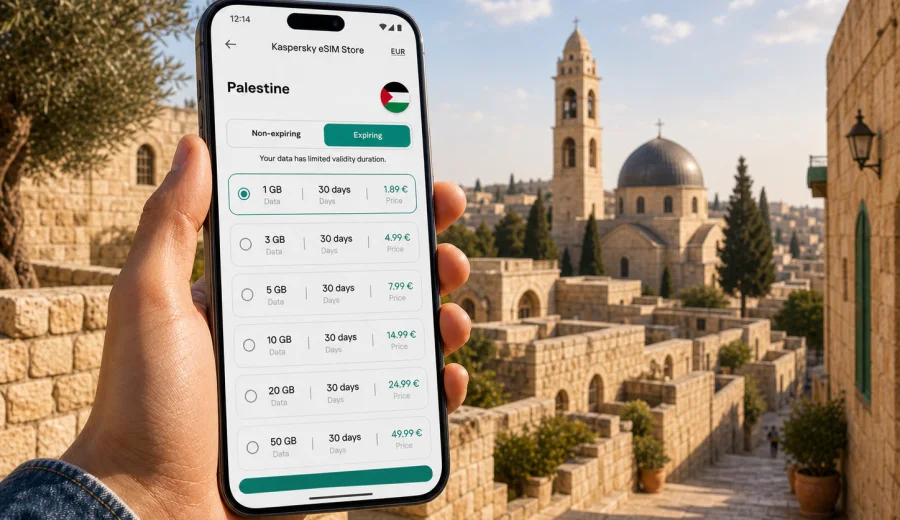
eSIM for Palestine: mobile connection and internet for your trip
Planning mobile internet before a trip to Palestine is one of those small details that can make the first hours much easier. You may need maps after arrival, a ride-hailing app, hotel messages, translation, banking confirmations, or a quick call through a messenger. An eSIM helps you prepare this connection without looking for a physical SIM card shop as soon as you land or cross into the country.
This guide explains how to use an eSIM for Palestine, how to estimate the right amount of data, what to check before buying a plan, and how to keep your primary SIM available while using mobile internet abroad. The focus is practical: choose a data plan, install it on a compatible phone, activate it at the right moment, and keep control of your travel connection.
Why an eSIM is useful in Palestine
An eSIM is a digital SIM profile installed on your device. For a trip, it usually works as a mobile data line: you keep your regular SIM for calls or banking messages, and use the eSIM profile for internet access where the selected plan is available.
For Palestine, that can be helpful in several common travel situations:
- arriving with no local cash or no time to compare SIM cards in person;
- using maps between Jerusalem, Bethlehem, Ramallah, Jericho, Hebron, Nablus, or other stops on your route;
- checking accommodation details and transport updates while moving between cities;
- staying in touch through messengers without depending only on hotel or cafe Wi-Fi;
- separating travel data from your home SIM to avoid accidental roaming charges.
An eSIM does not replace every part of a local mobile subscription. Unless the specific plan says otherwise, it is usually for mobile internet rather than a local phone number, regular voice calls, or SMS. For calls and messages, many travelers use internet-based apps over the data connection.
What to know before you choose a plan
The best eSIM plan for Palestine depends less on the country name alone and more on your trip pattern. A short visit with light navigation needs a different data allowance from a work trip with video calls. Before choosing, check four points.
| Planning point | What to decide | Why it matters |
|---|---|---|
| Trip length | How many days you need mobile data | eSIM plans usually have a validity period |
| Data use | Light, medium, or heavy | Streaming and video calls use much more data than maps |
| Route | One country or several countries | A regional plan may suit a multi-country itinerary |
| Device | eSIM support and no carrier lock | Installation works only on compatible, unlocked devices |
If you are visiting Palestine as part of a wider route, pay attention to where the plan is valid. Some travelers move between neighboring destinations during one journey, while others stay within one country. A plan that matches your actual route is more useful than one with a large data allowance in the wrong destination.
How much mobile data do you need in Palestine?
There is no perfect number for every traveler, but you can make a reliable estimate by thinking in scenarios. Maps, messaging, translation, and basic browsing are usually light. Social media, cloud photo backup, hotspot use, and long video calls are heavy.
| Travel style | Typical use | Practical data approach |
|---|---|---|
| Light | Maps, messaging, email, confirmations | Choose a smaller plan and avoid background updates |
| Balanced | Navigation, social apps, browsing, occasional calls | Choose a mid-size plan for daily flexibility |
| Heavy | Video meetings, hotspot, media uploads | Choose a larger allowance and monitor usage often |
| Family or group | One person shares hotspot occasionally | Check whether tethering is allowed in the plan terms |
For most leisure trips, the easiest mistake is not underestimating maps; it is forgetting automatic data use. Cloud backup, app updates, photo sync, and video autoplay can consume data quietly. Before travel, switch large updates to Wi-Fi only and download offline maps for the cities or regions you expect to visit.
eSIM, roaming, and local SIM cards: how they compare
Travelers usually choose between three options: international roaming from a home operator, a physical local SIM card, or a travel eSIM. Each can work, but each has a different trade-off.
| Option | Main advantage | Possible drawback |
|---|---|---|
| Home roaming | Uses your current number and SIM | Costs and limits depend on your home operator |
| Physical local SIM | Familiar local format | Requires finding a seller and changing SIM cards |
| Travel eSIM | Can be prepared before or during the trip | Requires a compatible device and correct setup |
An eSIM is often convenient because you can prepare it before the trip and avoid handling a small plastic SIM card. It is also useful if your phone supports dual SIM mode: your home SIM can remain active for messages, while the eSIM handles mobile data for the trip.
That said, you should not assume that any eSIM works on any phone. Device compatibility is essential, and some phones bought through carriers may be locked. Check this before you pay for a plan.
Device compatibility checklist
Before choosing an eSIM plan for Palestine, confirm that your smartphone or tablet can install and use eSIM profiles. Many recent iPhone, Samsung Galaxy, Google Pixel, and other flagship models support eSIM, but support varies by model, region, and carrier.
Use this checklist before you buy:
- your device supports eSIM in its settings;
- the device is not locked to one mobile operator;
- the operating system is up to date enough for eSIM installation;
- you have access to stable internet during installation;
- you understand which line will be used for mobile data after activation.
If you are unsure, check your device before choosing a plan. This is especially important if the phone was bought through a carrier, imported from another market, or previously used with only one physical SIM.
When to install and when to activate
Installation and activation are related, but they are not always the same moment. Installation adds the eSIM profile to the phone. Activation starts the plan or connects it to the local mobile network according to the plan conditions. The exact behavior can depend on the selected plan, so read the validity and activation details carefully.
A practical approach looks like this:
1. Check that your phone supports eSIM and is not carrier locked.
2. Choose a plan for Palestine or for the route you will actually travel.
3. Install the eSIM while you still have stable Wi-Fi.
4. Keep your primary SIM selected for calls or messages if you need it.
5. Set the eSIM as the mobile data line when you are ready to use it.
6. Enable data roaming for the eSIM profile if the instructions for the plan require it.
7. Test mobile data after arrival or when the plan is meant to become active.
For installation details, follow the Android instructions or the iOS instructions. The exact menus can differ slightly by device model and operating system version, so follow the screen prompts on your phone as well.
Choosing an eSIM plan for Palestine
Once your device is ready, choose the plan by destination, validity, data volume, and travel rhythm. The main question is simple: how much mobile internet do you need during the days when you will not reliably have private Wi-Fi?
For a short city-focused trip, you may only need data for maps, messaging, tickets, and reservations. For a longer stay, a larger package can reduce the need to watch every megabyte. If you work remotely, upload media, or use your phone as a hotspot, choose more data and check the plan terms for tethering.
Kaspersky eSIM Store is an app and website where you can quickly choose, arrange, and activate an eSIM with a suitable data plan for mobile internet during international travel. For this destination, you can prepare an eSIM plan for your trip to Palestine after checking your device and estimating your data needs.
Practical scenarios for Palestine
Different trips create different connection needs. Use these examples to plan more accurately.
Short cultural trip
If your route is mostly sightseeing, accommodation check-ins, restaurant searches, and navigation between cities, your data use may stay moderate. Download offline maps in advance, save booking confirmations, and keep mobile data for moments when live information matters: transport, directions, messaging, and digital payments.
Business or field visit
If you expect meetings, document sharing, video calls, and constant messenger use, plan more conservatively. Check whether your accommodation has reliable Wi-Fi, but do not depend on it for every task. A larger eSIM data allowance gives you more room for urgent work messages and route changes.
Multi-city travel
Many visitors move between several cities and towns rather than staying in one place. In that case, mobile internet is useful between Wi-Fi zones: on the way to accommodation, while checking navigation, or when coordinating pickup times. Keep a power bank with you, because navigation and mobile data can drain a battery faster than normal phone use.
Family travel
If one person manages maps, bookings, tickets, and group communication, that phone will use more data than the others. Decide whether every traveler needs an eSIM, or whether one or two devices are enough. If you plan to share a hotspot, confirm that the selected plan allows it and monitor data use.
How to reduce data use without losing convenience
Good preparation can make a smaller data plan feel more comfortable. The goal is not to avoid using mobile internet, but to prevent background tasks from using it without your attention.
- Download offline maps for the regions you expect to visit.
- Save hotel addresses and booking numbers in notes or screenshots.
- Turn off automatic app updates over mobile data.
- Disable automatic cloud photo backup until you are on Wi-Fi.
- Reduce video quality in streaming and social apps.
- Use Wi-Fi at your accommodation for large downloads.
- Check data usage in your phone settings every day or two.
These steps are especially useful if you choose a smaller plan for a short trip. They also help you notice if one app is using more data than expected.
What eSIM can and cannot do
An eSIM for travel is designed to help with mobile internet, not to solve every communication need. It is important to set the right expectations.
An eSIM can help you:
- use mobile data without inserting a physical SIM card;
- keep your regular SIM in the phone while traveling;
- choose a prepaid data plan for a specific destination;
- connect apps for maps, messaging, browsing, and travel services;
- manage a travel data line separately from your home plan.
An eSIM may not include:
- a local phone number;
- traditional voice calls;
- SMS messages;
- guaranteed availability in every indoor or remote location;
- the same terms as your home mobile subscription.
Coverage and speed depend on local network conditions, your device, the selected plan, and your location. Stone buildings, basements, crowded events, and remote areas can affect any mobile connection. If a connection is weak, try moving closer to a window, checking that the eSIM is selected for data, or restarting mobile data.
Setup checklist before departure
Use this checklist a day or two before you travel. It reduces last-minute troubleshooting and keeps the arrival process calmer.
| Task | Done |
|---|---|
| Confirm that your phone supports eSIM | |
| Check that the phone is not carrier locked | |
| Compare plan validity and data volume | |
| Install the eSIM while connected to Wi-Fi | |
| Save the QR code or installation email if provided | |
| Download offline maps and travel documents | |
| Decide which SIM line handles mobile data | |
| Turn off background app updates over mobile data |
Do not delete an installed eSIM profile unless you are sure you no longer need it. Some eSIM profiles cannot be reinstalled after removal, depending on the plan terms.
Troubleshooting if mobile data does not work
If your eSIM is installed but mobile data is not working, check the simple points first. Most setup problems are related to the active data line, data roaming settings, or local network registration.
Try this sequence:
1. Make sure the eSIM profile is turned on.
2. Select the eSIM as the mobile data line.
3. Enable data roaming for the eSIM if required by the plan instructions.
4. Turn airplane mode on for a few seconds, then turn it off.
5. Restart the phone if the network does not register.
6. Check that you are within the plan validity period and destination.
7. Contact support if the issue continues.
Avoid changing many settings at once. Work through the list step by step, so you know which change solved the issue.
Security and convenience while using travel internet
Mobile data can reduce your dependence on public Wi-Fi in airports, cafes, stations, and hotel lobbies. That is useful for everyday travel tasks such as messaging, maps, or booking changes. Still, use normal digital hygiene: keep your phone locked, update important apps before travel, and avoid entering sensitive information on unfamiliar public devices.
Kaspersky eSIM Store is not a VPN and is not a tool for bypassing restrictions or hiding identity. Its role in this context is to help you choose and activate an eSIM data plan for mobile internet in an international trip. If you need a VPN for a separate reason, treat that as a separate service and review local laws and service terms.
Common mistakes to avoid
Small setup mistakes can cause unnecessary stress. These are the ones travelers most often can prevent.
- Buying before checking eSIM compatibility.
- Installing the eSIM on the wrong device.
- Deleting the eSIM profile after installation.
- Leaving the home SIM selected for mobile data and triggering roaming.
- Assuming that all plans include voice calls and SMS.
- Forgetting that validity can start according to the plan rules.
- Using cloud backup or video autoplay on mobile data.
- Waiting until arrival to read the installation instructions.
The easiest prevention is to prepare while you still have stable internet, time, and access to your regular accounts.
FAQ: eSIM and internet in Palestine
Can I use an eSIM in Palestine for WhatsApp, Telegram, maps, and email?
Yes, if the selected eSIM plan is active, your device is compatible, and mobile data is working in the destination. Messaging apps, navigation, email, and browser access use mobile internet. Voice calls and SMS through the mobile network are not usually included unless the plan terms say so.
Do I need to remove my physical SIM card?
Usually no. On dual SIM devices, you can keep your physical SIM installed and add the eSIM as a second line. Many travelers keep the home SIM for important messages and choose the eSIM for mobile data.
Should I install the eSIM before traveling?
It is often easier to install it before departure while you have reliable Wi-Fi. Check the plan rules so you understand when validity starts. Some travelers install in advance and activate data after arrival.
What happens if I run out of data?
Your mobile internet may stop or slow down depending on the plan terms. Check whether top-up or another plan is available in your account or app. To avoid surprises, monitor usage in your phone settings.
Can I use hotspot with an eSIM?
It depends on the selected plan and device settings. If you need to share data with a laptop or another phone, check whether tethering is allowed before relying on it.
Is eSIM always better than roaming?
Not always. It depends on your home operator's roaming offer, your trip length, data needs, and the destination. eSIM is attractive when you want a prepaid travel data option that you can prepare without buying a physical SIM card.
Final preparation for your trip
For a smooth mobile connection in Palestine, prepare the basics before you leave: check device compatibility, choose the right data volume, install the eSIM on Wi-Fi, and confirm which line your phone will use for mobile data. Keep your home SIM available if you need banking messages or calls, and use the eSIM profile for travel internet where the plan applies.
When you are ready to plan your connection, choose an eSIM plan for Palestine through Kaspersky eSIM Store and install it on a compatible device before your trip or when you have a stable internet connection.