
Travel connectivity guide
Palm Beach eSIM for Aruba Travel
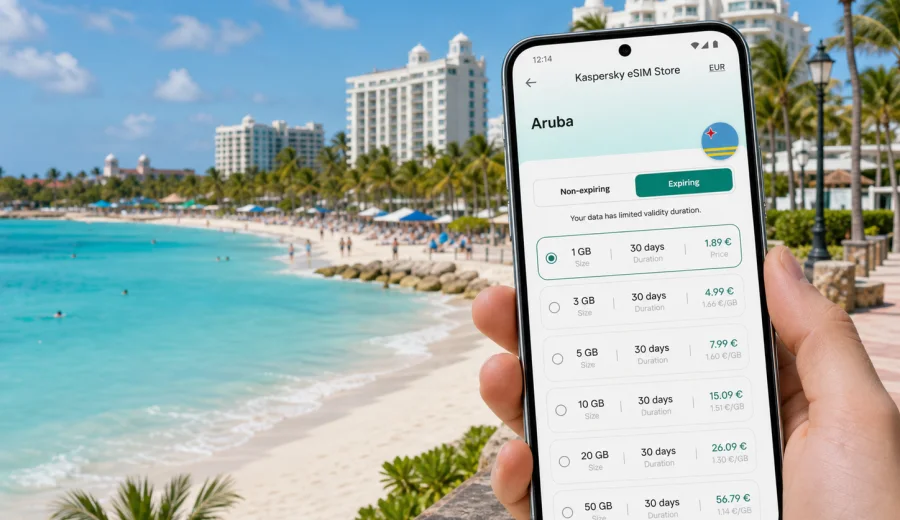
Palm Beach eSIM: mobile connection and internet for a trip to Aruba
Palm Beach is one of Aruba's easiest places to enjoy once your mobile internet is ready before the trip. The resort strip is compact, the beach is close to many hotels, and most daily routes are short. At the same time, you may still need data from the first minutes after arrival: to message your hotel, open a taxi app, check a transfer pickup point, follow maps from Queen Beatrix International Airport, confirm a dinner booking, or share your arrival with family.
An eSIM can be useful because it lets you prepare mobile internet without looking for a physical SIM card after the flight. You choose a tariff for the destination, install it on a compatible device, and use it for travel data when you need maps, messengers, bookings, email, translation, and browser access. For Palm Beach, that convenience is most noticeable in the gap between airport Wi-Fi, hotel Wi-Fi, and the moments when you are moving between places.
This guide explains how to plan an eSIM for Palm Beach, how much data different trip styles may need, what to check before you fly, and how to use mobile internet around the beach, hotels, restaurants, casinos, conference venues, and short trips across Aruba.
Why mobile internet matters in Palm Beach
Palm Beach looks simple on a map: a long beach area on Aruba's northwest coast, with hotels, restaurants, shopping, nightlife, and water-sport operators close to each other. In practice, visitors often move between several small zones during the day: the hotel lobby, beach palapa, restaurant row, mall areas, marina pickup point, taxi stand, and nearby beaches such as Eagle Beach or Arashi.
Mobile internet helps with ordinary travel tasks that are easy to underestimate:
- finding the correct hotel entrance or apartment gate;
- checking a transfer driver's message after landing;
- using maps when street names, resort names, and beach access points look similar;
- confirming tour times for snorkeling, sailing, diving, or off-road trips;
- managing restaurant reservations in the busy evening period;
- calling through messengers when your regular roaming voice plan is expensive;
- checking flight changes before leaving the resort;
- using mobile boarding passes and travel documents.
Palm Beach is also a place where you may rely on Wi-Fi more than you expect. Hotels, cafes, malls, and tour desks often have Wi-Fi, but it is not always available exactly when you are moving, waiting outside, crossing the beach, or standing near a pickup point. An eSIM is not a replacement for every local communication need, but it can reduce the number of times you have to stop and ask for a password.
Arrival scenario: from the airport to Palm Beach
Most travelers arrive through Queen Beatrix International Airport near Oranjestad. The ride to Palm Beach is usually short by island standards, but the first hour still involves decisions: finding transport, contacting the hotel, checking check-in time, and making sure the address is correct. If your phone is online, you can handle those tasks before you leave the terminal.
A practical arrival plan:
1. Install the eSIM profile before the trip while you have a stable connection at home.
2. Keep your primary SIM active for calls or banking messages if you need it.
3. After landing, choose the eSIM line for mobile data.
4. Confirm that data roaming is enabled for the eSIM if the tariff instructions require it.
5. Open your hotel address, transfer details, and offline backup screenshots before leaving the terminal.
This is especially useful if your accommodation is not a large resort on the main strip. Palm Beach includes high-rise hotels, boutique stays, apartments, villas, and side streets behind the beachfront. A small mistake in the address can send you to a similar property name or a different entrance. Mobile internet gives you a faster way to check details before the driver starts the route.
Where eSIM helps around Palm Beach
The value of mobile data changes by situation. On a relaxed beach day you may only need a messenger and a map. On a day with tours, car rental, remote work, or several restaurant bookings, the data need is higher.
| Palm Beach situation | Why mobile internet helps | Practical tip |
|---|---|---|
| Airport transfer | Driver messages, address checks, hotel contact | Save your hotel name and address offline too |
| Resort check-in | Booking confirmations and payment verification | Keep screenshots in case lobby Wi-Fi is busy |
| Beach day | Messaging, maps, weather, ride pickup | Avoid large cloud backups on mobile data |
| Dinner plans | Reservations, menus, taxi coordination | Mark the restaurant before leaving the hotel |
| Water-sport pickup | Time changes and marina locations | Confirm the exact meeting point in the morning |
| Business trip | Email, calendar, video links, documents | Choose more data if you will tether a laptop |
| Day trip from Palm Beach | Navigation and messaging away from hotel Wi-Fi | Download offline maps as a backup |
The key is not to use mobile data for everything. Hotel Wi-Fi can handle heavy downloads, streaming, and backups when it is reliable. eSIM data is more valuable for movement, navigation, verification, and time-sensitive messages.
How much data to plan for Palm Beach
Data use depends on your habits, but you can estimate it by trip style. A traveler who mainly uses maps and messengers needs less than someone who uploads videos, works from a laptop, or uses video calls every day.
| Trip style | Typical mobile-data use | What to consider |
|---|---|---|
| Short beach break, 2-3 days | Low to moderate | Maps, messaging, restaurant searches, taxi coordination |
| One-week resort stay | Moderate | Daily navigation, photos, browsing, tour communication |
| Family trip | Moderate to high | Several phones, shared plans, map use, entertainment for children |
| Remote-work stay | High | Email attachments, hotspot use, video meetings, cloud documents |
| Active island itinerary | Moderate to high | Navigation to beaches, parks, restaurants, and pickup points |
For Palm Beach, the safest approach is to match the tariff to your actual route. If you mostly stay at one resort and use hotel Wi-Fi for heavy tasks, a smaller package may be enough. If you plan to rent a car, visit multiple beaches, work from different places, or rely on your phone for bookings every day, choose more data and a validity period that covers the whole stay.
Before choosing, check the tariff details: destination, data volume, validity period, price, activation rules, and whether top-up is available. This helps avoid paying for a package that is too small, too large, or valid for the wrong period.
Choosing an eSIM tariff for a Palm Beach trip
Palm Beach is in Aruba, so the country destination matters more than the city name when you choose a travel eSIM. For a city article, the relevant landing page is the Aruba page because the mobile data package is selected for the country where the city is located.
If you are comparing options before travel, you can use Kaspersky eSIM Store to choose an eSIM tariff for a trip to Palm Beach in Aruba. Review the available data volumes, validity periods, and tariff conditions, then pick the option that matches your route and length of stay.
Use this checklist before you decide:
- Destination: the tariff should cover Aruba, not just a different Caribbean destination.
- Validity: the active period should cover arrival day, full stay, and departure day.
- Data volume: allow extra data for maps, ride coordination, work calls, and photo uploads.
- Activation rules: check when validity starts and what steps are needed after installation.
- Device readiness: confirm that your phone supports eSIM and is not locked to one carrier.
- Backup access: keep hotel address, transfer details, and booking confirmations offline.
Kaspersky eSIM Store should be understood as an app and website where you can quickly choose, arrange, and activate an eSIM with a suitable tariff for mobile internet on an international trip. The mobile service conditions depend on the selected tariff and destination, so always read the plan details before payment.
Device checks before you travel
Not every phone supports eSIM, and some devices may be locked by a carrier. Before you buy a tariff, check your device and make sure it can install an eSIM profile. This is the most important technical check for a Palm Beach trip because it is easier to solve device questions before you board the flight than after you land.
Also check these points:
- Your phone software is up to date enough to support eSIM installation.
- You have a stable internet connection while installing the eSIM profile.
- You know which SIM line will be used for mobile data after arrival.
- Your primary SIM remains available if you need banking messages or calls.
- Data roaming is enabled for the eSIM if the tariff instructions require it.
- You do not delete the eSIM profile unless you are sure it is no longer needed.
An eSIM tariff for travel usually focuses on mobile data. It may not include a regular phone number, voice calls, or SMS unless the specific tariff conditions say otherwise. For many Palm Beach scenarios, messengers and internet calls are enough, but you should plan separately if you must receive traditional calls or text messages.
How to install and activate the eSIM
The most reliable time to install an eSIM is before the trip, while you are on a stable home or office connection. You can then activate mobile data for the eSIM when you arrive, according to the tariff instructions. If you prefer to install after landing, make sure you have dependable Wi-Fi at the airport or hotel.
General steps:
1. Choose the destination and suitable tariff.
2. Complete the purchase and open the eSIM details in your profile or app.
3. Install the eSIM on the device that will be used in Aruba.
4. Set the eSIM line for mobile data when you need it.
5. Keep your primary SIM settings as needed for calls and messages.
6. Test browser access and messaging before starting a transfer or tour.
For device-specific setup, follow the Android installation instructions or the iOS installation instructions. The exact wording on your phone may vary by model and operating system version, so follow the on-screen steps carefully.
Local movement: hotels, taxis, buses, and walking routes
Palm Beach is walkable in many places, especially along the hotel zone, shopping areas, and restaurant streets. Still, the heat, beach gear, evening plans, and side streets can make short routes feel less obvious. Mobile data helps you check whether a restaurant is a five-minute walk from your resort or a ride away, whether the entrance is on the beach side or road side, and whether a pickup point is near a lobby, pier, or parking area.
Taxi and transfer coordination is one of the strongest arguments for having mobile data. A driver may send a message about the license plate, meeting point, or timing. Tour operators may update departure times for wind, sea conditions, or group logistics. If you are offline, those changes can reach you too late.
If you rent a car, mobile internet is useful beyond Palm Beach. Routes to Eagle Beach, California Lighthouse, Arashi Beach, Oranjestad, San Nicolas, and natural attractions can be easier with online maps, especially when you need updated traffic, fuel stops, or parking information. Downloading offline maps is still a good backup because coverage and signal quality can vary by location and local network conditions.
Hotel Wi-Fi and mobile data: use both wisely
Palm Beach hotels often provide Wi-Fi, but a resort network is not the same as mobile internet. Wi-Fi can be excellent in your room and weaker near the beach, pool, parking area, lobby entrance, or an outdoor restaurant. Some networks require room-number login, renew sessions, or disconnect as you move between buildings.
Use hotel Wi-Fi for:
- system updates;
- cloud photo backup;
- long video calls when the connection is stable;
- large document downloads;
- streaming and entertainment.
Use eSIM mobile data for:
- maps and walking routes;
- messaging outside the hotel;
- taxi and tour coordination;
- mobile boarding passes;
- urgent email;
- payment confirmations;
- translation and quick searches.
This split keeps your travel data available for the moments when it matters most. It also reduces dependence on public Wi-Fi in cafes, beaches, and shared spaces.
Business trips, stopovers, and short routes
Palm Beach is also used for meetings, incentive trips, short work-and-rest stays, cruise connections, and quick island breaks. In these cases, eSIM data is best treated as a backup layer for movement: calendar changes, taxi messages, boarding passes, meeting locations, and urgent email when hotel Wi-Fi is not available.
If you will work from Palm Beach, choose more data if you expect hotspot use, keep large downloads on hotel Wi-Fi, and save meeting addresses offline. If you are staying only one or two nights, prioritize installation before departure, a validity period that covers the full stay, and enough data for maps, messages, airport transfer details, and flight updates.
For routes outside Palm Beach, check the selected tariff conditions before relying on mobile data. A country tariff for Aruba can be useful for trips to Eagle Beach, Oranjestad, Arashi Beach, San Nicolas, and other island stops, but local network availability and performance can still vary by place and conditions.
Common mistakes to avoid
The most common eSIM problems are usually preparation problems. They are easier to prevent than fix after arrival.
- Buying a tariff for the wrong destination.
- Waiting until the airport exit to install the eSIM.
- Forgetting to check whether the device supports eSIM.
- Using mobile data for cloud backups and running out too quickly.
- Deleting the eSIM profile before the trip ends.
- Assuming the tariff includes voice calls or SMS.
- Forgetting to switch mobile data to the eSIM line.
- Ignoring the validity period and activation rules.
For Palm Beach, also avoid relying only on screenshots of maps. Screenshots help, but they cannot update your route, show a changed pickup point, or help you message a driver. Keep offline backups, but make sure your phone can go online when plans change.
FAQ: eSIM for Palm Beach
Is Palm Beach a separate eSIM destination?
Usually you choose the country destination rather than a separate city destination. Palm Beach is in Aruba, so you should look for an Aruba tariff and read the plan details before purchase.
Can I install the eSIM before flying to Aruba?
In many cases, yes. Installing before departure is often more convenient because you can use a stable connection at home. Activation and validity rules depend on the selected tariff, so check the instructions before you travel.
Will an eSIM give me a local phone number in Palm Beach?
Travel eSIM tariffs are commonly focused on mobile data. A regular phone number, voice calls, or SMS may not be included unless the tariff conditions specifically say so. You can usually use messengers and internet calling apps over mobile data.
Should I keep my regular SIM enabled?
Many travelers keep the regular SIM available for calls, banking messages, or account verification, while using the eSIM for mobile data. Check your phone settings so you understand which line handles data, calls, and messages.
Is hotel Wi-Fi enough for a Palm Beach trip?
It may be enough inside the hotel, but it may not help while you are in a taxi, at a beach pickup point, walking to dinner, or checking flight updates away from the resort. eSIM data is useful as a mobile layer between Wi-Fi zones.
Can I use eSIM data for trips outside Palm Beach?
If the tariff covers Aruba, it is intended for the destination rather than only the city. Local network availability and performance can vary, so download offline maps and check tariff conditions before relying on mobile data for a full island route.
Final checklist before departure
Before you leave for Palm Beach, make sure you have:
- chosen a tariff for Aruba with suitable data volume and validity;
- checked that your device supports eSIM and is not carrier-locked;
- installed the eSIM or saved the installation details where you can access them;
- reviewed Android or iOS setup instructions for your device;
- saved hotel, transfer, flight, and booking details offline;
- planned how your regular SIM and eSIM will work together;
- turned off heavy mobile-data tasks such as automatic cloud backup;
- packed a charger or power bank for long beach and tour days.
Palm Beach is easier when your phone is ready for the small decisions that happen all day: where to meet the driver, which entrance to use, when the tour starts, whether the table is confirmed, and how to reach the next beach. Preparing mobile internet before the trip gives you more control without making the phone the center of the holiday.
To get ready, open Kaspersky eSIM Store and choose an eSIM tariff for Aruba that fits your Palm Beach itinerary, data needs, and travel dates. Check the conditions, install the eSIM on a compatible device, and keep your mobile internet plan ready before arrival.