
Travel connectivity guide
Palma de Mallorca eSIM for Travel Internet
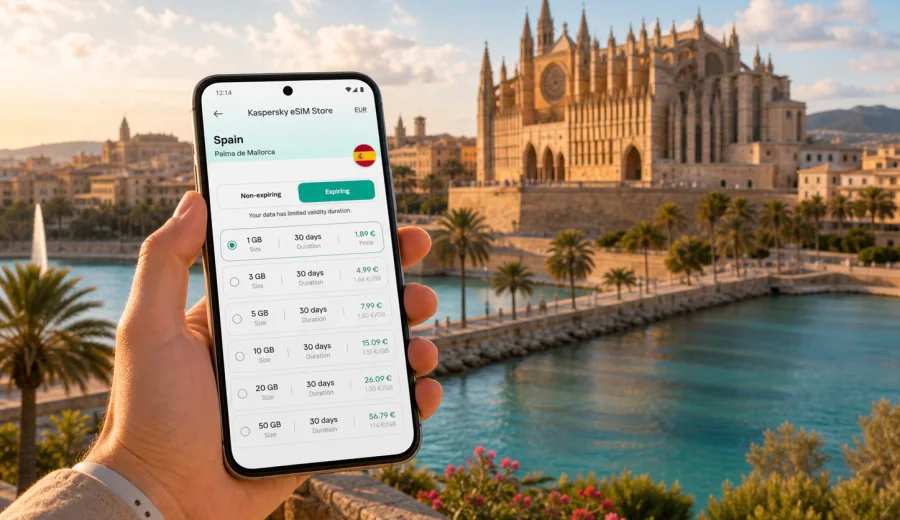
Palma de Mallorca eSIM: Mobile Connection and Internet for Your Trip
Palma de Mallorca is a city where mobile internet starts being useful before you reach your hotel. You may land at Palma de Mallorca Airport, check a transfer address in the old town, message an apartment host in Santa Catalina, compare bus routes to Platja de Palma, or confirm a dinner reservation near La Lonja. An eSIM helps you prepare mobile data for these moments without looking for a physical SIM card after arrival.
This guide focuses on Palma de Mallorca itself: the airport, port, hotel districts, local transport, business trips, stopovers, beaches, and day trips from the city. Spain is the country context because your eSIM plan must match the destination, but the practical question is local: how do you stay online while moving around Palma?
Why eSIM can be useful in Palma de Mallorca
Palma is compact enough for walking, but a trip rarely stays in one neighborhood. The airport is outside the city center, beaches stretch along the bay, hotels are spread from Cala Major to Can Pastilla, and many visitors use Palma as a base for routes to Valldemossa, Soller, Alcudia, or the Tramuntana mountains. Mobile data helps with the small decisions that shape each day.
Typical travel moments include:
- opening maps after landing at Palma de Mallorca Airport;
- checking bus times between the airport, the center, and beach areas;
- using ride-hailing or taxi information when luggage makes walking inconvenient;
- contacting your hotel or apartment host before check-in;
- finding the right entrance in the old town, where streets can be narrow and similar;
- sharing live location with family or colleagues;
- managing restaurant bookings, boarding passes, and ferry details;
- using translation, mobile banking, and travel apps without waiting for Wi-Fi.
An eSIM is a digital SIM profile installed on a compatible device. For a traveler, its main purpose is simple: it can help you connect to mobile internet abroad without inserting a physical SIM card. It is not a full replacement for a local mobile contract, and ordinary calls or SMS are not included unless the selected plan says so. For calls, many travelers use messengers over mobile data.
Palma travel scenarios where mobile data matters
Palma can feel easy until you need a specific route at a specific time. A working data connection is especially helpful in the following scenarios.
| Scenario in Palma | Why mobile internet helps |
|---|---|
| Arrival at PMI airport | Check transport options, hotel address, QR codes, and arrival messages before leaving the terminal. |
| First walk in the old town | Use maps in small streets around the Cathedral, La Lonja, Placa Major, and Santa Eulalia. |
| Beach day near the bay | Compare routes to Cala Major, Illetes, Portixol, Can Pastilla, or Platja de Palma. |
| Business trip | Join video calls, open documents, and move between meetings without depending only on hotel Wi-Fi. |
| Cruise or ferry stop | Navigate quickly from the port area to the center and back within a limited time window. |
| Day trip from Palma | Use maps, tickets, parking apps, and route updates for Soller, Valldemossa, Deia, or Alcudia. |
The value is not only speed. It is control. You can choose a prepaid plan before the trip, check its data volume and validity period, install the eSIM on a compatible phone, and then use the selected eSIM profile for mobile data when you need it.
Arrival at Palma de Mallorca Airport
Palma de Mallorca Airport is one of the first places where travelers feel the difference between having mobile data ready and waiting for public Wi-Fi. You may need to tell your hotel you have landed, open your transfer voucher, find the bus stop, or check whether traffic into Palma is heavy.
If you install your eSIM before departure, keep the activation details available and check when the plan validity starts. Some plans begin when the eSIM connects to a supported network, while others may have different conditions. Read the plan details before purchase so you know whether to activate before flying or after landing.
A simple arrival checklist:
1. Install the eSIM while you still have a stable internet connection.
2. Keep your primary SIM active if you need to receive bank messages or calls.
3. On arrival, select the eSIM profile for mobile data.
4. Enable data roaming for the eSIM if your device or plan instructions require it.
5. Open maps and transport apps before leaving the terminal.
6. Keep hotel and transfer details available offline in case you need them during setup.
This is especially useful for late arrivals, family trips, conference travel, and short stays where you do not want to spend the first hour solving connectivity.
Getting around Palma with mobile internet
Palma rewards flexible movement. You can walk between the Cathedral, Parc de la Mar, La Lonja, Passeig del Born, and Santa Catalina, then take a bus or taxi to a beach, hotel, office, or port. Mobile data helps you change plans without stopping to search for Wi-Fi.
Use mobile internet for:
- live walking navigation in the old town;
- checking whether a bus route is practical with luggage;
- confirming taxi pickup points near pedestrian streets;
- comparing beach routes when the weather changes;
- finding parking information if you rent a car;
- checking ferry or excursion updates;
- using mobile payments where supported;
- translating menus, signs, and messages.
Palma also has many practical pauses: cafes, hotel lobbies, coworking spaces, and shopping streets. Public Wi-Fi can be useful, but it is not always available exactly when you need it. An eSIM plan can reduce dependence on open Wi-Fi networks in airports, cafes, and busy public places.
Choosing an eSIM plan for a Palma de Mallorca trip
For Palma, choose the plan by matching it to Spain, your trip length, and the way you use data. A weekend in the old town has different needs from a two-week stay with day trips across Mallorca.
Consider these questions before choosing:
- How many days will you spend in Palma and Mallorca?
- Will you use maps often, or mostly stay near the hotel?
- Do you plan to work remotely or join video calls?
- Will you use social media uploads, cloud backup, or streaming?
- Are you visiting other cities in Spain during the same trip?
- Do you need only Spain, or does your route include several European countries?
Light users usually need data for maps, messaging, tickets, email, and restaurant searches. Heavier users should allow more data for video calls, large photo uploads, navigation in a rental car, and hotspot use if the plan and device settings allow it. Always check the selected plan conditions before relying on tethering or heavy work use.
For Palma de Mallorca, Kaspersky eSIM Store helps you choose, arrange, and activate an eSIM with a suitable data plan for travel in Spain. You can choose an eSIM plan for your Palma de Mallorca trip after checking the data volume, validity period, and destination coverage shown for the selected plan.
How much data might you need in Palma?
Data use depends on your habits, so treat the examples below as planning guidance rather than a promise. The safest approach is to choose a plan that covers your realistic daily use and leaves a buffer for unexpected route changes, long transfers, or work tasks.
| Trip style | Common data use in Palma | Planning tip |
|---|---|---|
| Short city break | Maps, messaging, boarding passes, restaurant searches | Choose enough data for airport arrival, city walks, and return travel. |
| Beach and city stay | Maps, messaging, photo sharing, transport checks | Add a buffer for beach routes and day changes around the bay. |
| Business trip | Email, documents, meeting apps, maps, messaging | Check plan validity and data volume before relying on it between meetings. |
| Family trip | Navigation, tickets, messaging, shared photos | More devices and photo uploads can raise data use quickly. |
| Mallorca base trip | Car navigation, day trips, bookings, weather checks | Choose a plan with enough data for travel outside Palma as well. |
If you expect to stream video, upload many high-resolution files, or use your phone as a hotspot, check the plan details carefully. eSIM travel plans are often best for mobile internet on the phone itself, while hotspot use, speed, and availability depend on the selected plan, device, and local network conditions.
District-by-district mobile internet needs
Palma is easier to plan when you connect data needs to neighborhoods rather than thinking only about the country.
Old Town and Cathedral area. Use maps for walking routes, meeting points, museum tickets, restaurant locations, and hotel entrances in narrow streets. Battery and data management matter because you may spend many hours outside.
Santa Catalina and Son Espanyolet. Mobile data is useful for restaurant bookings, evening routes, taxi pickup points, and messaging if your group splits up.
Portixol and Molinar. These waterfront areas are popular for walks and cycling. Use maps for the route back to the center or to connect with buses along the bay.
Cala Major and Illetes. Beach trips often involve route checks, weather updates, and messages to hotels or friends. If you are staying outside the center, a ready data connection makes local movement easier.
Can Pastilla and Platja de Palma. These areas are convenient for airport access and beach stays. Mobile data helps with airport transfers, bus routes, and hotel coordination.
Business zones and conference hotels. If you travel for work, mobile data helps bridge gaps between hotel Wi-Fi, meeting venues, taxis, and cafes. It also gives you a backup for messages and documents while moving around Palma.
Before you buy: compatibility and device checks
Not every phone or tablet supports eSIM, and some devices may be locked by an operator. Check this before choosing a plan, especially if your trip is close and you do not have time to troubleshoot.
Before purchase, check your device and confirm:
- the device supports eSIM;
- the device is not locked to a single mobile operator;
- the operating system is up to date enough for eSIM setup;
- you can access the internet during installation;
- you know which SIM or eSIM profile should handle mobile data;
- you understand whether the plan includes only data or also other services.
If you use dual SIM settings, keep your home SIM for calls or SMS if needed and set the travel eSIM as the mobile data line. This is useful when bank confirmations or work calls still arrive on your usual number.
How to install and activate eSIM for Palma
The exact setup flow depends on your phone, but the practical sequence is similar: choose a plan, install the eSIM profile, and select it for mobile data. If you need device-specific steps, use the Android installation guide or the iOS installation guide.
Basic setup steps:
1. Choose Spain as the destination for your Palma de Mallorca trip.
2. Select a plan by data volume and validity period.
3. Complete the purchase and open the eSIM details in your profile or app.
4. Install the eSIM using the provided instructions or QR code.
5. Name the profile clearly, for example "Spain travel".
6. Set that eSIM as the mobile data line when you are ready to use it.
7. Turn on data roaming for the eSIM if the instructions say it is required.
8. Wait a few minutes for the device to connect to a supported local network.
Do not delete the eSIM profile after installation unless you are sure you no longer need it. In many cases, an activated eSIM cannot simply be moved to another device.
Practical checklist for Palma de Mallorca
Use this list before you fly, especially if you will arrive late, travel with children, or go straight to a meeting.
- Save your hotel address in English and Spanish.
- Download offline maps for Palma as a backup.
- Install the eSIM while connected to reliable Wi-Fi.
- Check when the plan validity begins.
- Keep the QR code or setup instructions accessible.
- Confirm that your passport, boarding pass, and booking apps work offline if needed.
- Disable automatic cloud backup on mobile data unless you have enough allowance.
- Set messaging apps to reduce media auto-downloads.
- Bring a power bank for long walking days and day trips.
- Keep your primary SIM available if you need calls or SMS on your usual number.
These steps make the eSIM part of your travel preparation rather than a problem to solve at the airport.
Stopovers, cruises, and short stays
Palma is a common stop for cruise passengers, ferry travelers, and short city breaks. In these situations, time is limited. You may have only a few hours to get from the port to the Cathedral, walk through the old town, eat nearby, and return on time. Mobile data helps you avoid wasting that window.
For a short stop, prioritize:
- a plan that is ready before arrival;
- map access from the port or airport;
- saved return route details;
- messaging with travel companions;
- enough data for tickets, maps, and emergency schedule checks.
If you are arriving by cruise, remember that port areas and city streets may have different walking times than they appear on a static map. Live navigation can help you choose between walking, taxi, and bus options without guessing.
Day trips from Palma
Many travelers use Palma as a base for Mallorca. Mobile data becomes more important once you leave the city, especially if you rent a car or travel by bus and train.
Popular routes from Palma include:
- Soller and Port de Soller for the valley, tram, and harbor;
- Valldemossa and Deia for mountain villages;
- Alcudia and Pollenca for the north of the island;
- Es Trenc for beach plans, depending on season and transport;
- Andratx or Port d'Andratx for the southwest coast.
For these routes, use data for navigation, parking information, weather, timetable checks, and restaurant bookings. If you drive through mountainous areas, keep essential route details available offline as a backup. A travel eSIM helps with mobile internet where network access is available, but no provider can guarantee perfect coverage at every point of a route.
Common mistakes to avoid
Avoid these Palma travel connectivity mistakes:
- Waiting until the airport exit to think about mobile data.
- Buying a plan without checking whether your device supports eSIM.
- Choosing too little data for a trip with car navigation and photo uploads.
- Forgetting that travel eSIM plans usually focus on mobile data, not a local phone number.
- Deleting the eSIM profile after setup because it looks unused.
- Leaving your phone set to the wrong mobile data line.
- Relying only on hotel Wi-Fi for transport, tickets, and maps.
The best setup is boring in a good way: the eSIM is installed, the plan is understood, and you know which line handles mobile data before you need it.
Quick answers about eSIM in Palma de Mallorca
Is eSIM useful for a weekend in Palma?
Yes, it can be useful even for a short stay because arrival, maps, tickets, taxis, restaurant bookings, and hotel messages often happen before you find reliable Wi-Fi.
Should I choose Palma or Spain as the destination?
For a city article, the travel need is Palma de Mallorca, but the plan destination should match the country where the city is located. For Palma, choose Spain unless your route requires a regional or multi-country option.
Can I use eSIM for calls and SMS?
Travel eSIM plans commonly focus on mobile data. Calls and SMS are not included unless the selected plan says so. You can usually use internet-based messengers over mobile data.
Can I install eSIM before flying to Mallorca?
In many cases, installing before departure is convenient. Check the plan details so you understand when validity starts and when to turn on the eSIM for mobile data.
Do I still need Wi-Fi?
Wi-Fi can still be useful at hotels or for large downloads. eSIM is helpful when you are moving around the city, arriving at the airport, or away from trusted Wi-Fi.
What if the eSIM does not connect immediately?
Check that the eSIM is selected for mobile data, data roaming is enabled if required, airplane mode is off, and the device is compatible. Connection can take a few minutes and depends on the device and local network conditions.
Choose an eSIM plan for Palma de Mallorca
Palma is a city where a prepared mobile connection makes ordinary travel tasks simpler: airport arrival, route changes, beach plans, hotel check-in, business meetings, port transfers, and day trips across Mallorca. Before you travel, check device compatibility, choose a Spain plan with suitable data volume and validity, install the eSIM on a compatible device, and keep the setup instructions available.
Kaspersky eSIM Store is an app and site where you can quickly choose, arrange, and activate an eSIM with a suitable data plan for mobile internet in an international trip. To prepare for Palma de Mallorca, choose an eSIM plan for Spain and review the plan details before departure.