
Travel connectivity guide
Panaji eSIM for Mobile Internet
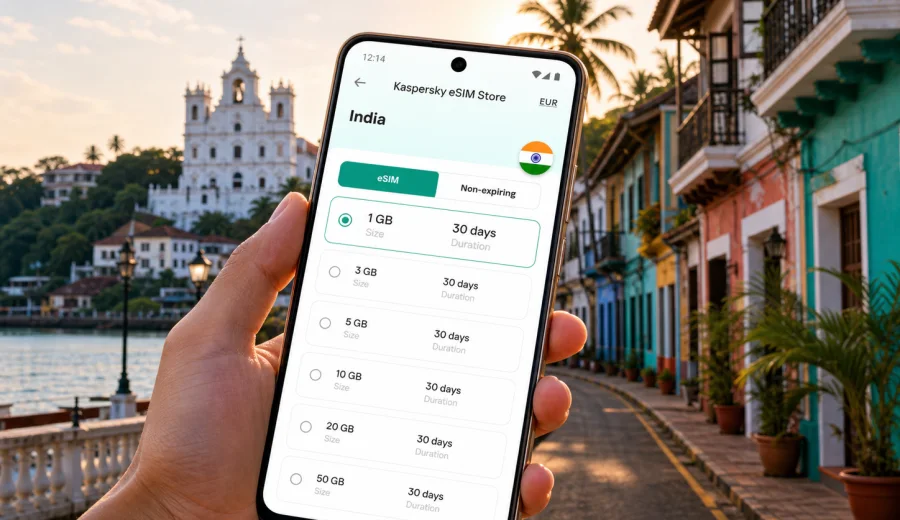
Panaji eSIM: mobile connection and internet for a smoother city trip
Panaji is compact, but it is not a city where you want to spend your first hour hunting for a SIM card or relying on hotel Wi-Fi for every plan. The capital of Goa sits by the Mandovi River, close to heritage streets, ferry points, business hotels, beaches, Old Goa routes, and airport transfers. A reliable mobile connection helps you move between these places with less friction.
This guide focuses on Panaji itself: arrival, local movement, navigation, hotels, business trips, stopovers, and short routes from the city. India is the country context because the eSIM tariff must match the destination, but the examples stay city-focused.
Why mobile internet matters in Panaji
Panaji is easy to enjoy on foot, by taxi, by app-based ride, by local bus, or by short drives to nearby beaches and heritage areas. The challenge is coordination: narrow older streets, small hotel lanes, ferry points, taxi pickups, and tropical weather can change a simple route.
With mobile internet ready, you can handle the small decisions that shape the day:
- find your hotel or guesthouse from the airport transfer drop-off point;
- use maps around Fontainhas, Sao Tome, Campal, Miramar, and the riverfront;
- message a driver when a pickup location is not obvious;
- check restaurant hours before crossing town;
- translate short notices, menu items, or service messages;
- join work calls from a hotel lobby or cafe when Wi-Fi is unstable;
- keep travel documents, boarding passes, and booking details accessible;
- plan day trips from Panaji without waiting for a hotel desk.
Panaji is also a base for travelers who move all day: riverfront in the morning, a meeting in Patto, Old Goa in the afternoon, and a beach-side dinner later. Mobile data keeps maps, messages, transport, and confirmations connected.
Arrival: airports, transfers, and the first hour online
Most visitors arrive in Goa by air and continue to Panaji by road. Depending on your flight, you may land at Dabolim or Mopa. The first hour often includes driver messages, hotel details, route checks, and updates to family or colleagues. Airport Wi-Fi can help, but it may require registration and will not follow you to the pickup area.
Before departure, save the following offline:
| Item | Why it helps in Panaji |
|---|---|
| Hotel address and phone number | Some small hotels and heritage stays are easier to find with a landmark nearby. |
| Arrival airport name | Goa has more than one airport option, so transfers should be confirmed clearly. |
| First route to Panaji | Useful if mobile data is slow at the terminal or during the first few minutes. |
| Booking PDFs or screenshots | Keeps check-in details available even before data is active. |
| Emergency contacts | Helpful if your main messaging app needs verification or a backup contact. |
An eSIM does not replace preparation, but it reduces what must go perfectly after landing. If your device is compatible and setup is complete, you can switch on mobile data when you are ready and start using maps, messages, and travel apps.
Panaji neighborhoods where data is especially useful
Panaji rewards slow exploration, but plans can change quickly. These areas are where mobile data is especially practical:
- Fontainhas and Sao Tome: narrow heritage lanes, cafes, galleries, and residential streets where maps help you avoid repeated detours.
- Mandovi riverfront: evening walks, cruise meeting points, traffic, and taxi coordination.
- Campal and Miramar: hotels, promenade walks, restaurants, and beach-side pickups.
- Patto and business areas: meetings, offices, government buildings, email, calendar updates, and document access.
- Old Goa routes: common half-day trips where return timing and ride coordination matter.
How much data do you need for a Panaji trip?
The right data amount depends on how you travel. Many hotels and cafes offer Wi-Fi, but mobile internet remains important between those fixed points.
Use this simple planning table:
| Trip style | Typical mobile data use | Practical approach |
|---|---|---|
| Short stopover, 1-2 days | Low to moderate | Maps, messaging, taxi coordination, boarding passes. |
| Weekend in Panaji and nearby beaches | Moderate | Navigation, photo sharing, restaurant searches, ride apps. |
| Business trip | Moderate to high | Email, calendar, documents, calls, backup for hotel Wi-Fi. |
| Family trip | Moderate | Multiple route checks, shared locations, bookings, messaging. |
| Workation base | High | Choose a larger allowance and keep video calls mainly on trusted Wi-Fi. |
Video calls, cloud backups, hotspot use, and streaming can use data quickly. Reserve mobile data for movement and essential tasks, then use secure hotel or workplace Wi-Fi for large downloads.
Choosing an eSIM tariff for Panaji
For a Panaji trip, choose India as the destination and match the tariff to your stay length, route, and data habits.
Start with four questions:
1. How many days will you be in Goa?
2. Will you stay mostly in Panaji or travel to beaches and heritage sites?
3. Do you need mobile data only for your phone, or also for a laptop through hotspot?
4. Will you use video calls, streaming, cloud backup, or large file transfers?
If the trip is short, a smaller package may be enough for maps and messaging. If Panaji is your base for Old Goa, Dona Paula, beaches, and airport transfers, choose more data. If the trip includes work, add a buffer.
Before you travel, you can choose an eSIM tariff for your Panaji trip through Kaspersky eSIM Store by selecting India and comparing data amounts and validity periods. The site and app help you choose, arrange, install, and activate an eSIM with a suitable mobile internet tariff for an overseas trip.
What to check before buying
The most important check is device compatibility. Not every smartphone supports eSIM, and some compatible devices may be restricted by a carrier lock or regional model differences. Before you pay, check your device.
Also review these points:
- your phone should be unlocked for mobile service use where required;
- your operating system should be up to date enough to handle eSIM setup smoothly;
- you should have a stable internet connection during installation;
- the tariff destination should match India, not only a city name;
- the data amount and validity period should fit the whole stay;
- voice calls and SMS are usually not included unless the specific tariff says so;
- local network conditions can vary by area, building, weather, and congestion.
Keep your primary SIM active if you need bank messages, airline alerts, or calls to your usual number. On many phones, you can use your home SIM for calls or SMS and the eSIM for mobile data. Check the default data line before opening maps.
How to install an eSIM before your Panaji trip
Install the eSIM while you still have reliable Wi-Fi, especially if you are traveling for work or arriving late at night. The basic flow is simple: choose the tariff, complete the purchase, add the eSIM profile, then select when to activate mobile data.
For detailed setup, use the official installation guides: Android instructions and iOS instructions. Read the steps before departure so you know where the mobile data, SIM line, and roaming settings are on your device.
A practical setup checklist:
1. Connect to trusted Wi-Fi.
2. Install or open the Kaspersky eSIM Store app, or use the website.
3. Select India as your destination.
4. Choose a tariff by data amount and validity period.
5. Add the eSIM profile using the provided setup flow.
6. Label the line clearly, for example "India data".
7. Keep your home SIM as the line for calls if you still need it.
8. Set the eSIM as the mobile data line when you are ready to use it.
9. Disable data roaming on your home SIM if you do not want it to use mobile data abroad.
Some profiles start validity when installed, while others start when they first connect to a supported network. Conditions depend on the selected tariff, so read the details before installing.
Practical Panaji scenarios
Use mobile data for the moments that are hard to schedule precisely:
| Scenario | What mobile internet helps with |
|---|---|
| Late hotel arrival | Driver messages, booking details, live location, and a clearer lane or landmark. |
| Fontainhas walk | Map checks between heritage streets, cafes, galleries, and the riverfront. |
| Business day in Patto | Calendar changes, email, document access, and backup data when venue Wi-Fi is weak. |
| Evening near Miramar | Ride timing, group messages, restaurant checks, and return planning. |
| Old Goa day trip | Route checks, saved notes, ride coordination, and return timing. |
| Short stopover | One simple route, luggage decisions, and airport transfer updates. |
For taxis and app-based rides, confirm the pickup point in writing when possible. Riverfront areas, hotels, and narrow lanes can have several plausible waiting spots. Hotel Wi-Fi is useful for large uploads, streaming, updates, and long calls; treat eSIM data as the personal layer for movement, booking confirmations, airport updates, and backup access to work chat or email.
Data-saving settings
Before you leave for India, adjust your phone so mobile data does not disappear in the background:
- turn off automatic cloud photo backup on mobile data;
- disable app updates over mobile data;
- download offline maps for Goa and your main Panaji areas;
- set messaging apps to download media on Wi-Fi only;
- use lower data mode if your phone offers it;
- check which SIM line is selected for mobile data;
- label the eSIM line clearly, for example "India data".
Hotspot can help for a laptop or a second phone, but it can also drain battery and data quickly.
eSIM, roaming, local SIM, and Wi-Fi
| Option | Best for | Watch out for |
|---|---|---|
| eSIM | Prepared mobile data, short trips, dual-SIM convenience | Requires a compatible unlocked device and correct setup. |
| Standard roaming | Keeping your usual number active | Costs and limits depend on your home operator. |
| Local physical SIM | Longer stays or travelers who need a local number | Requires time, documents where applicable, and a SIM slot. |
| Hotel or public Wi-Fi | Large downloads and stationary work | Not available while moving; quality and security vary. |
For many Panaji visitors, the practical setup is mixed: keep the home SIM for your usual number, use eSIM for data in India, and use trusted Wi-Fi for heavy tasks.
Common mistakes to avoid
- Waiting until you are outside the airport terminal to research mobile data.
- Assuming every eSIM includes calls and SMS.
- Installing the eSIM on the wrong phone.
- Leaving your home SIM selected as the mobile data line by mistake.
- Choosing only by price instead of destination, data amount, validity, and route.
FAQ
Is an eSIM useful if I stay only in Panaji for two days?
Yes, if you rely on maps, messaging, ride coordination, or online booking details.
Can I use one eSIM for Panaji and other parts of Goa?
Choose the tariff by destination and coverage conditions. For Panaji, select India and review the details of the chosen tariff before travel.
Will an eSIM give me a local Indian phone number?
Usually no. Travel eSIM tariffs are commonly focused on mobile data. Voice calls and SMS are included only if the specific tariff conditions say so.
Should I activate the eSIM before I fly or after landing?
Read the tariff conditions first. Validity may begin at installation or after first network connection, depending on the tariff.
Can I keep my usual SIM in the phone?
On many dual-SIM devices, yes. You can often keep your usual SIM for calls or SMS and use the eSIM for data, but settings and device behavior vary.
Is public Wi-Fi enough for Panaji?
It may be enough inside a hotel or cafe, but it will not help reliably during transfers, walks, taxi coordination, or day trips. Mobile data fills those gaps.
Final checklist before you leave
Use this checklist the day before your flight:
- confirm that your phone supports eSIM and is not restricted for adding a new profile;
- select India as the destination for your Panaji trip;
- choose a data amount and validity period that match your route;
- read installation and activation conditions;
- save hotel, airport, and first-day route details offline;
- download maps for Panaji, Old Goa, Miramar, and any beach area you plan to visit;
- set app updates, cloud backup, and media downloads to Wi-Fi only;
- pack a charger or power bank for navigation-heavy days.
Panaji is at its best when you can move lightly: walk through heritage lanes, cross from the riverfront to a meeting, change dinner plans, or take a short trip beyond the city without stopping to solve connectivity.
Before your journey, open Kaspersky eSIM Store and prepare an eSIM tariff for India that fits your Panaji itinerary. Choose the data amount and validity period carefully, install it on the right device, and keep your mobile connection ready for arrival, city movement, hotel check-ins, business tasks, and short trips around Goa.