
Travel connectivity guide
eSIM for Panama: mobile internet guide
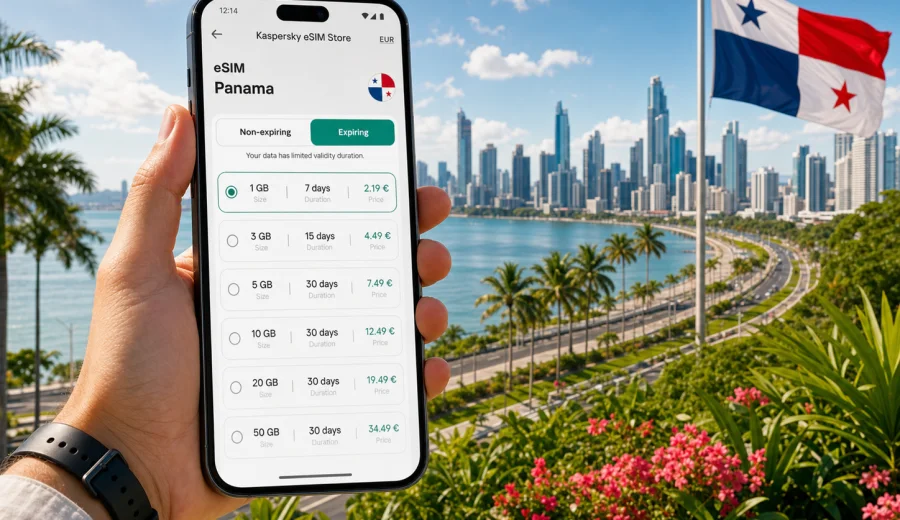
eSIM for Panama: mobile connection and internet for your trip
Panama is a country where a reliable mobile connection quickly becomes part of the travel plan. You may need internet before leaving Tocumen International Airport, while crossing Panama City by taxi, checking ferry times for Taboga, sharing a location in Casco Viejo, or keeping maps ready on the road toward Boquete, Bocas del Toro, El Valle de Anton, or the Caribbean coast. An eSIM can make that first online moment simpler because you do not need to look for a physical SIM card after arrival.
For most travelers, an eSIM for Panama is best understood as a digital SIM profile for mobile internet in a foreign trip. You choose a data package for the destination, install it on a compatible phone, and use it for apps, maps, email, browsing, ride-hailing, hotel messages, and internet-based calls. It is not a replacement for every local mobile service: unless the selected tariff says otherwise, an eSIM data plan usually does not include a local phone number, regular voice calls, or SMS.
Kaspersky eSIM Store is an app and website where you can quickly choose, arrange, and activate an eSIM with a suitable data plan for mobile internet during an international trip. The useful part for Panama is control: you can review the amount of data, validity period, destination, and cost before you travel, then install the eSIM on a compatible device and keep your main SIM for your usual number if your phone supports dual SIM use.
Why an eSIM is useful in Panama
Panama has several travel styles in one trip. A business visit may focus on Panama City, Punta Pacifica, Costa del Este, and meetings around the banking district. A leisure route may include the Panama Canal, beaches on the Pacific side, mountain towns in Chiriqui, islands in Bocas del Toro, and transfers by shuttle, domestic flight, ferry, or rental car. In all of these situations, mobile internet helps with practical decisions rather than just entertainment.
An eSIM can help when you need to:
- open maps after landing and check the route to your hotel;
- message a driver, host, guide, or colleague;
- confirm flight, ferry, bus, or tour details;
- use translation and banking apps;
- share documents or tickets from your phone;
- work with email and cloud files during a short business stay;
- keep a backup connection when public Wi-Fi is slow, crowded, or unavailable.
The main advantage is preparation. You can install the eSIM before the trip if your phone and plan conditions allow it, then activate data when you are ready to use it. This reduces the pressure of solving mobile internet at the airport, in a shopping mall, or at a small store while you are tired from the flight.
Where mobile internet matters most during a Panama trip
Panama is compact on the map, but journeys often combine city streets, highways, islands, and mountain areas. Mobile data is especially useful in the first and last hours of each travel segment.
| Travel situation | Why mobile data helps | Practical note |
|---|---|---|
| Arrival at Tocumen International Airport | Maps, taxi apps, hotel messages, flight updates | Install your eSIM before departure if the plan instructions allow it |
| Panama City stay | Navigation, bookings, restaurant reservations, payments | Keep your main SIM active for banking codes if needed |
| Panama Canal and day tours | Tickets, guide communication, photo backup | Download key documents before leaving the hotel |
| Boquete or Chiriqui route | Maps, weather, shuttle coordination | Mountain routes can be less predictable than city areas |
| Bocas del Toro and islands | Ferry times, lodging messages, local navigation | Save offline maps as a backup before boat transfers |
| Cross-border route in Central America | Multiple destinations, transport changes | Check whether a country or regional eSIM plan fits your itinerary |
No mobile option can remove every coverage gap. Local network availability, building materials, weather, congestion, and the exact place where you are standing can affect the connection. The practical approach is to use an eSIM as your prepared mobile data option and keep important travel details available offline as well.
How to choose an eSIM data plan for Panama
Start with your trip length and the way you use your phone. A traveler who needs maps, messengers, boarding passes, and light browsing can usually manage with a smaller data package than someone who joins video calls, uploads large files, or uses a laptop through mobile hotspot. Panama trips also vary: three days in Panama City, two weeks around the country, and a multi-country route through Central America call for different choices.
Before you choose a tariff, check these points:
1. Destination: confirm that the plan is valid for Panama or for the region that includes your route.
2. Data amount: choose enough gigabytes for navigation, messages, email, browsing, and any work needs.
3. Validity period: match the plan duration to your travel dates, including arrival and departure days.
4. Activation rules: read when the validity period starts and whether activation requires connection to a local network.
5. Hotspot rules: check whether tethering is supported if you plan to share data with a laptop or another device.
6. Top-up options: see whether you can add more data if your trip changes.
As a quick planning rule, light use means maps, messengers, ride apps, and checking reservations. Medium use adds social media, browsing, photo sharing, and regular email. Heavy use includes video calls, hotspot, cloud sync, streaming, or large uploads. For heavy use, choose a larger package or be ready to top up if the selected tariff allows it.
A simple way to prepare your mobile internet
You do not need to make the eSIM decision complicated. For a Panama trip, a practical process looks like this:
1. Check whether your smartphone supports eSIM and is not locked to one carrier.
2. Estimate your data use for the full trip, not only for Panama City.
3. Choose a Panama or regional plan that matches your route and travel dates.
4. Install the eSIM while you still have a stable internet connection.
5. Keep your main SIM available for calls, SMS, or banking codes if you need them.
6. After arrival, set mobile data to the eSIM profile and follow the plan instructions.
When you are ready to compare options, you can choose an eSIM data plan for Panama in Kaspersky eSIM Store and review the available data packages, validity periods, and conditions before your trip.
Device compatibility: check before you pay
The most important technical step is compatibility. Not every phone supports eSIM, and some phones that support eSIM may still be locked by a carrier. Before buying a data plan, check your device and make sure it can add an eSIM profile for travel.
Also check these device details:
- your phone model supports eSIM in the region where it was purchased;
- the device is not carrier-locked;
- you have a stable internet connection for installation;
- your operating system is updated enough to manage eSIM profiles correctly;
- you know which SIM profile will be used for mobile data after arrival;
- you understand whether your primary SIM will stay active for calls or messages.
If you use a dual SIM setup, label each line clearly in your phone settings. For example, keep your home SIM for your number and use the travel eSIM for mobile data. This helps avoid accidental roaming charges on your main SIM.
How to install and activate an eSIM for Panama
Installation steps vary slightly by device, but the basic flow is similar. After arranging the selected plan, the eSIM appears in your profile or instructions. You add it to the phone, confirm the mobile data settings, and activate it according to the plan rules. If you need device-specific help, use the Android installation guide or the iOS installation guide.
A safe installation checklist:
- install the eSIM while connected to reliable Wi-Fi;
- do not delete the eSIM profile unless support instructions tell you to do so;
- keep the QR code or installation details available until setup is complete;
- give the eSIM line a clear name such as Panama data;
- turn off data roaming on your main SIM if you want to avoid using it abroad;
- enable data roaming for the eSIM if the selected plan instructions require it;
- test only when the plan conditions say activation will not start too early.
Some eSIM plans begin their validity period when they connect to a supported local network. Others may have different activation rules. Read the instructions for the specific tariff before installing or switching it on. This is especially important if you are preparing the eSIM several days before your flight.
eSIM, roaming, local SIM, and public Wi-Fi: what to compare
An eSIM is one option among several ways to stay online in Panama. The best choice depends on your phone, trip length, budget, and tolerance for setup time.
| Option | Strengths | Trade-offs |
|---|---|---|
| Travel eSIM | Can be prepared before arrival, no physical SIM swap, clear data package | Requires compatible unlocked device and careful activation |
| Standard roaming | Uses your existing SIM and number | Cost and data limits depend on your home operator |
| Local physical SIM | Can work well for longer stays | Requires store visit, physical card, and local setup steps |
| Public Wi-Fi | Useful in hotels, cafes, airports, and offices | May be slow, unavailable, or inconvenient when moving around |
For many trips, the choice is not either-or. You can keep hotel Wi-Fi for large downloads, use your main SIM for important messages or verification codes, and use an eSIM for mobile data while moving around the country.
Practical scenarios in Panama
Use your route to choose the right data allowance:
- Arrival day: keep enough data for airport messages, maps, ride apps, and hotel check-in.
- Business day in Panama City: allow for email, document access, and internet calls; check hotspot rules if you need a laptop.
- Bocas del Toro or Taboga: save ferry details offline and use mobile data for updates and lodging messages.
- Boquete or El Valle: download maps in advance, then use mobile data for weather, route changes, and travel coordination.
- Regional journey: compare a Panama plan with regional options where available if you will also visit nearby countries.
Before departure, install the eSIM if the plan instructions allow it, save travel documents offline, check which SIM handles mobile data, and pause large cloud backups or app updates. This preparation reduces pressure after landing and helps your data package last longer.
Common mistakes to avoid
The same problems cause most travel eSIM frustration. Avoid them before they happen:
- buying a plan before checking eSIM support on the exact device;
- assuming the eSIM includes a phone number, voice calls, or SMS;
- deleting the eSIM profile after installation because the connection is not active yet;
- leaving mobile data on the home SIM and accidentally using roaming;
- choosing a validity period that ends before the final travel day;
- forgetting that some plans need data roaming enabled for the eSIM line;
- using heavy video or hotspot without a data allowance that fits that behavior.
If something does not work, pause before changing many settings at once. Check the installation status, selected mobile data line, roaming setting for the eSIM, local signal, and the plan instructions. If questions remain, contact support with your device model and a clear description of the issue.
FAQ about eSIM and internet in Panama
Can I use an eSIM for calls in Panama?
Most travel eSIM plans are designed for mobile data. Regular voice calls and SMS are usually not included unless the tariff states otherwise.
Should I install the eSIM before I arrive in Panama?
Often, yes. Install it on stable Wi-Fi, but first check when the validity period starts.
Will my regular SIM still work?
On many dual SIM phones, you can keep your regular SIM for your usual number and use the eSIM for mobile data.
Do I need data roaming for the eSIM?
Some eSIM tariffs require data roaming on the eSIM profile. Follow the instructions for the selected plan.
Is public Wi-Fi enough for Panama?
Hotel and cafe Wi-Fi can help, but mobile data is more practical during transfers, road trips, ferry changes, and walking routes.
What happens if I use all my data?
Options depend on the selected tariff. Check whether top-up is available and monitor data use in your phone settings.
Can I move the eSIM to another phone?
Transfer may be limited by plan conditions, so install it on the device you will actually use during the trip.
Choose your eSIM plan for Panama before you travel
A good mobile internet setup for Panama is simple: confirm that your device supports eSIM, choose a data package that matches your route and trip length, install the eSIM with stable internet, and switch mobile data to the travel line when you are ready. This gives you a practical way to stay online for maps, messages, bookings, work apps, and everyday travel decisions without searching for a physical SIM card after arrival.
Before your flight, review the available options and prepare an eSIM data plan for your Panama trip through Kaspersky eSIM Store. Choose the package carefully, read the activation conditions, and keep the installation instructions available until your phone is ready for travel.