
Travel connectivity guide
Paphos eSIM for Mobile Internet in Cyprus
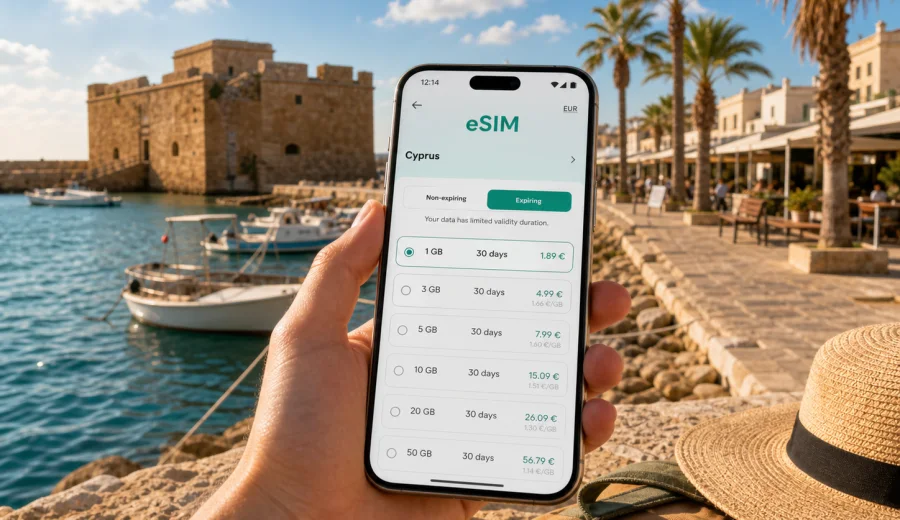
Paphos eSIM: mobile connection and internet for a smooth city trip
Paphos is an easy city to enjoy when your phone is already ready for the trip. The airport is close to the coast, the main hotel areas are spread along the waterfront, and many days are built around short moves: from Kato Paphos to the harbor, from the Old Town to a restaurant terrace, from Coral Bay to a sunset viewpoint, or from the city to the Akamas area. Mobile internet helps with all of these small decisions. It keeps maps, taxi apps, hotel messages, digital tickets, restaurant bookings, and work calls within reach when you are not on hotel Wi-Fi.
An eSIM is useful in Paphos because it lets you prepare mobile data before you arrive or shortly after landing. You do not need to look for a physical SIM card first, compare unfamiliar shop offers at the airport, or depend on a cafe network just to open a map. With a compatible phone, you can install a digital SIM profile, choose a data package for Cyprus, and use mobile internet for navigation, communication, and travel planning.
This guide focuses on Paphos itself: arrival, local movement, districts, hotels, beaches, business travel, stopovers, and day trips from the city. Cyprus matters because the eSIM tariff is selected for the country, but the practical question is local: how much connectivity do you need for a real stay in Paphos?
Why mobile internet matters in Paphos
Paphos is compact compared with larger capitals, but it is not a city where everything sits on one straight tourist street. The harbor and archaeological park are in Kato Paphos. The Old Town, also called Ktima, sits higher inland. Many resorts are along the coastal road toward Chloraka, Kissonerga, and Coral Bay. Airport arrivals, rental car pickup, intercity bus trips, and beach days all create moments when mobile data is more reliable than waiting for Wi-Fi.
Common Paphos travel tasks that depend on mobile internet include:
- opening maps after landing at Paphos International Airport;
- checking the address of a hotel or apartment in Kato Paphos, Universal, Tombs of the Kings, Chloraka, or Coral Bay;
- messaging a host about check-in time;
- comparing taxi, bus, and walking routes;
- navigating between the harbor, the archaeological park, the Old Town, and beach areas;
- checking restaurant opening times before crossing town;
- using translation, banking, airline, and travel insurance apps;
- joining a work call from a hotel room, serviced apartment, or cafe;
- sharing location with family or colleagues during a solo trip.
Public Wi-Fi can help in a hotel lobby or cafe, but it does not follow you along the coastal promenade, into a rental car, or to a bus stop. A prepared eSIM gives you a data connection for the moments between fixed Wi-Fi points.
Arrival at Paphos International Airport
Paphos International Airport is one of the main gateways to western Cyprus. It is especially convenient for holidays in Paphos, Coral Bay, Polis, Latchi, and the Akamas Peninsula. The airport is close enough to the city that the first transfer often feels simple, but it still helps to have data before leaving the terminal.
When you land, you may need to:
1. Turn off airplane mode and check whether your travel eSIM is active.
2. Open the address of your hotel or apartment.
3. Message the host, driver, or tour operator.
4. Check bus or taxi options.
5. Confirm whether the rental car desk is inside the terminal or at a nearby pickup area.
6. Save the route before driving on unfamiliar roads.
If you are arriving late in the evening, mobile internet becomes even more useful. Some apartment check-ins rely on messages, codes, or instructions. If your hotel is not in central Kato Paphos, the route may include smaller roads through Universal, Geroskipou, Chloraka, or coastal resort areas. Having data ready makes the first hour less dependent on airport Wi-Fi or roaming settings.
City areas where an eSIM is most useful
Paphos travel usually shifts between several small zones rather than one large downtown. Each zone creates a different internet need.
| Area in or near Paphos | Typical travel use | Why mobile data helps |
|---|---|---|
| Kato Paphos and the harbor | Hotels, restaurants, promenade, boat trips | Maps, restaurant bookings, tour messages, photo sharing |
| Paphos Archaeological Park | Sightseeing near mosaics, ruins, and the harbor | Digital tickets, maps, audio guides, meeting points |
| Old Town / Ktima | Cafes, markets, viewpoints, museums | Walking navigation between narrow streets and bus stops |
| Tombs of the Kings area | Hotels, apartments, coastal walks | Route planning and ride-hailing when walking distances feel longer |
| Universal | Apartments, longer stays, self-catering trips | Host messages, grocery searches, local transport checks |
| Chloraka and Kissonerga | Coastal hotels and villas | Taxi coordination, beach route planning, remote work calls |
| Coral Bay | Beach days and resort stays | Bus timing, family coordination, restaurant searches |
| Geroskipou | Airport-side routes, beach, local stops | Driving navigation and quick checks before leaving the city |
The practical lesson is simple: choose data for your real movement pattern, not just for the city name. A traveler staying in a harbor hotel for two nights will use data differently from a family based in a villa near Coral Bay or a remote worker staying in Universal for three weeks.
How much data you may need in Paphos
The right data amount depends on how you use your phone. Navigation and messages are light. Video calls, cloud backups, social video, and tethering are heavier. Before choosing an eSIM tariff, check the validity period as carefully as the data volume. A plan that lasts long enough for the trip is usually easier to manage than one that requires attention in the middle of a beach day or business schedule.
Here is a practical guide:
| Trip style | Likely data behavior | Planning note |
|---|---|---|
| Weekend in Kato Paphos | Maps, messaging, restaurant searches, boarding pass | A smaller package may be enough if hotel Wi-Fi is reliable |
| One-week beach holiday | Daily navigation, photos, family chats, taxi apps | Choose enough data for beach days away from Wi-Fi |
| Family villa stay | Multiple devices, route planning, grocery runs, streaming by children | Keep streaming on Wi-Fi where possible and consider a larger package |
| Business trip | Email, calls, document access, hotspot for laptop | Prioritize validity and a comfortable data buffer |
| Road trip from Paphos | Maps, parking searches, village routes, weather checks | Download offline maps, but keep mobile data for updates |
| Stopover or late arrival | Messages, transfer coordination, hotel access | A short-validity option can be practical if the stay is brief |
Avoid choosing only by the lowest visible price. A tariff should match the number of days, expected data use, and whether you will rely on your phone for work, driving, or family coordination. eSIM tariffs usually focus on mobile data. Regular voice calls and SMS may not be included unless the selected tariff explicitly says so, so plan to use internet-based calling and messaging apps when needed.
Using eSIM around Paphos by transport type
Paphos is manageable, but transport choices change during the day. You may walk along the harbor in the morning, take a bus to Coral Bay in the afternoon, and use a taxi or rental car after dinner. Mobile internet supports each mode differently.
For walking, data helps with turns between the harbor, archaeological sites, the municipal beach areas, and the Old Town. Walking routes can be less direct than they look on a map because of hotel zones, larger roads, and archaeological areas.
For buses, data helps you check current routes, stops, and schedules before committing to a plan. Paphos has useful local and regional connections, but service frequency can vary by route, day, and season. If you plan to visit Coral Bay, the Old Town, or the airport by bus, check timing while you still have a comfortable buffer.
For taxis and transfers, mobile data helps you share your exact pickup location. This is useful near hotel entrances, villa areas, beaches, and the harbor, where "near the promenade" may not be precise enough.
For rental cars, data is valuable beyond the city. Roads from Paphos toward Polis, Latchi, Akamas viewpoints, Troodos villages, or Limassol can involve route decisions where live maps and local searches are useful. Download offline maps before longer drives, but keep mobile internet available for traffic, closures, fuel stops, and updated destination details.
Preparing eSIM before you fly
The simplest approach is to prepare your eSIM before departure, while you still have a stable home connection. That way, your arrival routine in Cyprus is not built around airport Wi-Fi, roaming uncertainty, or a search for a local SIM shop.
Before the trip, make a short checklist:
- Confirm that your phone supports eSIM and is not locked to one carrier.
- Choose Cyprus as the destination for your data tariff.
- Match the data amount and validity period to your full Paphos itinerary.
- Install the eSIM profile while you have stable Wi-Fi.
- Keep your primary SIM active for important bank, airline, or account messages if you need them.
- Learn where to switch mobile data from your primary SIM to the eSIM.
- Save hotel addresses and important booking details offline.
For a city trip, it is usually better to think in scenarios than in abstract data volumes. Will you drive from the airport? Will you use your phone as a hotspot? Will you join video calls? Will children use your phone for streaming? Will you spend several days in beaches or villages outside Paphos? Each answer changes the data buffer you should prepare.
When you are ready to compare options, Kaspersky eSIM Store helps you choose, arrange, and activate an eSIM tariff for travel mobile internet. You can prepare an eSIM tariff for your trip to Paphos in Cyprus before departure and review the data amount, validity period, and destination before you activate it.
Device compatibility and installation
Not every phone can use eSIM. Before buying any eSIM tariff, check whether your device supports eSIM and whether it is unlocked for mobile service profiles. This matters especially if the phone was purchased through a carrier, issued by an employer, or used with regional restrictions. You can check your device before choosing a tariff.
Installation is usually a short process, but it is worth doing it calmly on a reliable Wi-Fi connection. After you receive the eSIM details, follow the installation flow for your device, then choose when to activate mobile data according to the tariff conditions.
Basic installation flow:
1. Open the eSIM installation details in Kaspersky eSIM Store.
2. Add the eSIM profile to your compatible phone.
3. Name the line clearly, for example "Cyprus data" or "Travel eSIM".
4. Keep your usual number available if you need bank or airline messages.
5. Set mobile data to the travel eSIM when you are ready to use it.
6. Enable data roaming for the eSIM if the selected tariff instructions require it.
7. Test the connection after arrival in Cyprus.
If you need device-specific steps, use the Android installation guide or the iOS installation guide. Keep the instructions accessible before you fly, especially if you expect to arrive late or move directly from the airport to a rental car.
Frequently asked questions
Is an eSIM useful if my hotel in Paphos has Wi-Fi?
Yes, because hotel Wi-Fi only helps when you are at the property. Mobile data helps during airport arrival, transfers, walks, bus rides, beach days, restaurant searches, and trips outside the city.
Can I use an eSIM for normal calls and SMS?
Many travel eSIM tariffs focus on mobile data. Regular voice calls and SMS may not be included unless the tariff conditions say otherwise. You can usually use internet-based calling and messaging apps over mobile data.
Should I activate the eSIM before or after arriving in Cyprus?
Install the eSIM profile before departure if possible. Activation timing depends on the tariff conditions, so check whether validity starts at installation, activation, or first network connection. If you are unsure, read the instructions before you fly.
What if I travel from Paphos to Limassol or Nicosia?
For a Cyprus tariff, the same country destination is intended for travel within Cyprus. Check the selected tariff conditions and make sure the validity period covers the whole route, not only your first days in Paphos.
Final checklist before your Paphos trip
Before you leave for Paphos, make sure your mobile setup matches your itinerary:
- Your phone supports eSIM and is unlocked.
- Your eSIM tariff is for Cyprus and covers the whole stay.
- The data amount fits your planned use: maps, messages, work, hotspot, or road trips.
- Installation instructions are saved or easy to open.
- Your hotel address, booking details, and airport transfer information are available offline.
- Mobile data switching is clear: you know which line handles travel data.
- Roaming settings for the eSIM are set according to the tariff instructions.
Paphos is easier when your phone is ready before the first transfer and the first day trip beyond the city. Kaspersky eSIM Store helps you choose, arrange, and activate an eSIM tariff for travel mobile internet, so you can focus on the route instead of searching for connectivity after arrival. Choose an eSIM tariff for your Paphos trip in Cyprus and review the data volume, validity period, and setup steps before you travel.