
Travel connectivity guide
Papua New Guinea eSIM: mobile internet guide
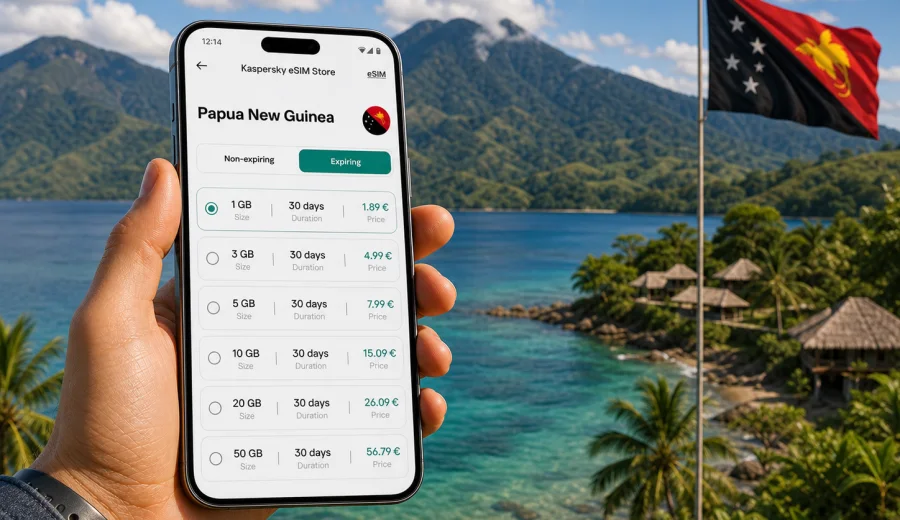
eSIM in Papua New Guinea: mobile connection and internet for your trip
Papua New Guinea is a destination where mobile internet can make the difference between a smooth trip and a day spent looking for Wi-Fi. Many routes combine Port Moresby, coastal areas, islands, mountain roads, business visits, research work, diving trips, or family travel. In these situations, an eSIM can help you prepare mobile connection before arrival without buying a physical SIM card at the airport or in town.
This guide explains how to use eSIM for internet in Papua New Guinea, what to check before buying a tariff, how much data you may need, and how to install the eSIM on a compatible phone. The focus is practical: maps, messaging, transport, accommodation, work apps, and travel planning.
Kaspersky eSIM Store is an app and website where you can quickly choose, order, and activate an eSIM with a suitable mobile data tariff for an international trip. It is not a mobile operator and does not own mobile networks. Your experience depends on the selected tariff, your device, local network conditions, and the places you visit.
Why eSIM is useful for Papua New Guinea
Papua New Guinea is not a destination where every travel task can be postponed until you find hotel Wi-Fi. You may need internet as soon as you land, during a transfer, when coordinating with a guide, or while checking a domestic flight time. An eSIM gives you a digital SIM profile for mobile data, so you can keep your main physical SIM in the phone and use a separate data line for the trip.
Typical travel situations where eSIM is useful:
- arriving at Jacksons International Airport in Port Moresby and needing maps, messages, or a ride contact;
- checking hotel or lodge instructions when the booking confirmation is in your email;
- using maps and translation tools in Port Moresby, Lae, Madang, Mount Hagen, Goroka, or coastal regions;
- staying in touch with a tour organizer, dive operator, driver, office, or family;
- avoiding repeated logins to public Wi-Fi networks in airports, cafes, and hotels;
- keeping work apps available during a business trip or field visit.
The main benefit is preparation. You can review available data options before departure, install the eSIM profile on a compatible device, and know which line should handle mobile data when you arrive.
What eSIM does and does not include
For most travel eSIM tariffs, the core service is mobile internet. That means data for apps, browsers, maps, email, messengers, cloud documents, video calls, and other online services. A travel eSIM does not automatically replace every function of a local SIM card.
| Feature | What to expect |
|---|---|
| Mobile data | The main purpose of the eSIM tariff. |
| Phone number | Usually not included unless the tariff conditions say otherwise. |
| Voice calls and SMS | Usually not included unless specified in the tariff. |
| Messengers | Work through mobile data if the app itself is available and configured. |
| Hotspot | May depend on the selected tariff and device settings. |
| Coverage | Depends on local network availability and the selected tariff conditions. |
If you need ordinary voice calls or SMS for a local service, check the exact tariff details before purchase. For many travelers, internet-based calls and messages through apps are enough, but that depends on your route and work requirements.
Before you buy: check your device
Not every phone supports eSIM, and some devices are locked to a carrier. Before you choose a tariff, check your device and confirm three points:
- the phone or tablet supports eSIM;
- the device is not locked to one carrier;
- your operating system is up to date enough to install and manage an eSIM profile.
This check matters more than the destination. Even a well-chosen tariff will not help if the device cannot install the eSIM profile or if the mobile data line is blocked by device settings.
How to estimate data for Papua New Guinea
Data needs vary by travel style. A person who mainly uses maps and messages can travel with a smaller package. A traveler who uploads photos, joins video calls, and uses cloud files will need more.
| Trip pattern | Common online activity | Practical data approach |
|---|---|---|
| Short stop or transit | Messages, email, maps, booking details | Choose a compact package and monitor usage. |
| 5-7 day trip | Navigation, social apps, web search, occasional calls | Select a medium package with enough buffer. |
| Business visit | Email, documents, work chat, video calls | Choose more data and avoid heavy updates on mobile data. |
| Diving or island trip | Messaging, weather checks, photo backup when available | Use mobile data for essentials and upload large files on trusted Wi-Fi. |
| Multi-region itinerary | Port Moresby plus highlands, coast, or islands | Choose a tariff with enough duration and check conditions carefully. |
The safest habit is to separate essential data from optional data. Essential data includes maps, messages, email, transport, booking apps, and banking confirmations. Optional data includes long video streaming, large backups, app updates, and high-resolution uploads.
Mobile internet realities in Papua New Guinea
Papua New Guinea is geographically complex. Mountains, islands, remote roads, and coastal areas can affect mobile signal quality. In larger urban areas, mobile internet may be easier to use. In remote regions, forests, valleys, sea routes, and village locations can make signal availability less predictable.
For that reason, avoid planning your trip as if mobile internet will behave the same in every location. Download key information before long transfers, keep offline copies of hotel addresses and emergency contacts, and do not rely only on cloud access for critical documents.
Useful preparation checklist:
- save the address of your accommodation offline;
- download offline map areas for Port Moresby and other planned regions;
- keep airline, hotel, and tour confirmations in a folder available offline;
- tell key contacts which messenger you will use;
- keep a power bank charged during road or boat transfers;
- check the eSIM tariff duration and when validity starts.
eSIM compared with roaming, public Wi-Fi, and local SIM cards
Travelers usually compare four options: international roaming, public Wi-Fi, buying a local physical SIM card, or using an eSIM. Each option has a place, but the right choice depends on your arrival schedule, device, budget, and need for control.
| Option | Strengths | Limits |
|---|---|---|
| International roaming | Uses your existing number and familiar account | Costs and conditions can vary by home operator and plan. |
| Public Wi-Fi | Useful in hotels, airports, and offices | Availability, speed, login pages, and security can be inconsistent. |
| Local physical SIM | Can be practical for longer stays | Requires finding a sales point, checking conditions, and changing SIMs. |
| eSIM | Can be prepared before or during the trip without a physical SIM | Requires eSIM-compatible, unlocked device and correct setup. |
An eSIM is often most convenient when you want to handle mobile internet before departure or shortly after arrival. It also helps if your phone has one physical SIM slot and you want to keep your main SIM available for calls, banking messages, or account recovery.
Choosing an eSIM tariff for Papua New Guinea
When you compare eSIM tariffs, do not choose only by the largest number of gigabytes. Match the tariff to the route and the way you use data. Papua New Guinea trips can include very different scenarios: a short business visit to Port Moresby, a cultural festival route in the highlands, a coastal itinerary, or several domestic flights.
Look at these tariff details:
- data allowance in GB;
- validity period in days;
- destination or region covered by the tariff;
- whether the tariff is expiring or non-expiring;
- when the validity period starts;
- whether top-up is available;
- whether hotspot use is allowed;
- refund and support conditions.
For a short trip, a smaller package may be enough if you use Wi-Fi for large downloads. For a longer route, extra data can reduce the need to ration maps, messages, and work apps. For business travelers, the duration can matter as much as gigabytes: a package that covers the entire stay is easier to manage than one that expires too soon.
If you want to prepare mobile internet before departure, you can choose an eSIM tariff for Papua New Guinea in Kaspersky eSIM Store and review the available data volume, duration, and conditions before installing it on your device.
How to install and activate eSIM
The exact setup flow depends on your phone model and operating system, but the overall process is simple. You choose the destination and tariff, order it, install the eSIM profile, then select it for mobile data.
Basic setup steps:
1. Check that your phone supports eSIM and is unlocked.
2. Choose Papua New Guinea as the destination and select a suitable tariff.
3. Complete the order on the website or in the app.
4. Install the eSIM profile using the on-screen instructions or QR code.
5. Name the new line clearly, for example "PNG data".
6. Set the eSIM line as the mobile data line when you are ready to use it.
7. Turn on data roaming for the eSIM if the instructions or device settings require it.
8. Keep your primary SIM active only for the services you need.
For detailed setup, use the Android installation guide or the iOS installation guide. Install the eSIM while you still have a stable internet connection, because your phone needs to download and register the digital SIM profile.
Do not delete the eSIM profile after installation unless you are sure it is no longer needed. Some eSIM profiles cannot be transferred or reinstalled on another device after activation. Always read the conditions shown for the selected tariff.
Practical scenarios for travelers
Arrival in Port Moresby
The first hour after landing is when mobile data is most useful. You may need to message a driver, confirm a hotel pickup, open a map, check domestic flight information, or contact a colleague. If your eSIM is already installed, you can switch mobile data to the eSIM line after landing and follow the activation instructions.
Keep your hotel address and contact number offline as a backup. If the phone needs a few minutes to connect to the local network, you will still have the basic details available.
Business trip
Business travelers usually need predictable access to email, chat, documents, maps, and video calls. Before the trip, check whether your company phone is unlocked and supports eSIM. If your work profile uses security tools, confirm that adding an eSIM line will not conflict with device policies.
Data-saving tips for business travel:
- disable automatic cloud photo upload on mobile data;
- download large presentations before departure;
- set video call apps to lower data use when possible;
- keep a backup contact channel with your local host;
- monitor data usage after the first day.
Outdoor, coastal, or island routes
For diving, trekking, village visits, island stays, or long road transfers, mobile coverage can be less consistent than in cities. An eSIM is still useful, but it should be part of a wider preparation plan. Download maps, keep emergency contacts offline, and do not wait until a remote location to retrieve important documents from the cloud.
If your route includes several days away from larger towns, choose a tariff with enough duration and avoid using mobile data for heavy uploads unless you have a stable connection and enough data left.
How to control data use
Most phones let you see mobile data use by app. Check this screen after the first day in Papua New Guinea. It shows whether a background service is consuming more data than expected.
Simple controls:
- turn off automatic app updates on mobile data;
- pause cloud photo and video backup;
- download playlists, maps, and documents before the trip;
- use lower video quality on calls and streaming;
- close hotspot when you are not using it;
- keep system updates for trusted Wi-Fi.
Data can disappear quickly when a phone starts syncing photos, videos, or work files in the background. A few minutes of checking settings before the trip can save a large part of your package.
Common mistakes to avoid
The most common eSIM problems are not complicated. They usually come from missing preparation steps or from misunderstanding what the tariff includes.
Avoid these mistakes:
- buying before checking device compatibility;
- installing the eSIM on the wrong phone;
- deleting the profile after activation;
- assuming the eSIM includes a phone number;
- forgetting to switch mobile data to the eSIM line;
- leaving automatic downloads active;
- waiting until a remote area to install the profile;
- ignoring the tariff validity period.
If the eSIM does not connect immediately, check the active mobile data line, data roaming setting for the eSIM profile, airplane mode, and local signal. If questions remain, contact support with your order details and device model.
Quick checklist before departure
Use this checklist one or two days before the trip:
- Device supports eSIM and is unlocked.
- Main phone operating system is updated.
- Papua New Guinea eSIM tariff is selected for your travel dates.
- eSIM profile is installed while you have stable internet.
- Primary SIM and eSIM line names are clear.
- Offline maps and booking documents are saved.
- Data-heavy app updates and backups are paused.
- Power bank and charging cable are packed.
- Important contacts are available outside cloud-only apps.
This preparation is especially useful if your itinerary includes domestic flights, early transfers, business meetings, or remote accommodation.
FAQ
Can I use eSIM for calls in Papua New Guinea?
Most travel eSIM tariffs are designed for mobile data. Ordinary voice calls and SMS are usually not included unless the tariff conditions state otherwise. You can often use internet-based calling and messaging apps through mobile data.
Should I install eSIM before I travel?
It is usually better to install the eSIM profile before departure while you have a stable internet connection. Activation and data use may depend on the selected tariff conditions, so read the instructions before switching the eSIM line on.
Can I keep my usual SIM card active?
Yes, many modern phones can keep your primary SIM and eSIM installed at the same time. You can set the eSIM for mobile data and keep your regular SIM for calls, SMS, or account messages if your device supports this setup.
Does eSIM replace public Wi-Fi?
It does not have to replace Wi-Fi completely. It gives you another way to get online when Wi-Fi is unavailable, inconvenient, or not trusted. For large downloads, a trusted hotel or office Wi-Fi network may still be useful.
What if I travel beyond Port Moresby?
Choose a tariff that fits the whole route and prepare for variable signal conditions outside major areas. Download key information offline and check your data usage regularly.
Can I use hotspot with a travel eSIM?
Hotspot availability depends on the selected tariff and device settings. Check the tariff conditions before relying on hotspot for a laptop, tablet, or another phone.
Key takeaways
- eSIM is useful for mobile internet in Papua New Guinea because it can be prepared without a physical SIM card.
- The most important checks are device compatibility, carrier lock status, tariff duration, and data allowance.
- Travel eSIM usually focuses on mobile data, not a local phone number, voice calls, or SMS.
- Papua New Guinea routes can include areas with variable signal, so offline preparation remains important.
- Kaspersky eSIM Store helps you choose, order, and activate an eSIM tariff for an international trip through the app or website.
Prepare mobile internet for Papua New Guinea
Before you fly, decide how much data you need, check that your device supports eSIM, and install the profile while you still have reliable internet. This gives you a cleaner start when you arrive and reduces the need to search for a physical SIM card or open Wi-Fi network during the first hours of the trip.
For a practical next step, open Kaspersky eSIM Store and prepare an eSIM tariff for your trip to Papua New Guinea. Review the data volume, validity period, and conditions, then install and activate the eSIM on your compatible device when you are ready to use mobile data.