
Travel connectivity guide
eSIM for Paraguay: mobile internet guide
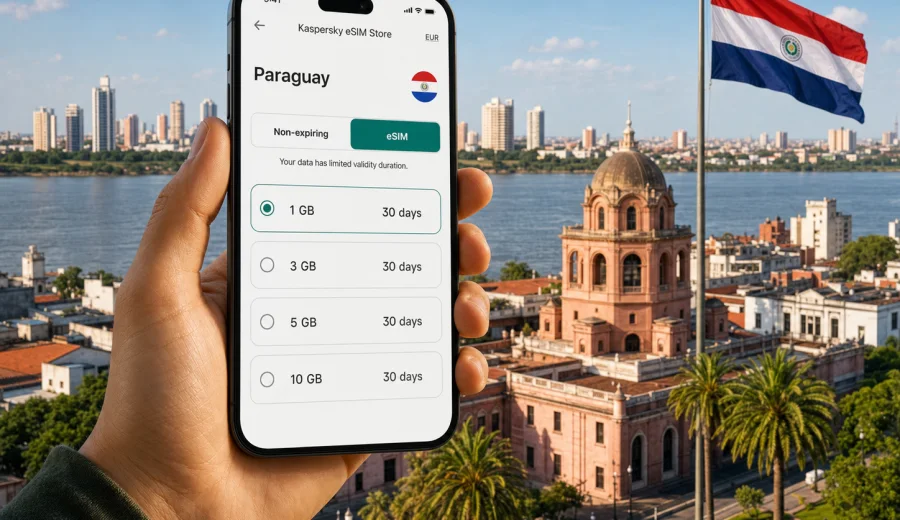
eSIM for Paraguay: mobile connection and internet for your trip
Paraguay is a country where mobile internet can quickly become part of the travel plan. You may need maps after landing near Asuncion, messaging during a transfer, translation in a taxi, a banking app at a hotel desk, or a stable connection while moving between Ciudad del Este, Encarnacion, the Chaco, and towns along the Paraguay River. An eSIM helps you prepare that connection without looking for a physical SIM card after arrival.
An eSIM is a digital SIM profile installed on a compatible smartphone or tablet. For a trip to Paraguay, it can be used for mobile data with a prepaid plan for the destination. You choose a plan, install the eSIM on your device, and select it for mobile data when you are ready to use it. The exact conditions depend on the plan you choose, so it is important to check data volume, validity period, destination coverage, and activation details before you pay.
Kaspersky eSIM Store is an app and website where you can quickly choose, arrange, and activate an eSIM with a suitable mobile internet plan for an international trip. It is not a mobile operator and does not provide a network. Its role is to help you prepare the eSIM setup for travel, compare the visible plan conditions, and manage the activation flow in a clear way.
Why an eSIM is useful in Paraguay
Paraguay travel often combines city movement with longer routes. A short stay in Asuncion may involve ride-hailing, restaurant reservations, mobile check-in, and messages with your hotel. A regional itinerary may include border areas near Brazil or Argentina, buses between cities, or rural stretches where you want essential apps ready before you arrive at your next stop. In these situations, mobile internet is not only about browsing. It supports navigation, payments, confirmations, work messages, and contact with people waiting for you.
With an eSIM, you do not need to remove your primary SIM card or find a local shop immediately after arrival. You can install the digital profile before departure or when you still have Wi-Fi access, then activate mobile data when the trip begins. This is especially useful if your first day is busy, if your flight lands late, or if you prefer to avoid making connectivity decisions while tired.
An eSIM can also reduce dependence on public Wi-Fi. Airport, cafe, hotel, and bus-station networks may be convenient, but they are not always available when you need a map or a ride. Having a mobile data plan prepared gives you a more predictable option for everyday travel tasks.
What eSIM for Paraguay means in practice
For travelers, an eSIM for Paraguay usually means a prepaid data plan linked to a digital SIM profile. It is installed on a compatible device and used for mobile internet in the destination. It normally does not replace your main phone number. Unless the chosen plan explicitly says otherwise, ordinary voice calls and SMS are not included. For calls and messages, you can use internet-based apps over mobile data.
The practical value is control. Before choosing a plan, you can review the main conditions:
| What to check | Why it matters for Paraguay |
|---|---|
| Data volume | Maps, messaging, video calls, and photo backup use very different amounts of data. |
| Validity period | A weekend, a two-week trip, and a longer stay need different plan lengths. |
| Destination | The plan should include Paraguay or the region you will use. |
| Activation rules | Some plans start when installed; others start when connected to a supported local network. |
| Tethering | If you need to share data with a laptop, check whether the selected plan allows it. |
| Device support | Your phone or tablet must support eSIM and must not be locked by an operator. |
These checks take a few minutes, but they help avoid common problems: choosing too little data, activating too early, or discovering at the airport that the device cannot add an eSIM profile.
How much data to choose for Paraguay
The right amount of data depends less on the country and more on your habits. A traveler who mostly uses maps and messages may need far less than someone who uploads videos, joins calls, or shares a connection with a laptop.
Use this simple planning guide:
| Travel pattern | Typical data needs | Practical note |
|---|---|---|
| Light use | 1-3 GB | Messaging, maps, email, and occasional browsing. |
| Standard city trip | 3-5 GB | Daily maps, bookings, social apps, and photo sharing. |
| Longer or multi-city trip | 5-10 GB | More navigation, regular calls over the internet, and frequent app use. |
| Work or hotspot use | 10 GB or more | Video calls, cloud documents, laptop tethering, and heavier browsing. |
Avoid choosing only by price. A very small plan may be fine for a short stop, but it can become inconvenient if you use maps all day or if your hotel Wi-Fi is unreliable. A larger plan may be more comfortable for a longer trip, but it is still worth checking the validity period so the data does not expire before you use it.
Paraguay travel scenarios where eSIM helps
Arrival in Asuncion is the first common scenario. After landing, you may need to message your accommodation, check a ride route, find the address in a map app, or confirm a booking. If your eSIM is already installed, you can select it for mobile data and avoid relying only on airport Wi-Fi.
City movement is another scenario. Asuncion, Ciudad del Este, and Encarnacion each involve different routines: transport, food delivery, event tickets, banking confirmations, and calls over messaging apps. Mobile internet keeps those small tasks from becoming delays.
Regional travel is where preparation matters more. If your route includes Itaipu-area visits, Encarnacion, Jesuit mission towns, or long-distance buses, you may not want to solve connectivity at each step. An eSIM plan with suitable validity lets you keep one setup for the trip, subject to the plan conditions and local network availability.
Border-area travel needs careful checking. Paraguay shares borders with Brazil, Argentina, and Bolivia, and some trips include more than one country. If you will cross a border, check whether you need a Paraguay-only plan, a regional plan, or a separate plan for another destination. Do not assume that one country plan will cover the full route unless the plan details say so.
What to check before choosing an eSIM plan
Before you choose any eSIM plan for Paraguay, start with the device. Check your device to confirm that it supports eSIM and is not locked by an operator. Some smartphone models differ by region of sale, so the model name alone is not always enough. You should also make sure your operating system is up to date and that you have internet access for installation.
Then check the plan. Look at the destination, data volume, validity period, price, activation rules, and whether tethering is allowed if you need it. If you expect to use navigation heavily or share data, choose more data than you would for a light messaging-only trip. If you are staying only a few days, make sure the validity period is not unnecessarily long for your needs.
Finally, check your travel timing. Installing an eSIM before departure can be convenient, but you should understand when the plan starts. If the plan begins at installation, installing too early may reduce the useful period. If it begins when connected in the destination, you can usually prepare earlier, but the exact behavior depends on the selected plan.
How to install and activate an eSIM for Paraguay
The installation process is usually straightforward, but it is best done calmly before you urgently need mobile data. Kaspersky eSIM Store provides the eSIM details after you choose and arrange a plan. You can then follow the instructions for your device.
For Android, use the Android installation guide. For iPhone and other iOS devices, use the iOS installation guide. The exact menu names may vary by device model and operating system version, but the core flow is similar: add the eSIM profile, keep your primary line if needed, and select the eSIM for mobile data when you want to use it.
Basic installation checklist:
1. Confirm that your device supports eSIM and is not operator-locked.
2. Choose a plan for Paraguay or the region that matches your route.
3. Keep Wi-Fi or another internet connection available during installation.
4. Add the eSIM profile using the provided instructions or QR code.
5. Label the profile clearly, for example, Paraguay travel data.
6. Select the eSIM for mobile data when you are ready to use the plan.
7. If required by the device or plan, enable data roaming for the eSIM profile.
8. Wait a few minutes for registration on a local network after arrival.
Do not delete the eSIM profile unless you are sure you no longer need it. In many cases, an eSIM cannot simply be moved to another device after activation. If you run into an issue, check the instructions first and then contact support through the available product channel.
Choosing a plan in the middle of your travel preparation
Once you know your device is compatible and your route is clear, you can use Kaspersky eSIM Store to choose an eSIM plan for your trip to Paraguay. Review the available data volumes and validity periods, then match the plan to your real travel habits instead of choosing only the smallest or largest option.
A practical approach is to write down three details before you open the plan page: how many days you will be in Paraguay, whether you will cross into another country, and which apps you cannot travel without. This keeps the choice focused. A person who needs maps, messaging, and bookings for five days has different needs from a person who will work from a laptop for two weeks.
If you are unsure, choose a plan that gives you enough room for the tasks you know you will do every day. Navigation, calls over the internet, cloud photo backup, and hotspot use can consume data quickly. Streaming video on mobile data is the easiest habit to limit if you want your plan to last longer.
eSIM, roaming, and local SIM cards: a practical comparison
There is no single best option for every traveler. The right choice depends on convenience, price, device support, and how much time you want to spend arranging mobile internet.
| Option | Main advantage | What to consider |
|---|---|---|
| eSIM | Can be prepared before arrival and does not require a physical SIM swap. | Requires a compatible, unlocked device and careful plan selection. |
| Standard roaming | Uses your existing mobile account and number. | Costs and data limits depend on your home operator. |
| Local physical SIM | May suit longer stays or people who need local phone services. | Requires finding a point of sale, handling a physical card, and checking registration rules. |
| Public Wi-Fi | Useful for large downloads at hotels or cafes. | Not always available when you need navigation, transport, or urgent messages. |
For many Paraguay trips, eSIM is attractive because it fits the preparation stage. You can handle it before the flight, keep your primary SIM in place, and start using mobile data when the plan is active and the device is connected. Still, you should compare it with your home roaming terms and your route.
How to make your data last longer
Good data habits can make a smaller plan feel more comfortable. Before your trip, download offline maps for Asuncion and any other main destinations. Turn off automatic cloud photo and video backup on mobile data. Update apps before departure while you are on home Wi-Fi. In messaging apps, limit automatic media downloads. If you use a laptop hotspot, disconnect it when the task is finished.
During the trip, check your data balance regularly. If your device shows both your primary SIM and the eSIM, confirm that mobile data is assigned to the travel eSIM. This avoids accidental use of expensive roaming from your home line. Also check which line is used for calls and SMS, especially if your primary number must stay available for banking or work confirmations.
Short list for everyday use:
- Use Wi-Fi for large updates and media backup when you trust the network.
- Keep mobile data for maps, transport, messaging, and essential apps.
- Disable background refresh for apps that are not needed during travel.
- Download tickets, hotel addresses, and key documents for offline access.
- Monitor data use after video calls or hotspot sessions.
Common mistakes to avoid
The first mistake is buying a plan before checking device compatibility. eSIM support depends on the exact device model, region, and lock status. Always check before payment.
The second mistake is confusing installation with activation. Installing the eSIM profile adds it to the device. Activation and data use depend on the plan rules and connection to a local network. Read the plan details so you know when the validity period begins.
The third mistake is leaving the wrong SIM selected for mobile data. If your primary home SIM remains the data line, you may use roaming even though the eSIM is installed. After arrival, open your mobile network settings and confirm the eSIM is selected for cellular data.
The fourth mistake is expecting a data eSIM to include a regular phone number. Most travel eSIM plans are for mobile internet. Use messaging and calling apps for communication unless your selected plan clearly includes other services.
The fifth mistake is deleting the eSIM too early. If you remove the profile before the trip ends, restoring it may not be possible in the same way. Keep it installed until you are finished with the plan.
Quick preparation checklist for Paraguay
Use this checklist a few days before departure:
- Confirm your passport, bookings, and arrival address are available offline.
- Check that your phone supports eSIM and is not operator-locked.
- Decide whether you need a Paraguay-only plan or a regional option.
- Estimate data based on maps, messaging, calls, work, and hotspot use.
- Install the eSIM while you still have reliable Wi-Fi.
- Save the installation details in case you need to review them.
- Label your primary SIM and travel eSIM clearly in device settings.
- Turn off unnecessary background mobile data use.
- Keep your primary number active if you need banking codes or work messages.
- Test that you know where to switch mobile data lines on your device.
This preparation is simple, but it reduces stress on arrival. Instead of using the first hour of the trip to solve mobile internet, you can focus on transport, accommodation, and the plan for the day.
FAQ about eSIM and mobile internet in Paraguay
Can I install an eSIM before flying to Paraguay?
Yes, in many cases you can install the eSIM before departure while you have stable Wi-Fi. Check the selected plan conditions to understand when validity begins. If the plan starts at installation, wait until closer to travel time.
Does an eSIM for Paraguay include calls and SMS?
Usually no. Travel eSIM plans are commonly focused on mobile data. If calls, SMS, or a phone number are important, check the exact plan conditions before choosing it. You can usually use messaging and calling apps over mobile internet.
Do I need to remove my physical SIM card?
No, not usually. One advantage of eSIM is that you can keep your physical SIM in the device and use the eSIM for travel data. Your device settings let you choose which line handles mobile data, calls, and messages.
Can I use the eSIM as a hotspot?
It depends on the chosen plan and device settings. If you plan to share data with a laptop or another phone, check whether tethering is allowed before choosing the plan.
What if my eSIM does not connect immediately after arrival?
Wait a few minutes, restart mobile data, and confirm that the eSIM is selected for cellular data. Some devices may require data roaming to be enabled for the eSIM profile. If the problem continues, review the installation instructions and contact support.
Is eSIM better than a local SIM card in Paraguay?
It depends on your trip. eSIM is often convenient for short stays, arrival-day internet, and travelers who want to prepare before departure. A physical local SIM may suit some longer stays or users who need specific local services. Compare the conditions before deciding.
Final step: prepare your eSIM for Paraguay
If Paraguay is on your itinerary, prepare mobile internet before the busy part of the trip begins. Check device compatibility, choose a data volume that fits your route, install the eSIM with the correct instructions, and confirm the mobile data line after arrival.
Kaspersky eSIM Store helps you choose, arrange, and activate an eSIM with a suitable plan for mobile internet in an international trip. When you are ready, choose an eSIM plan for Paraguay and keep the plan details close while you travel.