
Travel connectivity guide
Parham eSIM: mobile internet for your trip
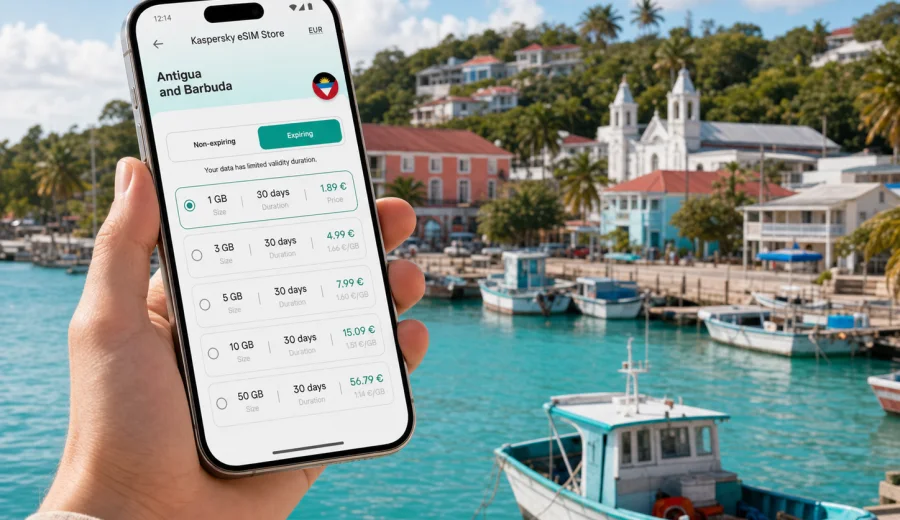
Parham eSIM guide: mobile connection and internet for your trip
Parham is a quiet harbor town on the northeast side of Antigua, useful for travelers who want a slower base, a marina stop, or a practical route across Antigua and Barbuda without staying only in the busier capital area. It is close enough to V. C. Bird International Airport for a short transfer, close enough to St. John's for errands and onward transport, and calm enough for travelers who prefer local streets, waterfront views, small guesthouses, and day trips by car.
That mix makes mobile connection planning important. In Parham, your phone is not just for sharing beach photos. It helps you confirm a transfer, navigate narrow roads, message a host, check marina details, compare routes to beaches, call a taxi through an app or messenger, and stay reachable during a business stopover. Public Wi-Fi can help in a hotel or cafe, but it is not a full travel plan. An eSIM gives you a way to prepare mobile internet before arrival, then use data on a compatible phone without looking for a physical SIM card after landing.
This guide focuses on Parham as a city destination: arrival, local movement, navigation, hotels, work trips, stopovers, and short routes from the town to other parts of Antigua. It also explains how to choose an eSIM data plan through Kaspersky eSIM Store in a way that fits a trip to Antigua and Barbuda.
Why eSIM matters in Parham
Parham is not a place where every travel task happens in one large commercial district. A typical day may include a transfer from the airport, a walk near the harbor, a drive toward nearby beaches, a stop in St. John's, and messages with a hotel, villa manager, marina contact, or tour operator. These are small actions, but they depend on steady mobile internet.
An eSIM is useful because you can prepare it before the trip. Instead of waiting until you find a shop or relying only on hotel Wi-Fi, you can choose a prepaid data plan, install the eSIM on a compatible device, and keep it ready for arrival. The exact experience depends on your phone, the selected plan, and local network conditions, so it is better to treat eSIM as a practical travel tool rather than a guarantee of identical signal in every corner.
For Parham, the strongest benefit is control. You know the data allowance, validity period, and destination before you travel. You can keep your primary SIM active for calls or messages if your device supports dual SIM settings, while the eSIM handles mobile data abroad.
Arrival: from the airport to Parham
Many visitors reach Parham after landing at V. C. Bird International Airport. The distance is manageable, but the first hour after arrival often has several small tasks: confirming pickup, checking the address, sending arrival updates, opening a map, and making sure your accommodation knows when you will arrive. This is where mobile internet is more useful than waiting for Wi-Fi.
If your eSIM is already installed, you can turn on the correct data line after landing, check that mobile data is assigned to the travel eSIM, and open navigation before leaving the airport area. If you are being collected by a driver, mobile internet helps with simple coordination: a photo of the pickup point, a message about baggage delay, or a quick call through an internet messenger.
For a rental car, data is even more important. Antigua's routes are not complicated, but road names, junctions, and small turnoffs can be easier with live maps. Downloading offline maps before travel is still a good backup, especially if you plan to explore the coast or return after dark.
Local movement around Parham
Parham itself is compact, but trips around it are often spread out. You may move between the harbor, guest accommodation, beaches, restaurants, supermarkets, and viewpoints. Some travelers use taxis and arranged transfers; others rent a car because it gives more flexibility for beaches and island routes. In both cases, a data connection reduces friction.
Use mobile internet in Parham for:
- checking the exact pickup point for a taxi or private transfer;
- sending your live location to a host or travel companion;
- confirming opening hours before driving across the island;
- using maps when road signs are limited or a route changes;
- checking weather before a boat trip, beach day, or outdoor meeting;
- keeping payment, booking, and travel documents accessible;
- messaging if a meeting point changes.
The point is not to be online every second. The point is to avoid losing time when a small travel detail depends on a working connection.
What to prepare before you leave
Parham works best when your phone setup is ready before the flight. You do not need to overcomplicate it, but a few checks make the first day easier.
| Before travel | Why it matters in Parham |
|---|---|
| Check that your phone supports eSIM | Some devices and carrier-locked phones cannot add a travel eSIM. |
| Install the eSIM while you still have stable Wi-Fi | Airport arrivals are not the best place to troubleshoot setup. |
| Save your accommodation address offline | Useful if mobile data takes a few minutes to settle after landing. |
| Download an offline map of Antigua | Good backup for coastal drives and low-signal spots. |
| Keep your primary SIM settings clear | You can decide which line handles calls, messages, and data. |
| Review the data allowance and validity | A short stopover and a week-long stay need different plans. |
Before buying any plan, check your device and make sure it supports eSIM. Also check whether your phone is locked to a carrier, because a locked phone may not accept a travel eSIM profile.
Choosing data for different Parham trips
The best data plan depends on how you use the city. Parham can be a quiet overnight base, a business stop with calls and email, a sailing or marina stop, or a starting point for drives around Antigua. Your usage pattern matters more than the number of calendar days.
For a short arrival or stopover, small data can be enough if you only need maps, messages, and check-in details. For a longer stay, choose more data if you plan to use ride coordination, cloud documents, photo backups, social apps, or video calls. If you work remotely from a guesthouse, do not assume mobile data should replace stable accommodation Wi-Fi, but it is useful as a backup when you need to join a call or send a document away from the room.
Practical data planning:
- Light use: maps, messaging, bookings, and occasional searches.
- Moderate use: navigation, photos, social apps, email, and regular browsing.
- Heavy use: video calls, hotspot use, cloud uploads, and streaming.
If your trip includes several islands or a wider Caribbean route, compare whether a country plan or a regional plan better fits the itinerary. For a Parham-focused stay, the Antigua and Barbuda destination plan is the natural starting point.
When to set up your eSIM for Parham
The safest setup sequence is simple: choose the destination, review the conditions, install the eSIM on Wi-Fi before travel, and activate mobile data when you are ready to use it. Some plans start validity when installed, and others start when the eSIM first connects to a supported network. Always read the plan details before you confirm the purchase.
Kaspersky eSIM Store is an app and website where you can choose, arrange, and activate an eSIM with a suitable data plan for mobile internet during an international trip. For Parham, you should select Antigua and Barbuda as the destination and compare the available data allowances and validity periods. When you are ready, you can prepare an eSIM data plan for Antigua and Barbuda before the trip and keep the setup ready for arrival.
That country landing page is the correct internal page for a city article about Parham because the eSIM plan is selected by destination country, not by a separate city page.
How to install and activate the eSIM
Installation is usually easiest before departure, when you have a stable Wi-Fi connection and time to read each step carefully. After purchase, follow the setup flow for your device. If you need detailed steps, use the Android installation guide or the iOS installation guide.
Basic sequence:
1. Confirm that your device supports eSIM and is not carrier-locked.
2. Choose Antigua and Barbuda as the destination.
3. Select the data allowance and validity period for your Parham itinerary.
4. Install the eSIM profile on Wi-Fi.
5. Keep your usual SIM settings unchanged unless you want to adjust calls or messages.
6. After landing, set the travel eSIM as the mobile data line.
7. If the plan instructions require it, enable data roaming for the eSIM line.
8. Test maps and messaging before leaving the airport or accommodation.
Do not delete the eSIM profile after activation unless you are sure the plan conditions allow reinstallation. Many travel eSIM profiles are designed for one installation on one device.
Parham scenarios where mobile internet helps
A quiet hotel or guesthouse stay
If you stay near Parham for a calm break, you may not need constant data. Still, mobile internet helps with arrival messages, map checks, dinner plans, weather, and day trips. It is also useful when accommodation Wi-Fi is limited to the room or common area.
A marina or sailing stop
Parham's harbor setting makes it relevant for travelers connected with boats, transfers, or coastal plans. In this scenario, mobile data helps you coordinate timing, share location, check weather, and keep documents accessible. If you rely on messaging apps, test them before leaving a stable connection.
A business visit
For a business trip, the main risk is not sightseeing inconvenience. It is missing a message, being late to a meeting, or losing access to email between the airport, Parham, and St. John's. Choose enough data for maps, email, authentication prompts, and backup messaging. Keep large uploads for Wi-Fi unless your plan and battery are ready for heavier use.
A short stopover
On a one-day or two-day stop, mobile internet is mostly about speed. You want to leave the airport, reach Parham, find food, confirm your return transfer, and keep boarding details close. A smaller plan can work if you avoid video and keep background app updates under control.
A road trip from Parham
If Parham is your base for beaches, viewpoints, and drives across Antigua, data becomes part of route planning. Use it for live maps, detours, restaurant checks, and contact with your accommodation. Keep an offline map as a backup because coastal and rural areas can behave differently from the airport and town zones.
Avoiding common connection problems
Most travel connection problems are not dramatic. They are small setup issues that become stressful because they happen at the airport or in a taxi. Prepare for them before Parham and you will handle the first day more calmly.
Checklist:
- eSIM profile installed before the flight;
- travel eSIM selected for mobile data after landing;
- data roaming enabled for the eSIM if required by the plan;
- primary SIM kept for calls and messages if needed;
- background app updates limited to reduce data use;
- offline map downloaded;
- passport, booking, and transfer details saved offline;
- battery pack packed for long arrival days.
If mobile data does not start immediately, wait a few minutes, restart the phone if needed, and recheck the device settings. Make sure you are not trying to use the primary SIM for data by mistake.
FAQ about eSIM in Parham
Can I use eSIM as soon as I land near Parham?
If the eSIM is installed, the plan is valid, your device is compatible, and the phone connects to a supported local network, you can use mobile data after you configure the travel eSIM as the data line. It may take a few minutes for service to register.
Do I need a separate city plan for Parham?
No. For a city trip to Parham, choose Antigua and Barbuda as the destination. The plan is selected at country level, while the article focus is the city and nearby travel scenarios.
Is eSIM enough for maps and taxis?
For most travelers, a travel eSIM data plan is useful for maps, messages, and pickup coordination. Keep offline maps and saved addresses as a backup, especially when driving outside town or moving between beaches.
Will an eSIM replace my normal phone number?
Usually no. Many travel eSIM plans focus on mobile data and do not include a regular phone number, voice calls, or SMS unless stated in the plan conditions. Use your primary SIM for your usual number if you need it and your device settings support that setup.
Should I install the eSIM before or after arrival?
Install it before arrival when you have Wi-Fi and time to follow the instructions. Then activate or assign it for mobile data according to the plan rules when you are ready to use it.
Final preparation before your Parham trip
Parham is a good place to keep travel simple: arrive from the airport, settle near the harbor or a quiet local base, and use the town as a calm point for Antigua routes. Mobile internet supports that rhythm. It helps with the small decisions that make a trip smoother: where to meet a driver, which road to take, whether a restaurant is open, how to contact a host, and when to leave for the airport.
Before you travel, check your phone, choose the right data allowance, install the eSIM on Wi-Fi, and save the details you may need offline. If you want to prepare mobile internet for the trip in advance, you can choose an eSIM data plan for your Parham trip to Antigua and Barbuda through Kaspersky eSIM Store and keep the setup ready for arrival.