Travel connectivity guide
Parika eSIM: Mobile Data for River and Road Trips
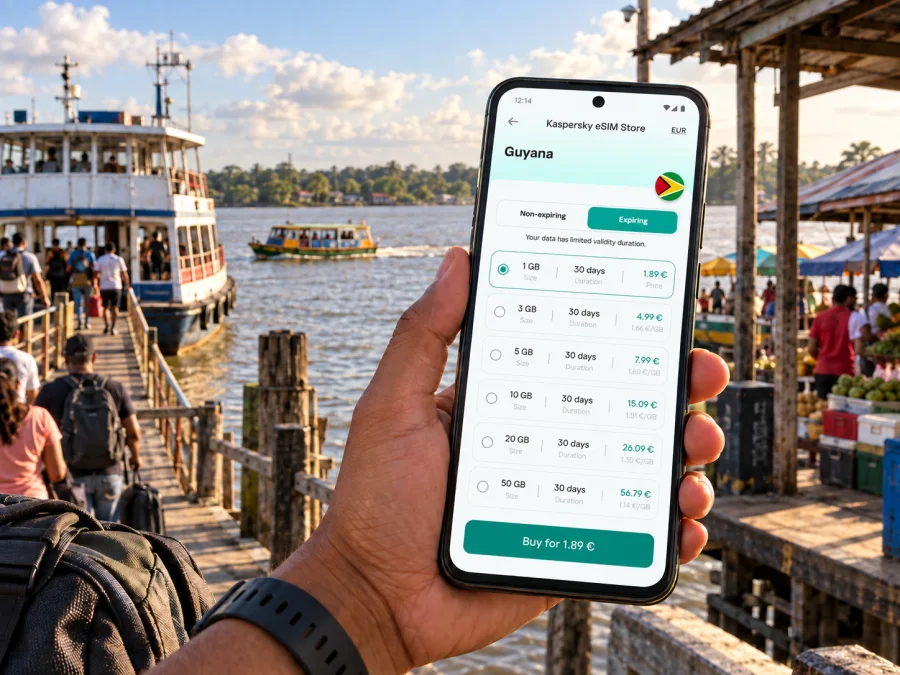
Parika eSIM: mobile connection and internet for your trip
Parika is a river port and market town in western Guyana, where an ordinary road journey can turn into a crossing of the Essequibo. For visitors, the town is a transfer point: arrive from Georgetown, reach the stelling for a ferry or water taxi, meet a driver, or stop near the market before continuing toward an island or the Essequibo Coast. Mobile internet helps with the joins between those parts of a trip: confirming a meeting point, checking a map, messaging your host, and keeping travel details at hand.
An eSIM can be useful when you want mobile data on a compatible phone without changing the physical SIM in it. Kaspersky eSIM Store is an app and website where travellers can choose, arrange, and activate an eSIM with a suitable data plan for an international trip. The right preparation for Parika is less about being online every minute and more about having the information you need at the moments when the route changes from road to river.
Why Parika is a useful place to plan around
Parika sits on the eastern side of the Essequibo River in Guyana’s Essequibo Islands–West Demerara region. Its riverside terminal, commonly called the stelling, connects road travel with services crossing the river. The town therefore has a different rhythm from a destination where visitors mainly move between central neighbourhoods by car: arrival times, boarding points, luggage, and onward transport all matter.
Many travellers reach Parika from Georgetown by road. From there, routes across the river lead toward places including Supenaam and the islands of Wakenaam and Leguan; services toward Bartica also make the town relevant to longer journeys inland. Routes, vessel types, boarding arrangements, and operating times are subject to change. Check current information with the relevant transport operator before setting out, and allow a margin if you have a hotel check-in, tour, or onward connection to meet.
Parika is not simply a place to pass through. The market area, roadside businesses, food stops, and riverside activity can make a short wait part of the visit. If you have time, keep your phone ready for practical navigation while also looking up from the screen: the river, boats, and working port are the reason this stop feels distinct.
The first arrival: road, town, and stelling
If you are travelling from Georgetown, arrange your ground transfer with a clear destination name. “Parika” may mean the town, market area, or ferry terminal in casual conversation, so confirm whether your driver is taking you to the stelling, your accommodation, or a particular meeting point. Save the address or pin in advance and keep the host’s phone number and message thread accessible.
At the terminal, use the signs and directions from staff to identify the correct departure point. Several services can leave from the same general area, and a boat going across the river is not interchangeable with one heading up-river. Ask the operator to confirm the destination, departure arrangement, fare, luggage handling, and expected return options before boarding. If you have a connection on the other bank, agree on the next meeting point with your driver or guide before your departure.
A compact arrival checklist:
- Save your accommodation address and the stelling location for offline reference.
- Keep your passport, payment method, and travel documents in a secure, reachable place.
- Confirm the destination with the driver and again with the boat operator.
- Keep a little time in reserve for traffic, queues, weather, and schedule changes.
- Send a short message when your road vehicle departs and when you board the boat.
Mobile data can help you send those updates, but it should not be your only copy of the plan. Screenshots, saved messages, and a note with the destination name are useful when the signal is inconsistent, the phone battery is low, or you are busy handling bags.
Getting around town without losing your bearings
A short visit may keep you near the market, main road, accommodation, and terminal, but a map pin may not show the right entrance or pickup side. Give drivers a named landmark as well as a pin, and say “stelling” when you mean the ferry terminal. Agree on the destination and fare before a ride; confirm a return pickup rather than assuming the same driver will be available.
In busy areas, secure your phone and step aside before checking directions. If travelling in a group, agree on a fallback meeting point in case someone loses signal. Before leaving one leg of the journey, prepare the next: save the destination, check its spelling, share the plan with the person meeting you, and keep an offline map if your app supports it. That small routine makes the road-to-river handoff easier to manage.
Using mobile internet for a river crossing
Before boarding, download or save your accommodation details, meeting instructions, and any confirmation you have received. Keep the onward destination and contact name in a note that opens offline. Do not rely on a live map to identify the correct boat; confirm the destination and boarding point with staff or the operator.
Use data for messages and updates around the crossing, such as telling a driver when you are delayed. Ask your host whether data access is dependable at the next stop instead of assuming conditions stay the same along the route. Exchange the full onward plan before leaving: who will meet you, where, and what to do if the timing changes. Put your phone away whenever boarding or conditions make using it unsafe.
Choose a data plan for the way you travel
Start with your itinerary and phone habits. A short transfer may call for messaging, maps, and booking details; several crossings may add video calls, photo sharing, or work apps. Estimate your use and compare the plan’s data allowance, validity, destination, and price.
| Travel pattern | Typical phone use | What to prepare |
|---|---|---|
| Brief transfer through Parika | Messages, map checks, pickup coordination | Save locations and confirmation details before departure |
| Overnight stay near town | Navigation, messages, browsing, occasional calls in apps | Estimate data for the full stay and check the plan’s validity |
| Work trip with meetings | Email, calendars, document access, messaging | Download important files and confirm your accommodation’s Wi-Fi |
| Several river journeys | Repeated map checks and changes to meeting plans | Keep a data margin and confirm each crossing locally |
| Day trip from Parika | Route coordination, photos, messages | Ask the guide about connectivity along the route |
The table is a planning guide, not a promise about network availability or a recommendation for a specific data quantity. Actual use depends on how you use your phone, and service conditions vary by location. Before purchasing, read the current plan details for Guyana in Kaspersky eSIM Store and choose an option that fits your dates and expected data use.
Stay connected while working or checking in
For a business trip, keep addresses, meeting contacts, and the day’s itinerary easy to open. Check your next pickup before leaving an office or accommodation, and send concise updates when plans change. Use stable Wi-Fi for video calls when available; reserve mobile data for messages, navigation, and essential tasks.
If you are coordinating colleagues, share one clear plan with the meeting place, time, contact, and fallback point. An overnight guest should ask the accommodation about check-in, the best approach from the road or stelling, and Wi-Fi availability. Save the host’s directions in advance: a map pin may lead to the property boundary rather than its entrance.
Short stopover: make the wait useful
Confirm the onward service before deciding whether you have time for food or a market visit. Keep bags with you and stay close to the departure point if the connection is tight. During a longer wait, ask staff how boarding works, then choose a nearby place to rest. If a crossing is delayed, get current information from the operator and message your host or pickup contact; do not guess at a revised arrival time.
- Tight connection: remain near the departure point.
- Longer wait: confirm boarding arrangements before stepping away.
- Changed plan: agree on a new meeting point with your driver or host.
Exploring from Parika
Parika can be a starting point for island visits and journeys toward the Essequibo Coast, and a transfer point for travel toward Bartica. Ask your guide or accommodation what has been arranged, when to arrive, and whether the return service needs separate confirmation. For a day trip, carry enough battery for navigation and communication, save return details before departure, and ask about connectivity along the route.
If travelling via Supenaam and continuing by road, treat the crossing and onward transfer as separate legs. Confirm where the next vehicle will meet you, whether it will wait, and what to do if the boat is late. Send an update before boarding when possible. Check current arrangements for Wakenaam, Leguan, Bartica, or other destinations: services and schedules can change, so avoid tight connections based only on an old timetable or map estimate.
eSIM preparation before you leave
Set up your travel plan while you have dependable internet and time to read the instructions. Confirm that your phone supports eSIM and is not locked to an operator; device support can differ by model and region, so check your device’s eSIM compatibility. Review the destination, data allowance, validity period, price, and activation guidance before choosing a plan.
Kaspersky eSIM Store is an app and website that helps travellers choose, arrange, and activate an eSIM with a suitable plan for mobile data abroad. A travel data eSIM does not provide a regular phone number, calls, or SMS unless the particular plan states otherwise. Messaging and voice apps can use data when the other person is online.
If installing before departure, follow the steps for your device: instructions for Android or instructions for iOS. Check which line is selected for mobile data. If you plan to activate later, confirm what starts the plan’s validity and what connection installation requires; details depend on the plan and device.
A simple setup checklist
Before travelling to Parika, confirm the phone is eSIM-compatible and not operator-locked; check that the plan covers Guyana and that its data, validity, price, and activation terms suit your trip. Follow the device instructions, keep the QR code or activation details accessible, and know which line is selected for mobile data. Save maps, lodging details, crossing information, and important contacts offline. Charge your phone and carry a power bank if available.
Avoid deleting an installed eSIM profile while troubleshooting unless the instructions tell you to; some profiles cannot be installed again after deletion. If the connection does not start, check plan status and data-line settings, allow a few minutes for registration, then follow the plan’s support guidance.
Practical scenarios
Arriving from Georgetown for a crossing: save the terminal location, confirm the destination with your driver, and message the person meeting you before boarding.
A departure is delayed: ask the operator for current information, then update your host or pickup contact with a realistic estimate.
Working overnight: download key files first, check whether your accommodation has Wi-Fi, and reserve data for essential tasks.
No data at the stelling: verify the selected data line and plan status, then retry after a short wait. Use saved contacts and ask staff for route guidance rather than guessing which boat to take.
Common questions about eSIM and Parika
Is an eSIM useful for a short stop in Parika?
It can be, if you need data for maps, messages, or pickup coordination and your phone supports eSIM. Save route details offline as a backup.
Does a travel eSIM replace my usual phone number?
No. It is for mobile internet and does not provide a regular number, calls, or SMS unless the selected plan specifically includes them. Your usual SIM may remain available under your operator’s terms.
Will mobile data work throughout a ferry journey?
Coverage can vary by place and conditions. Do not rely on continuous service while crossing; save directions and confirmations before boarding.
Can one plan cover Parika and onward travel?
Check the plan’s destination and terms. A plan may be intended for a country or region, while service availability depends on local conditions and the selected plan.
What should I save before leaving town?
Keep the accommodation address, crossing and onward transport details, host or guide contact, and map locations available offline.
Make your Parika travel plan easier to manage
Parika is a practical gateway between road and river travel in Guyana. A clear pickup plan, saved destination details, and a little flexibility make it easier to handle a crossing, a market stop, or an onward journey without relying on last-minute searches. Use mobile data for useful updates, and keep the key information accessible offline as well.
Before departure, check that your device is compatible, review the plan’s current terms, and install the eSIM when you have time to follow the instructions. When you are ready, choose a suitable eSIM plan for your trip to Guyana through Kaspersky eSIM Store, then keep your phone prepared for the road and river legs of your journey.


