
Travel connectivity guide
Paris eSIM: mobile internet for your trip
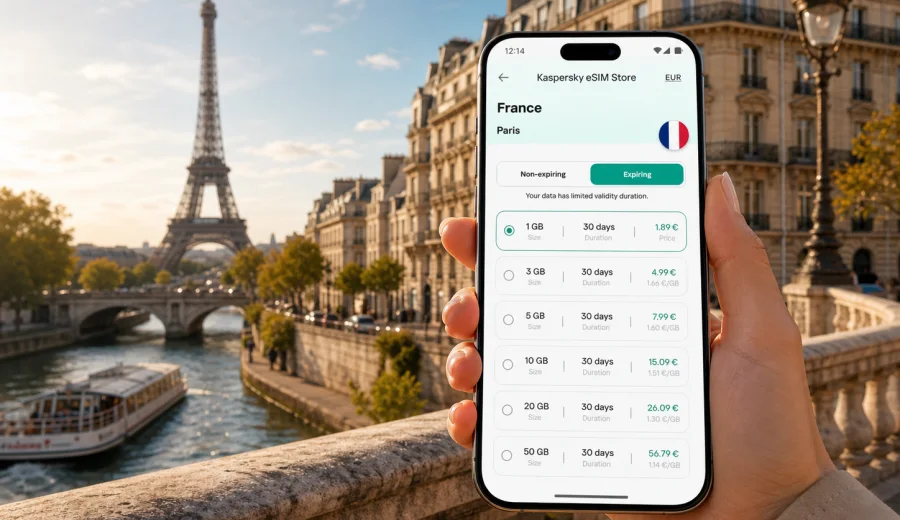
Paris eSIM: mobile connection and internet for your trip
Paris is a city where mobile internet becomes useful immediately. You may need a map at Charles de Gaulle or Orly, ride-hailing at the terminal, a train route across the RER and Metro network, a hotel confirmation, or a messaging app when plans change. An eSIM helps prepare mobile data for Paris without looking for a physical SIM card after arrival.
This guide is for travelers who want to stay online in Paris: tourists, business visitors, families, stopover travelers, and anyone combining the French capital with other places in France. The focus is the city scenario: airports, transport, hotels, day trips, work calls, bookings, navigation, and the small online tasks that keep a Paris trip moving.
Kaspersky eSIM Store is an app and website where you can choose and activate an eSIM with a suitable plan for mobile internet during an international trip. Before choosing any plan, check the destination, data allowance, validity period, activation rules, and device compatibility.
Why eSIM is useful in Paris
Paris rewards planning, but it also changes quickly during the day. A museum time slot may need to be shown at the entrance, a Metro line can be interrupted, a restaurant may ask for confirmation, and a taxi pickup point at a major station can be hard to find without live location sharing. Mobile internet helps you handle these moments without depending only on hotel Wi-Fi or public hotspots.
An eSIM is useful in Paris because many common trip tasks happen outdoors or in transit:
- finding the right RER train from the airport;
- checking Metro, bus, tram, and walking routes;
- using maps in dense districts such as Le Marais, Saint-Germain-des-Pres, Opera, and Montmartre;
- translating menus, signs, and short messages;
- opening hotel, apartment, train, and attraction bookings;
- coordinating with family, colleagues, guides, or drivers;
- using messaging and calling apps through mobile data;
- checking day-trip routes to Versailles, Disneyland Paris, Fontainebleau, or nearby cities.
The practical advantage is that mobile data can be ready before you need it. You do not have to start your first hour in Paris by searching for a shop, comparing physical SIM cards, or relying on the first open Wi-Fi network you can find.
Paris arrival scenarios where mobile data helps
Paris has several arrival patterns, and each one creates a slightly different connectivity need.
| Arrival point | Typical online task | Why preparation helps |
|---|---|---|
| Charles de Gaulle Airport | RER B, taxi pickup, hotel route, messages after landing | The airport is large, and transfer decisions often happen before you reach the city |
| Orly Airport | Orlyval, tram, taxi, ride-hailing, map checks | Several routes can work depending on the hotel district |
| Gare du Nord | Eurostar, Thalys, RER, Metro, taxi coordination | The station is busy, and live directions reduce confusion |
| Gare de Lyon | onward train, Metro transfer, hotel check-in | Useful for travelers arriving from southern or eastern France |
| Gare Montparnasse | routes toward Left Bank hotels, taxis, buses | Helpful when moving with luggage through a dense area |
| Road arrival | parking apps, hotel access, low-emission zone checks | Mobile data supports navigation and last-mile planning |
If Paris is your first stop in France, prepare the eSIM before departure while you still have stable home internet. If Paris is part of a longer route, choose a plan that matches the full itinerary.
How to estimate data for a Paris trip
Data use depends on how you travel, not just how many days you stay. A traveler who downloads offline maps, uses hotel Wi-Fi for video, and checks messages lightly will use much less data than someone who uploads photos, works from cafes, streams video, and uses live navigation all day.
Use this as a planning guide:
| Trip style | Typical Paris behavior | Plan choice to consider |
|---|---|---|
| Weekend city break | maps, messages, tickets, restaurant searches | a smaller data allowance with validity covering all travel days |
| Museum and sightseeing trip | maps, audio guides, photo uploads, booking pages | moderate data allowance, especially if you share media often |
| Business trip | email, maps, meeting apps, hotspot for laptop in short sessions | enough data for work tasks plus a buffer |
| Family trip | multiple navigation checks, messaging, attraction tickets, occasional video for children | a larger allowance or separate plans for key devices |
| Remote-work stay | video calls, cloud documents, hotspot use | a higher allowance and careful checking of hotspot rules |
| Stopover | airport route, hotel access, messaging, transport updates | short validity and enough data for arrival and departure |
For most visitors, the largest avoidable data drain is background activity. Before you travel, disable automatic cloud backup on mobile data, pause app updates, download offline maps for central Paris, and save booking PDFs in your wallet or files app. Then mobile data can be used for live tasks rather than silent downloads.
Choosing an eSIM plan for Paris
For a Paris city article, the right country context is France. Paris does not require a separate city-only plan if the plan is designed for France and the selected conditions match your trip. What matters is whether the plan covers the destination, how much data it includes, how long it remains valid, and when the validity period starts.
When comparing options, check five details:
1. Destination: the plan should be suitable for France if your trip is centered on Paris.
2. Validity: the plan should cover your full stay, including arrival and departure days.
3. Data allowance: choose enough data for maps, messages, tickets, and work if needed.
4. Activation rules: check whether the plan starts after installation, after first connection, or according to specific terms.
5. Device readiness: make sure your phone supports eSIM and is not locked to a carrier.
If Paris is only one stop in a wider itinerary, think beyond the city. A France plan can suit Paris plus Lyon, Nice, Bordeaux, Marseille, or Strasbourg. A regional option may be relevant if you are crossing borders by train, for example from Paris to Brussels, Amsterdam, Geneva, or Luxembourg. Always compare the actual destination list and terms before choosing.
When to install and activate your eSIM
The calmest approach is to choose your plan before travel and install the eSIM while you still have reliable Wi-Fi. Installation usually needs an internet connection because the eSIM profile has to be added to the device. Activation and first connection depend on the plan terms and the local network conditions after arrival.
A practical sequence:
1. Check that your phone supports eSIM and is not carrier-locked.
2. Choose France as the destination for a Paris-focused trip.
3. Compare data allowance and validity period against your itinerary.
4. Install the eSIM before departure if the plan terms allow it.
5. Keep your primary SIM available for calls or SMS if you need it.
6. After arrival, select the eSIM profile for mobile data.
7. Enable data roaming for the eSIM if the plan instructions require it.
8. Test maps and messaging before leaving the airport or station.
If you prefer to install after landing, make sure you have Wi-Fi at the airport, hotel, or station. Installing under time pressure is rarely ideal, especially if you are tired, moving with luggage, or trying to meet someone.
A practical mid-trip decision point
By the time you have planned your arrival route, hotel area, and expected data use, you can choose a plan more confidently. In Kaspersky eSIM Store, you can view eSIM plan options for a trip to France and compare them against your Paris itinerary: number of days, expected navigation use, photo sharing, business tasks, and any day trips outside the city.
This is also the right moment to decide whether one phone needs data or whether several travelers should prepare their own eSIM plans. A shared hotspot can be convenient, but it drains the main phone battery and depends on the plan terms. For groups, separate data access on key devices often makes meeting points, split activities, and emergency coordination easier.
How to install an eSIM for a Paris trip
Installation steps differ slightly by device, but the general flow is simple: choose a plan, add the eSIM profile, select it for mobile data, and follow the instructions shown on your device. If you need device-specific guidance, use the Android installation instructions or the iOS installation instructions.
Before you begin, use Wi-Fi and keep the QR code or profile details available. Do not delete an installed eSIM profile unless you are sure you no longer need it; in many cases, an eSIM cannot simply be moved to another device after activation. If mobile data does not start immediately, wait a few minutes, check that the eSIM is selected for cellular data, and confirm whether data roaming needs to be enabled for that eSIM profile.
Device compatibility checklist
Not every phone supports eSIM, and some models differ by country of sale or carrier lock status. Before arranging a plan, check your device and confirm that it can add an eSIM profile.
Use this checklist before your Paris trip:
- Your smartphone or tablet supports eSIM.
- The device is not locked to one carrier.
- The operating system is up to date enough to manage eSIM profiles.
- You have Wi-Fi available for installation.
- You understand which SIM line will handle mobile data.
- Your primary SIM remains available if you need normal calls or SMS.
- You know whether the selected plan allows hotspot use.
An eSIM used through Kaspersky eSIM Store is intended for mobile internet in travel. It does not automatically include a local phone number, standard voice calls, or SMS unless the terms of a specific plan say otherwise. For calls and messages, many travelers use internet-based apps over mobile data.
Paris transport and local movement
Paris transport is extensive, but the best route can change by time of day, station closures, luggage, weather, and walking distance. Mobile data helps you compare train, bus, taxi, ride-hailing, and walking options before leaving the airport, station, hotel, or venue.
It is also useful around busy places such as the Eiffel Tower, the Louvre, Gare du Nord, La Defense, and major event venues. Meeting points can be crowded, entrances can be confusing, and late-night routes can change. Paris is walkable, but a live map often saves time when bridges, construction, station exits, and transfers are involved.
Hotels, apartments, business trips, and stopovers
Hotel Wi-Fi helps after check-in, but many online tasks happen before you reach the room: opening a door code, calling reception, finding the correct entrance, or changing a meeting route. For apartments, mobile data can matter even more because check-in instructions are often digital.
Business travelers should plan for email, calendar changes, messaging, and short backup hotspot sessions if venue Wi-Fi is unavailable. A Paris stopover can also be data-intensive because you may need airport maps, luggage storage details, tickets, a digital boarding pass, and a route back to the airport.
Day trips and preparation checklist
Many Paris trips include Versailles, Disneyland Paris, Giverny, Fontainebleau, Reims, Chartres, Lille, or Rouen. A France-focused plan can be useful because navigation and ticket checks continue beyond central Paris. If you cross a border by train, check the destination list in the selected plan before relying on it outside France.
Before departure:
- confirm your phone supports eSIM;
- choose a plan that covers France and your full travel dates;
- install the eSIM on Wi-Fi if the terms allow it;
- save hotel, train, flight, and ticket confirmations offline;
- download an offline Paris map as a backup;
- disable automatic cloud backup and app updates on mobile data;
- pack a power bank if you will use maps and camera all day.
On arrival, select the eSIM for mobile data, check whether data roaming is required for that profile, and test maps and messaging before leaving the terminal or station.
FAQ about eSIM in Paris
Is eSIM useful for a first trip to Paris?
Yes. eSIM can be useful for navigation, transport, bookings, messaging, translation, and day-trip planning, especially during the first hours after arrival.
Should I choose a Paris or France eSIM plan?
For a Paris-focused trip, choose a plan suitable for France. The plan should match your full itinerary, including any day trips outside the city.
Can I install eSIM before flying to Paris?
Often, yes, if the plan terms allow it. Installation before departure is usually easier because you can use stable Wi-Fi. Check when the validity period starts.
What if my eSIM does not connect immediately?
Check that the eSIM profile is installed, selected for mobile data, and allowed to use data roaming if required. Connection can take a few minutes and depends on device settings and local network conditions.
Choose an eSIM plan for your Paris trip
Paris is easier when mobile data is ready for airport transfer, Metro changes, hotel check-in, maps, tickets, messages, work updates, and day trips. Kaspersky eSIM Store helps you choose, arrange, and activate an eSIM with a suitable plan for mobile internet in your trip to France.
Before you travel, check device compatibility, compare data allowance and validity, and keep installation instructions available. When you are ready, choose an eSIM plan for your trip to Paris and France.