Travel connectivity guide
Pemba eSIM: Mobile Internet & Travel Tips
Pemba eSIM: Mobile Connection and Internet for a City Stay
Pemba is a coastal city in northern Mozambique, where a visit may combine an airport arrival, meetings around town, time by Pemba Bay and a stay near Wimbe Beach. Those plans often involve several short journeys rather than one fixed route: checking a hotel address, arranging a transfer, finding a restaurant, confirming a meeting point or sending a message after landing. A mobile connection can make those small decisions easier to manage as you move around the city.
An eSIM is a digital SIM profile that you add to a compatible device. For a trip to Pemba, it can be a practical way to prepare mobile internet without removing the physical SIM you use at home. You can use data for maps, messaging, email and online bookings, subject to the selected tariff and the local network conditions. It does not automatically provide a regular phone number, voice calls or SMS; check the tariff details before you rely on any of those services.
Why mobile internet helps in Pemba
Pemba is spread between its urban centre, the bay-facing areas and the beach side of the peninsula. Your day may begin near Pemba Airport, continue to a hotel or office, and end around Wimbe. That makes connectivity useful for coordinating each leg, especially when an address is unfamiliar or plans change.
Mobile data is most useful for specific tasks:
- At arrival: open a saved accommodation address, message the person meeting you, or check details sent by your host.
- On the way into town: follow a route while you confirm the destination and agree where a driver should stop.
- Between the centre and Wimbe: compare the route with your plans and let a hotel or colleague know if your timing changes.
- During a workday: check email, join a call where the connection allows, share documents and confirm appointments.
- Around the bay: keep practical details, reservations and contact information accessible while you are away from your accommodation.
Coverage, speed and availability vary by location, device, network and local conditions. A map may also be incomplete or out of date. Save key details offline and treat mobile internet as a useful planning aid rather than a substitute for confirming transport and opening times directly.
Arriving at Pemba Airport
Pemba Airport is the city’s air gateway. Before travelling, confirm your flight and arrival arrangements with your airline or host; schedules can change. Once you land, a working data connection can help you retrieve a booking message, share your arrival time and locate the address for your next stop.
A calm arrival routine is more useful than trying to solve everything at the airport door:
- Keep your accommodation name, full address and a contact number available offline.
- Confirm who is meeting you and the agreed pickup point before leaving the terminal area.
- Open the route to your destination while you have a moment to check the address carefully.
- Share your expected arrival time with your host or colleague.
- If a map pin and written address do not match, pause and confirm which one is correct before setting off.
Do not assume that a driver will automatically have access to your booking details or live location. A short message with the hotel name and a recognizable meeting point can prevent confusion. If your itinerary includes a domestic connection, keep the onward flight information and contact details available separately from your email inbox.
Moving between the centre, the port and Wimbe
Pemba’s character changes with the part of town you are visiting. The central area is useful for everyday errands and appointments; the port and bay form a working coastal setting; Wimbe is the better-known beach area and a common base for visitors. These are not interchangeable addresses. When booking accommodation or arranging a meeting, check which area the listing refers to and how far it is from the places on your schedule.
| Part of your day | What to confirm | How a connection can help |
|---|---|---|
| Airport pickup | Exact terminal meeting point and destination address | Send updates if arrival timing changes |
| Town-centre errand | Street name, entrance and opening details | Check a map and contact the person you are meeting |
| Port-side visit | Gate or office instructions from your host | Retrieve messages and coordinate a pickup |
| Wimbe stay | Property location and arrival arrangements | Share your expected arrival and find nearby services |
| Evening return | Agreed transport and drop-off point | Message your accommodation if plans shift |
Transport options and journey times depend on the day, route and arrangements available to you. Confirm the ride and fare before departure, and do not rely on a map estimate as a promise of travel time. If you are carrying luggage or travelling after dark, arranging the next leg through your hotel or local contact can make the plan clearer.
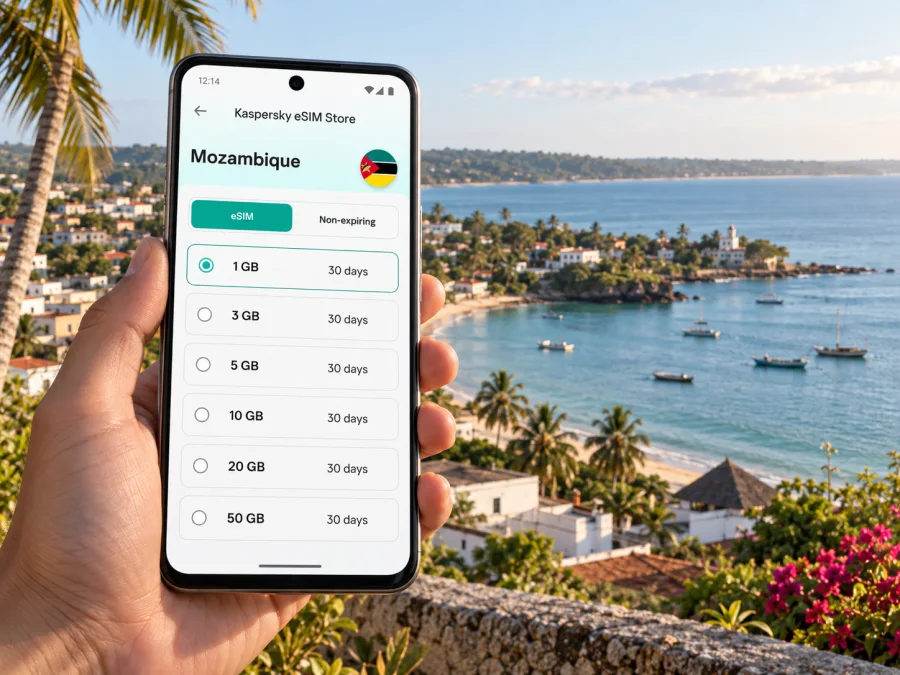
For a stay that crosses several parts of Pemba, you can choose an eSIM tariff for travel in Mozambique before departure. Kaspersky eSIM Store is an app and website where you can select, arrange and activate an eSIM with a suitable tariff for mobile internet abroad. Review the destination, data allowance, validity period, price and activation terms shown for the specific option before you decide.
Choosing where to stay and planning around it
In Pemba, the location of your accommodation shapes how you organize the day. A base near Wimbe may suit a beach-focused visit, while a central address can make town errands or appointments more convenient. If work takes you to the port or another part of the city, compare the accommodation location with the actual meeting address rather than choosing by area name alone.
Before confirming a booking, check:
- the complete street address and a map pin;
- whether the property is in the centre, near Wimbe or elsewhere on the peninsula;
- how arrival and late check-in are handled;
- whether the property can help arrange a transfer;
- the distance to your first appointment or planned activity;
- whether Wi-Fi is available and where it works within the property.
A hotel’s Wi-Fi can be useful for larger downloads or calls, but it may not be available during the trip between locations. Mobile data gives you another way to access messages and maps while moving, if service is available. For important work, download documents in advance and keep meeting details in a calendar or note as well as in email.
If your accommodation is near the coast, remember that “near the beach” does not tell you how convenient it is for a morning meeting elsewhere in town. Conversely, a central hotel may not be the most direct base for a relaxed day at Wimbe. Mark your principal destinations before booking and compare the actual addresses. A simple map with the airport, accommodation, first appointment and beach area can reveal whether you are planning several crossings of the city or a compact itinerary.
Navigation that works when plans change
Maps are useful for orientation in Pemba, but they should be combined with local confirmation. Road names, pins and property entrances do not always line up exactly, and the shortest displayed route may not be the one your driver uses. Use navigation to understand direction and approximate distance, then confirm the pickup point with the person who knows the location.
A practical navigation setup:
- Save your accommodation and key appointments as starred places.
- Take a screenshot of the route from the airport to your first stop.
- Keep the written address and a nearby landmark together in one note.
- Download an offline map for the parts of Pemba you expect to visit, if your map app supports it.
- Share the destination name as well as a pin; a pin alone can be misplaced.
- Recheck the route before leaving a hotel, especially after a meeting or meal runs late.
When walking, stay attentive to traffic, weather and your surroundings instead of looking at the screen continuously. Check the next turn while stopped, then put the phone away. If you lose data, a saved map, written address and a local contact can help you continue without repeatedly searching for a public Wi-Fi signal.
A short visit, a work trip or a longer stay
The right data allowance depends more on how you use your phone than on the number of places on your itinerary. A short stopover with messaging and occasional map checks is different from several days of video calls, document sharing or cloud backups. Think through your likely usage before choosing a tariff.
| Travel pattern | Likely data use | A sensible preparation |
|---|---|---|
| Short stopover | Messages, pickup coordination and a few map searches | Save flight, hotel and onward-journey details offline |
| City break | Navigation, restaurant searches, photos and messaging | Check the tariff validity against the full visit |
| Business visit | Email, messaging, documents and possible calls | Download work files and limit automatic backups |
| Beach and town combination | Repeated route checks and coordination between areas | Keep addresses for Wimbe and town appointments together |
| Extended stay | Regular browsing, calls and media use | Estimate daily use and review top-up or validity terms |
These are planning examples, not promises about data consumption. Video, automatic photo uploads, app updates and hotspot use can use data quickly. You can reduce avoidable use by updating apps before departure, disabling automatic cloud uploads on mobile data and choosing Wi-Fi for large files when you trust the network.
Set up an eSIM before you need it
Preparing the eSIM before travelling can reduce the number of tasks you have to manage after landing. Start with your device: confirm that it supports eSIM and is not restricted by a carrier lock. Keep access to a reliable Wi-Fi connection during setup, and follow the activation instructions for the selected tariff. Installation steps differ between device models and operating system versions.
Kaspersky eSIM Store helps you choose, arrange and activate an eSIM with a suitable tariff for a trip abroad. Before completing the selection, check that Mozambique is the destination, then compare the tariff’s data allowance, validity, price and activation conditions. The tariff is for mobile data; it should not be treated as a local voice number or SMS service unless its terms explicitly say otherwise.
A sensible setup sequence is:
- Check eSIM support and any carrier restriction on your phone. Check whether your device is compatible.
- Choose the Mozambique destination and review the tariff details, including validity and activation timing.
- Complete the purchase and install the profile while you have stable internet access.
- Label the eSIM clearly, such as “Mozambique data,” so you can distinguish it from your home line.
- Before departure, read the device-specific steps: Android eSIM installation instructions and iOS eSIM installation instructions.
- On arrival, select the travel eSIM for mobile data and check the activation settings described in the tariff instructions. Some devices or tariffs may require data roaming to be enabled for that eSIM.
Do not delete an eSIM profile to troubleshoot unless the relevant instructions or support team tells you to do so. Reinstallation may not be possible under every tariff. Keep the purchase confirmation and support details somewhere you can access while travelling.
Frequently asked questions
Is an eSIM useful for a visit focused on Pemba?
It can be useful if you expect to use maps, messaging, email or online bookings while moving between the airport, town centre and Wimbe. The value depends on your itinerary, device and tariff terms. If you only need occasional access, plan around accommodation Wi-Fi and keep key details offline.
Does an eSIM provide a local phone number?
A data-focused eSIM does not necessarily include a phone number, regular voice calls or SMS. Read the details of the selected tariff. You can use internet messaging or calling apps when data is available, while calls through your usual line remain subject to your home operator’s terms.
Can I rely only on online maps in Pemba?
It is better to keep a backup. Save important places and, where possible, an offline map. Carry the written address and confirm a meeting or pickup point with your host or driver. Map data and mobile coverage can vary.
How should I choose a tariff for a short stay?
Estimate the days you will use data and the activities you expect to do. Compare the allowance, validity, destination and activation terms shown for the tariff. Messaging and occasional navigation differ from video calls or hotspot use, so use your own recent phone data as a guide.
Pemba is easier to navigate when each leg is planned around a real address: the airport, your accommodation, an appointment, the port or Wimbe. An eSIM can make the online parts of that plan more convenient, while offline notes and local confirmation cover the moments when a signal or map is uncertain.
Prepare your eSIM for Mozambique
If an eSIM fits your device and travel plans, use Kaspersky eSIM Store to choose and arrange a suitable tariff for mobile internet abroad. Review the data allowance, validity and activation conditions, then install the eSIM using the instructions for your phone. Choose an eSIM tariff for your trip to Mozambique and keep your Pemba addresses and arrival details saved for offline access.


