
Travel connectivity guide
Pereira eSIM for mobile internet in Colombia
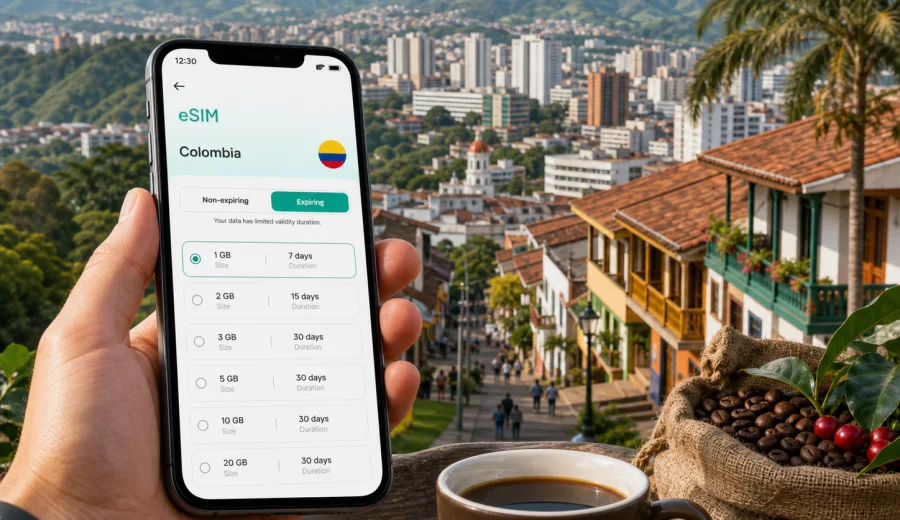
Pereira eSIM: mobile connection and internet for a smarter city trip
Pereira is one of the most useful gateways to Colombia's Coffee Cultural Landscape. Travelers use the city for coffee farm visits, regional business, family trips, medical appointments, university meetings, and road connections to Salento, Santa Rosa de Cabal, Manizales, and Armenia. In all these scenarios, mobile internet is not only for posting photos. It helps you find your hotel, call a ride, check a reservation, translate a message, open a ticket, and adjust plans when mountain weather or traffic changes.
An eSIM can make the first day in Pereira simpler because you do not need to look for a physical SIM card after landing. With a compatible phone, you can prepare a digital SIM before the trip, install it using the provided setup flow, and use a mobile data plan when you are ready to go online. Kaspersky eSIM Store is an app and website where you can quickly choose, arrange, and activate an eSIM with a suitable mobile data plan for an international trip.
This guide is about Pereira, not a general Colombia itinerary. Colombia is the destination you choose for the data plan, but the practical questions are city-based: arrival at Matecana International Airport, local movement, hotels, business days, stopovers, and short trips from Pereira into the coffee region.
Why mobile internet matters in Pereira
Pereira is compact compared with larger Colombian cities, but travel inside and around it is not always linear. Hotels and apartments may be in Circunvalar, Pinares, the city center, Cerritos, the airport area, Dosquebradas, or on a road corridor toward Santa Rosa de Cabal. A short-looking route can involve hills, bridges, traffic, or a cross-municipality transfer.
Mobile data is useful for ordinary moments that quickly become stressful without a connection:
- confirming your hotel address after landing;
- checking the pickup point for a taxi or ride-hailing service;
- sharing your live location with a host, colleague, or driver;
- opening boarding passes, hotel confirmations, and payment alerts;
- translating practical messages in Spanish;
- comparing routes between Pereira, Dosquebradas, Santa Rosa de Cabal, Salento, and Armenia;
- checking rain forecasts before a coffee farm visit or thermal-springs trip.
Pereira also works well as a base city. You may sleep in Pereira but spend the day in another town, or arrive for a meeting and continue to a coffee experience the next morning. In those mixed trips, mobile internet helps you avoid guessing where to go next.
Arrival at Matecana International Airport
Many visitors first need mobile data at Matecana International Airport. The airport is close to the city, so the transfer can be short, but arrival is exactly when connectivity matters. You may need to message a driver, check your hotel's neighborhood, confirm a vehicle plate, or see whether the route goes toward Pereira, Dosquebradas, Cerritos, or another nearby area.
Before the flight, save your essentials offline:
- hotel name and full address;
- booking number;
- the address of your first meeting or event;
- passport and insurance copies in secure storage;
- emergency contacts;
- eSIM setup instructions or QR code, if supplied separately.
Then use mobile data for the details that can change: traffic, pickup instructions, route time, and messages from your hotel or host. If you plan to install your eSIM before departure, do it on stable Wi-Fi. Activation and plan validity depend on the selected plan, so read the conditions before you begin using data.
Where visitors usually need data
The need for internet in Pereira changes by neighborhood and purpose. A leisure traveler may use maps and messaging; a business traveler may need calendar changes and document access; a family may rely on ride coordination and shared locations.
| Area or scenario | Why mobile data helps |
|---|---|
| Matecana International Airport | Arrival messages, ride pickup, hotel route, boarding updates |
| Avenida Circunvalar and Pinares | Restaurants, hotels, meetings, evening transport |
| City center and Plaza de Bolivar | Walking routes, local errands, translation, payments |
| Cerritos and Ukumari corridor | Family trips, longer rides, route checks, ticket details |
| Dosquebradas | Meetings, shopping, family visits, cross-city travel |
| Santa Rosa de Cabal road | Thermal-springs trips, weather checks, return transport |
| Bus terminal | Regional tickets, transfer timing, route updates |
For short stays, the most important uses are maps, ride ordering, and messaging. For longer stays, data becomes part of the daily rhythm: restaurant searches, appointment changes, payment confirmations, and evening planning.
eSIM, roaming, local SIM, or public Wi-Fi?
There is no single correct option for every traveler. The right setup depends on your device, trip length, and tolerance for errands after arrival.
| Option | Best for | Practical note |
|---|---|---|
| eSIM data plan | Travelers with compatible phones who want to prepare before arrival | You install digitally and keep your physical SIM in place if your phone supports that setup |
| Standard roaming | Very short trips where convenience matters more than cost control | Check your home operator's rates before using data abroad |
| Local physical SIM | Longer stays or travelers who need a local number | Usually requires time, a shop visit, and local purchase conditions |
| Public Wi-Fi | Light browsing in hotels, cafes, or the airport | It is not dependable while moving around the city |
A travel eSIM is especially practical in Pereira when you expect to move between neighborhoods or take day trips. You can keep your usual SIM for your home number and use the eSIM for mobile data if your device allows it. Many travel eSIM plans are data-only; standard voice calls, SMS, and a local phone number are not included unless the selected plan conditions say so. For calls and messages, travelers often use internet-based apps.
How much data may you need?
Data use depends more on behavior than on the city itself. Pereira can be a light-data destination if you mainly use messaging and maps, or a heavier one if you upload videos, work on video calls, and use your phone as a hotspot.
| Trip style | Typical use | Data planning idea |
|---|---|---|
| 1-2 day stopover | Messaging, maps, rides, check-ins | A smaller package may be enough if you avoid streaming |
| 3-5 day city stay | Navigation, searches, calls over apps, light social media | Choose enough data for daily movement and route changes |
| Coffee-region itinerary | Maps, photos, cloud uploads, guide coordination | Consider extra data for longer road days and photo sharing |
| Business trip | Email, chat, documents, occasional video calls | Pick more data than a leisure traveler and keep Wi-Fi as backup |
| Family travel | Shared planning, rides, photos, hotspot use | Usage can rise quickly if several people rely on one phone |
The biggest data drains are video calls, streaming, automatic cloud backups, app updates, and high-resolution uploads. Before leaving for Pereira, turn off automatic app updates on mobile data and set photo backup to Wi-Fi only. If you use hotspot mode for a laptop, monitor usage carefully because laptops can consume data much faster than phones.
When to install and activate your eSIM
The safest workflow is to prepare the eSIM before travel and activate mobile data at the right time according to the selected plan's rules. Some plans begin validity when installed; others begin when they first connect to a supported network. Always check the plan conditions.
A practical sequence:
1. Check that your phone supports eSIM and is not locked to one operator.
2. Choose Colombia as the destination for your Pereira trip.
3. Select a data package by traffic volume and validity period.
4. Install the eSIM while you still have stable Wi-Fi.
5. Label it clearly, for example "Colombia data" or "Pereira trip".
6. When you are ready to use mobile data abroad, set the eSIM as the mobile data line.
7. If the instructions require data roaming for the eSIM, enable it only for that line.
If you are preparing through Kaspersky eSIM Store, you can choose an eSIM data plan for Colombia before your Pereira trip and review the available data volumes and validity periods. This is the useful planning point for the country landing page because the city trip still uses Colombia as the destination for plan selection.
Device compatibility before you buy
Not every phone supports eSIM, and some phones that support eSIM may still be restricted by an operator lock. Do not leave this check until you are at the airport or already in a taxi.
Before buying a plan, confirm that:
- your exact phone model supports eSIM;
- the device is not locked to one mobile operator;
- you have stable internet for installation;
- your phone software is current enough for eSIM setup;
- you understand whether the eSIM can be reinstalled or transferred under the selected conditions.
If you are unsure, use the internal compatibility checker before purchase: check your device. This is especially useful for work phones, operator-contract phones, and device models whose eSIM support varies by region.
Installing eSIM for Pereira travel
Install the eSIM before you need it. Home Wi-Fi is usually the calmest option, but hotel or airport Wi-Fi can also work if the connection is stable. If your setup uses a QR code, keep it available on another screen or device if required. If the setup is app-based, follow the app steps and do not delete the eSIM profile unless the instructions say it can be restored.
For setup details, use the appropriate internal guide: Android installation instructions or iOS installation instructions. Exact setting names can vary by phone and operating system version, but the core idea is the same: add the eSIM profile, choose it for mobile data, and apply the settings required by the selected plan.
After installation, check which line handles mobile data. This matters if your home SIM remains active for calls or messages. Clear labels reduce the risk of using standard roaming by accident.
Getting around Pereira with mobile data
Pereira is a city where mobile internet saves time in small, practical ways. A hotel may be near a restaurant on the map but separated by a steep street. A meeting may be across the viaduct in Dosquebradas. A coffee tour may start early, before you can ask several people for directions.
Use mobile data for:
- checking pickup points before ordering a ride;
- comparing routes through Pereira and Dosquebradas;
- saving your hotel address in Spanish;
- choosing between car, bus, and walking routes;
- finding pharmacies, supermarkets, ATMs, and restaurants near your route;
- sharing trip progress with someone waiting for you.
If you use regional buses, keep screenshots of tickets and destination details. Mobile data is useful for changes, but screenshots still help when signal is weak or your battery is low.
Hotels, apartments, and longer stays
Hotels in Pereira often provide Wi-Fi, but mobile data remains useful. You may arrive before check-in, leave luggage, and go straight to a meeting. You may stay in an apartment where the entry instructions are sent through a booking app. You may need to message reception while outside the building or order transport late in the evening.
For hotel and apartment stays, mobile internet helps you:
- open booking apps at reception;
- check the exact entrance if the building has several access points;
- use translation apps for practical questions;
- keep work chat available when Wi-Fi is slow;
- call a ride without waiting in the lobby;
- check restaurants and supermarkets after a late arrival.
For longer stays, review your data balance every few days. It is easy to spend more data than expected when your phone quietly backs up photos or updates apps while you are resting at the hotel.
Business trips and working days
Pereira is a regional business center as well as a travel base. Visitors come for meetings in commerce, health services, education, logistics, agriculture, and coffee-related industries. A business trip usually has less tolerance for connectivity gaps because calendars, documents, messages, and rides may change during the day.
For business travel, choose a more conservative data package than you would for a weekend. Video calls, file downloads, cloud documents, and laptop hotspot use can consume data quickly. Keep large downloads for hotel or office Wi-Fi and reserve mobile data for movement: rides, messages, meeting updates, and urgent access.
A simple business checklist:
- download key documents before the flight;
- save meeting locations in your map app;
- confirm whether meetings are in Pereira or Dosquebradas;
- label your eSIM before landing;
- carry a power bank for long days;
- monitor data after video calls or hotspot sessions.
If you travel with a company phone, confirm eSIM support and operator-lock status before buying a plan. Some managed devices restrict mobile profile installation even when the hardware supports eSIM.
Stopovers and trips from Pereira
Some travelers use Pereira as a connection point rather than a final destination. A stopover may include one night near the airport, a quick meeting, or a transfer to Salento, Filandia, Santa Rosa de Cabal, Armenia, or Manizales. In that case, the value of mobile internet is speed and certainty.
For short stays, prioritize fast airport-to-hotel navigation, reliable driver messages, access to transfer details, and battery saving. Public Wi-Fi is least convenient when you are moving quickly because you may not spend enough time in one cafe or lobby to rely on it.
For day trips, mobile data helps with:
- departure times and pickup points;
- offline maps before leaving the city;
- guide or driver messages;
- weather checks for rain jackets or route changes;
- return transport coordination;
- payment or ticket confirmations.
Do not assume a day trip uses less data than a city day. Photo uploads, map checks, and group coordination add up. If you want to post many videos from coffee farms or thermal springs, upload them later on Wi-Fi or choose a larger data package.
Data-saving settings before departure
A travel eSIM is easier to manage when your phone is not wasting data in the background. Make these changes before you leave or while connected to Wi-Fi:
- turn off automatic app updates on mobile data;
- pause cloud photo and video backup on mobile data;
- download offline maps for Pereira and nearby routes;
- download Spanish language packs for translation apps;
- set streaming apps to Wi-Fi only or low-data mode;
- restrict background data for apps you do not need during the trip;
- check which SIM line is assigned to mobile data.
These settings are useful because a Pereira day can move quickly from airport arrival to city errands to a regional road. You want data available for maps, messages, transport, and urgent information, not background updates.
Quick checklist for Pereira
Before departure:
- check eSIM compatibility and operator-lock status;
- choose Colombia as the destination for your Pereira trip;
- select a data package that fits your trip length;
- install the eSIM on stable Wi-Fi;
- save hotel, airport, and meeting addresses offline;
- download offline maps for Pereira and the coffee region;
- turn off high-data background settings.
On arrival:
- confirm which SIM line is used for mobile data;
- enable settings required by the selected eSIM plan;
- message your hotel, host, or driver;
- check the route before leaving the airport;
- keep your battery above reserve level.
During the stay:
- use hotel Wi-Fi for large uploads and streaming;
- monitor data after video calls or hotspot use;
- keep screenshots of tickets and bookings;
- save return routes before regional trips;
- review your data balance before the final travel day.
FAQ: eSIM and mobile internet in Pereira
Is an eSIM useful for a short trip to Pereira?
Yes. A short trip often leaves little time for errands, so preparing an eSIM before travel can help with airport pickup, maps, messages, and hotel check-in.
Should I choose a Pereira plan or a Colombia plan?
Pereira is the city focus, but the plan destination is Colombia. Choose a Colombia data plan that matches your trip length and expected data use.
Can I keep my usual phone number active?
On many dual-SIM phones, you can keep your usual SIM for calls or messages and use the eSIM for mobile data. The exact behavior depends on your device and settings.
Does a travel eSIM include calls and SMS?
Many travel eSIM plans are data-only. Standard voice calls, SMS, and a local phone number are not included unless the selected plan conditions state otherwise. You can use messaging and calling apps over mobile internet.
Prepare your mobile internet for Pereira
Pereira is easiest when your phone is ready before the first ride. With an eSIM-compatible device, you can prepare mobile internet for Colombia, keep your travel documents and routes accessible, and move through the city with less dependence on public Wi-Fi or physical SIM errands.
Kaspersky eSIM Store helps you choose, arrange, and activate an eSIM with a suitable data plan for an international trip. Before you go, check your device, review the plan conditions, install the eSIM on stable Wi-Fi, and prepare an eSIM data plan for your trip to Pereira. That preparation gives you a clean start when you land in Colombia and need maps, messages, transport, and everyday internet right away.