
Travel connectivity guide
Perth eSIM: Mobile Internet for Your Trip
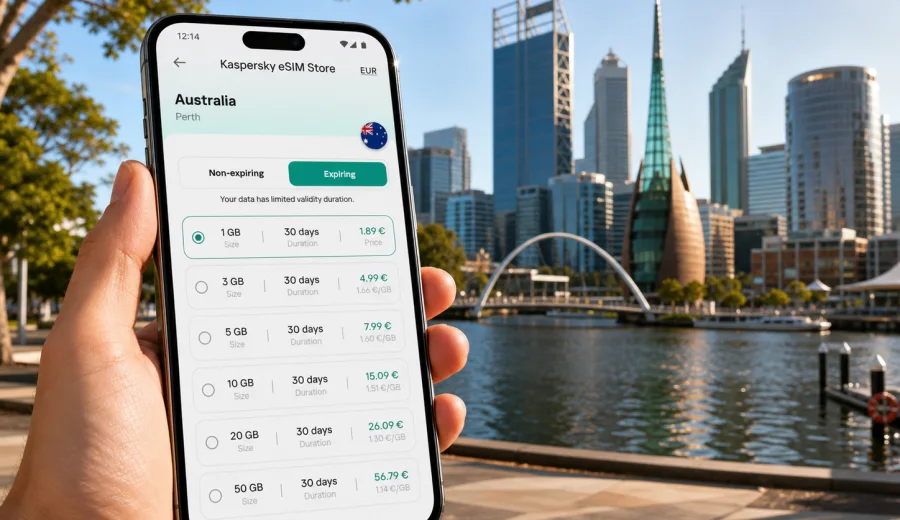
Perth eSIM: mobile connection and internet for your trip
Perth is a city where mobile internet quickly becomes part of the travel plan. The airport is outside the central business district, the coastline stretches far beyond one beach, and many useful day trips start with a train, ferry, car hire, or rideshare booking. If you are arriving for work, a stopover, a family visit, or a longer Western Australia itinerary, an eSIM can help you prepare mobile data before you start moving around the city.
An eSIM is a digital SIM profile installed on a compatible phone or tablet. For travel, it is mainly useful for mobile internet: maps, hotel messages, transport apps, translation, online check-in, restaurant bookings, ride hailing, and keeping in touch through internet-based calls and messaging. It usually does not replace a local phone number for ordinary calls or SMS unless the selected tariff says so.
Kaspersky eSIM Store is an app and website where you can choose, arrange, and activate an eSIM with a suitable data plan for an overseas trip. It is not a mobile operator and does not own a network. The practical benefit is the travel scenario: you choose the destination, check the traffic volume and validity period, install the eSIM on a compatible device, and use mobile data in Perth with fewer last-minute steps after arrival.
Why Perth trips are easier with prepared mobile data
Perth is spread out. A short city break can include the CBD, Elizabeth Quay, Kings Park, Northbridge, Cottesloe Beach, Fremantle, and perhaps a ferry connection toward Rottnest Island. A business trip may involve meetings in the CBD, West Perth, East Perth, Subiaco, or Burswood. A longer route can continue toward the Swan Valley, Mandurah, the Pinnacles, or Margaret River.
That geography changes how you use internet during the day. You may need data at the airport to find your transfer, again at the hotel to confirm check-in, later on a train platform to check the route, and then on the waterfront to message a group or open a booking. Public Wi-Fi can help in some places, but it is not a reliable travel plan by itself, especially when you are outside a hotel, cafe, or venue.
With an eSIM prepared before the trip, you can avoid searching for a physical SIM card immediately after landing. You still need to check device compatibility and the plan conditions, but you can make those decisions calmly before you are standing with luggage, a low battery, and a new address to find.
Typical Perth moments where mobile data helps:
- opening a map after landing at Perth Airport;
- messaging a hotel or apartment host about arrival time;
- checking public transport, rideshare, taxi, or car-hire details;
- navigating between the CBD, Northbridge, Elizabeth Quay, and Kings Park;
- managing bookings for Fremantle, Rottnest Island, Swan Valley, or coastal trips;
- joining a video call or checking work files during a business stay;
- translating menus, signs, or travel notices when needed;
- sharing your location with family or colleagues.
Arrival at Perth Airport
For many visitors, the first mobile-data need appears before they reach the city. Perth Airport handles domestic and international traffic, and your next step may be a train, bus, taxi, rideshare, hotel shuttle, or rental car. Even if your transfer was arranged in advance, internet access helps you check the pickup point, message the driver, open the hotel address, and confirm that your route matches the terminal you used.
If you install your eSIM before the flight, keep in mind that activation and data usage can depend on the selected plan conditions. Some plans begin their validity when they connect to a supported local network, while others may have different rules. Read the terms before you activate. If you prefer to install after arrival, make sure you still have a temporary internet connection for the installation step, such as airport Wi-Fi or another active SIM.
At the airport, mobile data is useful for simple tasks that are easy to underestimate:
| Situation | Why data helps |
|---|---|
| Transfer to the city | Check the route, pickup area, travel time, and address details. |
| Late arrival | Message the hotel, apartment host, or colleague if plans change. |
| Car hire | Open the booking, map the exit route, and save the destination. |
| Family travel | Coordinate luggage, pickup, child seats, and meeting points. |
| Work trip | Join a call, check email, or confirm the first appointment. |
Getting around Perth with eSIM mobile internet
Perth is comfortable to explore, but it is not a compact old-town destination where every plan happens within a few blocks. The Swan River divides parts of the city experience, beaches sit along the coast, and suburbs can be a meaningful distance from the CBD. Mobile internet helps you make small decisions throughout the day instead of planning every movement at breakfast.
In the city centre, data helps with walking navigation between the station area, Elizabeth Quay, offices, hotels, restaurants, and shopping streets. In Northbridge, it helps you find evening venues and coordinate with friends. Around Kings Park, it helps with walking routes, lookout points, rideshare pickup, and the route back after sunset. On the coast, it helps you compare Cottesloe, Scarborough, City Beach, and Fremantle plans depending on weather, time, and transport.
If you are relying on public transport, keep route details available offline where possible, but do not assume that screenshots will be enough for a full day. Platform changes, service updates, and connection choices are easier to manage with live data. If you are driving, mobile internet supports navigation, parking apps where used, fuel stops, and last-minute changes to the route.
How much data to choose for Perth
The right data allowance depends on your trip style. A traveler who mainly uses maps and messaging can use much less than someone who works from a laptop through a hotspot or uploads videos from the coast. Do not choose by city name only. Choose by length of stay, daily habits, and whether your accommodation has reliable Wi-Fi.
Use this practical guide as a planning frame:
| Trip style in Perth | Common data use | What to check before choosing |
|---|---|---|
| Stopover or 1-2 days | Maps, messages, rideshare, hotel details | Short validity, modest data volume, quick setup. |
| City break | Navigation, bookings, social sharing, restaurant searches | Enough data for several active days outside the hotel. |
| Business trip | Email, documents, video calls, hotspot backup | Higher allowance and validity that covers the full stay. |
| Family trip | Shared plans, maps, attraction bookings, messaging | Separate eSIMs for key devices or a plan suitable for hotspot use if allowed. |
| Road or regional route | Navigation, route checks, accommodation messages | Country or regional coverage that matches the whole itinerary. |
Before you decide, check four things: the destination covered by the tariff, the data volume, the validity period, and the activation rules. Also check whether hotspot use is allowed if you plan to connect a laptop or another device. Terms can differ by plan, so read the plan details instead of assuming every eSIM behaves the same way.
For a Perth trip that stays inside Australia, you can review eSIM plan options for Australia and choose a data allowance and validity period that fit your route. If your itinerary continues beyond Australia, compare the country, regional, or global options that match the full journey before you activate anything.
Perth areas where mobile data is especially useful
Perth has several travel zones with different mobile-internet needs. The CBD is practical and work-focused. Elizabeth Quay is useful for sightseeing, river views, dining, and ferry connections. Northbridge is active in the evening, with restaurants, bars, galleries, and events. Kings Park is close to the city but can still leave you checking walking paths, viewpoints, and pickup points. Fremantle feels like a separate day out, with markets, heritage streets, the port area, and connections toward Rottnest Island.
For beaches, mobile data helps with weather, transport, and meeting points. Cottesloe is a classic choice, while Scarborough and City Beach may suit different plans depending on where you are staying. Coastal days often involve changing clothes, securing transport, checking sunset timing, and finding food nearby. Those tasks are easier with a working mobile connection than with a plan that depends on the next Wi-Fi network.
For business travelers, the most useful feature is not sightseeing. It is continuity. You can move between the airport, hotel, meeting venue, coworking space, restaurant, and client office while keeping access to maps, messages, email, calendar changes, and authentication prompts. If you use two-factor authentication for work accounts, make sure your setup does not depend on receiving ordinary SMS to a number that may not be active while travelling.
eSIM for hotels, apartments, and longer stays
Hotel Wi-Fi is useful, but it should not be your only internet plan in Perth. Check-in may happen before you receive the room details. Apartment hosts may send access instructions through a booking app. Some hotels have strong Wi-Fi in rooms and weaker coverage in lobbies, lifts, or meeting spaces. If you work during the trip, you may also need a backup connection for calendar changes or urgent messages.
An eSIM does not need to replace hotel Wi-Fi. It complements it. You can use Wi-Fi for large downloads and mobile data for movement around the city. This balance is often better than using mobile data for everything or relying only on public networks. If your plan has a limited data allowance, save heavy updates, cloud sync, and video streaming for trusted Wi-Fi where possible.
For longer stays, review whether you need one larger plan, a plan with a longer validity period, or the ability to top up if supported by the chosen tariff. Do this before the plan runs low, especially if you are heading outside central Perth for a day trip.
Step-by-step: prepare eSIM before flying to Perth
1. Check that your phone or tablet supports eSIM and is not locked to a mobile operator. You can also check your device before choosing a plan.
2. Decide whether your trip is only Perth, a wider Western Australia route, or part of a multi-country itinerary.
3. Choose the destination and compare data volume, validity period, price, activation rules, and hotspot conditions.
4. Arrange the selected eSIM plan through Kaspersky eSIM Store and keep the installation details available.
5. Install the eSIM while you still have a stable internet connection. For device-specific setup, use the Android setup instructions or the iOS setup instructions.
6. Label the eSIM clearly in your phone settings, for example "Australia data", so you do not confuse it with your home SIM.
7. On arrival, select the eSIM for mobile data and follow the plan instructions. On some devices, data roaming may need to be enabled for the eSIM profile.
8. Keep your home SIM available only if you need it for calls, SMS, or banking messages, and check roaming costs with your home operator before using it.
Do not delete the eSIM profile after installation unless the plan instructions or support team tell you to do so. Some eSIM profiles cannot be moved or reinstalled freely after activation. If something does not connect, check the plan instructions, device settings, and support options before making changes.
Practical checklist for the first day in Perth
Use this checklist before you leave the airport or hotel:
- mobile data is set to the travel eSIM profile;
- the home SIM is not using paid roaming unexpectedly;
- maps for Perth and Fremantle are saved or recently loaded;
- your hotel address is pinned in maps;
- key bookings are available in apps or email;
- messaging apps are working over mobile data;
- battery saver does not block the apps you need for transport and maps;
- you know how much data is included and when the plan expires;
- hotspot use is checked if you plan to share data with a laptop.
This preparation is especially useful if you arrive late, travel with children, carry sports equipment, or need to go straight from the airport to a meeting. It turns mobile internet into part of the travel setup rather than a problem to solve after landing.
Day trips from Perth and data planning
Many Perth trips include at least one day outside the central city. Fremantle is a common choice for markets, cafes, heritage buildings, and the waterfront. Rottnest Island is popular for a full-day outing that may include ferry tickets, maps, bike hire, beach planning, and group messages. The Swan Valley is useful for food and wine routes. Mandurah, the Pinnacles, and Margaret River can be part of longer plans, though they require more careful timing and transport decisions.
For these routes, mobile data helps most before and between activities: checking tickets, opening saved maps, confirming meeting points, messaging a tour provider, or changing the return plan. Coverage and speed depend on local networks and geography, so do not describe any eSIM as something that works in every place. Save essential details offline before leaving the city, and use mobile data as the active layer for live updates.
If you plan to drive outside Perth, prepare more than the eSIM. Download offline maps, keep a charging cable in the car, carry water, and share your route with someone if you are heading into less urban areas. eSIM mobile data is useful, but it is not a substitute for normal route planning.
Common mistakes to avoid
The most common mistake is buying or activating a plan without checking the device. eSIM support can vary by model, region of sale, and operator lock status. A phone that looks modern may still need a compatibility check. Another mistake is choosing too little data for a trip that includes work calls, hotspot use, video uploads, or several people relying on one device.
Travelers also sometimes install the eSIM but forget to select it for mobile data. Others leave their home SIM active for data roaming and only notice later. After installation, review the SIM settings carefully: which SIM handles mobile data, which SIM handles calls and SMS, and whether data roaming is enabled only where it is needed for the travel eSIM.
Finally, do not wait until the last minute if you need the eSIM for a work trip. Install and label it before departure, keep the QR code or profile details accessible, and know where to find support. Connection may take a few minutes and depends on the device and local network conditions.
Quick answers about eSIM in Perth
Is eSIM useful for a short Perth stopover?
Yes, if you need maps, transfer details, hotel messages, or work access during the stopover. Choose a plan with validity and data volume that match the short stay.
Can I use eSIM for ordinary calls and SMS in Perth?
Usually, travel eSIM plans are focused on mobile data. Ordinary phone calls and SMS are not included unless the selected tariff specifically says they are. For calls and messages, you can use internet-based apps over mobile data.
Should I install the eSIM before or after arrival?
Installing before travel is often more convenient because you still have a stable connection and time to check settings. Activation rules vary by plan, so read the plan details before deciding when to activate.
Do I still need Wi-Fi?
Wi-Fi can be useful for large downloads, streaming, backups, and laptop work. eSIM mobile data is more useful when you are moving around Perth and cannot rely on a trusted Wi-Fi network.
Can I use one eSIM for Perth and other parts of Australia?
If the selected plan covers Australia and its validity period fits your route, it can be suitable for Perth and other Australian destinations. Check the plan conditions before purchase.
Choose an eSIM plan for your Perth trip
A good Perth mobile-internet plan is not only about being online. It is about making the first hour after arrival easier, keeping maps and bookings available, moving between spread-out districts, and staying reachable during business or family travel. Before you choose, check your device, confirm the destination coverage, compare data volume and validity, and read the activation rules.
Kaspersky eSIM Store helps you choose, arrange, and activate an eSIM with a suitable data plan for overseas travel. If Perth is your main destination, you can choose an eSIM plan for your trip to Australia and prepare mobile internet before you land.