
Travel connectivity guide
Peru eSIM: mobile connection and internet
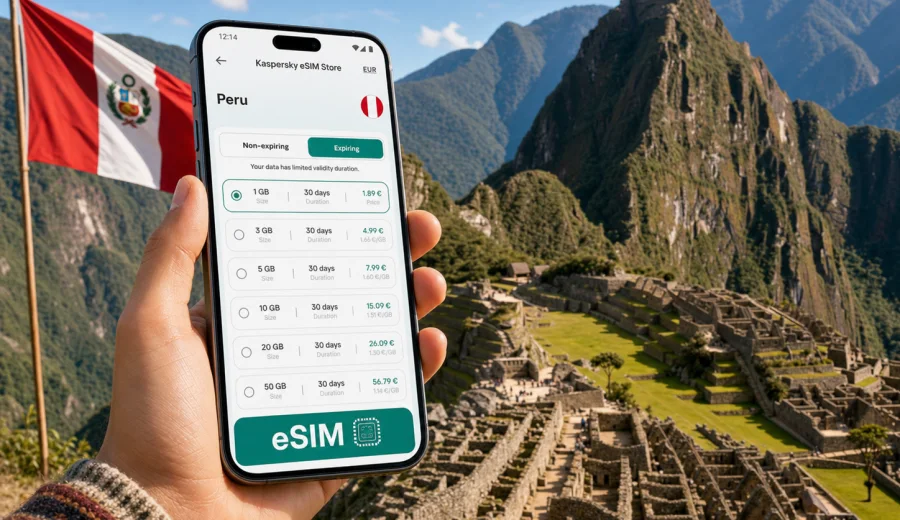
eSIM in Peru: mobile connection and internet for your trip
Peru is a country where mobile internet can quickly become part of the travel plan, not just a convenience. You may land in Lima, connect onward to Cusco, move between hotels and train stations, check tickets for Machu Picchu, use maps in Arequipa, or message a driver after a late arrival. A working data connection helps you handle these small tasks without depending only on hotel Wi-Fi, airport kiosks, or a physical SIM card shop.
An eSIM is a digital SIM profile that you install on a compatible smartphone or tablet. For a trip to Peru, it can help you prepare mobile internet before you leave or shortly after you arrive. Instead of replacing your main number, an eSIM is usually used as a separate data line for travel. Your regular SIM can remain in the device for calls or banking messages, while mobile data runs through the travel eSIM if your phone settings allow it.
Kaspersky eSIM Store is an app and website where you can quickly choose, arrange, and activate an eSIM with a suitable tariff for mobile internet in an international trip. The useful part is control: you can check the destination, data allowance, validity period, and tariff conditions before you rely on the connection abroad.
Why eSIM is useful for Peru
Peru travel often combines several types of movement in one itinerary. A visitor might spend one night in Miraflores, fly to Cusco, take a train through the Sacred Valley, and then return to Lima for an international flight. Each stage creates a different internet need.
Common situations where mobile data helps:
- checking ride-hailing pickup points after landing;
- opening hotel, hostel, or apartment booking details;
- using maps when streets, stations, and terminals are unfamiliar;
- receiving travel updates from airlines, trains, guides, or tour operators;
- translating short phrases or menus;
- sharing location with people you are meeting;
- using messengers for calls when your eSIM tariff is data-only;
- checking weather and altitude-related travel plans before day trips.
Public Wi-Fi can be useful, but it is not always where you need it. Airport Wi-Fi may require registration, cafe Wi-Fi may be slow, and hotel Wi-Fi may not help when you are already on the road. A travel eSIM gives you another option for mobile internet, provided your device supports eSIM and the chosen tariff is valid for Peru.
What to know before choosing an eSIM tariff
An eSIM for Peru should be selected by matching the tariff to your itinerary, not by picking the largest data package by default. The right choice depends on how long you stay, how often you use maps, whether you upload photos, and how much time you spend away from stable Wi-Fi.
Use this simple planning table:
| Travel scenario in Peru | Likely data need | What to check before purchase |
|---|---|---|
| Short stop in Lima | Low to moderate | Validity period, enough data for maps and messaging |
| One week in Lima and Cusco | Moderate | Data allowance, activation timing, compatibility |
| Remote work from hotels | Higher | Larger data package, hotspot rules, backup Wi-Fi |
| Multi-city route across Peru | Moderate to higher | Coverage conditions in the tariff and data validity |
| Family trip with one main planner | Moderate | Whether one device will handle navigation, bookings, and messaging |
Do not assume that a travel eSIM includes a local phone number, voice calls, or SMS. Many eSIM tariffs for trips are focused on mobile data. If you need voice calls, check the conditions of the selected tariff before purchase. For most travel tasks, messengers, email, maps, and booking apps use mobile data and do not require a local voice number.
How much data may be enough in Peru
There is no universal answer, because data use depends on habits. A traveler who mostly sends messages and checks maps may use far less data than someone who uploads videos, streams music, or joins video calls. The practical approach is to list the apps you expect to use and choose a data package that matches the trip length.
Typical data planning:
- Light use: messaging, maps, email, booking confirmations, occasional browsing.
- Medium use: all light-use tasks plus photo sharing, social media, translation apps, and frequent navigation.
- Heavy use: video calls, streaming, cloud backups, hotspot use, and work tools.
Before you leave, reduce avoidable data use. Download offline maps for Lima, Cusco, Arequipa, and any route you already know. Save hotel addresses, tickets, insurance documents, and passport scans offline. Turn off automatic video downloads in messengers. Pause cloud photo backup until you are on trusted Wi-Fi. These steps make a smaller eSIM data package more practical.
Device compatibility comes first
Before choosing any tariff, confirm that your device can use eSIM. A compatible phone or tablet must support eSIM technology and should not be locked in a way that prevents adding another mobile profile. Some device models vary by country or region, so checking the exact model is better than relying on the general phone name.
You can use the compatibility window to check your device before buying. This step matters because an eSIM cannot help if the phone cannot install the profile, if the device is locked to another carrier, or if local settings prevent the travel line from being used for data.
A quick compatibility checklist:
- your smartphone or tablet supports eSIM;
- the device is not carrier-locked in a way that blocks another mobile profile;
- you have a stable internet connection for the installation step;
- the device software is up to date enough to manage eSIM profiles;
- you know which SIM line should be used for mobile data after activation.
Installing and activating an eSIM for Peru
Installation is usually straightforward, but it is worth doing it carefully. After purchase, the eSIM profile may be available in your account, in the app, or through a QR code and instructions. Keep your device connected to Wi-Fi or another stable internet source during installation.
General steps:
1. Confirm that your device supports eSIM and is ready for a new mobile profile.
2. Choose Peru as the destination and select a tariff by data allowance and validity.
3. Complete the purchase and open the installation instructions.
4. Add the eSIM profile to your device.
5. Set the travel eSIM as the mobile data line when you are ready to use it.
6. Check whether data roaming must be enabled for that eSIM profile.
7. Keep your primary SIM active only if you need it for calls, SMS, or banking messages.
For device-specific setup, follow the Android installation guide or the iOS installation guide. The exact menu names can differ by phone model and operating system version, so it is better to follow the relevant guide than guess from memory.
When to prepare the eSIM
Many travelers prefer to prepare the eSIM before departure, especially if they arrive late, have a connection, or need to show booking details immediately. Preparing early can reduce pressure at the airport. However, you should read the tariff conditions carefully, because the validity period and data use may start according to the rules of the selected tariff.
A practical approach is to install the eSIM profile before the trip when the instructions allow it, then activate mobile data for that line only when you are ready to use it. If you are unsure, check the activation rules shown with the tariff before purchase.
For a Peru trip, you can choose an eSIM tariff for Peru in Kaspersky eSIM Store after checking compatibility, trip length, and expected data use.
Peru travel scenarios and data planning
Different routes through Peru create different mobile internet habits. The country is often explored in stages, and each stage has its own data tasks.
Lima arrival
Lima is the main arrival point for many international travelers. You may need data for airport pickup messages, hotel directions, ride-hailing apps, or checking whether a domestic connection is still on time. If you stay in Miraflores, Barranco, or the historic center, maps and transport apps can be useful even on the first day.
Preparation tip: save your hotel address offline before the flight, then use mobile data for live route checks and messaging after arrival.
Cusco and the Sacred Valley
Cusco, Ollantaytambo, Aguas Calientes, and Machu Picchu routes often involve tickets, time slots, trains, buses, guides, and weather checks. Mobile internet helps you coordinate plans, but you should still save essential documents offline. Mountain routes and remote areas can have variable signal conditions, so do not rely on any mobile connection as the only place where important documents are stored.
Preparation tip: keep QR tickets, reservation numbers, and guide contacts available offline as well as in email.
Arequipa and southern routes
Arequipa, Colca Canyon, and longer bus routes create another kind of data use: navigation, translation, messages, and checking schedules. If you spend many hours on the road, background data can quietly reduce your allowance. Turn off unnecessary app refresh and download entertainment before travel days.
Preparation tip: use mobile data for live information and communication, but avoid streaming on long transfers unless your data package comfortably allows it.
Work and longer stays
If you plan to work during your Peru trip, treat eSIM data as part of a wider connectivity plan. Hotel or apartment Wi-Fi may handle video calls, while eSIM mobile data can help when you move between places or need a backup for essential messages. If you expect hotspot use, check the tariff conditions because tethering rules can vary.
Preparation tip: separate critical work tasks from high-data activities. Email and documents use far less data than video meetings and cloud sync.
eSIM, roaming, local SIM, and Wi-Fi: how they compare
Each option has a place. The right choice depends on time, budget, convenience, and how much control you want before arrival.
| Option | Strength | Limitation |
|---|---|---|
| Travel eSIM | Can be prepared digitally, useful for data on arrival | Requires compatible unlocked device and correct setup |
| Standard roaming | Uses your existing mobile account | Costs and conditions depend on your home carrier |
| Local physical SIM | May suit long stays or local calling needs | Requires finding a shop and using a physical SIM slot |
| Public Wi-Fi | Useful in hotels, cafes, and airports | Not always available when you are moving |
An eSIM is often attractive when you want mobile internet without changing a physical SIM card. It is also useful if your phone supports dual SIM behavior, because you can keep your main number available while the eSIM handles travel data.
Practical checklist before your flight
Use this checklist a day or two before departure:
- Check that your phone supports eSIM and can add a new profile.
- Confirm that Peru is the selected destination in the tariff.
- Compare data allowance and validity period with your itinerary.
- Read when the tariff validity starts.
- Save installation instructions where you can find them.
- Download offline maps and key documents.
- Disable automatic cloud backup over mobile data.
- Keep your main SIM settings clear: which line is for calls, which line is for data.
- Make sure you know how to contact support if installation questions appear.
This preparation takes a few minutes and can prevent common problems: buying a tariff for the wrong destination, choosing too little data, activating too early, or discovering compatibility issues after arrival.
Settings that help control data use
Once the eSIM is installed, phone settings matter. A travel data package is easier to manage when apps are not using it in the background.
Recommended settings:
- Set the eSIM as the mobile data line only when you are ready to use it.
- Keep data roaming enabled for the eSIM only if the installation instructions or device settings require it.
- Turn off mobile data for apps that do not need it during the trip.
- Disable automatic app updates over mobile data.
- Pause video autoplay in social media apps.
- Download playlists, maps, and documents on Wi-Fi.
- Check data usage in your phone settings during the trip.
If your connection does not work after activation, do not repeatedly delete and reinstall the eSIM unless the instructions tell you to. First check the selected data line, roaming setting for the eSIM profile, airplane mode, and whether the device has had time to register on a local network.
What eSIM does not solve
It is important to set expectations correctly. An eSIM helps with mobile internet in a trip, but it is not a magic replacement for every communication need.
Keep these limits in mind:
- An eSIM data tariff may not include a local phone number.
- Voice calls and SMS are not included unless the selected tariff states otherwise.
- Coverage and speed depend on local network conditions and the selected tariff.
- A device that does not support eSIM cannot install an eSIM profile.
- Some eSIM profiles cannot be transferred to another device after activation.
- Refund and replacement conditions depend on the purchase and usage rules.
For travel planning, the safest habit is to keep important information offline and use mobile data for tasks that benefit from being live: route changes, messaging, navigation, and booking updates.
Short answers for quick planning
Is eSIM useful in Peru?
Yes, if your device supports eSIM and you want mobile internet without buying a physical SIM card after arrival. It is especially useful for maps, messaging, booking apps, and travel updates.
Can I install the eSIM before flying to Peru?
In many cases, you can prepare the eSIM before departure, but you should follow the instructions and check when the tariff validity begins.
Will my regular phone number still work?
That depends on your device and home carrier settings. Many travelers keep the primary SIM for calls or SMS and use the eSIM for mobile data.
Does an eSIM include calls and SMS?
Not necessarily. Many travel eSIM tariffs are data-focused. Check the selected tariff conditions if calls or SMS are important.
Can I use eSIM data for hotspot?
Possibly, but tethering rules may vary by tariff and device. Check the conditions before relying on hotspot for work or another device.
What should I do if mobile data does not start immediately?
Check that the eSIM is selected for mobile data, that roaming is enabled for the eSIM profile if required, and that the device has registered on a local network. If questions remain, contact support.
Choose an eSIM tariff for Peru
Peru rewards good preparation. If your mobile internet is ready, it is easier to move from the airport to the hotel, manage train and tour details, use maps in unfamiliar streets, and stay in touch across Lima, Cusco, Arequipa, and other parts of the route.
Before buying, check your device compatibility, read the tariff conditions, choose the data allowance and validity period that fit your itinerary, and save the installation instructions. When you are ready, you can prepare an eSIM tariff for your trip to Peru through Kaspersky eSIM Store and set up mobile internet for the journey in a controlled, practical way.