
Travel connectivity guide
Philippines eSIM: mobile connection and internet
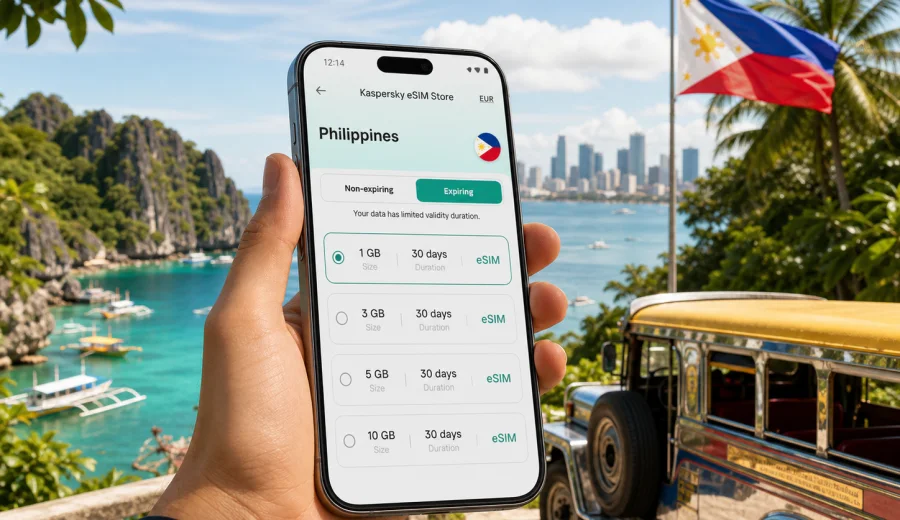
eSIM in the Philippines: mobile connection and internet for your trip
The Philippines is a country where mobile internet quickly becomes part of the travel plan. You may land in Manila, change terminals, book a ride to Makati, fly onward to Cebu, check ferry times for Bohol, or share a hotel address with a driver in Palawan. In each of these moments, a stable way to get online matters more than a long list of travel apps. An eSIM helps you prepare mobile data before the trip and avoid searching for a physical SIM card immediately after arrival.
This guide explains how to use an eSIM for the Philippines, how to estimate data needs, what to check before buying a plan, and how Kaspersky eSIM Store can help you choose, set up, and activate a suitable data package for travel. The focus is practical: airport arrival, island routes, city navigation, hotspot use, messaging, maps, online payments, and backup planning.
Why mobile internet matters in the Philippines
Travel in the Philippines often combines large cities, domestic flights, ferries, beach destinations, and rural transfers. You may need internet access not only in Manila or Cebu, but also while moving between islands or coordinating with hotels, dive centers, tour operators, and drivers.
Mobile data is useful for:
- navigation from airports, ports, bus terminals, and ferry piers;
- ride-hailing and taxi coordination in Manila, Cebu, Davao, and resort towns;
- hotel check-in details, booking confirmations, and digital receipts;
- messaging through apps when voice calls and SMS are not included in an eSIM plan;
- checking weather, ferry schedules, flight updates, and traffic;
- translating menus, signs, and local instructions;
- using mobile banking, payment apps, and travel insurance documents;
- sharing a hotspot with a laptop or tablet when your plan and device allow it.
Public Wi-Fi can help in hotels, airports, malls, and cafes, but it is not a complete travel connectivity plan. It may require registration, may be slow at busy times, and may not be available on the road. A prepared eSIM gives you a more predictable way to start using mobile data when you need it.
What an eSIM does for a Philippines trip
An eSIM is a digital SIM profile installed on a compatible smartphone or tablet. Instead of inserting a plastic SIM card, you add a mobile data plan to your device through settings or by scanning a QR code. For travel, this is useful because you can prepare the plan before departure and turn it on when you are ready to use it.
For the Philippines, an eSIM is usually best understood as a mobile data solution. It helps you get online for maps, messages, apps, browsing, and travel tasks. It normally does not replace a local phone number, and standard voice calls or SMS are not included unless the terms of the selected plan clearly say otherwise. For calls, many travelers use internet-based messengers.
The main advantage is control. You can check the destination, amount of data, validity period, and price before you activate the plan. That is especially helpful if your trip includes several islands and you do not want to spend the first hour after landing comparing SIM counters or searching for a shop.
Where travelers use mobile data most
The Philippines is not one single travel pattern. Your data use depends on whether you stay mostly in cities, travel between islands, work remotely, or spend long days outdoors.
| Trip scenario | Typical internet tasks | Practical data note |
|---|---|---|
| Manila stopover | ride apps, maps, hotel messages, food delivery | Short trips can work with a smaller plan if you avoid video streaming. |
| Cebu and Bohol | navigation, ferry updates, tours, photos in cloud apps | Data use rises when you upload photos or use maps all day. |
| Palawan or island routes | messaging, weather checks, bookings, hotspot backup | Coverage and speed can vary by area, so download key details offline too. |
| Business travel | email, calls through apps, documents, hotspot | Choose more data and check whether hotspot use is allowed. |
| Long vacation | daily maps, messaging, social media, bookings | Match the validity period to the full trip length, not only arrival day. |
A good rule is to decide what mobile data must do for you. If it is only for navigation and messaging, you may need less. If you plan to use cloud backup, video calls, short-form video, or laptop hotspot, you should choose a larger allowance.
Before you buy: device compatibility
Not every phone supports eSIM, and some devices are locked to a mobile operator. Before choosing a plan, check three things:
- your phone or tablet supports eSIM;
- the device is not locked to another carrier;
- you know where eSIM settings are located on your device;
- you have a stable internet connection for the initial installation step;
- your current physical SIM can remain active if you need your usual number for banking or messages.
You can check your device before purchase. This step is worth doing early, especially if you are traveling with an older phone, a device bought through an operator contract, or a model that has different eSIM support by region.
How much data do you need in the Philippines?
There is no single correct amount of data for every traveler. The best plan depends on your route, length of stay, and habits. The table below gives a practical way to think about it without pretending that every trip is identical.
| Data use level | Good for | Watch out for |
|---|---|---|
| Light | maps, chat, email, booking confirmations | Avoid automatic photo backup and video apps. |
| Moderate | daily navigation, social media, web browsing, ride apps | Monitor app updates and cloud sync. |
| Heavy | hotspot, video calls, remote work, frequent media uploads | Choose a larger package and check validity. |
For a short city visit, a small package may be enough if you use hotel Wi-Fi for large downloads. For a two-week island trip, it is safer to choose a plan with enough data for daily navigation and communication. For work travel, treat mobile data as a productivity tool: it should support calls through apps, document access, and backup hotspot use without forcing you to ration every megabyte.
Practical data-saving settings
Before you depart, adjust your phone so the eSIM data goes toward travel tasks rather than background activity.
Checklist:
- download offline maps for Manila, Cebu, Bohol, Palawan, or your main route;
- turn off automatic app updates on mobile data;
- pause automatic cloud photo and video backup;
- set messaging apps to download media only on Wi-Fi;
- reduce video streaming quality when using mobile data;
- check which SIM is selected for mobile data after you install the eSIM;
- keep your main number active for calls or verification messages if you need it.
Choosing a plan before departure
If you prefer to plan ahead, choose your eSIM while you still have reliable home internet. In Kaspersky eSIM Store, you can select the Philippines as the destination, compare available data amounts and validity periods, and prepare the plan before your flight. The product is designed to help you choose, arrange, install, and activate an eSIM plan for mobile internet in an overseas trip, not to act as a mobile operator.
When comparing options, look at:
- destination: the plan should match the Philippines or the wider route you will actually travel;
- data amount: enough for maps, messages, booking apps, and your expected media use;
- validity: long enough for the full trip or the part of the trip where you need mobile data;
- activation rules: when the validity period starts and what action triggers it;
- hotspot support: important if you plan to share data with a laptop or tablet;
- device compatibility: check before payment, not after landing.
When to install and when to activate
Installation and activation are related but not always the same moment. Installation adds the eSIM profile to your device. Activation starts or prepares the service according to the conditions of the selected plan. The exact flow can depend on the plan and your device, so read the instructions shown during setup.
A practical approach:
1. Choose a suitable Philippines plan before departure.
2. Install the eSIM while you still have stable Wi-Fi.
3. Keep your regular SIM as the default for calls and messages if you need it.
4. After arrival, switch mobile data to the eSIM.
5. Enable data roaming for the eSIM if the setup instructions require it.
6. Open a browser or map app and confirm that mobile data is working.
If you are ready to prepare mobile internet before your route starts, you can choose an eSIM plan for your trip to the Philippines and review the available data packages, validity periods, and conditions before you travel.
Installation links for Android and iOS
The exact setup screens vary by device model and operating system version, but the basic idea is the same: add the eSIM profile, label it clearly, select it for mobile data, and check that the correct line is active when you arrive.
Use the relevant setup guide:
After installation, give the eSIM a clear label such as "Philippines data" or "Travel eSIM". This helps prevent confusion when your regular SIM and travel eSIM are both visible in settings. If your device asks which SIM should be used for mobile data, select the eSIM only when you are ready to use the plan according to its activation terms.
Arrival scenarios: what to do first
The best setup is the one that works when you are tired, carrying luggage, and trying to get from the airport or port to your accommodation. In Manila, test mobile data before leaving the airport and save your hotel address offline. In Cebu, keep ferry details and tour meeting points available without internet. In Palawan, download maps before long transfers because local conditions can change by island, coast, and terrain. For business travel, test email, messaging, calendar sync, and hotspot before your first important call.
eSIM compared with roaming, airport SIM cards, and public Wi-Fi
Different connectivity options can work, but they solve different problems.
| Option | Strength | Limitation |
|---|---|---|
| eSIM | Can be prepared before travel; no physical SIM swap; clear data and validity conditions | Requires a compatible, unlocked device. |
| Standard roaming | Uses your regular mobile subscription | Costs and data limits can vary significantly by home operator. |
| Airport SIM card | Physical local option after arrival | Requires time at a counter and may involve queues or identity checks depending on local rules. |
| Public Wi-Fi | Useful for large downloads in hotels and cafes | Not available during transfers and may be unreliable or crowded. |
Common mistakes to avoid
Many eSIM issues are preventable. The most common problems happen before the trip, not during the technical setup.
- Buying before checking eSIM compatibility.
- Installing the eSIM on the wrong device.
- Deleting the eSIM profile after activation without checking whether it can be reinstalled.
- Forgetting to switch mobile data from the home SIM to the travel eSIM.
- Leaving cloud backup or app updates active on mobile data.
- Assuming that a data-only plan includes a local phone number.
- Waiting until airport Wi-Fi is unstable before trying to install the eSIM.
- Choosing a validity period shorter than the full route.
Quick planning checklist
Use this checklist a few days before departure:
- Confirm that your device supports eSIM and is unlocked.
- Choose a Philippines eSIM plan that matches your trip length.
- Install the eSIM while connected to reliable Wi-Fi.
- Download maps and booking documents.
- Turn off background data-heavy tasks.
- Label the eSIM clearly in phone settings.
- Keep your regular SIM active if you need calls, SMS, or bank verification.
- Test mobile data after arrival before leaving the airport or port.
For group trips, check each device separately. One compatible phone does not mean every phone in the group supports eSIM.
Short answers for travelers
Can I use an eSIM as soon as I arrive in the Philippines?
Usually, you can prepare it before departure and switch mobile data to it after arrival. Follow the activation rules for the selected plan.
Does an eSIM include calls and SMS?
Many travel eSIM plans are data-only. Check the plan conditions if calls or SMS matter.
Is public Wi-Fi enough?
It can help in hotels and cafes, but mobile data is more practical for transfers, island trips, and real-time travel tasks.
A practical recommendation
For a smooth Philippines trip, prepare mobile internet before departure, keep the setup simple, and avoid relying on a single connection source. Use eSIM for maps, ride apps, messages, booking details, and travel updates. Use Wi-Fi for large downloads when it is available, and keep offline copies of the most important documents and route information.
Prepare your eSIM for the Philippines
If the Philippines is your next destination, choose your data plan before the busy part of the journey begins. Review the available options, match the data amount to your route, and install the eSIM while you still have stable Wi-Fi. Then, when you arrive, you can focus on the trip instead of searching for a physical SIM card.
You can prepare an eSIM plan for mobile internet in the Philippines through Kaspersky eSIM Store and follow the setup steps for your device before you travel.