Travel connectivity guide
Phu Quoc eSIM: Mobile Internet for Your Trip
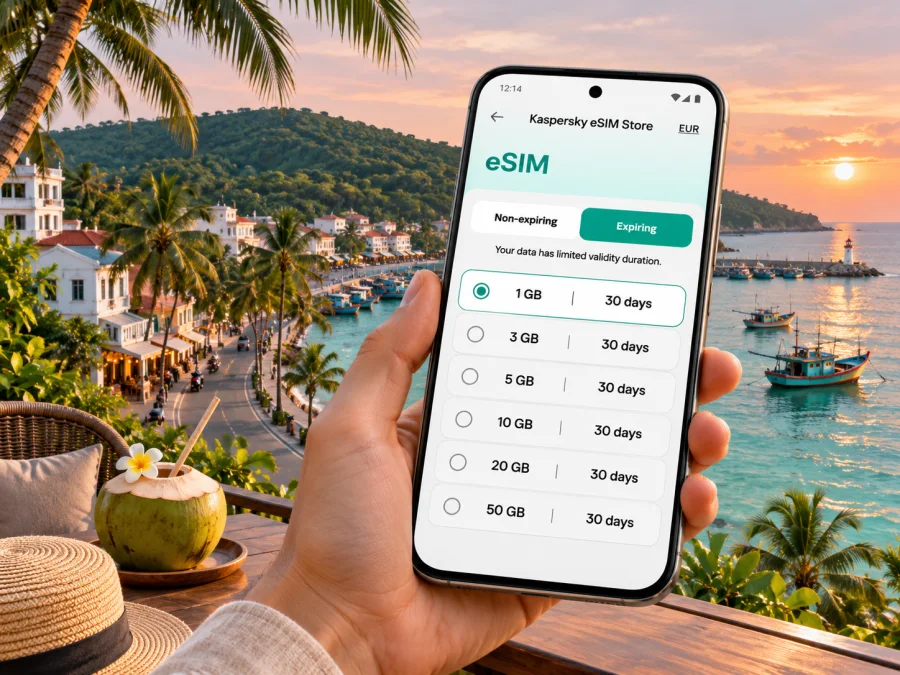
Phu Quoc eSIM: mobile connection and internet for an island stay
Phu Quoc is often entered in a booking form or itinerary as a city, but its geography is that of an island destination: Vietnam’s largest island, with resort districts, a main town, villages, beaches and forested areas spread along the coast. Administratively, Phu Quoc became a special zone of An Giang Province in Vietnam’s 2025 local-government reorganisation. For a traveller, the practical point is simple: a plan labelled for Vietnam is the relevant country-level option to check; a local signal on one stretch of the island does not guarantee the same experience at a remote beach, on a boat or inside a resort.
A mobile data connection helps with airport pickup messages, directions between accommodation and beaches, ride bookings, translation, online check-in and keeping in touch. An eSIM can be useful if your phone supports it and the Vietnam plan’s terms suit your dates and expected data use. It is not a substitute for checking coverage and does not provide a separate phone number unless a plan explicitly says so.
What to plan for before arriving
Phu Quoc has an international airport, ferry connections from the mainland, and destinations on the island that can be widely separated by road. Many visitors stay around Duong Dong or Long Beach and make day trips south to An Thoi or north toward Ganh Dau, Bai Thom and Rach Vem. A hotel transfer may work well for arrival, while navigation and a ride-hailing app can be useful later. Save your hotel address and booking details offline in case your connection is delayed or unavailable.
Coverage depends on the local network, terrain, building materials, congestion and the exact plan. Expect the most predictable connectivity around settled areas and main roads; remote coves, forest routes, offshore islands and boat trips can be less consistent. No mobile plan should be treated as a guarantee of service everywhere on Phu Quoc. Keep a second option for critical tasks, such as hotel Wi-Fi, a saved map, or a phone call through your existing line if roaming is available.
At a glance
| Trip situation | Why mobile data helps | A sensible backup |
|---|---|---|
| Landing at Phu Quoc International Airport | Confirming a pickup and checking the route to your stay | Hotel transfer instructions saved offline |
| Staying in Duong Dong or Long Beach | Finding restaurants, shops, meeting points and transport | Pin your accommodation before leaving |
| Driving to a beach or attraction | Route changes, navigation and messaging | Download an offline map for the areas you expect to visit |
| Boat tour or island-hopping day | Meeting the operator and checking return details before departure | Keep the meeting point and operator contact details saved |
| Working remotely | Messages, maps and backup access away from accommodation | Confirm Wi-Fi quality with the property and avoid relying on one connection |
Choose a plan around your route, not just your arrival
Before selecting an eSIM, write down the places you expect to visit and the number of days you will use mobile data. A short stay based in Duong Dong has different demands from a week with road trips, remote-work sessions and tours around the An Thoi islands. Consider whether your accommodation provides dependable Wi-Fi, whether you will upload photos or join video calls, and whether you need data as soon as you leave the airport.
Check the plan details rather than choosing only by its displayed data amount. Confirm that Vietnam is included, when validity begins, how long the package lasts, whether it expires, what happens when the data allowance is used, and whether tethering is permitted if you plan to connect a laptop. A regional package can suit a wider itinerary, but check its included destinations and terms; the word “Asia” alone does not establish exactly where it works. Prices and package availability can change, so use the live plan information at the time of purchase.
If your trip combines Phu Quoc with Ho Chi Minh City, Ha Noi or another country, decide whether one country-specific package or a multi-destination option best fits the route. The correct choice depends on the actual listed coverage and the time you will spend in each place. Do not assume a Vietnam plan follows you across a border or that a regional plan has identical allowances in each destination.
Where you are staying changes the data routine
Phu Quoc is not a compact city where every errand begins a short walk away. Choose the base that fits the trip, then prepare maps and addresses for the areas you will actually visit.
- Duong Dong: The main town is a practical base for markets, dining, services and onward transport. Save the name and map pin of your lodging, since hotel names can be similar and a pin can be more useful than a translated address.
- Long Beach: This western coastal strip has many hotels, restaurants and sunset spots. If you move between the beach, town and a resort farther south, check the route and pickup point before ordering a car.
- An Thoi and the south: Visitors use this area for boat trips and the cable car to Hon Thom. Download directions in advance and keep tour or ticket details available offline; mobile coverage may vary once you are out on the water.
- Ong Lang and the west coast: A quieter stay may put you farther from the services and transport options of Duong Dong. Ask the accommodation about pickup arrangements before you arrive.
- The north, including Ganh Dau, Bai Thom and Rach Vem: These trips can involve longer drives and less developed stretches. Plan the return journey, save the destination pin, and do not depend on a live map as your only navigation aid.
- East-coast stops such as Cay Sao: Routes and services can be less familiar to first-time visitors. Confirm the road destination with your driver or host and keep enough battery for navigation and calls.
These are planning pointers, not a promise about network performance. Reception can differ indoors, and a beach that looks close on a map may take longer to reach by road. Ask your host or tour operator for current directions and transport arrangements.
Getting from the airport, port and around the island
Phu Quoc International Airport serves the island, with domestic and international itineraries varying by season and airline. Check your own flight confirmation for terminal and arrival details. After landing, connect to Wi-Fi if available, confirm the driver’s meeting place, and then use mobile data for the onward route. If you have arranged a hotel transfer, retain its instructions and contact number before the flight.
Ferries from Rach Gia and Ha Tien are another way to reach Phu Quoc. Schedules, departure points and crossings can change with season and sea conditions. If you are travelling onward after arrival at the port, confirm where your transfer will meet you; do not assume the ferry terminal and your accommodation are close together.
Across the island, visitors use taxis, hired cars, minibuses, coaches, motorbike rentals and organised tours. Ride-hailing availability and pickup accuracy can vary by location and time. Confirm the vehicle and pickup point before setting off. If renting a motorbike, follow local licensing and road rules, wear a helmet, and pull over safely before checking navigation.
For the current Vietnam options, review the eSIM plans for Vietnam and compare their displayed validity, data allowance and coverage terms with your itinerary. Kaspersky eSIM Store is an app and website for choosing, ordering and activating an eSIM with a suitable tariff for mobile internet on an overseas trip; the underlying service is supplied by the local telecommunications providers identified in the plan information.
A practical arrival sequence
- Before travelling, save your booking confirmation, accommodation address, transfer instructions and airline or ferry details for offline access.
- At the airport or port, confirm your pickup point with the driver or accommodation before leaving the designated arrivals area.
- After connecting, check the route and expected destination name with the driver; map pins are useful when names have multiple spellings.
- Before a day trip, download the area map, note the return time and save the operator’s contact details.
- If the signal drops, continue with the saved route and meeting information, then reconnect in a settled area or through accommodation Wi-Fi.
Preparing an eSIM for Phu Quoc
Check these points before ordering:
- Your phone supports eSIM and is not locked to a carrier. Regional variants of the same device name can differ, so verify the exact model sold in your market. Check whether your device supports eSIM.
- The plan includes Vietnam and its validity covers the dates you need.
- You understand whether validity starts at purchase, installation or first network connection; check the plan terms instead of assuming.
- You have a reliable internet connection available when installing the eSIM, if the installation process requires it.
- You know which line will handle mobile data and whether data roaming must be enabled for the travel eSIM, according to its instructions.
- Your existing SIM remains available for calls or SMS if you want to keep using it, and you understand any home-carrier roaming charges that may apply.
- You have stored the installation QR code or activation details safely and have not deleted the profile after setup.
Kaspersky eSIM Store helps you select and activate a travel eSIM, but compatibility, local network availability and plan conditions still matter. Some eSIM packages are data-only: do not expect a local number, standard calls or SMS unless those features are explicitly included. Internet calling and messaging apps may work over data, subject to the app, connection and local rules.
Install and activate before the first trip across the island
Start with a compatible, unlocked device, an internet connection, and the QR code or installation details provided after ordering. Menu labels differ by phone software. Follow the instructions for your device: eSIM setup instructions for Android and eSIM setup instructions for iOS.
- Check compatibility. Confirm that the exact device and regional variant support eSIM and are not carrier-locked. Use the device compatibility check if you are unsure.
- Open mobile settings. Find the mobile-network or cellular section and choose the option to add an eSIM.
- Add the profile. Scan the supplied QR code or follow the provider’s alternative installation steps. Keep the code private and do not share it publicly.
- Label the line. Give the travel profile a clear name such as “Vietnam data” so you can distinguish it from your home SIM.
- Choose the data line. Set the travel eSIM as the line for mobile data when you are ready to use the plan. Keep your usual line configured for calls or texts if that is what you want.
- Review roaming settings. Enable data roaming for the travel eSIM only if its instructions require it. Check your home SIM’s data settings to avoid unintended roaming charges.
- Wait for registration. Connecting can take a few minutes. If service does not appear, check the plan’s activation instructions, selected data line and network selection before reinstalling anything.
- Delay data use if needed. You can install the profile before travel and leave the travel line switched off until you are ready, if the plan terms allow it. Verify when validity starts so installation does not begin the package earlier than intended.
- Keep the profile. Do not delete the eSIM to troubleshoot unless support or the provider’s instructions tell you to; some QR codes cannot be reused.
Once it connects, test a simple web page or message while you still have time to troubleshoot. Save the plan details and support route offline, then make sure your phone can switch back to the home line when needed.
Manage data sensibly on an island itinerary
Maps, translation, messaging and ride apps usually use less data than extended video streaming, cloud photo uploads or video meetings. To stretch an allowance, download offline maps and entertainment over trusted Wi-Fi, disable automatic photo backup on mobile data, and check which apps can use cellular data in the background. Keep a power bank for long days on the road; a phone that runs out of battery cannot provide directions even when the network is available.
For remote work, ask about Wi-Fi before booking and keep a fallback for essential messages. Mobile data can help, but speeds, indoor reception and hotspot permissions vary. Do not schedule a critical video call from a boat or isolated beach without confirming a dependable connection.
For boat tours, check in before departure, save the dock and meeting location, and note the return time. Do not assume that mobile service remains available offshore. Download directions for beach or forest visits.
If mobile data does not connect
Work through the basics before changing several settings at once:
- Check that the eSIM profile is installed and switched on.
- Confirm that the travel eSIM is selected for mobile data.
- Review the plan’s destination, start date, validity and remaining data.
- Follow the provider’s instructions for data roaming and network selection.
- Toggle airplane mode once, then wait briefly for the phone to register.
- Restart the phone if the connection still does not appear.
- Try again in a more settled area if you are on a remote road, at a beach or offshore.
- Contact support using the details in your order if the plan should be active but still fails.
Avoid deleting the eSIM profile as an early troubleshooting step. If you are in a location with no signal, a settings change will not create coverage; use saved information and Wi-Fi or ask your host to help arrange a transfer.
Frequently asked questions
Is Phu Quoc a city or an island?
Phu Quoc is physically an island and is widely described as an island destination. The name is also used for the administrative area; since Vietnam’s 2025 reorganisation it is a special zone in An Giang Province. Duong Dong is the island’s main town, so travel directions may refer to the town, a district or a beach rather than “Phu Quoc city.”
Will a Vietnam eSIM work everywhere on Phu Quoc?
No mobile service can be guaranteed everywhere. Coverage depends on the local partner network, location, terrain, buildings and congestion. A Vietnam plan is the relevant country-level plan to check, but verify its stated coverage and prepare offline maps for remote roads and boat trips.
Do I still need my regular SIM?
That depends on whether you need your usual number for calls, texts or verification messages. Keep the home SIM enabled for the functions you want, but review its roaming settings and charges. A travel eSIM may be data-only unless the specific plan says otherwise.
Can I make ordinary phone calls with the travel eSIM?
Only if the plan expressly includes voice service and a number. Many travel data eSIMs are for internet access only; check the individual plan terms. Internet calls through apps use data and need a working connection.
What if my phone does not support eSIM?
Use Wi-Fi where available, check with your home operator about roaming, or consider a local physical SIM if it suits your device and travel arrangements. Before buying any eSIM, verify the exact phone model and regional version through the compatibility checker.
Should I install the eSIM at home or on Phu Quoc?
You can prepare it before departure if the plan supports pre-installation and you have internet access. Read when the validity period begins. If you wait until arrival, use airport Wi-Fi if available and keep your transfer information offline in case the setup takes longer than expected.
A simple pre-departure checklist
- [ ] Confirm your arrival airport or ferry terminal and the pickup arrangement.
- [ ] Save your accommodation address, map pin and contact details offline.
- [ ] Check eSIM support for your exact device variant and confirm it is unlocked.
- [ ] Compare Vietnam coverage, validity, data allowance and activation terms on the selected plan.
- [ ] Install the eSIM over a stable connection and keep its profile available.
- [ ] Decide which line will handle data, calls and texts; review roaming settings for each.
- [ ] Download offline maps and essential bookings before leaving Wi-Fi.
Get ready for Phu Quoc
A little preparation makes arrival and island day trips easier: save your pickup details, choose a data allowance that matches your plans, check your phone’s eSIM support and review the activation timing. When you are ready, choose a Vietnam eSIM plan for your trip in Kaspersky eSIM Store, then follow the setup instructions for your phone. Plan for local coverage to vary by place, and keep the key parts of your itinerary available offline.


