
Travel connectivity guide
Phuentsholing eSIM: mobile internet guide
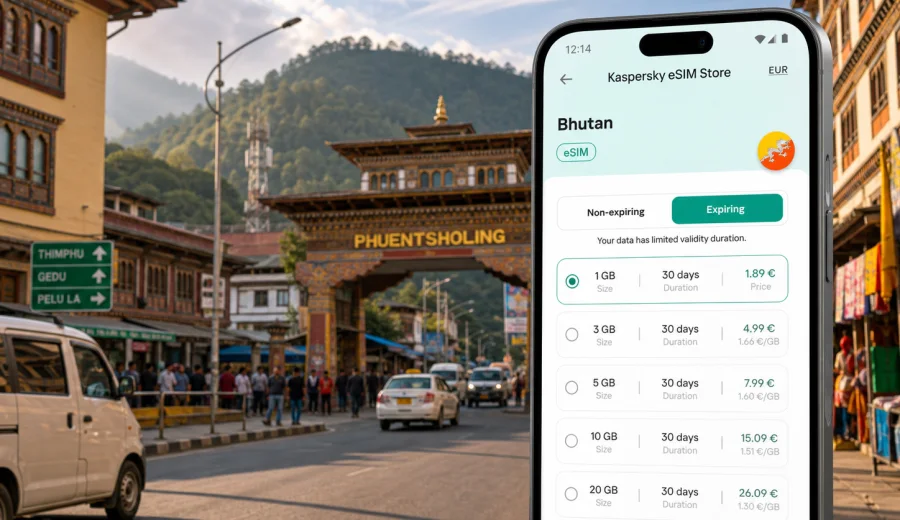
Phuentsholing eSIM: mobile connection and internet for your trip
Phuentsholing is often the first practical contact with Bhutan for travelers arriving by road from India. The city sits at the southern gateway to the country, close to Jaigaon on the Indian side of the border, and it works as a compact base for immigration formalities, hotels, onward transport, business visits, and trips toward Thimphu, Paro, or other parts of western Bhutan. For this kind of journey, mobile internet is not just a convenience. It helps you coordinate arrival time, find your hotel, message a driver, check documents, translate short phrases, and keep your route organized while moving between border procedures, taxis, buses, and local streets.
An eSIM can make that first day simpler because you do not need to search for a physical SIM card immediately after arrival. With a compatible phone, you can prepare a digital SIM profile before the trip or set it up when you have Wi-Fi, then use mobile data for maps, messaging apps, ride coordination, bookings, and work tasks. The key is to choose a tariff that covers Bhutan, check the data allowance and validity period, and understand when the plan starts using traffic.
Why Phuentsholing is a city where mobile internet matters
Phuentsholing is not a city where travelers usually stay disconnected for long. It is a transit point, a border city, a commercial hub, and a practical stop before mountain roads. Many visitors need internet in short, specific moments rather than for long sightseeing sessions:
- confirming hotel check-in after crossing the border;
- sending a location pin to a driver or local contact;
- checking route timing for the road toward Thimphu or Paro;
- opening booking confirmations and travel documents;
- using translation, currency conversion, and messaging apps;
- joining business calls from a hotel, office, or cafe;
- checking weather and road updates before leaving the city.
Public Wi-Fi can help in some hotels or cafes, but it is not a dependable plan for arrival, walking between offices, or coordinating transport from the street. A prepared eSIM gives you a way to use mobile data on your own device without waiting for a local counter, borrowing a hotspot, or depending on someone else to share a connection.
Arrival scenarios in Phuentsholing
The best mobile internet setup depends on how you enter the city. Phuentsholing has several common travel patterns, and each one creates a different data need.
| Arrival scenario | Typical internet need | Why eSIM helps |
|---|---|---|
| Road arrival from India | Maps, messaging, hotel location, document access | You can come online soon after you have a usable local mobile data signal |
| Overnight stop in Phuentsholing | Hotel check-in, dinner search, route planning | You can manage the evening without relying only on hotel Wi-Fi |
| Business visit | Calls, email, file access, contact coordination | You can separate travel data from your home SIM roaming settings |
| Transit toward Thimphu or Paro | Navigation, driver contact, weather checks | You can keep maps and messaging ready before the road journey |
| Return stop before leaving Bhutan | Ticket checks, border timing, family messages | You can use remaining data for the final logistics of the trip |
If you are entering Bhutan after a long day of travel, the practical value of mobile data is highest during the first hour. You may need to contact a hotel, confirm where a driver is waiting, or review your next route while standing outside with luggage. Preparing your mobile internet before that moment reduces small delays that can become tiring after a border crossing.
Where you may use data around the city
Phuentsholing is compact, but your phone still becomes a working travel tool. You may use mobile internet around the main commercial streets, near hotels, at restaurants, during walks, at offices, or while preparing for onward movement. Data use is usually moderate unless you stream video, upload many photos, or use your phone as a hotspot for a laptop.
Practical city uses include:
1. Opening offline-saved documents and backing them up in cloud storage when needed.
2. Keeping messaging apps active for coordination with hotels, drivers, colleagues, or relatives.
3. Loading maps before short walks or taxi trips.
4. Checking payment confirmations and reservation emails.
5. Sharing live location with a travel companion.
6. Reading route notes before the drive north into the hills.
7. Running a video call from a hotel only when the connection is stable enough and the data allowance is suitable.
For a one-night stop, a small data package may be enough if you mainly use maps and messages. For a business trip, a multi-day stay, or a route that continues through Bhutan, choose a larger allowance or a plan with a validity period that matches the full journey.
How much data to plan for Phuentsholing
There is no universal data amount for every traveler. The right allowance depends on how much you move around, whether you work from the phone, and how carefully you use hotel Wi-Fi. Use this table as a planning guide, not as a guarantee.
| Trip style | Data profile | What to watch |
|---|---|---|
| Short stopover | Messaging, maps, hotel apps, light browsing | Avoid automatic photo backup on mobile data |
| Two or three days in the city | Navigation, bookings, social media, restaurant search | Check app updates and cloud sync settings |
| Business visit | Email, documents, messenger calls, calendar access | Video meetings can consume data quickly |
| Phuentsholing plus western Bhutan route | Maps, weather, transport coordination, photo sharing | Pick a validity period that covers the whole route |
| Family trip | Several devices, shared photos, navigation, entertainment | Do not assume one phone plan should cover everyone |
Before departure, review the apps that use data in the background. Cloud photo backup, automatic video playback, app updates, and large messaging attachments can spend traffic without you noticing. If you want the eSIM mainly for travel logistics, set heavy apps to Wi-Fi only and keep mobile data for maps, messages, email, and essential services.
Choosing an eSIM tariff for a Phuentsholing trip
For a city article, the correct tariff direction is the country where the city belongs. Phuentsholing is in Bhutan, so you should look at plans for Bhutan rather than searching for a separate city plan. In Kaspersky eSIM Store, you can review the country direction, data allowance, validity period, and price before you arrange a tariff. This helps you match the plan to the real trip: one night in Phuentsholing, several days of meetings, or a longer route through Bhutan.
When comparing options, check:
- Country or region coverage. Make sure the tariff is intended for Bhutan or for a regional route that includes your destination.
- Validity period. The plan should cover your arrival day, local stay, and onward movement.
- Data volume. Choose enough traffic for maps, messages, bookings, calls, and work tasks.
- Activation rules. Read when the validity period starts and what steps are required on your device.
- Top-up or replacement options. If you may extend the journey, understand how you can add more data or choose another plan.
If your trip includes only Phuentsholing and one more Bhutanese city, a country plan can be a simple option. If you are crossing multiple countries before or after Bhutan, check whether a regional option fits the route better, but do not choose it only because it sounds broader. The useful plan is the one whose coverage, duration, and data amount match your actual itinerary.
For the main travel setup, you can prepare an eSIM plan for Bhutan before you reach Phuentsholing and keep the installation details ready on the device you will use during the trip.
Device compatibility before you travel
An eSIM works only on devices that support eSIM and are not restricted in a way that prevents adding a mobile data plan. Before you arrange a tariff, check the exact model of your phone or tablet, confirm eSIM support, and make sure the device is not locked to a carrier in a way that blocks another mobile profile. This is especially important if you use a company phone or an older device.
Use this quick checklist before you leave:
- Your device model supports eSIM.
- The operating system is updated enough for eSIM setup.
- The phone is not carrier-locked in a way that blocks adding another profile.
- You know which SIM should handle calls and which profile should handle mobile data.
- You have Wi-Fi available for installation if the setup requires downloading the eSIM profile.
- You have saved the QR code or installation details where you can access them.
If you are unsure, check your device before buying a tariff. This is better than discovering the issue at the border, in a hotel lobby, or just before a work call.
Installing eSIM before departure or after arrival
For Phuentsholing, the calmest approach is to install the eSIM while you still have a stable internet connection. Many travelers prefer to do this at home, in the hotel before crossing the border, or on trusted Wi-Fi before the road segment. Then, when the trip reaches Bhutan, you can select the eSIM profile for mobile data and follow the activation conditions of the chosen plan.
A simple setup flow looks like this:
1. Choose Bhutan as the destination and select a suitable data allowance and validity period.
2. Complete the order in Kaspersky eSIM Store.
3. Open the installation details from your profile, app, email, or QR code.
4. Add the eSIM profile to a compatible device.
5. Keep your primary SIM for calls if you need it, and set the eSIM as the mobile data line when appropriate.
6. Turn on data roaming for the eSIM profile if the setup instructions or device settings require it.
7. Test that mobile data works before relying on it for navigation or work.
For device-specific setup, use the Android installation instructions or the iOS installation instructions. The exact names of menu items can differ by model and operating system version, so follow the instructions on your device as well.
Do not delete the eSIM profile after installation unless you are certain you no longer need it. Some profiles cannot be moved to another device or reinstalled after removal, depending on the conditions of the tariff and profile.
Local movement: taxis, walking, hotels, and offices
Phuentsholing is easier to manage when your phone can switch between navigation, messaging, and bookings without interruption. Even if you know the hotel name, you may still need a map pin, a phone number, or a message thread. Some streets are easier to identify by nearby businesses, office buildings, or landmarks than by a formal address.
For local movement, keep these habits:
- Save your hotel address in offline notes and in a map app.
- Screenshot booking confirmations before travel.
- Keep a messenger thread open with the hotel or local contact.
- Download a small offline map area if your app supports it.
- Mark the place where your driver or group will meet you.
- Keep your battery charged before crossing the border or leaving the hotel.
If you are in Phuentsholing for meetings, mobile data also helps with calendar changes, document access, and quick messages between offices. Do not plan heavy uploads from the street. Use hotel or office Wi-Fi for large files, and keep mobile data for time-sensitive work.
Trips onward from Phuentsholing
Many travelers use Phuentsholing as a starting point rather than a final destination. The route north toward Thimphu or Paro can be long and terrain-dependent, and mobile data needs become more practical than recreational. You may want maps, weather checks, driver communication, hotel updates, or messaging with family. Coverage and speed can vary by location, terrain, local network conditions, and the selected tariff, so it is sensible to prepare offline backups.
Before leaving the city, do three things:
1. Download or cache the route while you have stable internet.
2. Confirm the next hotel, pickup time, and driver contact.
3. Check that the eSIM profile is selected for mobile data and that your data allowance is still sufficient.
On mountain roads, do not rely on constant connectivity for every decision. Keep key information available offline: hotel names, addresses, phone numbers, passport scans if appropriate, ticket details, and emergency contacts. The eSIM is a useful part of the trip setup, but good travel preparation also means having information on the device before you need it.
Short stopover checklist
If Phuentsholing is only a short stop, keep the setup light and practical.
- Install the eSIM before arrival if possible.
- Save hotel and transport details offline.
- Turn off automatic media downloads in messengers.
- Use mobile data for maps, messages, bookings, and route checks.
- Use Wi-Fi for large uploads, streaming, or software updates.
- Check remaining data before starting the next road segment.
This approach keeps the eSIM focused on the moments where it matters most: arrival, coordination, navigation, and onward travel.
Business trip checklist
For a business visit, treat mobile internet as part of your work kit. A small connection gap can affect a meeting schedule or document exchange, especially when you are moving between a hotel, office, and border area.
Prepare:
- a data allowance that covers email, messenger calls, cloud documents, and calendar sync;
- offline copies of presentation files and essential PDFs;
- a power bank or charging plan;
- a backup contact method for local partners;
- a clear setting for which SIM handles mobile data;
- Wi-Fi-only settings for large file sync if your allowance is limited.
If you expect video meetings, choose a larger data allowance and test the connection before the call. When possible, use hotel or office Wi-Fi for long video sessions and keep eSIM data for mobility and backup.
Common mistakes to avoid
Travelers often run into problems that are easy to prevent:
- buying a plan without checking whether the phone supports eSIM;
- choosing too little data for a route that continues beyond Phuentsholing;
- installing the profile only after leaving stable Wi-Fi;
- deleting the eSIM profile after setup;
- leaving photo backup or app updates active on mobile data;
- assuming a travel eSIM includes a regular phone number, SMS, or voice calls;
- forgetting to set the correct line for mobile data.
An eSIM tariff is usually focused on mobile internet. Voice calls and SMS are not included unless the selected tariff says otherwise. For many travel tasks, internet-based calls and messaging apps are enough, but you should check the plan details before you depend on any specific feature.
Quick answers about eSIM in Phuentsholing
Is eSIM useful for Phuentsholing if I stay only one night?
Yes, it can be useful if you need maps, hotel communication, booking access, transport coordination, or messages during arrival and departure. Choose a data amount that matches a short stay.
Should I choose a Phuentsholing plan or a Bhutan plan?
For a city trip, choose the country direction that covers the city. Phuentsholing is in Bhutan, so the relevant destination is Bhutan.
Can I install eSIM before crossing into Bhutan?
You can usually install the eSIM profile before travel when you have Wi-Fi, then activate or use it according to the conditions of the selected tariff and your device settings.
Does eSIM replace my regular phone number?
Not usually. Travel eSIM tariffs are commonly used for mobile data. Keep your primary SIM active for calls or SMS if you need your regular number.
What if I continue from Phuentsholing to Thimphu or Paro?
Pick a validity period and data allowance for the full Bhutan route, not only for the arrival city. Cache maps and key details before longer road segments.
Can I use public Wi-Fi instead?
You can use Wi-Fi where it is available and trusted, especially for large downloads. Mobile data is more useful when you are moving, coordinating transport, or outside a hotel.
Final preparation before you go
For Phuentsholing, the best mobile internet plan is the one that covers your real route: arrival at the border city, hotel check-in, local movement, meetings or errands, and the road onward through Bhutan. Check device compatibility, choose a suitable data allowance, install the eSIM while you have stable internet, and keep essential travel details offline.
Kaspersky eSIM Store helps you choose, arrange, and activate an eSIM tariff for mobile internet in a foreign trip without turning the first day into a search for a physical SIM card. Before you leave, choose an eSIM tariff for your trip to Bhutan and make sure your phone is ready for Phuentsholing.