Travel connectivity guide
Piriapolis eSIM: Mobile Internet for Your Trip
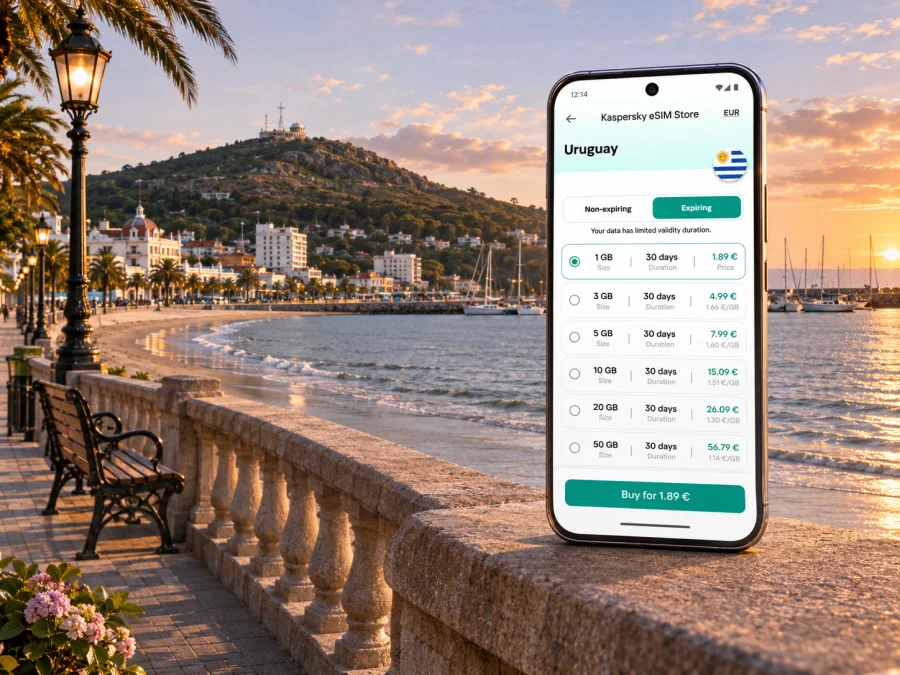
Piriapolis eSIM: mobile connection and internet for a coastal stay
Piriapolis is a small seaside city in Uruguay’s Maldonado Department, where a day can move from the central beach and rambla to the harbor, a hillside viewpoint, or a quieter stretch of coast. Mobile internet is useful for more than posting a sunset: it helps you check a bus departure, find a guesthouse entrance, read a map while walking unfamiliar streets, contact your host, and adjust plans when wind or rain changes the day.
An eSIM can make that routine easier to prepare. It is a digital SIM profile installed on a compatible, unlocked phone. A travel data plan can provide mobile internet in Uruguay, while your usual SIM remains available for calls or messages if your home carrier and device allow dual SIM use. Coverage, speed, activation rules, and the network used depend on the specific plan and local conditions, so check its details rather than assuming every service behaves the same way.
Why mobile data helps in Piriapolis
The city is walkable around its central waterfront, but a visit often includes places beyond the first row of streets. You may be checking where a local bus stops, finding a trail approach, confirming a restaurant opening time, or arranging a ride back after visiting a beach outside the center. A working data connection gives you a practical fallback when a printed map or a saved screenshot no longer answers the question.
Piriapolis also rewards a flexible itinerary. The rambla, port, central beach, and Cerro San Antonio can fit into one outing, while Cerro del Toro, Castillo de Piria, or the wider coast may need a separate trip. Before setting out, save directions and essential booking details offline as well. Mobile coverage is not guaranteed at every point, and a phone battery can run down quickly when maps, camera, and mobile data are all in use.
| Part of the visit | How mobile internet can help | A useful backup |
|---|---|---|
| Arrival and check-in | Message your accommodation, confirm an entrance, and find the address | Save the booking details and address before leaving the airport |
| Rambla and central beach | Check walking directions, weather, or a meeting point | Keep a simple offline map of the central area |
| Port and Cerro San Antonio | Find the access point and coordinate a return trip | Download the route and agree on a meeting place in advance |
| Coastal day trip | Review bus information and tell someone if the plan changes | Save the return stop and the last departure details |
| Remote work | Join a call or send files when a stable connection is available | Confirm Wi-Fi with your accommodation and keep key files offline |
Arriving and getting oriented
Many international visitors reach Piriapolis through Montevideo, then continue east by road. Carrasco International Airport serves Montevideo, and interdepartmental bus companies provide onward services from the airport and the capital toward destinations in Uruguay. Some services on the eastbound route serve Piriapolis; exact stops, schedules, and seasonal patterns change. Check the current timetable and confirm whether a service enters the town or stops along the route before buying a ticket. A map connection is especially useful if you are coordinating an airport pickup or changing vehicles in Montevideo.
If you arrive at night or during a busy summer period, plan the first leg before boarding your flight. Download your accommodation address, booking confirmation, and a map pin. Ask your host whether the bus stop is close to the property and whether a taxi or prearranged transfer is preferable for the final stretch. Do not rely on mobile data as your only copy of tickets or reservations: retain screenshots or offline copies in case service is slow or unavailable.
At the town’s bus terminal, the central waterfront is a practical starting point for many first-time visitors. Use the exact accommodation pin, rather than only a street name, to navigate from the terminal. In low-rise coastal neighborhoods, two entrances can look alike, and a rental may be set back from the road. If you are meeting a host, send a message while you have a clear signal and agree on a recognizable landmark.
Keep your first hour simple: connect to the network, confirm that maps load, and check the next step of your journey before leaving the terminal area. If mobile data does not work immediately, verify that the travel eSIM is selected for cellular data, that its line is enabled, and that data roaming is turned on if the plan’s instructions require it. Restarting the phone or toggling airplane mode may help it register, but do not delete an installed eSIM profile unless the provider’s support team instructs you to do so.
Choosing where to stay and what to navigate
Piriapolis has several useful reference points rather than one single visitor district. The beachfront and central streets place you near shops, restaurants, the main promenade, and the port. A stay farther along the coast can feel quieter and may give you more beach access, but you will need to plan transport and check how close the nearest bus stop, grocery shop, and services are.
Use mobile maps to compare the actual route from a property to the places you plan to visit. A listing’s broad neighborhood label does not tell you whether the walk includes an unlit stretch, a steep approach, or a long distance from the nearest stop. In daylight, take note of the route back. At night, follow well-lit streets and use a licensed or prearranged ride when that is the safer or more practical choice.
The waterfront route is a natural orientation walk. The Rambla de los Argentinos follows the bay through the central area, with the beach, shops, and landmarks spread along the coast. The port lies toward one end of the visitor route and is a useful point for checking your location. A map can help you distinguish the port area from the separate beach access points and find a return route if you continue past the busiest section.
Cerro San Antonio rises beside the town and is a well-known viewpoint. The local tourism information describes access on foot, by road, or by chairlift. Before you go, verify current opening and operating details for the option you intend to use; hours and availability can vary. Mobile data helps you check the approach and share your location, but you should also carry water, wear suitable footwear if walking, and avoid relying on a screen while moving over uneven ground.
Other places worth planning separately include Cerro del Toro, Castillo de Piria, and the coastal neighborhoods toward Punta Colorada, San Francisco, Playa Hermosa, and Playa Verde. Distances and transport options differ. For a beach outside the center, confirm the route in both directions before setting off and save the return stop. A ride-hailing app or taxi may be convenient when service exists, but availability and pickup accuracy can vary by time and location.
Mobile connection for a coastal itinerary
The practical question is not only whether a phone shows a signal in central Piriapolis. You may also want data on the road from Montevideo, at the port, near a hillside, or on an excursion along the coast. Network performance can change between locations, indoors and outdoors, and during busy periods. Reception can vary between locations, so plan important actions around places where you can pause and reconnect if necessary.
Before purchasing a travel plan, check the destination list, data allowance, validity period, activation trigger, hotspot rules, and any speed limits. If the plan identifies a local partner network, note that information, but do not infer coverage or performance beyond the provider’s terms. Uruguay has domestic operators that offer eSIM service for eligible local lines; this does not mean every international travel plan uses the same operator or has the same setup conditions.
Kaspersky eSIM Store is an app and website for choosing, purchasing, and activating an eSIM with a suitable data plan for an international trip. To compare the current options for this destination, review the Uruguay eSIM plans. The country page is the relevant destination page for a stay in Piriapolis; check the live plan details there for what is currently offered and whether the terms match your itinerary.
Match the plan to your days, not just the city name
A short weekend of maps and messaging uses data differently from a longer stay involving remote work, video calls, or daily photo uploads. Think through how you normally use your phone and where Wi-Fi will be available. A small data allowance may be enough if you download maps and media in advance; frequent video or cloud backups can consume substantially more. Do not choose a plan solely because its headline allowance looks large: duration, activation timing, and network conditions matter too.
| Your likely use | What to estimate before choosing |
|---|---|
| A brief city break | Number of travel days, map use, messaging, and whether accommodation Wi-Fi is available |
| A week with day trips | Data used while navigating, checking transport, and sharing photos away from Wi-Fi |
| Remote work | Video-call frequency, file transfers, hotspot permission, and a reliable indoor Wi-Fi fallback |
| A multi-country route | Whether one plan explicitly includes every destination and how its validity works across borders |
Keep data use predictable: download offline maps, pause automatic photo uploads, update apps on Wi-Fi, and use lower video quality when practical. Check data consumption in your phone settings or the provider’s app if available. If your plan allows top-ups, review how to add data before you need it. A top-up may have its own validity rules and may not solve a coverage issue.
Check your phone before you travel
Compatibility depends on the exact phone model, hardware version, country or region variant, software, and carrier lock status. A product family name alone is not enough to confirm eSIM support. Some devices sold in one market may have different SIM hardware from a similar model sold elsewhere; the support list for the precise regional version is the one to check. If you are unsure, check whether your device is compatible with eSIM before purchasing.
Also confirm that the phone is unlocked for use with another provider and that you can access the account or email where installation details will arrive. If you depend on your home number for verification codes, ask your current carrier how it handles roaming and incoming messages before changing SIM settings. Keep the primary line available if you need it, but select the travel eSIM for mobile data only when appropriate.
A quick preparation checklist:
- Confirm eSIM support for the exact regional device variant and operating-system version.
- Confirm the device is not carrier-locked.
- Install pending system updates while you still have reliable Wi-Fi.
- Check that you can sign in to the account used to purchase the plan.
- Save the installation instructions and support details offline.
- Make sure you understand when the plan’s validity begins: purchase, installation, or first connection can have different meanings.
Install and activate with a clear plan
If possible, install the eSIM while connected to stable Wi-Fi before departure, then follow the plan’s instructions for activation. Some plans start their validity when installed; others start when the eSIM first connects to a supported network. Read the terms for your specific plan so you do not start its validity earlier than intended. Avoid deleting or reinstalling the profile casually: eSIM transfer and reinstallation rules vary by provider.
For step-by-step setup, use the Android eSIM installation instructions or the iPhone eSIM installation instructions. Menu names can differ by phone model and operating-system version. Keep your main SIM line identified by name, label the travel profile clearly, and make sure mobile data is assigned to the intended line after installation.
Once you arrive in Uruguay, follow the plan’s activation steps. If data does not connect, check these items in order:
- Confirm the travel eSIM is switched on and selected for mobile data.
- Check whether data roaming must be enabled for that plan.
- Turn airplane mode on briefly, then turn it off and wait for network registration.
- Review the provider’s network selection instructions; use automatic selection unless support advises otherwise.
- Restart the phone and test a simple webpage or map with Wi-Fi turned off.
- If there is still no service, contact the plan provider over Wi-Fi before removing the eSIM profile.
A phone can show a network name yet still fail to load data because of an APN setting, a disabled data line, an activation delay, or an exhausted allowance. Record the error message and the time it occurred. That makes support easier and avoids repeatedly changing settings that were already correct.
Keep navigation dependable
Download the basic map before leaving Wi-Fi, then use live directions for changes. Bus timetables can vary by season, weekday, holidays, and traffic, so check the operator’s latest information before travelling and keep an offline copy of your ticket and return stop. Save your accommodation pin and agree on a meeting point with companions.
At the beach, protect your phone from sand, saltwater, and heat. Carry a power bank for a long day, keep it shaded, and download viewpoint routes before setting out. For walks over uneven ground, wear suitable footwear and avoid relying on a screen while moving.
Work, calls, and messages
A data-only eSIM is useful for messaging apps, email, maps, and web calls, but may not provide a regular local number, voice minutes, or SMS. Check the plan description. Keep your usual SIM active if you need its number and your carrier permits dual SIM use; review roaming charges first.
If you need to work remotely, ask your accommodation about Wi-Fi stability, especially for video meetings or uploads. Hotspot use may be restricted or use data quickly. Download files in advance and treat mobile data as a backup unless you have confirmed it meets your needs.
A simple itinerary with connectivity in mind
First afternoon: Check in, walk the central rambla, and save the beach, port, bus terminal, and grocery shop to your map. If conditions are clear, confirm the route and access option for Cerro San Antonio.
Full day: Explore the waterfront and port, then visit the viewpoint. Check chairlift operation before setting out and keep a return route saved. Leave time for the beach or a café.
Day beyond the center: Choose one or two places such as Castillo de Piria, Cerro del Toro, or a nearby beach. Verify opening information and transport in both directions, particularly outside the main holiday season.
Departure: Check the latest bus time and departure stop. Keep tickets and flight details offline and leave a traffic buffer.
Common questions
Is an eSIM useful for a weekend in Piriapolis?
It can be useful if you want mobile data for maps, messages, transport checks, and reservations without relying on public Wi-Fi. Compare the plan’s validity and data allowance with your expected use and your carrier’s roaming terms.
Will one eSIM work throughout Uruguay?
Do not assume that from the word “Uruguay” alone. Service depends on the plan, device, and local conditions; check the terms and expect reception to vary by location.
Does a travel eSIM include a phone number?
Many travel data plans are data-only. Calls and SMS may not be included unless a plan explicitly says so. Apps can make calls over data; ordinary phone calls require a voice service.
Can I keep my usual SIM active?
Many recent dual-SIM phones can keep a physical SIM and an eSIM available at the same time, but the exact behavior depends on the device and its regional variant. Check device settings and carrier terms, and choose which line handles data to avoid unexpected roaming charges.
What should I do if the eSIM has no internet?
Confirm that it is enabled, selected for data, and configured according to the provider’s instructions. Check the activation trigger and data balance, then retry network registration. If it continues, contact support over Wi-Fi before removing the profile.
Should I install the eSIM before leaving home?
Install before travel only if the plan’s validity rules suit your dates; follow its instructions and use stable Wi-Fi.
Prepare for your Piriapolis stay
A dependable trip plan combines mobile data with a few simple offline habits. Check your exact phone variant, understand the plan’s start date and data allowance, download maps and bookings, and verify current transport details before a long ride. In Piriapolis, that preparation helps you move between the rambla, port, viewpoints, beaches, and nearby sights without making every decision depend on a live signal.
When you are ready, use Kaspersky eSIM Store to review the current destination options, select a plan that fits your dates and expected data use, and follow its installation steps. Choose an eSIM plan for your Uruguay trip before departure, then keep your maps, tickets, and accommodation details available offline as a practical backup.


