Travel connectivity guide
Playa del Carmen eSIM: Mobile Internet Guide
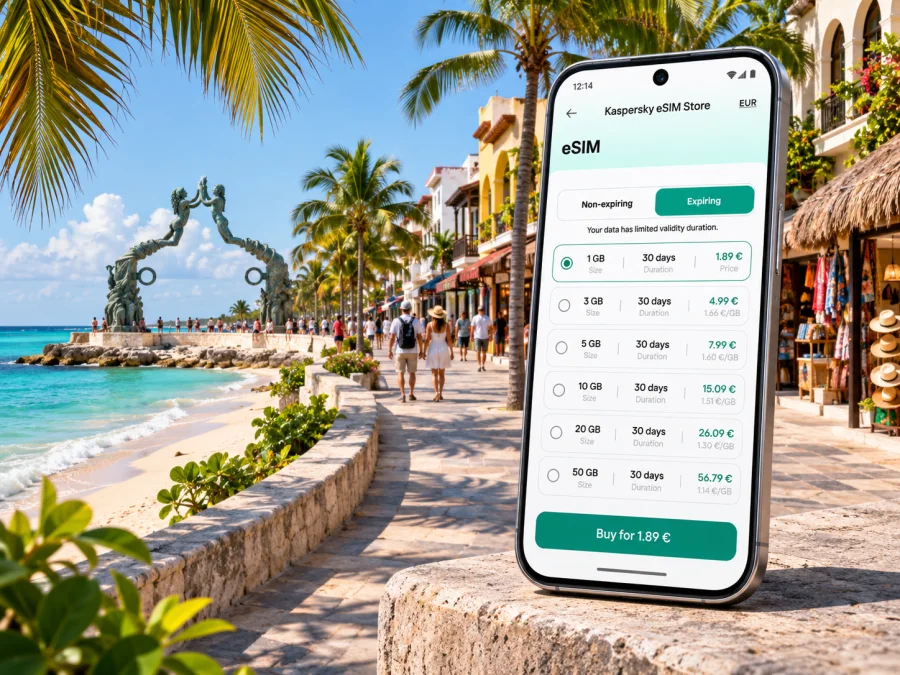
Playa del Carmen eSIM for mobile connection and internet
Playa del Carmen is easy to explore on foot in its central coastal area, but a trip here can also involve an airport transfer, a ferry, a hotel outside the center, or a day excursion along the Riviera Maya. Mobile internet helps with the practical details: checking a reservation, following a route, messaging your host, and keeping transport plans together. An eSIM can make that connection easier to prepare, provided your phone supports it and the plan you choose covers your destination and dates.
This guide focuses on using mobile data around Playa del Carmen: what to plan before leaving the airport, how to stay oriented between the beach and town, what to consider on a Cozumel ferry day, and how to choose and set up a travel eSIM without relying on assumptions about coverage or device compatibility.
What to expect from connectivity in Playa del Carmen
Playa del Carmen is a coastal city in Quintana Roo on Mexico’s Caribbean shore. Its central visitor area runs close to the beach, with Quinta Avenida (Fifth Avenue) serving as a busy pedestrian shopping and dining corridor. The ferry terminal, beach access points, hotels, restaurants, and bus connections make the center a useful base, but they are not all in the same place. A map pin and the name of a nearby avenue can be more useful than a hotel’s broad “Playa del Carmen” address.
Mobile service is provided by local networks, and the experience can vary with the selected plan, network partner, signal conditions, building materials, weather, and the number of people using a nearby cell site. An eSIM travel plan is generally best understood as a way to access mobile data. Unless the plan terms explicitly say otherwise, do not expect it to include a regular Mexican phone number, voice calls over the cellular network, or SMS. Keep your usual SIM active if you need its number for calls, bank verification, or messages, and check what roaming charges may apply to that line. Internet-based calling and messaging apps can work over data, subject to the app, connection, and recipient’s availability.
A quick planning snapshot
| Trip situation | What mobile data can help with | What to prepare |
|---|---|---|
| Arrival from Cancún airport | Checking the transfer, sharing an arrival update, and finding your accommodation | Save the address and transfer details offline before boarding |
| Walking in the center | Maps, restaurant information, and meeting points | Use a precise pin; streets and entrances can be easy to mix up |
| Ferry day to Cozumel | Checking departure details and coordinating after arrival | Confirm the ferry operator, terminal, and return plan directly before travel |
| Hotel outside the center | Navigation and contacting the property | Ask for the exact entrance or pickup point, not only the hotel name |
| Day trip beyond the city | Route changes and messages while travelling | Check that your selected plan is intended for every place on your route |
The table describes common uses, not a guarantee of signal or service at a particular address. Review the coverage and usage terms shown for the specific plan, and keep essential booking information available offline.
Arriving from Cancún and getting to your accommodation
Most international visitors heading to Playa del Carmen arrive through Cancún International Airport. The airport is not in Playa del Carmen, so the first task is a separate transfer into town. Official airport information lists ground-transfer options including ADO bus service and taxis; availability, pickup points, fares, and timetables can change. Check current details with the transport provider or airport before travelling, especially if your flight arrives late or your group has several bags.
The trip from the airport is a good reason to prepare your internet access before landing. You may want to check a ticket, contact a driver, confirm an accommodation’s check-in instructions, or tell someone that you have arrived. Save the hotel address in both a map app and a note, including the neighborhood and nearby cross streets. If your host has supplied a building entrance pin or a pickup point, save that too. A business name alone may not distinguish several similarly named properties.
The Tren Maya has a Playa del Carmen station and an official operator has announced a Cancún–Playa del Carmen service. Train routes and operating times can change, and a station transfer may be needed at either end. Treat the train as an option to investigate rather than an assumed airport-to-hotel connection: check the current timetable, the precise station, ticket conditions, and onward transport on the date you travel. If you have a close connection, arrive late, or need a direct ride to a hotel, compare the entire door-to-door journey rather than just the line-haul portion.
Getting around the city with a working data plan
The central grid is manageable for many short trips on foot, especially between Quinta Avenida, the beach, restaurants, and the ferry area. Heat, rain, luggage, mobility needs, and the time of day can make a short map distance feel different in practice. Check the walking route and your destination’s entrance before leaving, and carry a charging option if you expect to use navigation throughout the day.
For trips farther from the center, identify the pickup location before ordering a ride or meeting a driver. A hotel may use a different access road from the one shown by its map pin. If you are taking a taxi, agree on the destination and fare details before the trip where applicable. Mobile data supports communication and navigation, but it does not replace checking local transport arrangements or following instructions from the provider.
Quinta Avenida is lively and can be crowded, especially during busy hours and event periods. Its parallel streets and frequent intersections make it easy to walk past a turn while browsing shops. Save a pin for your hotel, a meeting place, and the ferry terminal. In a crowded area, a short text with a recognizable landmark can be easier for your group than trying to describe a route over a call.
Beaches, ferry trips, and excursions beyond town
The waterfront is central to Playa del Carmen’s identity, but beaches and access points are spread along the coast. Conditions on the shoreline can vary, and sargassum levels and beach maintenance are not constant. If a particular beach is important to your day, check recent local information before setting out. Use mobile data to review directions and updates, then follow posted signs and instructions at the beach.
The passenger ferry terminal connects Playa del Carmen with Cozumel. Before travelling, verify the current departure point, operator, ticket conditions, and return service with the ferry company. Do not assume that the timetable or ticket rules from an earlier visit still apply. If you have a tour or flight later the same day, leave time for the return crossing and onward transport. Download the information you need before boarding, since your data experience at sea or after arrival can differ from the city center.
For a day trip to Cozumel, choose a plan based on the whole route, not just Playa del Carmen. Confirm whether your data allowance and destination terms cover the island, and whether the plan remains valid for the full period you will be away. The same check matters for excursions toward Tulum, cenotes, parks, or other parts of Quintana Roo. A country-level selection may be relevant, but coverage and permitted use depend on the terms for the specific eSIM plan and its network partners.
Choosing a travel eSIM for Playa del Carmen
Start with the itinerary. A short city stay with hotel Wi-Fi and occasional map checks uses data differently from remote work, frequent video calls, or sharing a mobile hotspot. Estimate the tasks you expect to do, then compare the plan’s allowance, validity period, destination, and any limits on tethering or particular services. Do not choose by data volume alone: a large allowance is not useful if its validity does not fit your travel dates or its destination terms do not match your route.
Kaspersky eSIM Store is an app and website where you can choose, purchase, and activate an eSIM plan for mobile internet on an international trip. The available destination selection is country-based, so for a city visit you can check eSIM plan options for travel in Mexico. Review the current plan details there before purchase; this link is for browsing Mexico options and is not a statement that a particular plan or network is available at every Playa del Carmen address.
Use this checklist when comparing options:
| Check | Why it matters |
|---|---|
| Destination and route | A plan should match the places you will visit, including any island or onward stop |
| Data allowance | Navigation and messages use less data than frequent video streaming or hotspot use |
| Validity | Confirm when validity starts and whether it covers the full travel period |
| Network and coverage terms | Performance can vary by area and conditions; read the plan’s stated terms |
| Activation instructions | Know whether installation and first use happen before departure or after arrival |
| Tethering and usage restrictions | Confirm these details if you plan to connect a laptop or another device |
| Refund and transfer rules | Check what happens if plans change or you need to move the eSIM to another phone |
Avoid relying on a generic estimate of “data per day.” A traveler who mostly checks maps and sends messages may need a very different amount from someone uploading large files. You can limit background app refresh, disable automatic photo backups on mobile data, and download films, podcasts, and maps over Wi-Fi. If topping up is possible under the terms of your selected plan, check how it works before you need it.
Check your phone before you travel
Not every phone supports eSIM, and regional device variants can differ even when their names look almost identical. Compatibility can also depend on whether the device is carrier-unlocked. Check the exact model or variant in the manufacturer’s settings or documentation, and confirm that your carrier has not restricted the phone. Do not infer compatibility from a family member’s similar-looking handset or from the product name alone. Check whether your device supports eSIM before selecting a plan.
If your device has both a physical SIM and an eSIM, decide which line should handle mobile data. Keep the home line available for calls or verification only if you understand its roaming conditions. On some phones, the eSIM data line may require data roaming to be enabled; follow the plan’s setup instructions and use that setting only as directed. Menu names vary by operating system and device version.
Install and activate without losing access to your main line
The safest timing depends on the plan’s instructions. Some eSIMs can be installed ahead of travel but should not be activated until a particular point; others follow a different process. Read the validity and activation wording before installing. If installation uses a QR code, open it on another device or use the provider’s manual method if your phone cannot scan a code displayed on itself. Keep a copy of the instructions available offline.
A sensible sequence is:
- Connect to stable Wi-Fi and check the plan details, destination, validity, and installation instructions.
- Add the eSIM profile using the method shown for your device.
- Label the new line clearly, for example “Travel data,” so it is easy to identify in settings.
- Choose which line handles mobile data; keep your usual number selected for calls and messages if needed.
- Follow the plan’s instructions about data roaming and activation timing.
- When you are ready to use it, enable the travel line and test a simple page or message.
- If data does not work, check the selected data line, airplane mode, roaming setting, and the plan’s activation status before reinstalling anything.
For detailed steps, follow the Android eSIM installation instructions or the iPhone and iOS eSIM installation instructions.
If data does not work, connect to Wi-Fi where available, confirm the selected data line and plan status, then follow the device-specific troubleshooting instructions. Avoid deleting the eSIM profile unless support or the plan instructions tell you to do so.
Short-stay, work, and connection scenarios
A weekend in the center: download an offline map, save the hotel and ferry-terminal pins, and choose a plan whose validity matches your stay. Hotel Wi-Fi can handle larger downloads.
A week with day trips: list each destination, including Cozumel, before comparing plans. Check that the plan terms cover the full route and dates; save tour confirmations and meeting points offline.
Remote work: confirm hotspot rules and choose accommodation with Wi-Fi suited to your work. Do not treat mobile data as a guaranteed office connection; signal and congestion vary.
Late arrival: save transfer and check-in details before departure. Confirm current pickup arrangements and schedules, and leave enough time for the full airport-to-hotel journey.
Frequently asked questions
Will an eSIM work everywhere in Playa del Carmen?
No plan guarantees service at every location. Coverage and speed depend on the plan’s network arrangements, local conditions, device, and factors such as buildings or congestion. Review the plan terms and keep essential details offline.
Can I keep my usual number while using an eSIM for data?
Many dual-SIM phones can keep a regular line enabled while using an eSIM for data, but options vary. Check the selected data line and roaming charges on your usual SIM. A travel data plan does not automatically include a local number, cellular calls, or SMS.
Do I need a separate eSIM for Cozumel?
Check whether your chosen plan covers the island as well as the mainland. Do not assume the terms apply identically to every nearby destination.
Should I install the eSIM before flying?
Follow the plan’s instructions. Installation and the start of validity may be separate events, but the rule varies. Check the validity wording and keep activation details accessible.
What if my phone does not support eSIM?
Consider a supported, unlocked device, roaming through your existing provider, or a local physical SIM where available. Compare requirements before travelling and confirm compatibility before buying an eSIM plan.
Can I make ordinary calls?
Only if the selected plan explicitly includes voice service. Many travel eSIMs are for data; internet calling apps may work over data but do not provide a standard local phone line.
A practical arrival checklist
Before leaving home, confirm eSIM support and unlock status, read the plan’s destination and activation terms, and save your hotel address, transfer details, ferry information, and tour meeting points. Install the profile as instructed and choose which line handles mobile data.
After arrival, test a simple connection before setting out. Keep maps and confirmations available offline, and recheck that your plan fits any destinations beyond Playa del Carmen. These small steps help with navigation while allowing for real-world changes in transport and mobile service.
Prepare your eSIM for Playa del Carmen
Use Kaspersky eSIM Store on the website or in the app to review available options, compare the data allowance and validity, and choose an eSIM plan for your trip to Mexico. Check device compatibility and the plan’s terms before purchase, then install and activate it according to the instructions for your phone: explore eSIM options for Mexico.


