Travel connectivity guide
Pointe-a-Pitre eSIM: Mobile Internet Guide
Pointe-a-Pitre eSIM: mobile connection and internet for your trip
A dependable mobile connection makes the first hours in Pointe-a-Pitre easier: you can check where your accommodation is, message your host, look up a route from the airport and keep bookings close at hand. An eSIM can provide mobile data without swapping a physical SIM, provided your device supports it and the chosen plan covers Guadeloupe.
Pointe-a-Pitre is on Grande-Terre, one of Guadeloupe’s main islands. A useful detail when planning arrival: Pointe-a-Pitre International Airport, also known as Guadeloupe Pôle Caraïbes, is in the neighboring commune of Les Abymes, not in the city center. From the terminal, you will continue by road toward Pointe-a-Pitre or another part of the island, so having maps and your arrival details available can help you coordinate the next step.
Why mobile data helps in Pointe-a-Pitre
The city is a practical arrival and transfer point as well as a destination in its own right. You may need to find a hotel entrance, contact a driver, check a meeting address, translate a detail, or confirm the location of a ferry terminal. These are small tasks, but they tend to happen while you are carrying bags or working around an arrival schedule.
In practice, mobile data is most useful for maps, arrival messages, booking checks and work updates. Save critical addresses and confirmations offline as a backup.
A data-only travel eSIM is not a replacement for your usual phone line unless the plan says otherwise. Keep your home SIM available for calls or verification texts, and check its roaming terms. App-based calls and messages use internet data.
From the airport to the city: plan the handoff
Because the airport is in Les Abymes, not Pointe-a-Pitre proper, make sure your pickup instructions use the correct place name. If someone is meeting you, share the terminal and a clear pickup point before you leave the arrivals area. If you are arranging a taxi or other transfer, confirm the destination address and fare with the provider rather than relying on a pin alone.
Before your flight, save your accommodation address, pickup point, flight details, transfer confirmation and first route somewhere accessible offline.
Once you have a mobile connection, check that the map pin matches the written address. Guesthouses and apartments may use entrances on a different street from the one suggested by a broad neighborhood pin. A short message to the host can prevent an unnecessary detour.
Getting around the center
Pointe-a-Pitre’s historic center has a compact street grid, with the Place de la Victoire, the market area, the Darse waterfront and cultural sites as useful orientation points. Street names and map pins are more reliable than trying to navigate by a landmark description alone, especially when you are unfamiliar with local pronunciations.
| Situation | Use mobile internet for | Keep offline |
|---|---|---|
| Hotel arrival | Confirm the map pin and message your host | Full address and arrival notes |
| City walk | Follow directions and save a return point | Map and selected stops |
| Ferry or bus | Check the terminal and current operator details | Ticket and departure information |
| Business visit | Open schedules and message colleagues | Meeting address and key documents |
Markets, waterfront and cultural stops
The market streets and the waterfront give the city a distinct rhythm. The Marché Saint-Antoine is in the center, while the Marché de la Darse faces the Place de la Victoire across the quay. These names are helpful search terms when saving destinations. Opening arrangements can vary, so confirm current details before setting out, particularly if you have limited time.
The Place de la Victoire is a good map reference for the central area. Nearby, the Mémorial ACTe addresses the history of the slave trade and slavery; plan enough time for a considered visit and check the museum’s current visitor information in advance. The city also has historic architecture and smaller museums, so use a saved list rather than trying to fit everything into a single walk.
A practical sightseeing sequence might look like this:
- Before leaving: check the day’s opening information, weather and route; download a map if you expect to be away from Wi-Fi.
- At the first stop: save the next destination and note how you will return to your hotel or transport point.
- At the market or quay: keep your phone secure and use it only when needed in crowded areas.
- Before moving on: confirm the next address and whether your plan extends to the next island or municipality on your route.
Choosing a plan for a Guadeloupe trip
Start with the route, not with a guess about what a “France” plan includes. Guadeloupe is a French overseas department and region and an EU outermost region, but it is geographically in the Caribbean and has a distinct mobile-network market. The French regulator ARCEP reports mobile coverage for Guadeloupe as its own territory and distinguishes local network operators from those in metropolitan France. That makes the exact destination coverage printed in a plan important: do not assume that a plan labeled for metropolitan France includes Guadeloupe, or that a Guadeloupe plan automatically covers nearby islands or countries.
Before paying, review the plan’s stated destination or region, data allowance, validity period, price and any activation conditions. If you plan to travel beyond Pointe-a-Pitre—to another part of Grande-Terre, Basse-Terre, Marie-Galante or Les Saintes—confirm that the plan covers the whole itinerary. If your route includes another Caribbean territory, check it separately rather than inferring coverage from geographic proximity.
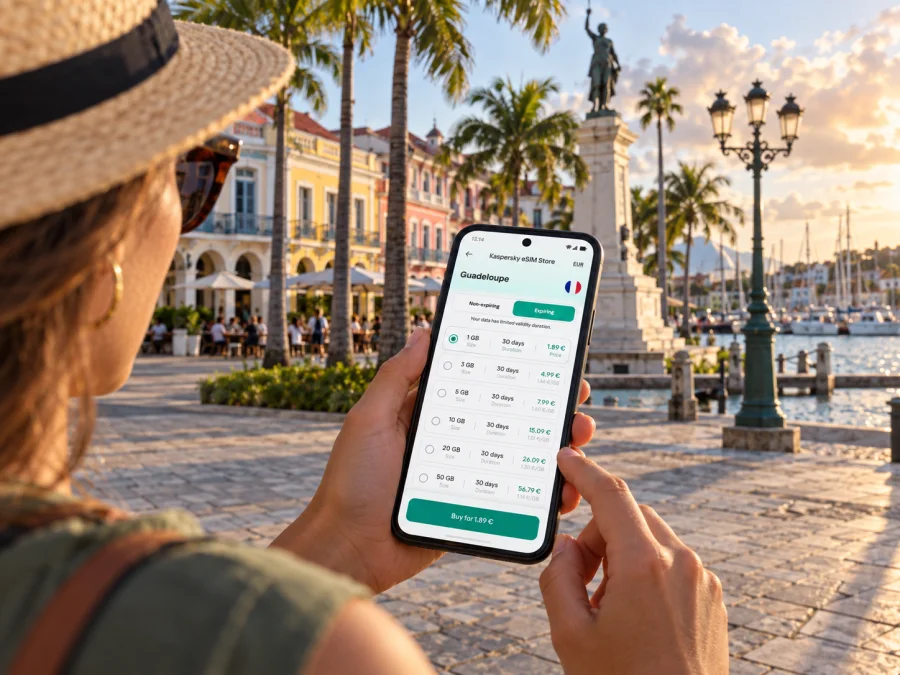
Kaspersky eSIM Store is an app and website that helps you choose, purchase and activate an eSIM with a suitable data plan for an international trip. You can review eSIM plan options for Guadeloupe and compare the displayed allowance and validity with your own itinerary before deciding.
Use this checklist when comparing options:
- Destination: Does the plan explicitly name Guadeloupe or a region that includes it?
- Route: Does the coverage fit each island or territory you intend to visit?
- Duration: Will the plan remain valid for the full trip, including arrival and departure days?
- Data use: Will you mainly use maps and messages, or also upload work files, make video calls and stream media?
- Activation: When does validity begin, and what steps are required to start using the plan?
- Device: Is the phone eSIM-compatible, unlocked, and able to use the required network bands and settings?
For a short city visit, directions, messaging, email and booking updates may be enough for modest data use. Remote work, frequent video calls, cloud backups and high-resolution media can use considerably more. Estimate from your own habits, turn off automatic photo backups over mobile data if you prefer, and use trusted Wi-Fi for large downloads when available. Avoid choosing solely by the largest allowance; match the plan’s conditions to the days and tasks you actually have.
Coverage and the local network market
A plan’s destination label and the local radio network are related but not identical questions. A travel eSIM provider may route a device onto a local partner network, and the available partner can depend on the plan. The local network experience may also differ between streets, buildings and travel routes. No single coverage statement can guarantee a particular signal indoors or at a specific moment.
ARCEP’s public coverage data separates Guadeloupe (department code 971) from metropolitan France and lists Orange Caraïbe, Outremer Telecom, Free Caraïbe and Digicel AFG among operators associated with the Guadeloupe territory. These names describe the local market; they do not mean every travel eSIM plan uses every network. Check the plan details for the supported destination and any network information it provides.
Device compatibility: check the exact variant
The country where you are traveling does not determine whether your phone can install an eSIM; the exact device model and its sales-market variant matter. Some models sold in particular markets differ in eSIM support. Apple, for example, documents models with different eSIM capabilities for mainland China, Hong Kong and Macao. That is a device-market distinction, not a different status for Guadeloupe.
Before choosing a plan, check the exact model number in your phone settings or device documentation, confirm eSIM support for that variant, and make sure the phone is not carrier-locked. You can check whether your device is compatible. Do this before purchase rather than relying on the model family name alone.
Installing and using your eSIM
If possible, install the eSIM while you have a stable internet connection, before leaving for the airport. Keep access to the order or QR code on another screen or printed copy if you need to scan it with the phone that will use the eSIM. Follow the prompts from your device and the plan instructions. The exact menu labels vary by operating system and model.
- Check first. Confirm compatibility, that the phone is unlocked, and that the plan names the territory you need.
- Open the order. Locate the eSIM installation details in your Kaspersky eSIM Store profile or order information.
- Add the eSIM. Use the on-screen setup or scan the QR code, following the instructions for your device. See the Android installation guide or the iOS installation guide for platform-specific steps.
- Label the line. Give the profile a clear name such as “Guadeloupe data” so it is easy to identify beside your home SIM.
- Choose mobile data settings. Select the travel eSIM for mobile data when you are ready to use it. Enable data roaming for that profile only if the plan or setup instructions require it.
- Confirm the connection. Once in the covered destination, allow time for registration, then open a simple webpage or messaging app. If it does not connect, review the profile’s data-line selection, roaming setting and plan conditions before changing other settings.
Installing a profile and beginning to use its data are not always the same event. Check the plan’s own rules for when validity starts. If you prefer to preserve the plan for arrival, do not turn on the travel profile’s mobile data until you are ready, unless the instructions say activation must happen earlier. Keep your usual number selected for calls and SMS if you still need it, and understand the roaming terms attached to that line.
Practical scenarios
A ferry connection or island extension
Pointe-a-Pitre’s maritime terminal at Bergevin serves inter-island journeys. Verify the operator, departure terminal, check-in time and current schedule before leaving. Confirm that the eSIM plan includes every destination on your route; a ferry ticket does not establish mobile coverage. Save tickets, directions and lodging details offline.
A compact preparation checklist
Before travel: verify territory, allowance, validity and activation rules; check the device variant and unlock status; save airport, hotel and ticket details offline.
On arrival: remember the airport is in Les Abymes, confirm the pickup point, select the travel eSIM for data when ready and check that the plan has connected.
During the stay: verify current transport details, monitor data use and confirm coverage before travelling beyond Guadeloupe.
Common questions
Is Pointe-a-Pitre in Guadeloupe or in mainland France?
Pointe-a-Pitre is a city in Guadeloupe, on Grande-Terre. Guadeloupe is part of France, but it is an overseas region in the Caribbean with a distinct local mobile market. For eSIM purposes, check that the plan specifically includes Guadeloupe rather than assuming mainland-France coverage applies.
Is Pointe-a-Pitre International Airport in the city?
No. Guadeloupe Pôle Caraïbes airport is in Les Abymes, the neighboring commune. Use the airport name and your exact destination address when arranging a transfer, then verify the pickup point with the service you booked.
Will a Guadeloupe eSIM include calls and texts?
Not necessarily. Many travel eSIM plans are for data only and do not provide a standard phone number, voice calling or SMS unless the plan explicitly states that they do. Internet-based messaging and calls can work through apps when data is available.
What if the eSIM does not connect after landing?
Check that the profile is enabled, selected for mobile data and configured according to the plan instructions. Confirm that the destination is included and that data roaming is enabled for the eSIM if required. Restarting the phone may help it register again. If the issue continues, contact the eSIM service’s support with the device model and a description of the steps already tried.
Stay connected on your Pointe-a-Pitre trip
A little preparation makes mobile internet more useful: confirm that your chosen plan covers Guadeloupe, check the exact eSIM variant of your device, and keep the airport pickup, hotel address and first route available offline. Once those basics are in place, you can use mobile data for maps, messages, bookings and work while exploring the city at your own pace.
When you are ready, choose an eSIM plan for Guadeloupe in Kaspersky eSIM Store. Review the territory, data allowance, validity and activation conditions, then install and activate the eSIM according to the instructions for your device.


