Travel connectivity guide
Port-au-Prince eSIM: Mobile Internet Guide
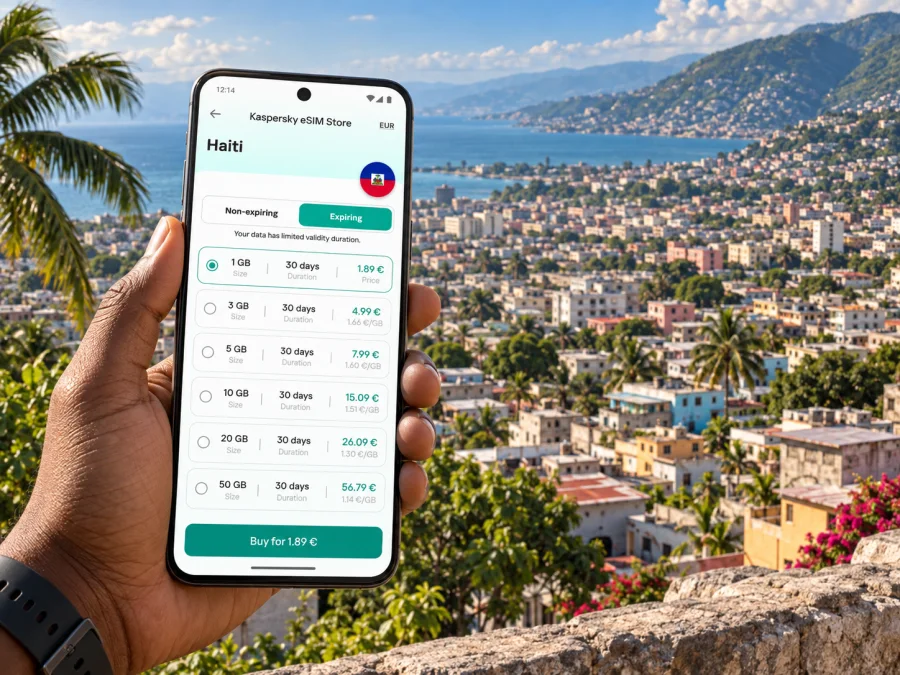
Port-au-Prince eSIM: mobile connection and internet for your trip
A visit to Port-au-Prince calls for more preparation than simply saving a hotel address. The city is busy, hilly in places, and shaped by road conditions and local arrangements that can change. Mobile internet can help you confirm a pickup, share your location with a contact, check a route, and keep key travel details close at hand. An eSIM lets you prepare a data connection for Haiti without swapping the physical SIM in your phone, subject to the selected plan, device compatibility, and local network availability.
This guide focuses on using mobile data around Port-au-Prince: planning the airport arrival, choosing where to stay, moving between appointments, and deciding what to keep available offline. Treat suggested routes and neighborhood notes as orientation rather than live directions. Before departure, confirm that travel to Haiti is appropriate for you, review current official travel guidance, and check directly with your airline, accommodation, and trusted local contacts about operating conditions and transport arrangements.
Plan the first hour before you fly
Port-au-Prince is served by Toussaint Louverture International Airport (PAP), outside the central downtown area. The drive to your destination depends on the route, traffic, and conditions that day, so do not rely on a fixed journey time or assume that an app’s suggested route is suitable.
Before departure, agree on a pickup with your host or accommodation. Confirm where the driver will wait, how you will identify them, and whom to contact if the flight changes. Save these details offline:
- the exact accommodation address and host’s number;
- your flight details and pickup instructions;
- a backup contact and agreed meeting point;
- screenshots of bookings or other arrival confirmations.
Keep your phone charged and the address accessible outside your map app. When you meet a driver, discreetly confirm the vehicle and destination. If mobile data is unavailable, use the saved instructions instead of trying to arrange a new route while unfamiliar with the area.
Data can help you send an arrival message, check a revised pickup note, or tell a trusted person that you have met your driver. It is not a substitute for a prearranged plan. If you prepared an eSIM, confirm that its line is selected for data and that the plan is active. Avoid repeatedly changing settings while moving; follow the plan instructions and use your saved contact details if troubleshooting is needed.
Choose a base around your actual itinerary
Port-au-Prince is not a city where a hotel’s map location alone tells you whether it is convenient. An address that appears close as the crow flies may require a different road route, and a short distance can take longer than expected. Ask your host, employer, or accommodation to confirm the exact pickup and drop-off arrangements for each leg. For a work visit, choose lodging based on confirmed access to the places you must attend, not on a generic claim that a district is central.
Pétion-Ville is a separate commune on the slopes above the central urban area and is frequently used as a base by visitors. It has hotels, restaurants, offices, and meeting venues, but reaching it from the airport or downtown still requires a route plan. Delmas and Turgeau are names you may see in addresses and local directions; treat them as orientation points, not a promise that any particular street or route is suitable. Downtown Port-au-Prince, including the area around Champ de Mars, is an important civic and historic reference, but access and conditions should be checked locally before setting out.
When comparing accommodation, ask concrete questions:
| Question | Why it helps |
|---|---|
| Can the property arrange or recommend a confirmed airport transfer? | It gives you a named contact and a clear handoff plan. |
| What exact address should I give to a driver? | A neighborhood name alone may not identify the entrance. |
| Which entrance or gate should visitors use? | Large properties and office compounds may have more than one access point. |
| Is there reliable Wi-Fi in the room or workspace? | It helps with calls, document downloads, and reducing mobile data use. |
| Who should I contact if my arrival time changes? | A direct contact is more useful than searching for a new one after landing. |
For a longer stay, ask whether the property’s Wi-Fi reaches the room and the places where you expect to work. Treat Wi-Fi as a useful secondary connection, not the only way to reach your host. If you need to attend a meeting, save the agenda, address, and participant details before leaving. A screenshot of directions is easier to use if mobile coverage or battery becomes unreliable.
Mobile internet for Port-au-Prince: what it can and cannot do
Mobile data can help you message a driver, receive a changed meeting time, check a saved location, or open a booking. It cannot confirm whether a road is open or a destination is operating; use your local coordinator for those decisions.
An eSIM is a digital SIM profile installed on a compatible device. Depending on the selected plan, it can provide mobile data during a trip to Haiti. Travel data plans usually do not include a regular local number, voice calls, or SMS unless their terms say otherwise. Check the specific plan conditions, particularly if you need to use messaging apps or hotspot a laptop.
Kaspersky eSIM Store is an app and website where you can choose, arrange, and activate an eSIM with a suitable plan for mobile internet on an international trip. Compare destination, data allowance, validity, start conditions, and restrictions with your dates and likely use. You can review eSIM plan options for Haiti after estimating your needs.
A practical estimate:
- Light use: messaging and occasional map checks; download maps and documents over Wi-Fi.
- Regular use: frequent messages, navigation, web pages, and work coordination; limit background updates.
- Data-heavy use: video calls, large files, or hotspot use; check allowance and hotspot conditions, and identify a Wi-Fi backup.
Your usage depends on habits, Wi-Fi access, and whether the connection is shared. Offline maps can reduce data use but do not show live traffic or closures. Set a data warning on your phone if available.
Getting around: plan each trip, not just the map
Road conditions, traffic, and local arrangements shape travel around Port-au-Prince. A map is useful for finding a destination or sharing a pin, but it cannot replace a driver or coordinator who knows current conditions. Confirm each route shortly before departure; do not treat a map line as advice to walk or drive through an unfamiliar area.
Tap-taps and shared minibuses are part of the local transport landscape, alongside taxis and private drivers. Routes, fares, boarding points, and availability may not be obvious to a first-time visitor and can change. Ask a trusted local contact which option is appropriate for your specific trip and how payment works. This guide does not assume any particular service is operating.
For each journey, note your starting point, the exact destination entrance, who confirmed the route, and what to do if plans change. Share the outline with someone who needs to know. Keep your phone charged and enough data for essential messages. If a pickup changes, contact your coordinator using the number saved in advance.
Before leaving:
- Confirm the exact destination with the person expecting you.
- Ask your host to confirm the route and pickup point that day.
- Save the location offline and screenshot any instructions.
- Avoid an unplanned walking leg without local guidance.
- Leave a buffer between appointments, especially when crossing between Pétion-Ville, Delmas, Turgeau, and downtown.
Using maps and keeping information available offline
Use navigation to orient yourself and share a pin, not to improvise a route. Save the airport, accommodation, office, and meeting locations before departure. Add context such as “hotel entrance” or “meeting reception”; a broad neighborhood label may not identify the right door. Download offline map areas if your app supports them, and remember that offline maps cannot show live traffic or closures.
Keep an offline note with your accommodation address, pickup instructions, appointment details, and backup contact. French and Haitian Creole are used in Haiti; a prepared message showing your destination may help, while local confirmation remains essential. If plans change, pause somewhere appropriate and contact your coordinator rather than navigating while distracted.
Business trips, stopovers, and visits from the city
For a work visit, ask the host organization who is coordinating transport, which entrance visitors should use, and how schedule changes will be sent. Keep documents and presentations available offline, and test calls over the accommodation’s Wi-Fi before an important meeting.
On a short stopover, keep the itinerary compact: a confirmed transfer, one appointment or visit, and a return with a generous buffer. If your ticket or departure window is tight, confirm the plan with your airline and local host before leaving the airport area. Travel from Port-au-Prince to another part of Haiti needs its own current route and operating check; do not assume a road shown on a map means an intercity trip is available or appropriate.
Prepare your eSIM before departure
The most convenient time to review setup is before you are relying on the connection. First check that your exact phone model and regional version support eSIM and that the device is not restricted by a carrier. Check whether your device supports eSIM before choosing a plan. Device support varies by model and market, so do not rely on a general statement about a phone family.
Then compare the plan details with your itinerary: destination, data allowance, validity, activation instructions, and conditions for beginning use. Read the setup screen carefully. Some eSIMs can be installed before travel and activated later according to their plan conditions; others may follow different instructions. Do not assume that installation and the start of validity are always the same event.
A careful setup sequence:
- Use a stable internet connection and keep the phone charged.
- Follow the installation steps shown for your device and plan.
- Label the new line clearly, for example “Haiti data,” so it is easy to identify.
- Review which line is selected for mobile data and whether data roaming is required by the plan instructions.
- Keep your usual number’s settings as intended for calls and messages, and check potential roaming charges with your home provider.
- Save the plan instructions somewhere accessible, then test the configuration when appropriate.
For platform-specific steps, use the eSIM installation instructions for Android or the eSIM installation instructions for iOS. Follow the current instructions displayed for your device and plan. If setup does not match what you see on screen, stop and consult the plan’s support guidance instead of deleting the eSIM profile; some profiles cannot be installed repeatedly.
FAQ
Will an eSIM replace my regular phone number?
Travel data plans usually provide internet access rather than a local voice number or SMS. Check the selected plan. You may keep your regular SIM active for calls if your phone supports dual SIM, but your home operator may charge roaming fees.
Can I rely on mobile data for every journey?
No connection is guaranteed. Signal, plan coverage, device settings, and local conditions vary. Save addresses offline and confirm routes with a trusted local contact.
Should I use mobile data or hotel Wi-Fi?
Mobile data is useful away from the property; Wi-Fi can suit longer work sessions and large downloads. Confirm the property’s arrangements and keep essential details available offline.
Is a map app enough to decide where to go?
No. A map can locate a destination or share a pin, but it cannot determine whether a route is appropriate at that moment. Ask your host or coordinator to confirm.
What if the eSIM does not connect?
Check activation status, the selected data line, and settings against the plan instructions. Do not delete the profile unless support tells you to. Use your offline address and contact details while troubleshooting.
How much data should I choose?
Estimate from your stay, navigation and messaging habits, work needs, and Wi-Fi access. Video calls and hotspot use consume more data than occasional messages. Match the allowance and validity to your schedule.
A final preparation list
Before departure, confirm that your trip is appropriate in light of current official guidance and conditions. Verify your flight, accommodation, airport transfer, and local contact directly. Save the exact addresses, meeting instructions, and a backup contact offline. Check device compatibility, read the eSIM plan conditions, install it over a reliable connection, and understand which line will use data. Share your itinerary with someone you trust and keep your phone charged.
Port-au-Prince travel is easier to coordinate when the digital tools support a plan made with people who know the city. Maps, messages, and an eSIM can help you access information, but the route, timing, and pickup should be confirmed locally. Choose an eSIM plan that fits your dates and expected data use in Haiti, then complete the setup before your journey. Choose an eSIM plan for your trip to Haiti in Kaspersky eSIM Store and keep the plan details and setup instructions close at hand.


