Travel connectivity guide
Port Harcourt eSIM: Mobile Internet Guide
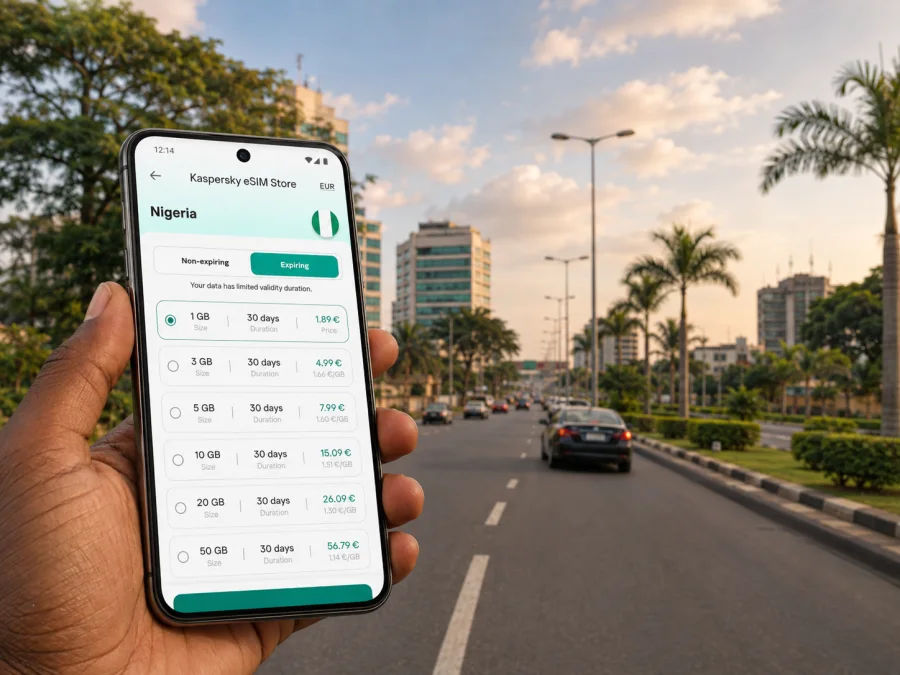
Port Harcourt eSIM: Mobile Connection and Internet for Travel
Port Harcourt is a practical base for business trips, visits to the Rivers State capital, and journeys through the Niger Delta. The city is spread across a busy road network, so a working mobile connection is useful from the moment you leave the airport. With an eSIM, you can prepare mobile internet for Nigeria without removing your physical SIM card. That makes it easier to check a transfer, open a map, message a hotel, or confirm a meeting while you are still settling in.
Kaspersky eSIM Store is an app and website where you can select, purchase, and activate an eSIM with a suitable tariff for mobile internet during an international trip. It is not a mobile network or a local operator. The practical task is simple: choose Nigeria as the destination, compare the data allowance and validity period that fit your stay, install the eSIM on a compatible phone, and use it for data when you arrive in Port Harcourt.
When an eSIM is useful in Port Harcourt
Port Harcourt travel often combines several small journeys rather than one fixed route. You may land at Port Harcourt International Airport in Omagwa, travel by road into the city, check in near GRA, attend meetings around Trans Amadi, and then move to another part of the metropolitan area. Each step can require a map, a message, a booking confirmation, or a call through an internet messenger.
Mobile data is useful for:
- sharing your arrival time with a driver or hotel;
- checking the route from the airport area to your accommodation;
- using online maps when a familiar landmark is easier to identify than a street name;
- confirming meeting locations and sending documents while travelling between offices;
- ordering or coordinating a taxi or ride where that option is available;
- translating short messages and checking information before setting out;
- keeping your usual number available while the eSIM handles data;
- avoiding a search for a physical SIM card during the first hours after landing.
The benefit is not that every route will be predictable. Port Harcourt traffic, weather, road works, and local access can change the time needed for a journey. A prepared data connection gives you a way to respond when the plan changes: send an update, recalculate a route, or find a nearby place to wait.
Arrival: plan the first hour before you land
Many visitors arrive through Port Harcourt International Airport at Omagwa, outside the central urban area. The onward trip is by road, so it helps to keep the important details available before leaving the terminal. Save your accommodation name, the driver’s contact details, and the address of your first appointment in a notes app as well as in your email. An eSIM can then support the live parts of the journey, such as messaging and navigation.
Use this arrival sequence:
- Keep your booking confirmation and the hotel address accessible offline.
- Confirm that the eSIM is installed and that mobile data is assigned to the correct line.
- After landing, check whether the phone has connected to the available local network through the eSIM.
- Send one short message to your driver, hotel, or travel companion before leaving the airport area.
- Open the map only after confirming the destination and planned route, and keep the phone charged.
If someone is meeting you, agree in advance who will message first, which meeting point to use, and what to do if the road journey takes longer than expected.
Arrival checklist
- [ ] The eSIM profile is installed on the phone you will carry.
- [ ] The destination is set to Nigeria in the selected tariff.
- [ ] Your accommodation address is saved offline.
- [ ] The eSIM is selected for mobile data after arrival.
- [ ] Data roaming is enabled for the eSIM if the installation instructions or device settings require it.
- [ ] Your primary SIM is configured so that unexpected data use does not start on that line.
- [ ] You have a charger or power bank for the airport-to-city journey.
Moving around the city: data for roads, districts, and changing plans
Port Harcourt is a road-oriented city for most visitor itineraries. Taxis, private cars, hired drivers, and ride services may all be part of a trip, depending on the route and what is available when you travel. Rather than relying on one transport option, keep the destination, the driver’s number, and a recognizable nearby landmark together in your travel notes.
An online map is most helpful when used as a planning aid, not as a promise of an exact arrival time. Before setting out, check the route and note an alternative destination such as a major hotel, office complex, shopping area, or well-known junction. If the route changes, mobile data lets you share the new plan without searching for Wi‑Fi.
| Situation in Port Harcourt | What mobile data helps you do | Useful preparation |
|---|---|---|
| Airport transfer | Message the driver and check the destination | Save the address and meeting instructions offline |
| Hotel check-in | Contact reception and share an arrival update | Keep the reservation number in your notes |
| Business meeting | Open the location, send a delay message, and access documents | Save the host’s name and phone number |
| City sightseeing | Check a route and keep companions informed | Download key map areas for backup |
| Evening return | Coordinate transport and confirm the accommodation | Carry a charged phone |
| Trip outside the city | Share the itinerary and monitor changes | Choose a tariff with enough validity for the whole route |
Districts and accommodation choices
Visitors may choose accommodation around GRA, Old GRA, Trans Amadi, Woji, Rumuola, or other parts of the wider city. The right area depends on your host, itinerary, budget, and current road conditions.
Keep the district name and exact property address. If you change accommodation, update the saved address so that an old location is not sent by mistake.
How to choose an eSIM tariff for a Port Harcourt trip
For a city visit, choose a Nigeria destination tariff rather than searching for a separate city product. Port Harcourt is the local stop; the country coverage and the selected tariff conditions determine whether the eSIM fits the trip. Read the details shown at the time of purchase and match them to your dates, route, and expected data use.
Consider four things:
- Destination. Confirm that the tariff is intended for Nigeria. If your itinerary includes another country, check whether a regional option is more appropriate instead of assuming that a single-country tariff will apply everywhere.
- Validity. Count the whole travel period, including the arrival day, airport transfer, and any road trip after Port Harcourt. A short business visit and a longer stay require different planning.
- Data volume. Maps and messages usually need less data than video calls, photo uploads, cloud backups, or streaming. Choose by your real habits rather than by the city name alone.
- Activation conditions. Check when validity starts, how the profile is installed, and whether data roaming must be enabled.
| Travel pattern | Data planning approach |
|---|---|
| Short stopover | Prioritise messages, maps, confirmations, and limited browsing; use hotel Wi‑Fi for large files when appropriate. |
| Two- or three-day business visit | Allow for navigation between meetings, messaging, email, and occasional document access. |
| Week-long city stay | Include regular maps, bookings, social messages, and moderate photo uploads. |
| City plus regional route | Allow for the full validity period and check the destination conditions before leaving Nigeria’s city network. |
| Remote-work schedule | Estimate video-call and file-transfer use honestly, then keep automatic updates and backups under control. |
Choose according to your itinerary. More data is not automatically better, while a small allowance may not suit a phone used for work. Compare the displayed Nigeria options with your real routine.
When your dates and data needs are clear, choose an eSIM tariff for your trip to Nigeria through Kaspersky eSIM Store. The app or website helps you review the destination, allowance, validity, and price before you complete the purchase.
Hotels, work, and everyday communication
Port Harcourt trips often mix professional and personal tasks. A business traveller may navigate between a hotel and an office, join a call, share an arrival update, and send a receipt. A leisure traveller may confirm a reservation and coordinate an outing. Separate essential data use from background activity.
Before the trip, review these phone settings:
- turn off automatic photo backup over mobile data if you do not need it;
- restrict automatic app updates until you have a reliable Wi‑Fi connection;
- download reservations and key documents for offline access;
- keep map searches focused on the next leg;
- use compressed images for routine updates;
- decide which messaging apps your travel group will use.
If you work from a hotel, test the meeting setup before the first call. Mobile data can be a useful backup when the hotel network is slow, but video calls can consume data quickly. Close unused cloud applications and save the meeting link in advance.
For ordinary voice calls and SMS, remember that a travel eSIM is primarily intended for mobile data. A selected tariff may not include a local number, voice minutes, or text messages unless its conditions say otherwise. Internet messengers can handle voice and text through data.
Install the eSIM before departure or after arrival
Installation is easier with a stable internet connection and enough battery. You can prepare the profile before leaving or install it after arrival. Do not delete the profile or change the primary line until you know which line handles data.
The general sequence is:
- Check that your phone supports eSIM and is not restricted by an operator lock. Check your device compatibility before purchasing.
- Select Nigeria and a tariff that matches the dates and expected data use.
- Complete the purchase in the app or on the website.
- Open the eSIM details in your profile and follow the displayed installation steps or use the supplied QR code.
- Label the new line clearly, for example “Nigeria travel data”.
- Set the eSIM as the line for mobile data when you are ready to use it.
- If required by the device or tariff instructions, enable data roaming for that eSIM profile.
- Test a map search or send a short message, then check the data line.
The menu names differ by phone model and operating system. For step-by-step guidance, use the Android installation instructions or the iOS installation instructions. Keep the QR code and purchase details available until activation is complete. If the profile does not connect, check the data line, roaming setting, signal, and tariff conditions before contacting support.
A safe dual-SIM setup
Many travellers keep their regular number active while using the eSIM for data. The exact settings depend on the phone:
- assign mobile data to the travel eSIM;
- decide whether calls and SMS should remain on the primary line;
- disable automatic switching between data lines if the phone offers that option;
- review which line is used for hotspot and messaging;
- monitor the first connection so data is not accidentally routed through the home SIM.
This arrangement does not change the terms of your home operator. Roaming, incoming calls, SMS, and other charges remain subject to that operator’s conditions, so check them before departure.
Practical Port Harcourt scenarios
A first-time visitor arriving for meetings
Install the eSIM at home, save the transfer, hotel, and meeting details offline, then use data to confirm the driver and update the host if traffic changes the schedule.
A short stopover
Use data for the next departure information, one message, a map, and a practical place to wait. Disable large downloads and make sure validity covers the stopover.
A longer city stay
Save each address with a clear label, estimate daily road journeys, and reserve large uploads and software updates for trusted Wi‑Fi when possible.
A regional journey
Check the Nigeria conditions and validity before leaving the city, tell a contact where you are going, and review the destination if another country is added.
What to do if the connection does not work
Start with simple checks. Confirm that the eSIM is enabled, selected for mobile data, and not blocked by a disabled roaming setting. Check the signal and airplane mode. Restart the device if the profile was just installed, then try a map tile or text message.
If the problem continues, compare the phone settings with the installation instructions and tariff conditions. Make sure the device has not selected the home SIM for data and keep your purchase details ready for support.
Frequently asked questions
Is a Port Harcourt-specific eSIM required?
Usually, the relevant choice is a tariff for Nigeria. Check the displayed destination and conditions; if the route crosses a border, consider a regional option.
Can I keep my normal SIM in the phone?
On a compatible dual-SIM device, you may be able to keep the physical SIM installed and assign data to the travel eSIM. The exact combinations depend on the phone. Review your home operator’s roaming settings.
Should I install the eSIM before flying?
Installing before departure can simplify arrival if you have a stable internet connection and a compatible phone. You can also install after arrival if you can access the setup information. Follow the device-specific instructions and do not remove the profile while troubleshooting.
Does the travel eSIM include a phone number?
Not necessarily. In this use case, the eSIM is intended primarily for mobile data. Voice calls and SMS may not be included unless the tariff conditions say otherwise. Internet messengers can use the data connection.
How much data do I need in Port Harcourt?
There is no universal amount. Maps and messages use less data than video calls, streaming, and frequent photo uploads. Estimate your routine, add airport and regional travel, and cover the complete itinerary.
What if I need help with activation?
Check compatibility, the data line, the eSIM roaming setting, signal, and tariff conditions. If the issue remains, contact support with purchase details and the phone model.
Prepare mobile internet for your Port Harcourt trip
The most useful setup is the one that matches your actual route: airport to hotel, hotel to meetings, short city journeys, and any trip beyond Port Harcourt. Check compatibility, choose Nigeria as the destination, compare the tariff’s data and validity, install the eSIM on the right device, and test the data line before you need it.
When you are ready, select an eSIM tariff for a trip to Port Harcourt and Nigeria. Kaspersky eSIM Store helps you prepare the eSIM through the app or website so that navigation, messages, bookings, and work tasks are easier to manage during your journey.


