Travel connectivity guide
Port of Spain eSIM: Mobile Internet Guide
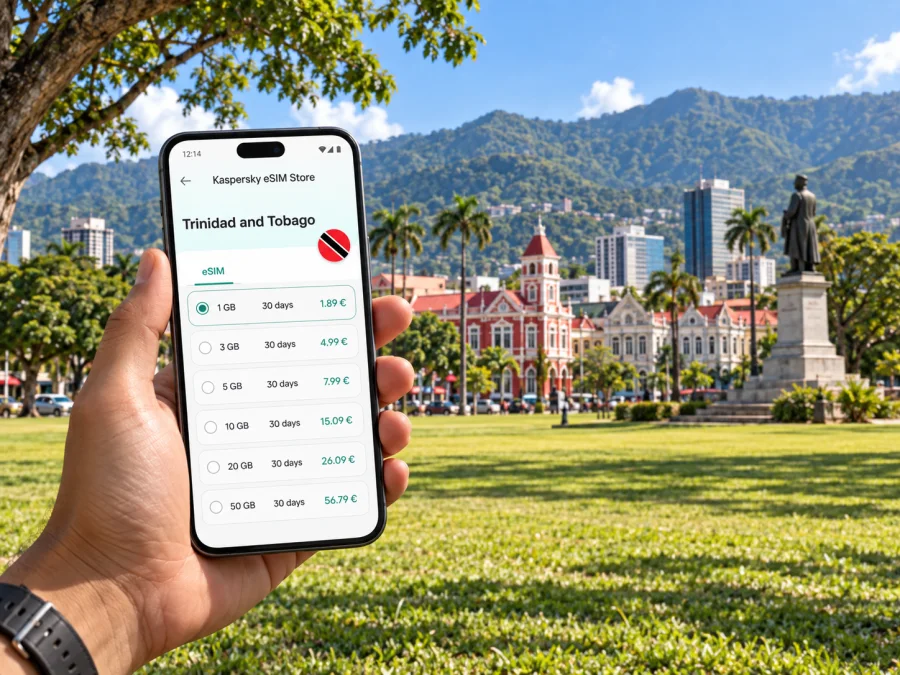
Port of Spain eSIM: prepare your mobile connection and internet for the city
Port of Spain is a compact capital with a busy downtown, leafy residential districts, a waterfront, and important venues spread between the centre and the northern edge of the city. A mobile data connection helps with the practical transitions: finding your hotel after arriving at Piarco, checking a meeting location, navigating between Woodbrook and the business district, or arranging a ride after dinner. An eSIM can make that connection easier to prepare before the trip, without changing the physical SIM in your phone.
The useful question is not simply whether you need data. It is where you will go, how long you will stay, and how often you expect to use maps, messages, email, and other online services. This guide focuses on those decisions in Port of Spain and on the steps that make arrival and movement around the city more predictable.
Start with the shape of the city
Port of Spain is Trinidad and Tobago’s capital and the main urban hub on Trinidad’s northwest coast. For a visitor, the city is best understood as a set of nearby but distinct areas rather than one single sightseeing zone. Downtown is useful for offices, government buildings, shopping, and transport connections. Woodbrook has restaurants and places to stay, while St James continues west along the main urban corridor. North of the centre, Queen’s Park Savannah forms a large open space beside cultural and civic landmarks.
That layout affects how you use mobile internet. A map search that is enough for a short walk downtown may not be enough for a day split between a hotel, a client meeting, and an evening reservation farther west. Save key addresses, keep the hotel location available, and check your route again when you change neighbourhoods. In a dense street grid, the correct entrance or side street can matter as much as the district name.
From Piarco to your first address
Most air arrivals for Port of Spain use Piarco International Airport, which is east of the city. The trip from the airport is a separate leg from getting around once you reach your accommodation. Before landing, save the hotel’s full address and any transfer instructions. If someone is meeting you, agree on a clear pickup point and a way to contact each other if the arrival hall is busy or your flight is delayed.
A map estimate is not a fixed arrival time: traffic, weather, and airport procedures can affect the journey. Leave a margin for meetings or check-in, and confirm transfer and pickup details with your hotel or host.
A simple arrival checklist:
- Keep the accommodation address in your notes as well as in your map app.
- Save a screenshot of the booking and transfer instructions for offline access.
- Make sure your phone has enough battery for the airport, route, and first messages.
- Decide how you will connect before you leave dependable Wi‑Fi.
- Check that the arrival plan names a specific pickup location, not just “outside.”
Once you are in the city, use your hotel or meeting point as a reference for the first few journeys. Port of Spain’s districts can be close together on a map but feel different in pace and street activity. A saved pin reduces the chance of confusing a similarly named street or arriving at the wrong entrance, particularly when a building has more than one access point.
Getting around without losing your bearings
Walking is practical for some central errands and short visits, but the heat, rain, distance, and time of day can change what feels comfortable. For longer hops, visitors commonly arrange a taxi or use local public transport. Ask your accommodation which option fits your destination and time. Confirm the vehicle, pickup place, route, and payment expectation before setting off; local advice is often more useful than choosing solely from a map line.
The Public Transport Service Corporation operates bus services, including services in Port of Spain. The Water Taxi Service connects Port of Spain with San Fernando, but it is a scheduled service and not a substitute for an on-demand city ride. Check the current operating information before building a day around a sailing. Routes, times, and service arrangements can change, so treat a timetable saved weeks ago as something to verify.
Mobile data is most useful as a planning aid rather than a promise that every route will be effortless. Use it to check a destination, communicate a change, or look up current public information. Keep a low-data fallback too: note the address, the name of the district, and a nearby landmark. If a signal is weak indoors or a phone battery is low, those details still help you ask for directions.
For visitors who will travel beyond the capital, the same routine applies. Port of Spain can be a starting point for journeys across Trinidad, but a city data plan should be considered alongside the full itinerary. A day trip may involve several legs and changing transport options. Look up the meeting point and return plan before you set out, and avoid assuming that a service runs at the same frequency throughout the day.
Choose a place to stay around your itinerary
The right base depends on what brings you to Port of Spain. A hotel near the downtown core can simplify access to offices and central errands. Woodbrook offers a different rhythm, with dining and evening activity around Ariapita Avenue and nearby streets. St Clair is convenient for some business and institutional visits, while a stay near the Savannah puts you close to open space and several cultural venues. These are broad orientation points, not guarantees about a particular property or route.
When comparing accommodation, check the exact address rather than relying on a neighbourhood label. Then map the trip to your most important destinations: the office, conference venue, restaurant, airport transfer point, or ferry terminal if your plans include a connection. Ask the property about transport options and arrival procedures. A listing may describe a district as central even when your daily destinations are spread across the city.
Mobile internet for work, maps, and everyday details
A work trip creates small online tasks throughout the day: confirming a room change, finding the entrance to a building, sharing a revised arrival time, or opening a document while moving between appointments. A data connection on your phone can keep those tasks available away from the hotel. It is still sensible to download essential files and save critical contact details in advance, particularly if your schedule is tight.
For a leisure visit, data is useful in short bursts. You might check a route from Woodford Square to the Brian Lara Promenade, confirm where a restaurant is, or message your host when a walk takes longer than expected. The promenade runs through the city centre and is associated with public events, so its atmosphere and activity can vary. Use current local information for events and hours rather than treating a past recommendation as a live schedule.
At this point, you can compare options for the whole trip and choose an eSIM tariff for travel to Trinidad and Tobago. Kaspersky eSIM Store is an app and website that helps you select, arrange, and activate an eSIM with a suitable tariff for mobile internet on an international trip. Review the destination, data allowance, validity period, activation details, and other conditions shown for the option you select; the right choice depends on your own route and use.
Prepare your eSIM before you travel
An eSIM is a digital SIM profile installed on a compatible device. It can be useful for travel because you can prepare it without inserting another physical card. Before choosing a tariff, check whether your device supports eSIM and confirm that it is not restricted by a carrier lock. Device support can vary by model, region, and hardware version, so check the exact phone rather than relying on the name of a product family.
A straightforward preparation sequence is:
- Check your phone. Confirm eSIM support, carrier-unlocked status, operating system readiness, and enough free storage for installation.
- Choose for the itinerary. Consider trip length, expected data use, and whether you will remain in Trinidad and Tobago or travel onward.
- Read the tariff conditions. Check when validity begins, how activation works, and any stated limitations before placing an order.
- Install with a reliable connection. Follow the setup instructions while connected to stable Wi‑Fi and keep the order information accessible.
- Label your lines. If you keep your home SIM active, name the lines clearly in device settings so you can distinguish travel data from your usual number.
- Review data settings. Choose which line handles mobile data, check roaming settings as directed by the tariff instructions, and avoid unintended data use on your home line.
Use the step-by-step Android eSIM installation instructions or iOS eSIM installation instructions for your device. Menu names differ across operating system versions. If an installation prompt does not match what you see, pause and consult the instructions for the relevant platform instead of repeatedly scanning or reinstalling a profile.
An eSIM tariff for mobile data does not automatically include a regular local phone number, voice calls, or SMS. Check the selected tariff’s terms. You can continue using your existing number for services tied to it, subject to your home plan’s conditions, while using the travel eSIM for data if your device supports dual SIM use. Internet-based messaging and calls may work through apps, but they depend on data access and the app’s own requirements.
A short stopover and a full workday need different plans
A visitor with only a few hours in Port of Spain should keep the plan compact. Choose one central area, arrange the airport transfer in advance, and save both the arrival and departure details. If you have time for a walk or meal, check the distance and allow room to return to the pickup point. Trying to cover downtown, the Savannah, and a distant appointment between flights can turn a brief stop into a stressful sequence of transfers.
A business traveller with a full schedule should prepare around fixed appointments. Save each venue’s address, contact person, and start time. Send the meeting organiser a message before departure if access instructions are unclear. Keep a separate note with the hotel address and transfer arrangement, and plan a buffer between locations rather than assuming that a short distance means a short journey.
For a longer stay, build flexibility into the plan. Reserve online tasks that need a dependable connection for times when you have power and a stable signal. Keep navigation, communication, and payment information in separate places where possible. If you plan to travel from Port of Spain to San Fernando by water taxi, verify the current sailing schedule and terminal details before you leave; if the schedule does not fit, ask about alternatives for that day.
Common questions
Is an eSIM useful if I am staying mainly in Port of Spain?
It can be useful if you expect to use maps, messaging, email, or online bookings while away from hotel Wi‑Fi. Estimate usage from your actual itinerary, then compare the tariff’s data allowance and validity with the length of your stay.
Can I use an eSIM as my only way to make calls?
Do not assume that a data tariff includes a regular phone number, voice calls, or SMS. Review the terms for the selected option. Messaging and voice calls through internet apps require a working data or Wi‑Fi connection.
Should I wait until I arrive to install the eSIM?
Follow the installation and activation instructions for the tariff you choose. Many travellers prefer to prepare while they have reliable Wi‑Fi and time to check the device settings. Read when the validity period begins so installation and activation happen at the appropriate point.
What should I do if I lose mobile data in the city?
Check the selected data line, mobile data setting, and tariff conditions first. Restarting the phone may help in some cases, but keep your saved hotel address and contact details available offline. If you are indoors, step outside and retry before changing settings you do not recognize.
Will one tariff suit a city stay and travel elsewhere in Trinidad and Tobago?
Check the destination and coverage terms displayed for the option. Consider all planned locations, including any onward travel, before choosing. Do not infer service conditions from the city name alone.
Before you head out
Port of Spain is easier to navigate when each journey has a clear starting point, a saved destination, and a fallback plan. Prepare your airport transfer, check the exact addresses of your hotel and appointments, and use local guidance to choose transport for the time and route. For a day around downtown, Woodbrook, St James, and the Savannah, mobile data can support navigation and communication while you move between distinct parts of the city.
Choose an eSIM tariff according to your trip length and expected use, and read its conditions before installation. If you are preparing a visit, review eSIM options for Trinidad and Tobago, then use Kaspersky eSIM Store on the app or website to select, arrange, and activate a suitable option for your international trip. Keep essential addresses offline too, so your plan remains usable if your phone needs a charge or a connection is temporarily unavailable.


