Travel connectivity guide
Porto Alegre eSIM: Mobile Internet for Your Trip
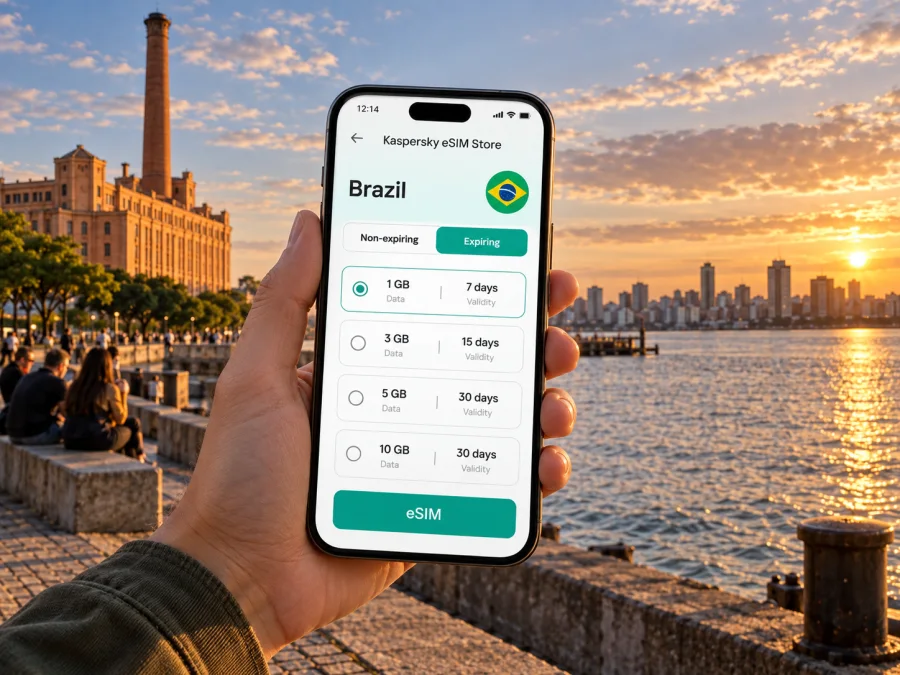
Porto Alegre eSIM: mobile connection and internet for your trip
Porto Alegre is a practical base for exploring southern Brazil, but its scale and spread-out neighborhoods make a working mobile connection useful from the first hour. You may need to check an arrival address, message your host, compare a ride option, find a restaurant, or follow a route along the Guaíba waterfront. An eSIM can prepare mobile internet for these tasks without replacing your primary SIM card.
This guide focuses on using mobile data in Porto Alegre: what to plan before you land, how to move between the airport and the city, where connectivity fits into different neighborhoods, and how to prepare for day trips. Coverage and speed depend on the local network, your device, the plan, and your exact location, so keep offline options for important addresses and tickets.
Why mobile data helps in Porto Alegre
Porto Alegre is the capital of Rio Grande do Sul, in Brazil’s south. The city sits beside the Guaíba, and its daily rhythm spans a central area, residential districts, business zones, parks, and waterfront spaces. A visitor may cross several of these settings in one day. Mobile data makes it easier to adapt when a meeting ends late, weather changes a walking plan, or a restaurant suggestion comes from a local rather than a guidebook.
Useful tasks often happen in short bursts:
- checking the route from the airport to your hotel;
- confirming a building entrance or a ride pickup point;
- translating a menu or a short message;
- checking opening hours before crossing town;
- sharing your location with a travel companion;
- looking up an onward bus, flight, or regional destination.
Maps are especially useful when street names or pronunciations are unfamiliar. Save your hotel address in Portuguese as well as in your preferred language. If you are using a ride service, compare the pickup marker with the physical exit or meeting point rather than relying on the map pin alone. Airport and event areas can have several nearby doors, lanes, and access roads.
Arriving and getting oriented
Salgado Filho International Airport serves Porto Alegre. Before leaving the terminal, have your lodging address, arrival instructions, and pickup details ready. Airport access and local transport arrangements can change, so check current information shortly before travel.
Use a short arrival routine:
- Connect to reliable Wi-Fi or enable your travel eSIM according to its instructions.
- Open the saved hotel address and confirm the route and pickup point.
- Keep your phone charged and booking details accessible offline.
- Allow time for traffic, waiting, and finding the correct exit.
The city is easier to navigate when you save a few anchors: your accommodation, the historic center, the central bus station, the airport, and the Guaíba waterfront. Save destinations for the day together so you do not have to re-enter addresses on the move.
Moving around: routes, transit, and pickups
The right way to move depends on distance, time, luggage, and time of day. Porto Alegre has bus services and urban rail connections, as well as taxis and app-based rides. Routes and service conditions can change; check current details before setting out, especially when you have a timed connection.
| Situation | What to check | Useful preparation |
|---|---|---|
| Airport to hotel | Exact address, pickup point, traffic | Compare current transport options |
| Short local trip | Walking route and conditions | Save a clear destination pin |
| Cross-city appointment | Travel time and transfers | Leave a buffer |
| Evening return | Entrance and pickup location | Confirm the meeting point |
| Trip beyond the city | Departure point and schedule | Save tickets and return details |
Before boarding, verify the route number, direction, and destination shown for the service. For a ride pickup, compare the map pin with the physical exit or landmark; a nearby pin may be on the opposite side of a divided road. Keep a payment option that works for your chosen service and screenshot the route if your battery is low.
Districts and common visitor routes
Historic center and Mercado Público
The Centro Histórico is a useful base for civic landmarks, older streets, shops, and transport connections. Mercado Público is a recognizable destination for food and local activity. Save the exact entrance or business address rather than relying on a broad “downtown” label. Opening hours vary, so check them close to your visit.
Cidade Baixa
Cidade Baixa is known for bars, cafés, restaurants, and evening activity. Save your accommodation and decide how you will return before going out. If plans change, mobile data helps check walking distances and coordinate with companions.
Moinhos de Vento
This neighborhood combines residential streets, restaurants, shops, and the park commonly called Parcão. Use a precise entrance or venue as a meeting point, and check daylight and weather before an early walk.
Orla do Guaíba
The waterfront is a popular place for walks and open views, but it stretches across multiple access points. Save a specific location and a return route in case you leave from a different section of the shore.
Hotels and business areas
Compare a hotel’s exact address with your first appointment, the airport route, and evening plans. A neighborhood name alone does not indicate cross-city travel time. Keep office details and reception instructions in your calendar or notes for offline access.
Plan the eSIM around your itinerary
For Porto Alegre, choose a data allowance based on how you actually use your phone. Navigation, messaging, email, and occasional searches usually consume less data than frequent video calls, cloud backups, or streaming. A work trip with regular calls and file transfers may need a different allowance from a weekend focused on walking and meals. Estimate your daily habits, then compare the plan’s data volume, validity period, destination, and activation terms.
Kaspersky eSIM Store is an app and website where you can select, purchase, and activate an eSIM with a suitable plan for mobile internet during an international trip. You can review eSIM options for Brazil while planning your Porto Alegre stay. Check the plan details carefully: the included data, validity, supported destination, and activation conditions determine whether it fits your dates and route.
An eSIM plan for mobile data does not automatically provide a regular phone number, voice calls, or SMS unless those features are explicitly included in its terms. Keep your usual number available if you need calls or verification messages, and use internet-based messaging when that is appropriate. Also check how your primary SIM handles roaming charges before departure.
A practical allowance estimate starts with categories rather than a guessed universal number:
- Light use: maps when needed, messages, short searches, and occasional email.
- Regular use: frequent navigation, social updates, photos, and routine work messages.
- Heavy use: video meetings, large uploads, hotspot sharing, or streaming.
Prepare your phone before departure
Check that your phone supports eSIM and is not restricted by a carrier lock. Check your device before purchasing a plan. Device support can differ by model, regional version, and carrier configuration, so check the specific phone you will carry rather than relying only on a product family name.
Before you install an eSIM, make sure you have a stable internet connection, access to the email or account used for purchase, and enough battery. Follow the installation instructions for your operating system: Android eSIM instructions or iOS eSIM instructions. Installation and activation are separate steps on some plans; use the plan’s displayed terms to understand when validity begins.
Before-you-go checklist
- Confirm the phone is eSIM-compatible and unlocked.
- Compare plan coverage, data allowance, validity, and activation conditions with your travel dates.
- Install the eSIM when you have a reliable connection and can follow the on-screen steps.
- Label your lines clearly, for example “Home” and “Travel,” if your phone offers that setting.
- Decide which line should handle mobile data and whether data roaming must be enabled for the travel eSIM under its instructions.
- Save your hotel address, arrival details, and important bookings for offline access.
- Keep your primary number settings and roaming preferences in mind.
Do not delete an installed eSIM profile simply to troubleshoot a temporary connection issue. Some profiles cannot be installed again after removal. First check the selected data line, network selection settings, plan validity, and any activation guidance shown for your purchase. If you are unsure, use the available support route in the app or website before making a change that may be difficult to reverse.
Three Porto Alegre travel scenarios
A short stopover
Check that you have enough time to leave the airport, visit one clearly defined destination, and return with a buffer. Save both addresses and avoid a plan that depends on a tight transfer.
A city weekend
Group the historic center, Cidade Baixa, Moinhos de Vento, and the waterfront by area rather than zigzagging across town. Keep an alternative for rain or changed opening hours. Saved maps and reservations help if your connection pauses.
A business visit
Download the documents you need, confirm each building address, and leave time between appointments. Check venue Wi-Fi for essential video calls; mobile data is a backup subject to your plan and local conditions.
Using mobile data beyond the city
Porto Alegre is a common starting point for trips elsewhere in Rio Grande do Sul. You may travel to another city for work, visit coastal areas, or continue toward the Serra Gaúcha. Before leaving, check the departure point, current schedule, ticket details, and return arrangements. Intercity buses and other services may use different terminals or boarding areas; save the exact location and arrive with time to spare.
Coverage can vary along a route, particularly outside dense urban areas. Download directions and tickets before departure, keep the destination written down, and let someone know your plans if you are traveling alone. When comparing eSIM plans, read the destination coverage terms for the complete itinerary. A plan suitable for Porto Alegre should not be assumed to cover every place you might visit in Brazil on identical terms.
If the connection does not work as expected
Start with checks that do not remove your eSIM:
- Confirm the eSIM line is enabled and selected for mobile data.
- Check that the plan has started and remains within its validity period.
- Review the plan instructions for data roaming and network selection.
- Move to a place with a clearer signal and wait briefly before trying again.
- Restart the phone if the basic settings look correct.
- Contact support through the app or website if the issue continues.
Questions travelers ask
Can I use an eSIM for maps and messaging?
A mobile-data eSIM can support maps, messaging, email, and other internet services when active and when local network conditions permit. Voice calls and SMS are not included by default; check the plan terms.
Should I install it before flying?
You can prepare it before departure if the plan instructions allow it. Check when validity begins and keep purchase details accessible after arrival.
Will one plan work throughout Brazil?
Check the stated destination coverage and terms, especially if you will travel beyond Porto Alegre. Do not infer coverage from the city name alone.
How much data should I choose?
Estimate maps, messaging, work, video, and hotspot use against the plan allowance and validity. Disable automatic photo backups over mobile data and download essential files over Wi-Fi when convenient.
A simple arrival-to-departure plan
Before booking: confirm device support, compare plan details, and note the addresses for your accommodation and first activity.
Before departure: install the eSIM according to its instructions, save tickets and essential information offline, and review roaming settings for both lines.
At arrival: verify the eSIM data line, open your saved route, and confirm the current pickup or transit information before leaving the airport.
During the stay: group destinations by neighborhood, keep an eye on data use, and save any changed return plans. For trips outside Porto Alegre, check coverage terms and transport details again.
Before flying home: review which line is selected for data and whether you want to keep or remove the travel profile. Follow the plan’s instructions and avoid deleting it while you may still need support or account information.
Porto Alegre rewards a little preparation: a saved address, a clear transport plan, and access to maps make it easier to move between the city center, neighborhood cafés, business appointments, and the Guaíba shore. A travel eSIM can make mobile data simpler to arrange, while the plan terms and local conditions remain the guide to what is available.
Get ready for Porto Alegre
Choose a plan that matches your dates, data habits, and full route through Brazil. With Kaspersky eSIM Store, you can select and activate an eSIM for mobile internet before your trip, then follow the plan instructions when you arrive. Explore eSIM plans for Brazil and prepare your phone, saved addresses, and arrival route before you leave.


