Travel connectivity guide
Postojna eSIM: Mobile Internet and Travel Guide
Postojna eSIM: mobile connection and internet for your visit
Postojna is a small Slovenian town with an unusually busy visitor itinerary: people arrive for the cave, continue to Predjama Castle, change trains, meet a guide, or use the town as a stop between Ljubljana and the coast. A mobile connection helps keep those moving parts in view. With an eSIM prepared for Slovenia, you can use maps, check current transport information, retrieve booking details and message your accommodation without first looking for a shop selling a physical SIM card.
An eSIM is a digital SIM profile installed on a compatible device. It can be useful for mobile data during a trip, while your existing number may remain available for calls or messages according to your home plan and phone settings. Exact service, data allowance, validity and supported networks depend on the specific plan. Check those details before purchase; a city name in a search does not by itself guarantee signal in every building, vehicle or underground attraction.
Why mobile data is useful around Postojna
Postojna is both a destination and a transport junction. You may need one set of directions to reach the railway station or bus station, another to find your hotel, and a third to coordinate a timed visit to Postojna Cave Park. When the plan changes—late arrival, rain, a delayed connection, or a longer stop at the cave—having data available makes it easier to check information as you go.
Common moments when a connection can help:
- Arrival and check-in: open a reservation, confirm an address, message your host about arrival time, or call up directions from the station.
- Finding the right departure point: distinguish the railway station, the bus station in the town centre, and the stop serving the cave park. They are separate places, so check the destination in your route app before setting off.
- Timed attractions: keep the ticket confirmation and selected entry time accessible. The cave operator advises visitors to arrive at the park 30 minutes before their tour; boarding begins 15 minutes before the selected time.
- A change of plan: check transport information, opening details or a taxi option if your day shifts. Timetables and seasonal shuttles can change, so rely on information for your actual travel date.
- Everyday communication: send a location pin, update family, or use a translation app when discussing an address or travel arrangement.
A phone connection is a practical tool, not a substitute for planning. Save the accommodation address, tickets, and essential directions offline before leaving a Wi-Fi connection. That gives you a fallback if the battery is low, mobile coverage is weak, or the phone is temporarily unable to connect.
A town visit and a cave visit are different journeys
Postojna Cave Park is near the town, but “near” does not mean that every arrival point is beside the entrance. The cave park’s official directions describe an approximately 25-minute walk from Postojna railway station to the park. The same information notes local bus service between the railway station, town bus station and cave park, and intercity connections through the bus station in the centre. Check the latest timetable before setting out rather than assuming a bus will match your arrival.
For orientation, think of your day as three linked points:
| Point | What it is useful for | Before you leave |
|---|---|---|
| Postojna railway station | Arrival or onward travel by train | Confirm the station name and departure time; allow for the walk or check local transport to the park. |
| Postojna bus station | Intercity buses and town-centre access | Confirm the stop and the operator’s current timetable for your date. |
| Postojna Cave Park | Cave tour, visitor facilities and the starting point for a Predjama trip | Keep your ticket time handy and arrive with a margin. |
A map can reduce confusion, but walking estimates do not account for luggage, weather, mobility, roadworks or the exact location of your lodging. If you have a timed tour, plan the station-to-park transfer first and leave a buffer. Avoid building an itinerary around a remembered departure time: services may differ by weekday, season or holiday.
Reaching the cave and Predjama Castle
The cave park is accessible from the A1 motorway, and its official visitor information describes the park as about two kilometres from the Postojna motorway exit. From the town, the railway-to-park walk is around 25 minutes according to the park’s directions. There is also a local bus linking the railway station, bus station and park; check the operator’s current timetable for the date and direction you need.
Predjama Castle is about nine kilometres from the Postojna Cave entrance. A shuttle between the cave park and the castle is available only for part of the year, according to the attraction’s current access information; the exact operating dates and departures need checking. If you are travelling outside its operating period, ask about the available alternatives, such as arranging a taxi, before committing to a tight schedule. Mobile maps can help with orientation, but they cannot tell you whether a seasonal transfer is running unless you check a current source.
The cave visit itself is not a place to rely on a live connection. The tour includes a cave train and a walking section through an underground environment. Download your ticket and any useful information in advance, agree on a meeting point with your group, and follow the guide’s instructions. Keep your phone secure and use it only where permitted. A mobile plan’s advertised coverage is not a promise of reception underground.
Choosing a Slovenia eSIM for a Postojna itinerary
Start with the whole route, not only the town name. If you fly into Ljubljana, travel by rail, visit Postojna and continue toward the coast or another country, compare the plan’s listed destination coverage with every stop on your itinerary. Do not infer regional coverage from a country label or assume a plan includes neighbouring destinations. The plan’s own terms are the relevant source.
Use this sequence to compare options:
- Confirm the destination. Check that the plan explicitly lists Slovenia and review any regional restrictions or supported network details displayed with it.
- Estimate trip length. Choose validity that covers your arrival, stay and onward travel. If your schedule is uncertain, look closely at when validity begins—installation, first connection or another event specified by the plan.
- Estimate data use. Messaging and route checks generally need less data than uploading many videos, tethering a laptop or streaming. Use your own habits as a guide and check whether a top-up is available if you might need more.
- Review the terms. Confirm data allowance, validity, price, activation conditions, hotspot rules if relevant, and any fair-use or speed limitations shown for the specific option.
- Plan for gaps. Save maps, tickets and confirmations offline, and keep access to Wi-Fi at your accommodation or transport hub as a backup.
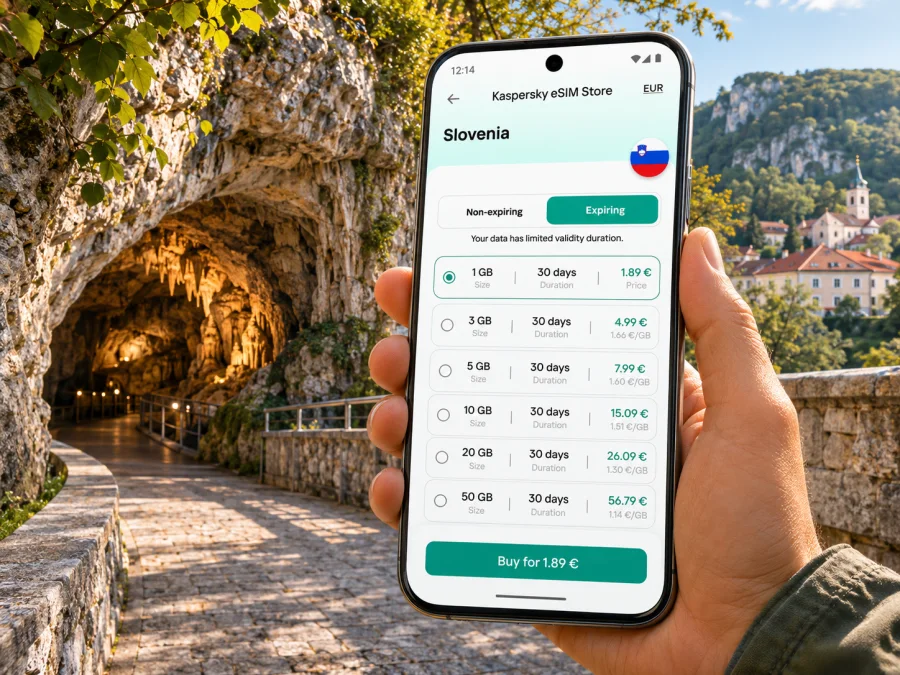
You can review available eSIM options for Slovenia in Kaspersky eSIM Store. The app and website let travellers select, arrange and activate an eSIM with a suitable travel data plan. Check the current terms shown for each option; availability, allowances, prices and network details are not fixed by this article.
How much data might you need?
There is no single allowance that suits every Postojna trip. A visitor who mainly checks a map, sends messages and opens tickets uses a different amount from someone who uploads high-resolution photos throughout the day, streams on a train or works remotely. The following comparison is a planning aid, not a data guarantee:
| Travel pattern | Likely data habits | Useful preparation |
|---|---|---|
| Short stop, mostly offline | A few map checks, messages and digital tickets | Download an offline map and tickets; compare a smaller allowance if the plan’s validity fits. |
| Full sightseeing day | Repeated maps, attraction details, photos and messaging | Keep photo backup and app updates on Wi-Fi; leave room for unplanned searches. |
| Several days with onward travel | Navigation, bookings, email and regular communication | Match validity to all travel days and review destination coverage across the route. |
| Remote work or frequent uploads | Video calls, cloud sync, hotspot use or large files | Estimate usage from past bills or device settings; check hotspot and speed terms carefully. |
Reduce avoidable consumption before departure: turn off automatic app updates over mobile data, pause cloud photo backup if you do not need it immediately, and download the route or media you already know you will use. On a short trip, data management is often more useful than choosing an allowance based on a generic “tourist” estimate.
Before you install: device and account checks
Compatibility depends on the exact phone model, the regional variant, its software and whether it is carrier-locked. A product family name alone is not enough to confirm eSIM support. Check the manufacturer’s specifications for your precise model and region, then check the phone settings for an option to add an eSIM. If the device was supplied by a carrier, ask whether it is unlocked for use with another provider’s profile. Check whether your device supports eSIM before choosing a plan.
Also make sure you can complete installation. Many eSIMs are added by scanning a QR code or following an in-app process, so you may need a second screen or a reliable internet connection during setup. Keep access to your email and account available, charge the phone, and do not delete a profile simply because it does not connect immediately; first follow the plan’s troubleshooting guidance.
A useful pre-trip checklist:
- [ ] Exact device model and regional version checked for eSIM support.
- [ ] Carrier lock status confirmed, if applicable.
- [ ] Slovenia and any onward destinations checked against the plan terms.
- [ ] Validity start condition and activation instructions understood.
- [ ] Ticket, lodging address and first route saved for offline access.
- [ ] Home SIM settings reviewed so calls, texts and data use the intended line.
- [ ] Battery, charger and access to the account used to obtain the eSIM are ready.
Install before travel or after you arrive?
If you have a stable connection before departure and the plan instructions allow advance installation, setting up early gives you time to resolve a device or account issue at home. Some plans begin their validity only when they first connect to a supported network; others may have different activation conditions. Read the plan details and installation prompts before proceeding. Do not assume that installing and activating always mean the same thing.
If you prefer to install after arrival, first make sure you can access Wi-Fi and your account. Airport Wi-Fi or accommodation Wi-Fi can help with setup, but it is sensible to have a fallback if you need directions before reaching either. Save the first leg of your route in advance, and keep the eSIM QR or installation details available in a secure place.
A general setup flow is:
- Connect to dependable Wi-Fi and open the eSIM installation instructions for your phone.
- Add the profile using the method provided for the selected plan. Follow the screen prompts and label the new line clearly, such as “Slovenia data”.
- Keep your primary number selected for calls or messages if you need it, and choose the travel eSIM for mobile data when appropriate.
- Enable data roaming for the travel eSIM only if the plan’s setup instructions require it. The correct setting depends on the plan; check its instructions rather than changing every line indiscriminately.
- After landing, allow the phone to register on an available supported network. If data does not work, check that the eSIM line and mobile data selection are enabled, then consult the plan’s troubleshooting steps.
Follow the detailed Android eSIM installation instructions or iPhone eSIM installation instructions for the relevant device. Menu names can vary by operating system version and manufacturer, so use the instructions that match your phone.
Where the connection helps on a real Postojna day
Arriving by train with a cave booking
Save your ticket and check the station-to-park route before arrival. Decide whether the walk or local bus suits your luggage and timing. The cave operator recommends reaching the park 30 minutes before the tour; boarding starts 15 minutes before the selected time. Keep the ticket available offline in case data is slow.
Combining the cave and Predjama
Predjama Castle is about nine kilometres from the cave entrance. Check whether a seasonal shuttle runs on your date and fits your cave tour. If it does not, arrange another transfer in advance. Use a map to agree on a meeting point and keep the return journey in mind.
A late check-in or short stop
Save your lodging address and check-in instructions over Wi-Fi. If transit is delayed, data can help you update your host or find the correct station. For a brief stop, keep the next ticket and departure details together and allow time to return to your train or bus.
Work while travelling
If you need email, video calls or a laptop hotspot, check the plan’s data and tethering terms first. Download large files over Wi-Fi and treat mobile data as a flexible backup, not a guaranteed office connection.
Signal, calls and practical limits
Coverage is determined by the local network and the place where you are using the phone. Reception can vary indoors, outside town, in transit and underground. A successful connection in the centre does not establish that the same service will work in every room or at every attraction. If a location matters for safety or work, ask your accommodation or meeting contact about local connectivity and keep a non-digital fallback such as a written address.
Travel data eSIMs are commonly intended for mobile data. Do not assume that the plan includes a local telephone number, conventional voice calls or SMS unless its terms say so. Internet calling and messaging apps can work over data when the other person is reachable through the same service, but emergency calling and verification texts may depend on your normal SIM and home provider. Keep your primary line available if you rely on it, and review roaming charges with your home operator.
If the phone shows signal but apps cannot load, check the selected data line, data roaming setting specified by the plan, remaining allowance and validity. Restarting the phone may help it reconnect, but avoid deleting the eSIM before checking the provider’s recovery process. If your plan includes network selection instructions, follow them. When a problem persists, use the support contact associated with the plan or service you selected.
Frequently asked questions
Is Postojna Cave inside the town?
The cave park is near Postojna rather than at the railway platform or bus station. The cave park’s directions estimate an approximately 25-minute walk from the railway station and describe a local bus connection between the railway station, bus station and park. Check the current route and timetable for your travel date.
Can I use mobile internet inside Postojna Cave?
Do not plan on a continuous mobile connection underground. Conditions depend on the network and location, and the tour takes place inside a cave. Save tickets and essential details in advance, follow visitor rules and use your phone only where permitted.
Will an eSIM work on every phone sold under the same model name?
Not necessarily. eSIM availability may vary by exact model, regional variant, software and carrier lock status. Verify your particular handset with its manufacturer and check the compatibility tool before purchase.
How much data should I choose for one day in Postojna?
Estimate based on what you will do: map checks, messaging and ticket access use a different amount from video streaming, frequent photo uploads or laptop tethering. Download offline content and review your typical usage rather than relying on a fixed daily figure.
Is the Predjama shuttle available all year?
The cave park describes the shuttle as seasonal. Check the current schedule for your date and arrange another transfer if it is not operating.
Prepare your connection for Postojna
A little preparation makes the town easier to navigate: confirm your device and plan, save tickets and addresses, check the latest train or bus information, and leave enough time for the cave and any onward visit to Predjama. A travel eSIM can provide a convenient way to access mobile data on a compatible device, subject to the specific plan and local network conditions.
When you are ready, use Kaspersky eSIM Store to compare the current options and choose an eSIM plan for your Slovenia trip. Install it according to the plan instructions, keep your primary line settings clear, and travel with key details saved offline as well.


