
Travel connectivity guide
Potosi eSIM for Mobile Internet in Bolivia
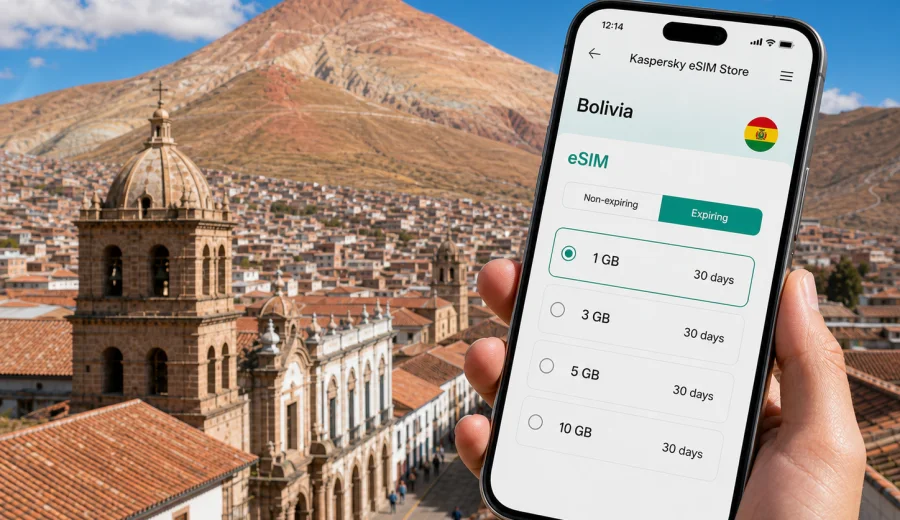
Potosi eSIM: mobile connection and internet for your Bolivia trip
Potosi is not a city where you want to solve mobile internet at the last minute. The altitude is high, the streets can be steep, hotels may be spread between colonial lanes and newer neighborhoods, and many travelers arrive after a long overland journey from Sucre, Uyuni, Oruro, or La Paz. A prepared eSIM can make the first hours easier: you can open maps, message your host, check a taxi route, confirm a tour time, and keep travel documents available without searching for a physical SIM card shop.
This guide focuses on practical mobile connection in Potosi: arrival, navigation, transport, hotel check-in, business travel, side trips, and the route planning that often comes with a journey through Bolivia. It is not a general country guide. The goal is to help you decide how much mobile data you may need, when to install an eSIM, what to check before purchase, and how to use mobile internet calmly while moving around the city.
Why mobile internet matters in Potosi
Potosi sits at more than 4,000 meters above sea level, and the travel rhythm can feel different from larger capitals. You may want to move more slowly, avoid unnecessary detours, and confirm details before walking uphill with luggage. Mobile data helps with exactly those small decisions.
Typical online tasks in Potosi include:
- navigating between the bus terminal, Plaza 10 de Noviembre, hotels, museums, cafes, and tour meeting points;
- checking whether a walking route is realistic at altitude or whether it is better to take a taxi;
- messaging accommodation before arrival, especially if you reach the city late;
- confirming mine tour pickups, museum schedules, or transport to Uyuni and Sucre;
- translating short messages, menus, signs, and booking details;
- using ride coordination, maps, banking apps, and travel insurance documents;
- sharing your location with family or colleagues during a high-altitude trip.
Public Wi-Fi can be useful in hotels and cafes, but it is not the same as having mobile internet when you are on the move. In Potosi, a few minutes of reliable data can save a long walk in the wrong direction, especially around hilly streets where a short distance on the map may still be tiring.
Potosi arrival scenarios where eSIM helps
Most visitors do not fly directly into Potosi as part of a simple international route. Many arrive by bus or private transfer after already crossing parts of Bolivia. That makes advance mobile setup more valuable: you may be tired, carrying bags, and switching between Spanish place names, offline booking screenshots, and local directions.
| Arrival situation | Why mobile data helps | Practical tip |
|---|---|---|
| Bus from Sucre | You may arrive at a terminal outside your hotel area | Save the hotel address and check the route before leaving the station |
| Route from Uyuni | Arrival times can shift after long road travel | Message your accommodation if you are delayed |
| Transfer from La Paz or Oruro | You may need onward transport details quickly | Keep booking confirmations and maps available offline and online |
| Late evening arrival | Fewer open shops and less time to compare options | Install eSIM before the trip so you only need to activate data |
| Business visit | Meetings may start soon after arrival | Keep email, calendars, maps, and messenger access ready |
How to estimate data for Potosi
Data needs vary by travel style. Potosi can be a short stop on the way to the Salar de Uyuni, a historical city break, a work visit, or part of a longer Bolivia itinerary. The amount of mobile internet you need depends less on the city itself and more on how you use your phone between hotels, tours, transport, and video-heavy apps.
Use this simple planning model:
- 1-3 GB can be enough for a short stay if you mainly use maps, messages, email, translations, and light browsing.
- 3-5 GB is more comfortable for several days with regular photo uploads, ride coordination, web searches, and backup navigation.
- 5-10 GB suits travelers who use cloud documents, social media, video calls, or frequent hotspot sharing.
- Higher data volumes may be useful for remote work, long Bolivia routes, or travelers who rely on mobile data more than hotel Wi-Fi.
Local movement: maps, taxis, and walking at altitude
Potosi is compact on a map, but altitude changes the practical experience. A route that looks quick can feel demanding, especially on the first day. Mobile internet helps you decide whether to walk, ask your hotel to call a taxi, or adjust the plan.
Useful mobile habits in Potosi:
1. Save your hotel and bus terminal in your maps app before arrival.
2. Download offline maps, then use mobile data for live search, updated routes, and messaging.
3. Keep a screenshot of your accommodation address in Spanish.
4. Check walking time and elevation before starting a route with luggage.
5. Share your live location with a trusted contact when taking unfamiliar transport.
6. Keep tour meeting points pinned, especially for early departures.
In the historic center, mobile data is most useful for small corrections: checking which street leads to a plaza, confirming a museum entrance, finding a cafe with Wi-Fi, or calling your hotel if a gate is closed. These are not heavy-data tasks, but they are easier when your phone is already online.
Choosing an eSIM tariff for Potosi and Bolivia
For a city article, the tariff destination should match the country the city belongs to. Potosi is in Bolivia, so look for a Bolivia tariff or a regional option that clearly includes Bolivia if your trip continues across borders. A city name may be useful for planning, but the eSIM tariff itself is normally organized by country or region.
Before choosing, check:
- destination coverage in the tariff details;
- data volume and validity period;
- when the validity period starts;
- whether top-ups are available for the selected tariff;
- whether mobile hotspot use is allowed or restricted;
- whether your phone supports eSIM and is not locked to another carrier;
- whether data roaming must be enabled for the eSIM profile on your device.
If your route is Potosi only, choose based on the number of days and your expected app use. If your route is La Paz, Sucre, Potosi, and Uyuni, choose for the whole Bolivia segment. If you cross into Chile, Argentina, or Peru, compare country and regional options carefully so you do not assume that one tariff covers every part of the route.
Kaspersky eSIM Store is an app and website where you can choose, set up, and activate an eSIM with a suitable data tariff for mobile internet during an international trip. For Potosi, you can use the Bolivia destination page to choose an eSIM tariff for your trip to Potosi after checking the tariff conditions and your device compatibility.
When to install and when to activate
There are two separate moments to think about: installing the eSIM profile and using mobile data through it. Many travelers prefer to install the eSIM before leaving home or while connected to reliable Wi-Fi, then activate mobile data when they are ready to use the tariff according to the conditions shown for the selected option.
A practical timeline:
1. Before departure, check whether your phone supports eSIM.
2. Choose the Bolivia tariff that fits your Potosi itinerary.
3. Complete setup while you still have stable Wi-Fi.
4. Keep the QR code or in-app setup instructions accessible.
5. On arrival in Bolivia or before entering the Potosi segment, turn on the eSIM line for mobile data if the tariff rules fit that timing.
6. Keep your primary SIM available for calls or SMS if you still need it, and use eSIM for data where appropriate.
Device compatibility checklist
An eSIM only works if the device supports eSIM and is not restricted in a way that prevents adding a new mobile plan. Before buying, check your device and confirm the model, region version, and carrier lock status.
Check these items:
- the phone or tablet supports eSIM;
- the device is unlocked if your carrier applies restrictions;
- the operating system is reasonably up to date;
- you have access to Wi-Fi for setup;
- you can receive any account emails or confirmation messages needed for purchase;
- you understand whether the eSIM includes data only or also other services, if stated in the tariff terms;
- you know which SIM line will be used for mobile data after activation.
Travelers sometimes confuse eSIM installation with immediate internet use. Installing the profile prepares the device. Actual data use depends on activation rules, selected line settings, roaming data settings, and local network availability under the tariff conditions.
Installing eSIM on Android and iOS
The exact menu names vary by phone model and operating system version, but the main flow is similar: add an eSIM or mobile plan, follow the QR code or in-app instructions, label the line clearly, and choose when that line should handle mobile data.
For step-by-step setup, use the official guides for Android installation and iOS installation. Keep the instructions open while connected to Wi-Fi, especially if you are installing after a long bus journey or before an early tour departure.
After installation, label the line with a practical name such as “Bolivia data” or “Travel eSIM”. This helps avoid using the wrong mobile data line, especially if your physical SIM remains active for calls, bank verification, or messages.
Potosi data-saving habits
Potosi is a good place to use mobile data deliberately. You may be outdoors, moving between viewpoints and colonial streets, or taking day tours where charging and Wi-Fi are limited. A few settings can keep your tariff useful for the whole stay.
| Setting or habit | Why it helps |
|---|---|
| Download offline maps | Mobile data is then used for live updates, not full map loading |
| Disable automatic cloud backup on mobile data | Prevents large photo uploads from using your allowance |
| Turn off autoplay video | Keeps social apps from consuming data in the background |
| Save tickets and hotel addresses offline | Reduces dependence on signal at stressful moments |
| Use Wi-Fi for large app updates | Keeps the eSIM tariff focused on travel tasks |
| Monitor data use daily | Helps you decide whether to top up or reduce heavy use |
If you work while traveling, separate essential and non-essential traffic. Email, maps, calendars, and messaging should take priority over uploads, entertainment, and system updates. Video calls can use data quickly, so hotel Wi-Fi may be better for long meetings if it is stable enough.
Trips from Potosi: Uyuni, Sucre, and La Paz
Potosi often sits in the middle of a wider Bolivia route. That matters for eSIM planning because data use can increase outside the city: bus journeys are long, routes can change, and you may need transport updates before reaching the next stop.
Common route patterns:
- Sucre to Potosi: useful for arrival coordination and hotel check-in.
- Potosi to Uyuni: useful for tour communication and offline map backup before salt flat travel.
- Potosi to La Paz or Oruro: useful for long-distance ticket details and family updates.
- Potosi as a work base: useful for meeting navigation and shared documents.
If the itinerary goes beyond Bolivia, review the tariff destination carefully. A Bolivia tariff is appropriate for Potosi and other covered locations within Bolivia, but a cross-border route may need a different regional option.
FAQ: eSIM and mobile internet in Potosi
Is eSIM useful for a short visit to Potosi?
Yes, especially if you arrive by bus, need maps for the historic center, coordinate a tour, or continue to Uyuni or Sucre. Even a small data allowance can cover essential travel tasks.
Should I buy a Potosi-specific eSIM?
City pages help you plan for a local trip, but tariffs are usually based on a country or region. For Potosi, choose a Bolivia tariff or a regional tariff that clearly includes Bolivia.
Can I use eSIM for calls and SMS?
Many travel eSIM tariffs focus on mobile data. Voice calls and SMS are not included unless the tariff conditions say otherwise. You can usually use internet-based calling and messaging apps over mobile data.
Can I install eSIM before I arrive in Bolivia?
Often, yes. Many travelers install the eSIM while connected to stable Wi-Fi before departure, then use the travel data line according to the selected tariff conditions. Check the activation and validity rules before deciding the timing.
Final preparation before you travel
Before you leave for Potosi, make the mobile internet setup part of your normal trip checklist. Confirm the hotel address, save maps, keep transport details offline, check your device compatibility, and decide how much data you need for Bolivia. A little preparation is especially useful in a high-altitude city where you may want fewer errands on arrival.
Kaspersky eSIM Store helps you prepare mobile internet for international travel through an eSIM tariff selected for your destination. If Potosi is part of your Bolivia route, review the available options and prepare an eSIM tariff for your Bolivia trip before you need mobile data for maps, messages, transport, or work.