Travel connectivity guide
Public eSIM Guide for Saint Barthelemy
Public eSIM: mobile connection and internet for your stay in Saint Barthelemy
Public is a waterfront quartier at the edge of Gustavia, where port activity and everyday island life meet. It is a useful base for travelers arriving by boat, visiting the harbor area, or moving between Public and Gustavia’s shops, offices, and restaurants. Because plans here often involve several short journeys rather than one walkable resort zone, mobile internet can help with directions, meeting points, messages, and last-minute changes.
An eSIM is a digital SIM profile that can be installed on a compatible, unlocked device. For a trip to Public, it can give you a way to use mobile data without swapping your usual physical SIM. You can prepare before departure, then use maps and travel apps as needed, subject to the selected plan’s coverage, data allowance, and validity terms.
What to know about Public before you arrive
Public lies beside Gustavia and is associated with the island’s commercial port area. It has a different feel from the historic harbor streets: port operations and practical services shape the waterfront, while Gustavia’s central streets are close by for restaurants, shopping, and many visitor errands. The distinction matters when choosing where to stay and how to plan your first ride.
The name can also cause confusion in map searches. Search for “Public, Saint Barthelemy” or “Anse du Public” and compare the pin with your accommodation or meeting point. Some listings may use Gustavia as a broad location even when the address is in Public or nearby. Save the exact property pin before travel, and confirm the pickup point directly with your host or driver.
| Trip detail | Why it matters in Public |
|---|---|
| Waterfront and port setting | Confirm which harbor or entrance your boat or transfer uses. |
| Close to Gustavia | You can combine Public-area errands with a visit to the town center, but check the route and terrain. |
| Island-wide plans | Beaches, accommodation, and viewpoints are spread across different quartiers; a map helps coordinate each leg. |
| Short stop or business visit | Save the address, contact details, and return arrangements before leaving a stable connection. |
Public is best approached as a practical arrival and movement point, not as a self-contained beach district. If your stay is elsewhere on the island, you may still pass through the area for a port transfer, a meeting, or a connection with Gustavia.
Arriving in Public and finding your way
Most visitors reach Saint Barthelemy by air or by sea, then make a separate transfer to their accommodation. The island’s airport is in the Saint Jean area, while ferry and port arrangements are centered around Gustavia; the precise route depends on your booking. Public sits by Gustavia’s commercial-port side, so do not assume every boat passenger disembarks at the same point or that a port pin is your hotel entrance.
Before you set off, put these details somewhere available offline:
- the full accommodation address and map pin;
- the name and phone or messaging contact of your host, driver, or vessel operator;
- the agreed pickup location and time;
- your onward transport plan if a flight, ferry, or appointment follows;
- a screenshot of any arrival instructions that might be difficult to retrieve later.
After landing or disembarking, check the route against the actual pickup point. Short distances on a map do not always mean a simple walk: roads can bend around the coastline and hills, and luggage or heat can make walking impractical. For a transfer, share the pin and a recognizable nearby landmark with the driver instead of relying on a neighborhood name alone.
A connected phone is useful for checking messages, confirming a late change, opening navigation, or contacting your accommodation. It is still sensible to save key details offline. Mobile data depends on your device, the network available at your location, and the terms of the eSIM plan you choose; no route or connection should be treated as guaranteed in every spot.
Getting around from the Public waterfront
Public is close to Gustavia, but visitors should plan trips around the island as separate legs. An accommodation in the hills, a beach visit, a lunch booking, and a return to the port can involve different roads and pickup points. Check the whole itinerary in a map before leaving, then keep the next destination and return address readily accessible.
For many visitors, a pre-arranged car or taxi is the simplest way to move between quartiers, especially with luggage or when the destination is outside Gustavia. Confirm availability and price with the provider rather than assuming a ride will be waiting. If you are driving, check parking and access instructions with your hotel or host; narrow roads, slopes, and limited space can make a pin alone insufficient.
Walking can suit a short trip between nearby points when the route is safe and comfortable. Review the road and elevation rather than judging only by distance. In warm weather, carry water and leave extra time. Around port activity, follow signs and instructions on site and avoid entering operational areas that are not open to visitors.
A simple route-planning routine
- Open the accommodation or meeting pin while you have a reliable connection.
- Compare it with the arrival point and confirm the transfer with the person meeting you.
- Check whether the route is intended for a vehicle or on foot.
- Save the destination and return point in your map app.
- Before departing, confirm opening times or reservations directly with the venue.
- Keep enough time for a changed pickup, traffic, or a missed turn.
Navigation apps are helpful for orientation, but local directions can be more precise for a villa entrance, hotel driveway, or port gate. If an address seems ambiguous, message the host with your ETA and ask them to verify the final approach. This is especially useful where a property sits above the waterfront or shares an access road with other buildings.
Public, Gustavia, and nearby stops
A stay in Public can make sense when your plans center on the commercial waterfront or when you want to be near Gustavia without assuming that every errand is on the same street. Gustavia’s harborfront and historic center are close enough to plan together, but each venue still has its own entrance and practical access. Check the route back after dinner or a late meeting rather than assuming that a short map distance will be an easy walk at any hour.
Public Beach is associated with the waterfront at the entrance to the port and has a sailing-school presence. It is not the same kind of setting as a broad resort beach, so check local conditions and access before making it the main beach day. For swimming or a longer beach visit, choose a destination suited to your plans and confirm transport in both directions.
Travelers with a free afternoon can use Gustavia as a point from which to plan other island stops. Select one or two destinations that fit the time available instead of trying to cover the whole island between appointments. Ask your driver or host about the most practical sequence; a route that looks compact on a map may include winding roads and changes in elevation.
Mobile data can help compare directions, send a location, or check a reservation while moving between these areas. It is useful for coordinating the day, but it does not replace local access guidance or a confirmed ride. If you expect to work during the trip, download documents and meeting details in advance and identify a quiet place with suitable facilities instead of relying on a beach or port area for calls.
Choosing an eSIM plan for a Public itinerary
Start with the actual length and shape of your trip. A short port call, several days based in Public, and an island-wide stay have different data needs. Consider what you will do online: navigation and messaging generally use less data than frequent video calls, cloud backups, or streaming. Review the plan’s allowance, validity period, supported destination, and activation conditions before purchase.
For an island visit, also think about whether your itinerary includes a connection through another destination. A plan for Saint Barthelemy should not be assumed to cover a stop elsewhere; verify every country or territory on your route in the plan details. Keep your usual SIM available if you need its number for calls or SMS, and set the eSIM as the mobile-data line when you are ready to use it.
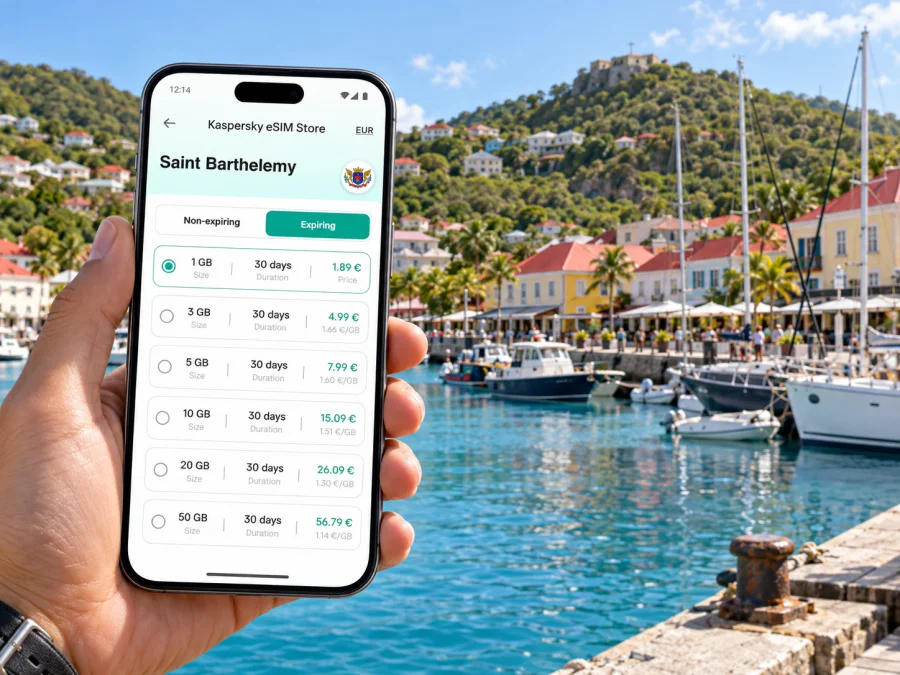
You can view eSIM plan options for Saint Barthelemy and compare the stated data amount and validity with your itinerary. Kaspersky eSIM Store is an app and website where you can select, arrange, and activate an eSIM with a suitable plan for mobile internet while traveling abroad. The available terms belong to the selected plan, so review them before completing your choice.
Estimate what you may use
| Your travel pattern | Data habits to consider |
|---|---|
| Port transfer and a few messages | Map checks, pickup coordination, and short text conversations. |
| Several island journeys each day | More frequent navigation, location sharing, and booking updates. |
| Remote work or business meetings | Email and documents may be modest; video meetings can use considerably more data. |
| Photos and social apps | Uploads, automatic backups, and high-resolution media can consume data quickly. |
These are planning categories, not fixed data estimates. App settings, signal conditions, and how often you use each service change consumption. Disable automatic photo backup over mobile data if you want to reserve your allowance for maps and essential communication. Download offline maps, boarding details, and work files before leaving Wi-Fi.
Prepare your phone before the trip
Before selecting a plan, check that the device supports eSIM and is not locked to a mobile operator. Some device models vary by market, so verify the exact model rather than relying only on a family name. Check your device’s eSIM compatibility before purchase.
Keep access to Wi-Fi available during installation, and follow the setup flow supplied with your plan. Installation and activation are related but not always the same step: depending on the plan terms, you may install the profile before departure and activate or start using it later. Read the instructions for the specific plan so you know when its validity begins.
Installation checklist
- Update your phone and make sure you can unlock it.
- Confirm eSIM support and remove any operator lock if applicable.
- Keep the QR code or activation details accessible on a second screen or printed copy.
- Use a stable Wi-Fi connection while adding the eSIM profile.
- Label the travel line clearly so you can distinguish it from your regular SIM.
- Choose the intended line for mobile data after arrival, following the plan instructions.
- Check whether the plan requires data roaming to be enabled for that eSIM.
For step-by-step help, see the Android eSIM installation instructions or the iOS eSIM installation instructions. Menu names can differ between operating-system versions, so follow the directions shown on your device.
An eSIM plan for mobile data does not automatically provide a regular phone number, standard voice calls, or SMS unless the plan explicitly says otherwise. Keep your usual line enabled for calls and texts if that suits your needs, and check with your home operator how roaming is handled. Messaging and internet calls can work through data when the relevant apps and contacts are available.
Practical situations in Public
You arrive by boat and have a pickup arranged
Before boarding, save the meeting pin, driver’s contact, and accommodation address. When you arrive, check for any message about a changed meeting point. Share your live location only if useful and appropriate, and confirm that the driver is waiting at the port area you are using. If mobile data is not yet available, use the saved instructions or the port’s posted guidance to reconnect with your contact.
You are staying nearby and visiting Gustavia
Save the route from your accommodation to the specific restaurant, office, shop, or harbor entrance. A neighborhood label is not enough when several businesses sit along the waterfront. For the return trip, keep the address visible and arrange transport in advance if you do not want to walk or if the route is steep.
You have a work appointment
Download your agenda and documents before leaving the hotel. Send the other attendee a precise meeting location, not just “Public” or “Gustavia.” Allow a buffer for the transfer, and avoid scheduling a video call while in transit. If you need to join remotely, check the venue’s connectivity and quiet-space arrangements beforehand.
You are making a short stopover
Keep the plan narrow: transfer, one confirmed appointment or nearby visit, then return to the departure point. Save return timing and operator contacts offline. Do not base a tight connection on a map’s estimated travel time alone; confirm local transport and leave a margin for changes.
If mobile data does not connect
First confirm that the eSIM line is installed and selected for mobile data. Check that airplane mode is off, mobile data is enabled, and the plan is active under its stated conditions. If the plan requires data roaming on the eSIM line, enable it as instructed. Restarting the phone or manually selecting a supported network may help in some cases, but only follow network-selection steps included in the plan guidance.
If service is still unavailable, connect to Wi-Fi if possible and review the plan details, remaining allowance, and validity. Keep your saved address and transfer details usable offline while resolving the issue. For help with the eSIM setup or account, use the support route provided in the app or purchase information.
Avoid deleting an eSIM profile as a first troubleshooting step. Some profiles cannot be reinstalled freely after removal. Check the plan instructions or contact support before removing or transferring it to another device.
Questions travelers ask
Is Public a good base for exploring the island?
It can suit visitors whose plans are tied to the waterfront or nearby Gustavia. For beach-focused or resort stays, compare the location of your accommodation with the places you expect to visit and arrange transport for each leg.
Can I walk from Public to Gustavia?
Some nearby destinations may be reachable on foot, but the practical route depends on the exact addresses, road conditions, slopes, heat, and time of day. Check the route itself and ask your host for local guidance before walking with luggage.
Will an eSIM help me find my port pickup?
Mobile data can help you open a map, message your driver, and share a location if the chosen plan is active and service is available. Save the meeting instructions in advance as a backup, and confirm the correct port entrance or meeting point.
Does a travel eSIM replace my usual phone line?
It can provide mobile data according to the selected plan, but it does not automatically replace a regular number or include standard calls and SMS. Keep your existing line if you need it, and review roaming settings and charges with your home operator.
When should I install the eSIM?
Follow the plan’s instructions. You may be able to install it before travel, but activation and validity can follow specific conditions. Read those details so the plan is ready when you intend to use it.
Make the first connection part of your itinerary
Public is a practical waterfront quartier beside Gustavia, and an easy visit depends on knowing your exact arrival point, destination, and return plan. Save addresses and pickup details before you travel, use maps to coordinate each leg, and leave room for the island’s roads and changing arrangements.
Before departure, review your phone’s eSIM compatibility, compare the plan allowance and validity with your stay, and install the profile according to its instructions. When you are ready, choose an eSIM plan for your trip to Saint Barthelemy through Kaspersky eSIM Store and keep the plan details available for your arrival.


