
Travel connectivity guide
Puerto Ayora eSIM for mobile internet
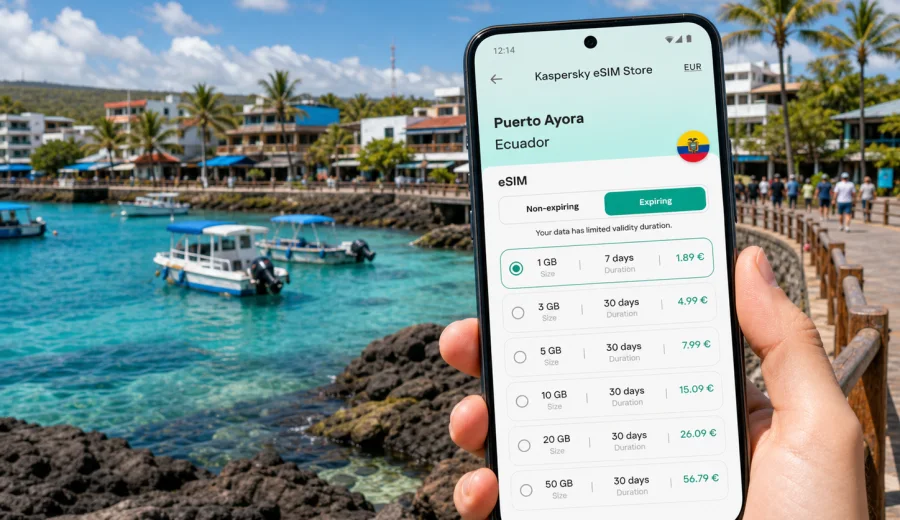
Puerto Ayora eSIM: mobile connection and internet for a Galapagos trip
Puerto Ayora is where Galapagos trips become practical. It is the main town on Santa Cruz Island, the base for hotels, dive shops, tours, restaurants, research visits, and transfers to nearby islands. If your trip starts with a flight to Baltra, continues by bus, ferry, taxi, and water taxi, and then settles into a hotel near the waterfront, mobile internet is useful from the first hour.
An eSIM helps you prepare mobile data before you need to find a shop or depend on hotel Wi-Fi. For Puerto Ayora, that matters because movement is fragmented: airport transfer, Itabaca Channel crossing, town taxis, boat piers, early tour departures, and walks to beaches or viewpoints. A digital SIM card gives you a separate travel data line on a compatible phone for maps, messages, bookings, and translation tools around Santa Cruz.
This guide focuses on Puerto Ayora, not Ecuador in general. The eSIM destination is Ecuador, but the travel scenarios are local: arriving from Baltra, getting to your hotel, navigating the waterfront, checking tour details, contacting a guide, planning Tortuga Bay, and staying online during short stays or longer island-based trips.
Why mobile data matters in Puerto Ayora
Puerto Ayora is compact, but a visitor still makes many small decisions during the day. You may need to confirm which pier your tour uses, check whether a meeting point is near the main dock, find your way back from Charles Darwin Avenue, message a hotel after a delayed ferry, or send documents to a dive operator. These tasks become awkward when your only connection is a cafe network or a lobby password.
Mobile internet is useful in Puerto Ayora for:
- finding your hotel after the Baltra transfer;
- checking maps around the waterfront, the municipal dock, and side streets;
- messaging guides, tour desks, drivers, and hotel reception;
- storing and opening booking confirmations;
- translating short messages in Spanish;
- checking weather and sea conditions before boat trips;
- coordinating family or business messages while you are on island time;
- using online banking or payment confirmations when needed.
Public Wi-Fi can help inside hotels and restaurants, but it is not a reliable plan for the whole day. You may be outside, on a dock, walking between tour offices, or waiting for transport. A travel eSIM is not about replacing every connection option; it is about having a practical backup that moves with your phone.
Arrival: from Baltra Airport to Puerto Ayora
Most visitors reach Puerto Ayora after landing at Baltra Airport. The transfer usually involves several stages: an airport bus on Baltra, a short channel crossing, then road transport across Santa Cruz Island toward Puerto Ayora. The route is straightforward, but it is exactly the kind of arrival where mobile data can reduce uncertainty.
During the transfer, you may want to:
1. Tell your hotel when you have landed.
2. Check whether a prepaid transfer or shared taxi is still waiting.
3. Open the hotel address before you lose focus in the arrival flow.
4. Confirm payment instructions or luggage details.
5. Save your ferry, bus, and tour confirmations for offline access.
If you install your eSIM before the trip, you can turn on the travel line when the plan conditions allow and when you are ready to use data. Activation behavior depends on the selected tariff, so read the conditions before you travel. Some travelers prefer to install the eSIM at home on stable Wi-Fi and activate it only when they arrive. Others install it after landing, but that requires a working connection at the airport or hotel.
The Puerto Ayora travel pattern
Puerto Ayora is not a city where you spend all day on public transport. Instead, your phone supports short, repeated decisions: where to meet a boat, how long the walk will take, whether a restaurant is open, when to leave for a tour, and how to share your location with a driver or group. That makes a modest but dependable data plan valuable.
| Travel moment in Puerto Ayora | Why internet helps | Practical data use |
|---|---|---|
| Arrival from Baltra | Transfer has several stages | Messaging, maps, hotel address |
| Waterfront walks | Streets and docks can be similar at night | Navigation and restaurant search |
| Tour mornings | Meeting points can change by operator | Messages, confirmations, maps |
| Tortuga Bay visit | You may want routes and timing | Offline maps plus light online checks |
| Business or remote work | Hotel Wi-Fi may not cover every moment | Email, messengers, document checks |
| Island transfers | Boat schedules require attention | Tickets, weather, contact details |
A useful approach is to combine offline preparation with mobile data. Download maps, keep PDFs available offline, and save key addresses. Then use eSIM data for updates, live messages, route checks, and unexpected changes.
Choosing an eSIM data plan for Puerto Ayora
The right eSIM tariff depends on how you use your phone. Puerto Ayora is often a base for nature-focused travel, so many visitors use data in bursts rather than streaming all day. Messaging, maps, email, online check-in, translation, and booking apps usually need less data than video calls or cloud backups.
Think about these questions before choosing:
- How many days will you stay in Puerto Ayora and Santa Cruz?
- Will you continue to Isabela, San Cristobal, or mainland Ecuador?
- Do you need only messaging and maps, or also work calls and file sharing?
- Will your hotel provide stable Wi-Fi for evenings?
- Are you traveling alone, with family, or in a group that coordinates by messenger?
For a short Puerto Ayora stay, a smaller package may be enough if you avoid heavy streaming and use hotel Wi-Fi for backups. For a longer Galapagos itinerary, choose a plan with a validity period that covers arrival and departure days too. If you will continue to Quito, Guayaquil, Cuenca, or another part of Ecuador, select a tariff for Ecuador rather than thinking only about Santa Cruz Island.
Practical data planning by scenario
Different Puerto Ayora travelers use mobile internet differently. A family may need maps, restaurant searches, and messages. A diver may need to send certification details, receive operator updates, and check early departures. A business traveler may need email and a stable backup if hotel Wi-Fi is crowded.
| Scenario | Suggested planning logic |
|---|---|
| Two or three days in town | Keep maps offline, use eSIM data for messages, bookings, and route checks. |
| One week on Santa Cruz | Choose enough data for daily navigation, photos shared in moderation, and tour coordination. |
| Multi-island itinerary | Check that the plan duration covers transfer days and the return to the airport. |
| Work while traveling | Allow extra data for email, video meetings, cloud files, and hotspot use if permitted by the tariff. |
| Family trip | Plan for one reliable phone at minimum, and consider whether each traveler needs separate mobile data. |
Avoid judging a plan only by headline data volume. Validity period, destination, supported device, activation rules, and personal usage matter more than a single number. When you know your dates and likely phone tasks, you can choose a mobile internet option for Ecuador through Kaspersky eSIM Store and review the tariff conditions before installation.
Before you buy: device and account checks
Before preparing an eSIM for Puerto Ayora, confirm that your phone or tablet supports eSIM and is not locked in a way that prevents adding a travel profile. This check is important because eSIM is a device feature, not just an app feature. If the phone is incompatible, a digital SIM profile cannot be installed in the usual way.
Use this quick checklist:
- Check your device before selecting a tariff.
- Make sure the device is unlocked for travel SIM use.
- Update the operating system if you usually postpone updates.
- Keep your main SIM active if you need your usual number for calls or bank messages.
- Confirm whether the selected eSIM tariff includes data only or additional services.
- Read when the validity period starts and how activation works.
- Save installation details while you still have stable Wi-Fi.
Most travel eSIM tariffs are designed for mobile data. Standard voice calls and SMS are not included unless the specific tariff conditions say so. For calls in Puerto Ayora, many travelers use internet-based messengers over mobile data or Wi-Fi.
Preparing mobile internet before the flight
The calmest setup is done before departure. Use your home Wi-Fi, choose the destination, review the tariff conditions, install the eSIM profile, and keep the travel line turned off until the correct moment if the plan instructions require that. This avoids trying to scan a QR code or follow setup screens while you are tired, carrying luggage, or moving through the airport transfer.
A simple preparation flow:
1. Confirm that your device supports eSIM.
2. Choose Ecuador as the destination for your Puerto Ayora trip.
3. Compare data volume, validity period, and price.
4. Complete the order and save the installation instructions.
5. Install the eSIM profile on stable Wi-Fi.
6. Label the line clearly, for example "Ecuador travel".
7. Before using it, check which line is selected for mobile data.
How to install an eSIM for a Puerto Ayora trip
Installation usually takes only a few steps, but the exact flow differs between Android and iOS devices. Follow the instructions for your operating system and keep Wi-Fi available until the eSIM profile is installed. If your phone uses dual SIM settings, give the travel eSIM a clear label so you do not confuse it with your regular line.
For setup details, use the Android installation guide or the iOS installation guide. After installation, check your mobile data settings, data roaming setting for the eSIM if the tariff requires it, and which SIM is used for calls, messages, and data.
Do not delete the eSIM profile unless you are sure the conditions allow reinstallation. In many travel scenarios, removing a profile can make it impossible to use again. If something does not work as expected, check the app or site instructions and support options before changing system settings repeatedly.
Getting around Puerto Ayora with mobile data
Puerto Ayora is walkable in the central area, but visitors still use taxis, hotel transfers, boats, and guided tours. Mobile internet helps you keep the small parts of the day connected. You can check walking time from the hotel to the pier, share your location with a guide, or confirm whether a tour office wants you at the main dock or a nearby pickup point.
Useful local moments include opening a saved map before walking to Tortuga Bay, checking the route back to your hotel after dinner, messaging a taxi contact for an early transfer, confirming a bay tour departure, translating short service messages, and checking essential file sync. Puerto Ayora has a relaxed pace, but tour schedules often start early; a travel eSIM gives your phone a data option when Wi-Fi is not available.
Day trips and onward routes from Puerto Ayora
Puerto Ayora is a base for exploring Santa Cruz and for continuing to other islands. Before a day trip, save the operator contact, pier or pickup location, departure time, hotel address, and offline maps. Mobile internet is most useful before and after the excursion: confirming a meeting point, messaging a guide, checking return plans, or arranging the next transfer.
For multi-island travel, think in dates rather than towns. Your plan should cover the day you leave Puerto Ayora, the day you arrive elsewhere, and the day you return or fly onward. A tariff that expires before the final transfer can be inconvenient even if the data volume looked sufficient.
FAQ: eSIM and mobile internet in Puerto Ayora
Is an eSIM useful if my hotel has Wi-Fi?
Yes, because much of Puerto Ayora travel happens outside the hotel: transfers, docks, walks, tour offices, restaurants, and day trips. Wi-Fi is helpful, but it does not follow you through the town.
Should I choose Ecuador or Puerto Ayora as the destination?
For a city article, the relevant destination is the country the city belongs to. Puerto Ayora is in Ecuador, so choose an eSIM tariff for Ecuador and check that the duration fits your full route.
Can I use an eSIM for phone calls and SMS?
Many travel eSIM tariffs focus on mobile data. Standard voice calls and SMS are included only if the specific tariff conditions say so. For calls and messages, travelers often use internet-based apps.
When should I install the eSIM?
Install it before departure on reliable Wi-Fi if possible. Activate or start using it according to the tariff instructions, because validity and activation rules can differ.
Prepare your Puerto Ayora connection before you travel
Puerto Ayora rewards travelers who prepare the practical details early: airport transfer, hotel address, tour meeting points, offline maps, and a mobile data plan for the moments between Wi-Fi networks. An eSIM can make that preparation simpler because you do not need to swap a physical SIM card or find a shop immediately after arrival.
Kaspersky eSIM Store helps you choose, set up, and activate an eSIM tariff for mobile internet in an international trip. Before buying, check device compatibility, read the plan conditions, and match data volume and validity period to your Puerto Ayora itinerary. When you are ready, prepare an eSIM tariff for your Ecuador trip and keep your phone ready for maps, messages, bookings, and local movement around Puerto Ayora.