Travel connectivity guide
Puerto La Cruz eSIM: Mobile Internet Guide
Puerto La Cruz eSIM: mobile connection and internet for your trip
Puerto La Cruz is a coastal port city in Venezuela’s Anzoátegui state, known to many visitors as a departure point for boat trips and travel toward Margarita Island. A working mobile connection helps with more than sightseeing: you may need to coordinate an airport pickup, find a hotel entrance, confirm a ferry departure, contact a host, or share your location while moving between nearby cities.
This guide covers airport arrival via nearby Barcelona, waterfront navigation, ferry planning and eSIM checks. Network conditions, provider requirements and available travel plans can change, so verify details for your dates and device.
What to know about mobile internet in Puerto La Cruz
Puerto La Cruz is in Juan Antonio Sotillo Municipality, in Anzoátegui. It sits within a connected urban area with Barcelona, Lechería and Guanta. The cities are close enough to combine in one itinerary, but they are separate places; a hotel, meeting venue or pickup point described as “Barcelona” or “Lechería” may not be inside Puerto La Cruz itself. Save the complete address and confirm the destination with your driver or host before setting off.
In the coastal city, data is useful for maps, messaging, bookings and coordinating a boat trip. Save accommodation details, transport confirmations, a local map and important numbers offline; service can vary along roads, marinas, islands and crossings.
Arrival: Barcelona airport and the road into Puerto La Cruz
Puerto La Cruz does not have the region’s main commercial airport. Visitors arriving by air commonly use General José Antonio Anzoátegui International Airport, whose airport code is BLA and which serves Barcelona. From there, you continue by road toward Puerto La Cruz or another nearby destination. Confirm the pickup point and destination in advance: “Barcelona” can refer to the airport city, while your hotel may be in Puerto La Cruz, Lechería or elsewhere in the metropolitan area.
Mobile data is useful at this stage for checking a driver’s message, opening the saved address, or updating someone if your arrival time changes. Before the flight, take a screenshot of the accommodation address and any pickup instructions. If you expect to meet a driver, agree on a recognizable meeting point inside or outside the terminal and a fallback method, such as a call or text over your existing line.
Airport and flight operations can change. Check your airline’s current itinerary and airport information close to travel rather than relying on an old schedule or a search result saved weeks earlier. If you have an onward road transfer, allow room for delays and keep the driver’s contact details somewhere you can access without mobile data.
Getting around the waterfront and city center
Puerto La Cruz is best approached as a group of destinations rather than one compact visitor zone. The waterfront promenade, Paseo de la Cruz y el Mar, is a useful orientation point for a stroll and for understanding the city’s relation to the harbor. Nearby food spots and meeting locations can use similar place names, so use the exact address or a map pin instead of searching only for a broad label such as “the port.”
The Anzoátegui state tourism authority describes a local route along the Paseo de las Cocadas, La Cruz y El Mar, including landmarks such as the Bulevar de las Cocadas, Escultura El Pirata, Gruta de la Virgen, Monumento al Desarme, the cross monument on the promenade and the Mirador del Cerro Las Monjas. These names are useful search terms when planning a walk, but confirm opening, access and route conditions locally. A route description does not guarantee that every site is open at a particular time.
For daily trips, use maps to compare the exact pickup and drop-off points, then confirm the ride or walking route with a local contact. Road names, entrances and map pins may not match the wording used by a hotel or tour provider. Share the pin with your driver where possible, and check that the route ends at the correct side of a large building or transport terminal.
| Trip purpose | Useful mobile-data task | Offline backup |
|---|---|---|
| Airport to hotel | Open the saved address and message your driver | Screenshot of address and pickup point |
| Waterfront walk | Search landmark names and follow a map | Downloaded city map and a short written route |
| Restaurant or meeting | Confirm the venue pin and arrival time | Venue name, phone number and street address |
| Ferry departure | Check current terminal instructions and contact the operator | Ticket, departure details and booking reference |
| Day trip | Coordinate pickup and share your location | Saved itinerary and return plan |
The best approach is to use mobile data for live updates and keep the critical details available offline. Navigation apps can reroute around traffic or a closed access road, but a map cannot tell you whether a pier, road or attraction is currently open. For that, rely on the local operator or your host.
Choosing a data option for Venezuela
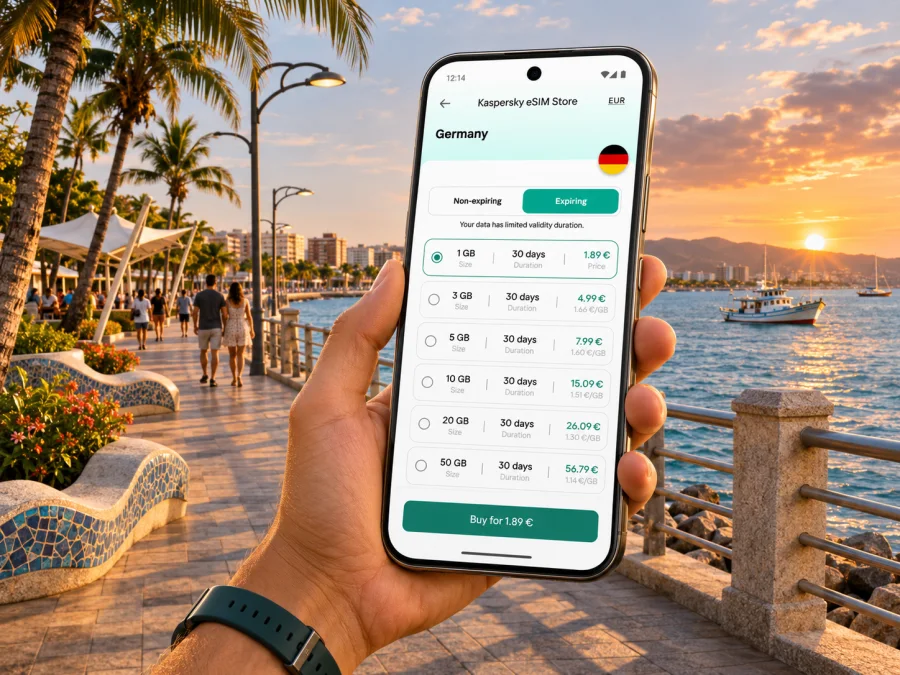
Before buying a travel eSIM, check that the exact destination and package are currently available, then compare the allowance, validity period, activation conditions and supported network information shown at checkout. Kaspersky eSIM Store is an app and website where you can choose, arrange and activate an eSIM with a suitable plan for mobile internet while travelling abroad. Availability and terms belong to the specific plan displayed at the time of purchase; they should not be inferred from the product name or from another country’s offer.
You can browse current eSIM options for Venezuela and check the plan details that apply to your trip. The page is for the country, not a Puerto La Cruz-specific coverage guarantee. Before paying, confirm Venezuela is included, how validity begins, what data allowance is provided, whether top-ups are possible, and what network or roaming settings the plan requires.
Venezuela also has local mobile operators. Digitel’s current official information describes eSIM lines and digital activation through its app, including identity verification. That is a local operator line and registration process; it is not the same thing as selecting an international travel data plan. Requirements, payment methods and eligibility may differ for a visitor, so check directly with the operator if you want a local number or voice and SMS service. Do not assume that a travel data eSIM supplies a Venezuelan phone number.
Coverage is not uniform simply because a plan lists a country. The local network, the plan’s roaming arrangements, your device’s supported radio bands, buildings, terrain and temporary network conditions can all affect service. A signal in the city center does not promise the same result at the waterfront, on the road to another town, aboard a boat or on an island. If reliable access matters for work, plan a backup and avoid scheduling a critical call where you cannot control the connection.
Check your device before you travel
An eSIM plan works only when the device supports eSIM and is not restricted by a carrier lock or another device limitation. Support can vary by exact model number, country or sales region, even when two phones share the same product family name. Check the full model and regional variant in your device settings or manufacturer documentation, and confirm that the phone is unlocked for use with another provider.
Check whether your device supports eSIM before you purchase. If you use a tablet, watch or a phone bought for a different market, verify that exact device rather than relying on a generic compatibility list. Keep the device operating system current where practical, but do not begin a major update just before departure if you cannot complete it safely.
Also consider how you will use your existing number. Many travel data plans are intended for internet access and do not include ordinary voice calls or SMS unless the plan explicitly says so. You may be able to keep a physical SIM active for calls or account verification and set the travel eSIM as the data line, depending on your phone’s dual-SIM features. Review your home carrier’s roaming charges and your device’s settings before changing lines.
Install and activate before the first journey
Read the plan’s activation instructions carefully. Some eSIMs can be installed before departure and begin validity only when they connect at the destination; other plans may start a validity period during installation or activation. Follow the terms shown for the exact plan you choose. Use a stable Wi-Fi connection, keep the QR code or manual activation details available on another screen, and avoid deleting an installed eSIM unless support or the plan instructions tell you to do so.
For device-specific steps, use the Android eSIM installation guide or the iPhone and iOS eSIM installation guide. Menu labels differ by operating system version and manufacturer, so follow the instructions displayed on your own device.
A practical setup sequence is:
- Confirm the plan’s country, data allowance, validity and activation rules.
- Connect to reliable Wi-Fi and install the eSIM using the provided QR code or manual details.
- Label the new line clearly, for example “Travel data,” so it is easy to identify.
- Choose which line handles mobile data; keep your regular line configured for calls or verification if needed and if its roaming terms suit you.
- Turn on data roaming for the travel line only if the plan instructions require it.
- At the destination, allow the phone to register on an available supported network, then test a simple webpage or messaging app.
- If it does not connect, check the selected data line, airplane mode, roaming setting and plan instructions before removing or reinstalling anything.
Installation and first connection are separate steps. A profile can be installed while the phone is at home, while data service may only work under the plan’s destination and activation rules. Keep the purchase confirmation and support route available in case you need help during the trip.
Keep data use predictable in town and on the water
Puerto La Cruz can be a starting point for coastal outings as well as a place to stay. A day on the water changes what “being online” means: the phone may be exposed to sun, spray and battery drain, and a connection can vary once you leave the urban shoreline. Download the route and any reservation details before boarding, save the operator’s contact information, and agree on a meeting or return plan with your group.
For ferry travel to Margarita, Conferry lists a Puerto La Cruz–Margarita route and directs passengers to its booking system for current sailings and availability. Timetables, prices and operating status can change. Check the operator’s latest schedule for your travel date, keep the ticket offline, and follow the terminal’s arrival instructions. A ferry connection is not guaranteed to be available throughout the crossing, so do not depend on mobile data alone for a ticket, boarding pass or important message.
Near the waterfront, use a protective case and keep your phone charged. If you are out for several hours, reduce background refresh, lower screen brightness and carry a power bank if you have one. Avoid leaving a phone unattended on a café table or boat seat. These are simple measures, but they matter when a device is both your map and the place where you store reservations.
City, airport, ferry or day trip: choose the right setup
Match the plan to your itinerary: a short city stay needs maps and messaging; a business visit may need backup access for calls; a ferry extension needs offline tickets and confirmed sailings; a multi-city route requires checking each destination. Do not infer service aboard a boat or on an island from a city listing.
If mobile data does not work
A failed connection can come from several places: the plan may not yet be active, the wrong line may be selected for data, roaming may be disabled, the device may not support the relevant configuration, or local service may be temporarily unavailable. Work through basic checks before reinstalling the profile.
- Confirm that the eSIM line is enabled and selected for mobile data.
- Check whether the plan has reached its activation date or destination condition.
- Review the plan instructions for data roaming and network selection.
- Toggle airplane mode briefly, then wait for the device to register again.
- Restart the phone if the first checks do not help.
- Try a simple webpage in another location, since indoor reception can differ from outdoor reception.
- Contact the plan’s support channel with the order reference and device details if the problem continues.
Avoid deleting the eSIM as a first troubleshooting step. Some profiles cannot be installed again after removal. If you need navigation while investigating, switch to your offline map and use Wi-Fi or your existing line only after checking its charges.
Frequently asked questions
Is Puerto La Cruz the same place as Barcelona?
No. Puerto La Cruz is in Sotillo Municipality; Barcelona is the nearby state capital and location of airport BLA. Confirm the city and full address on every booking.
Does a Venezuela plan guarantee coverage in Puerto La Cruz?
No. A country destination page is not a street-level guarantee. Check the current plan and network details, and allow for local conditions to vary.
Does a travel eSIM include a local number or SMS?
Not necessarily. Many are data plans. Check the selected plan for voice, SMS and a local number; internet calling apps do not replace services that require a regular number.
Can I install before flying, and will data work on a ferry?
Installation may be possible before departure, but validity starts according to the plan’s rules. At sea, do not count on uninterrupted service; save tickets and essential information offline.
Can I use a physical SIM and eSIM together?
Many compatible phones support this, but combinations vary by model and region. Verify your exact device and choose the data line in its settings.
A simple plan for a smoother visit
Before departure, verify eSIM support and device lock status, check the plan terms, and save your transfer, lodging address and ferry booking offline. In Puerto La Cruz, use mobile data for live navigation while keeping offline copies for interruptions.
Use the Kaspersky eSIM Store app or website to choose, arrange and activate an eSIM plan for your trip. Review current Venezuela options, compare allowance and validity with your itinerary, and complete device and activation checks before departure. Service depends on the plan, supported local network and conditions where you are.


