
Travel connectivity guide
Puerto Natales eSIM: mobile internet guide
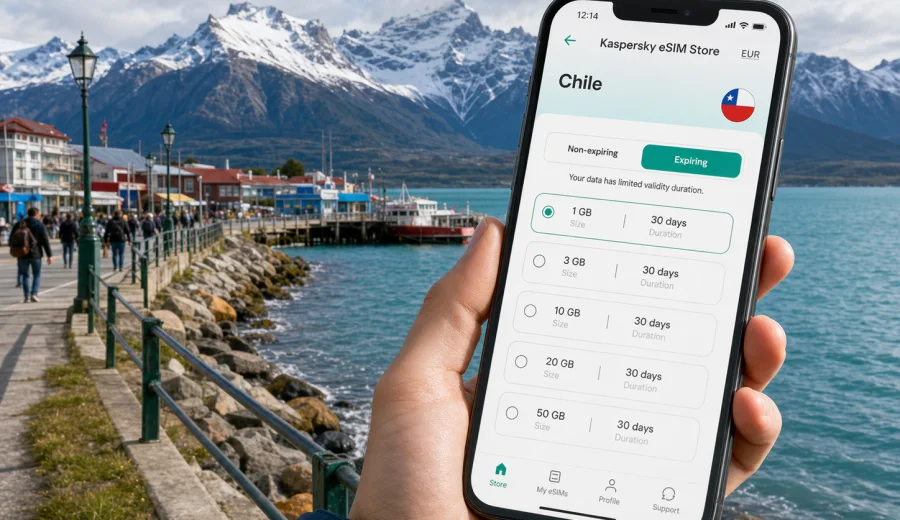
Puerto Natales eSIM: mobile connection and internet for your Chile trip
Puerto Natales is a practical base for Patagonia: a small waterfront city, a gateway to Torres del Paine, and a stopping point for travelers moving between airports, buses, hotels, ferries, rental cars, hiking routes, and day tours. Because the city is compact but the surrounding region is wide, your mobile connection matters from the first hour. You may need maps for the transfer from Punta Arenas, a messenger to coordinate a tour pickup, weather updates before a hike, or internet access to confirm a hotel booking after a long travel day.
An eSIM can make that part of the trip easier. Instead of searching for a physical SIM card after arrival, you can prepare a digital SIM profile before you travel and use a suitable data plan on a compatible phone. For Puerto Natales, that is useful not only inside the city, but also for the many small decisions around the trip: when to leave for the bus terminal, whether the wind forecast has changed, where the nearest supermarket is, and how to reach your accommodation when street signs and local directions are not enough.
This guide focuses on mobile internet in Puerto Natales, not on Chile in general. It covers arrival, local movement, transport, hotels, work trips, stopovers, routes from the city, data planning, eSIM setup, and what to check before choosing a plan.
Why mobile internet is useful in Puerto Natales
Puerto Natales is not a city where you spend the whole trip in one neighborhood. Even if your hotel is near the waterfront, your plans may include the bus terminal, restaurants around the center, rental offices, tour agencies, viewpoints, the pier, and early departures toward Torres del Paine. Many travelers also arrive tired after a long route through Santiago, Punta Arenas, El Calafate, or other Patagonian stops.
Mobile internet helps with everyday tasks that are easy to underestimate:
- finding your hotel after arriving by bus or transfer;
- checking maps when walking between the waterfront, center, and bus terminal;
- contacting a tour operator if pickup time changes;
- using messaging apps with family, colleagues, or travel partners;
- opening booking confirmations without relying only on hotel Wi-Fi;
- checking weather before a lake, glacier, or national park route;
- translating menus, signs, and short messages;
- sharing a location when meeting a driver or group;
- managing flight, bus, ferry, or accommodation changes.
The city itself is walkable, but Patagonia adds uncertainty. Wind, rain, road time, and early departures can make a stable data plan more valuable than it looks on paper. Even a short weekend in Puerto Natales can involve several moments when you need internet away from your room.
Arrival scenarios: where an eSIM helps first
Your first connection need is usually not social media. It is orientation. Puerto Natales can be reached in different ways depending on the season and route, so the exact arrival point may vary. Some travelers fly within Chile, some travel via Punta Arenas and continue by road, and some enter the region after visiting Argentina. In each case, mobile data helps you move from "I have arrived" to "I know where I am going."
| Arrival situation | What you may need online | Why eSIM can help |
|---|---|---|
| Bus or road transfer | Maps, pickup messages, hotel address | You can navigate before finding reliable Wi-Fi |
| Regional flight | Transport options, booking confirmations | You can check details after landing |
| Late arrival | Messenger, door code, taxi or transfer contact | You avoid depending on an open shop or cafe |
| Group tour start | Pickup location, guide messages, weather | You can coordinate without changing SIM cards |
| Cross-border route | Route planning, documents saved in cloud, accommodation messages | You keep travel information available on the phone |
If you install an eSIM before the trip, you can leave your physical SIM in place for your usual number while using the eSIM profile for mobile data, if your phone supports that setup. This is useful when your bank, airline, or messaging accounts still depend on your primary number.
City movement: compact streets, changing plans
Puerto Natales is easier to understand once you are on the ground: the waterfront, the center, the bus terminal, the pier area, and accommodation streets are not far apart. Still, mobile internet helps because many travel tasks happen while you are moving. You may be walking from the terminal with luggage, checking whether a restaurant is open, or comparing tour office addresses before committing to a plan.
Common city moments where data is useful:
1. You arrive at the bus terminal and need the fastest walking route to your hotel.
2. Your accommodation sends a message with check-in instructions.
3. A tour agency asks for passport details or a digital voucher through a messenger.
4. You need to find a pharmacy, ATM, laundry, supermarket, or gear rental.
5. You want to confirm the meeting point for a Torres del Paine day trip.
6. You check cloud notes, maps, or offline documents before leaving the city.
Public Wi-Fi can be helpful in hotels and cafes, but it is not always available exactly when you need it. A prepared eSIM plan reduces dependence on public networks and makes your phone more useful during the small gaps between transport, check-in, food, and excursions.
Data needs for different types of Puerto Natales trips
The right amount of data depends on how you travel. A person staying two nights before a national park transfer will use data differently from a remote worker spending a week in town. The table below gives a practical way to estimate usage without treating every traveler the same.
| Trip type | Typical online behavior | Data planning tip |
|---|---|---|
| Overnight stopover | Maps, messages, hotel and bus confirmations | A smaller data package may be enough if you avoid heavy video |
| Torres del Paine base | Weather, tour coordination, maps, photos, messages | Choose a plan that covers the full stay plus buffer days |
| Road trip | Navigation, route changes, accommodation searches | Allow extra data for maps and repeated location checks |
| Business visit | Email, video calls on Wi-Fi, backup mobile data | Keep mobile data as a fallback for urgent work |
| Long Patagonia route | Several cities, border movement, changing bookings | Check whether a country, regional, or wider route plan fits best |
For most travelers, the safest planning approach is simple: estimate your daily light use, add the days when you will be away from hotel Wi-Fi, and leave a margin for route changes. Patagonia trips often change because of weather or transport timing, so a plan that looks exact on a spreadsheet can feel too tight during the trip.
How to choose an eSIM plan for Puerto Natales
When you choose an eSIM plan for Puerto Natales, start with the country where the city is located: Chile. Then check the plan details rather than choosing only by headline data size. You need to know the amount of data, validity period, destination, price, and any important conditions before installing the eSIM.
Use this checklist before you decide:
- Destination: the plan should cover Chile for a Puerto Natales city trip.
- Validity: the active period should match the whole trip, including arrival and departure days.
- Data volume: include maps, messengers, weather, booking apps, and email.
- Device compatibility: your phone or tablet must support eSIM.
- Operator lock: the device should not be locked to a carrier that prevents eSIM use.
- Activation timing: check when the validity period starts for the selected plan.
- Hotspot needs: if you plan to share data, confirm whether tethering is allowed by the plan conditions.
- Voice and SMS: assume the plan is for mobile data unless the conditions say otherwise.
If you want to prepare mobile internet before arrival, Kaspersky eSIM Store helps you choose, order, and activate an eSIM with a suitable data plan for international travel. For a Puerto Natales trip, you can choose an eSIM plan for Chile and review the available data amounts and validity periods before you leave.
Puerto Natales use cases: from hotel check-in to park departures
The value of mobile internet in Puerto Natales is often practical, not dramatic. It is about avoiding small delays when the day is already full.
Hotel and apartment check-in
Many travelers arrive between transport legs. You may need a door code, a late check-in message, a map pin, or a quick call through a messenger. If the property is a few streets from the center or near the waterfront, mobile data helps you avoid wandering with luggage while looking for Wi-Fi.
Tour and transfer coordination
Day tours and transfers often depend on clear meeting points. A phone with mobile data lets you receive updates, share your live location when appropriate, and keep the guide's message thread available. It also helps if pickup is early and the hotel lobby is quiet.
Navigation around town
Puerto Natales is not hard to walk, but cold wind and luggage can make wrong turns annoying. Maps help you choose whether to walk, ask for a transfer, or plan errands in a sensible order: supermarket, gear rental, restaurant, bus ticket, hotel.
Remote work and business travel
Business trips to smaller cities require more planning than trips to large capitals. Hotel Wi-Fi may be enough for planned calls, but mobile data is a useful backup for email, authentication prompts, document access, and messages. Avoid relying on mobile data for long video meetings unless your plan and local conditions support it; use it as a practical fallback.
Weather and route decisions
Patagonian weather can affect clothing, transport timing, and excursion comfort. Mobile internet helps you check forecasts before leaving your room, but also while you are already out buying food, waiting for a pickup, or deciding whether to bring extra layers.
What eSIM does and does not replace
An eSIM for travel is mainly about mobile data. It can help you use maps, apps, email, websites, and messengers without installing a physical SIM card. It does not automatically replace every service connected with a local mobile subscription.
Keep these points in mind:
- An eSIM data plan may not include a local phone number, voice calls, or SMS.
- Calls and messages can usually be handled through internet-based apps if you have data.
- Coverage and speed depend on local mobile networks, terrain, device settings, and the selected plan conditions.
- Some phones require data roaming to be enabled for the eSIM profile.
- Installation and activation steps can differ between iOS and Android.
- A downloaded eSIM profile may have rules about transfer or reuse, so read the conditions before removing it.
This is why preparation matters. Check your device, select the correct destination, and keep the plan details accessible before you travel into a region where transport days can be long.
How to install and activate an eSIM for Puerto Natales
You can prepare the eSIM before departure or after arrival, but installation needs an internet connection. Many travelers prefer to complete setup at home or on reliable Wi-Fi, then switch the eSIM on when it is time to use data in Chile. Follow the instructions shown after purchase and keep the QR code or installation details available until the setup is complete.
General setup flow:
1. Check that your phone supports eSIM and is not carrier-locked.
2. Choose Chile as the destination for a Puerto Natales trip.
3. Select the data amount and validity period that match your route.
4. Install the eSIM profile using the app instructions or QR code.
5. Set the eSIM as the mobile data line when you are ready to use it.
6. Enable data roaming for the eSIM if the plan instructions require it.
7. Keep your primary SIM active for calls or messages if your device supports dual SIM use.
For device-specific guidance, use the Android installation instructions or the iOS installation instructions. Before choosing a plan, also check your device so you know whether it supports eSIM.
Practical data-saving tips in Patagonia
Even with a suitable plan, it is smart to manage data carefully. Puerto Natales trips often include long days outside the hotel, and you may not always want background apps using data while you are focused on transport or excursions.
Use these habits:
- Download offline maps for Puerto Natales, Punta Arenas, Torres del Paine, and your route before departure.
- Save hotel addresses, tour vouchers, bus details, and emergency contacts offline.
- Turn off automatic cloud photo backup on mobile data.
- Let app updates run on Wi-Fi only.
- Reduce video streaming and large file uploads when using mobile data.
- Keep weather, maps, messengers, and booking apps allowed to use data.
- Check data usage in your phone settings during the trip.
These steps do not make mobile data unnecessary. They make your plan last longer and keep the most important apps available when you are away from hotel Wi-Fi.
Common mistakes to avoid
The most common eSIM problems are usually preparation problems. They are easier to prevent than to fix during a windy arrival or an early transfer.
Avoid these mistakes:
1. Buying a plan without checking that it covers Chile.
2. Waiting until you have no internet to start installation.
3. Assuming every eSIM plan includes voice calls and SMS.
4. Forgetting to check device compatibility.
5. Removing the eSIM profile before reading whether it can be reinstalled.
6. Leaving background video, cloud backup, or app updates active on mobile data.
7. Choosing a validity period that ends before your return to Punta Arenas or onward route.
8. Depending only on public Wi-Fi for transport changes and hotel messages.
If you are traveling with another person, decide who will keep mobile data available for logistics. It is often useful for at least one phone in the group to have a prepared data plan, even if others rely mostly on Wi-Fi.
FAQ: eSIM and mobile internet in Puerto Natales
Do I need an eSIM if my hotel has Wi-Fi?
Hotel Wi-Fi helps when you are in the room, but Puerto Natales travel tasks often happen outside: arrival, walking routes, tour pickups, supermarkets, restaurants, and transfer changes. eSIM is useful for those gaps.
Can I use eSIM for Torres del Paine from Puerto Natales?
An eSIM plan for Chile can be useful on the route and for preparation, but mobile coverage in remote terrain can vary. Save important maps and documents offline before leaving the city, and do not rely on mobile data as your only navigation or safety tool in isolated areas.
Will eSIM give me a Chilean phone number?
Travel eSIM plans are usually focused on mobile data. Voice calls, SMS, and a local number are not included unless the specific plan conditions say so. For many travel tasks, you can use internet-based messengers and calling apps.
Should I install the eSIM before flying?
It is often convenient to install the eSIM while you still have reliable Wi-Fi. You can then activate or select it for mobile data according to the plan instructions when you are ready to use it in Chile.
Can I keep my usual SIM active?
Many compatible phones allow a physical SIM and an eSIM, or two eSIM profiles, depending on the model. This can let you keep your regular number for calls or messages while using eSIM for data. Check your device settings and carrier lock status before the trip.
Is eSIM useful for a business trip to Puerto Natales?
Yes, especially as backup data for email, messages, authentication, maps, and schedule changes. For long video calls or large file transfers, hotel or office Wi-Fi is usually more practical when available.
Final checklist before you travel
Before leaving for Puerto Natales, make sure the connectivity part of your trip is ready:
- Your phone supports eSIM and is not carrier-locked.
- You selected Chile as the destination for the plan.
- The validity period covers arrival, stay, and departure.
- You understand whether the plan includes only data or also other services.
- You saved installation instructions and key travel documents offline.
- You know how to switch mobile data to the eSIM profile.
- You downloaded offline maps for the city and onward route.
- You kept enough data for transport changes and final travel days.
Puerto Natales rewards good preparation. The city is compact, but the travel context around it is active: transfers, weather, national park logistics, early departures, and changing routes. Preparing mobile internet through eSIM helps you handle those details with less dependence on physical SIM shops or public Wi-Fi.
If Puerto Natales is part of your Chile itinerary, use Kaspersky eSIM Store to review available options and prepare an eSIM plan for your trip to Chile before you arrive. Choose the data amount and validity period that match your route, install the eSIM on a compatible device, and keep your travel information available when you need it most.