
Travel connectivity guide
Puerto Plata eSIM: Mobile Internet Guide
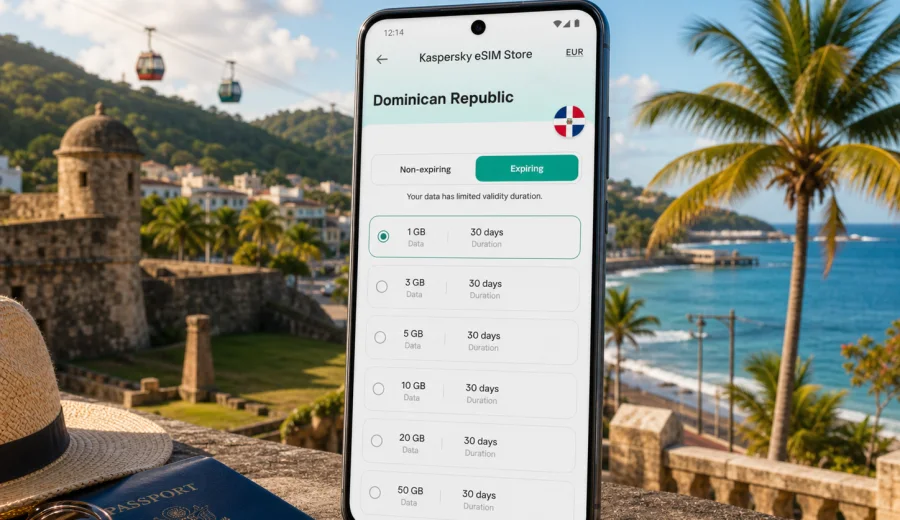
Puerto Plata eSIM: mobile connection and internet for your city trip
Puerto Plata is a city where mobile internet starts to matter before you reach the beach. You may need maps after landing, a ride to your hotel, messages with a host, a booking near the Malecon, or a route to the cable car, Fort San Felipe, Playa Dorada, Cofresi, Sosua, or Cabarete. An eSIM can make that first day easier because you can prepare mobile data before the trip.
This guide focuses on Puerto Plata, not on the Dominican Republic in general. The country matters because the eSIM plan must cover the Dominican Republic, but your real connectivity needs come from the city: airport arrival, hotel check-in, transfers, local taxis, resort areas, beach days, short work sessions, and side trips along the north coast.
Kaspersky eSIM Store is an app and website where you can choose, arrange, and activate an eSIM with a suitable data plan for mobile internet in an international trip. It is not a mobile operator and does not provide a phone network. The practical value is the travel workflow: choose the destination, review the data amount and validity period, install the eSIM on a compatible device, and use the selected profile for mobile data when your trip starts.
Why mobile internet matters in Puerto Plata
Puerto Plata is spread across several travel zones. The historic center, the Malecon, the port area, Playa Dorada, Cofresi, nearby beaches, and the roads toward Sosua and Cabarete can all become part of one short trip. A working data connection helps you handle the ordinary details that are easy to underestimate.
Common Puerto Plata moments where eSIM is useful:
- checking the address of your resort or apartment after landing;
- sending your arrival time to a driver, hotel, host, or colleague;
- opening a map before leaving Gregorio Luperon International Airport;
- comparing ride options and confirming a pickup point;
- translating menu items, hotel instructions, or short messages;
- keeping booking confirmations available when Wi-Fi is weak or unavailable;
- using messaging apps for calls when your plan is data-only;
- checking weather before visiting the cable car, the Malecon, or beaches;
- sharing a hotspot with a laptop if your device and chosen plan allow tethering.
In a city trip, the need is not only "internet at the hotel." It is internet between places: from the airport to the resort, from the resort to the city center, from the cruise or port area to a restaurant, from a beach stop back to the hotel, and from Puerto Plata to another north coast town.
Arrival: from airport mode to city mode
Many visitors arrive through Gregorio Luperon International Airport, which serves Puerto Plata and nearby north coast resorts. The first hour after arrival is often when mobile data is most useful. You may be outside familiar roaming conditions, your hotel Wi-Fi is not available yet, and you still need to coordinate transport.
Before leaving the arrivals area, it is worth doing a simple connection check:
1. Turn off data roaming on your primary SIM if you do not want to use standard roaming.
2. Select the installed eSIM profile for mobile data.
3. Make sure the eSIM line is enabled.
4. If the plan instructions require it, turn on data roaming for the eSIM profile only.
5. Open a map, a messaging app, and your hotel confirmation before starting the transfer.
This does not need to take long, but it is easier to do calmly before you are in a taxi queue, a shuttle bus, or a busy hotel lobby. Connection may take a few minutes and depends on the device, the selected plan, and the local network.
Puerto Plata travel scenarios and data needs
Different Puerto Plata trips use mobile data in different ways. A weekend at an all-inclusive resort is not the same as a remote-work stay, a cruise stop, or a route that includes Sosua and Cabarete. Use your real itinerary to choose the data amount and validity period instead of choosing by city name alone.
| Trip scenario in Puerto Plata | Typical mobile data use | What to check before choosing a plan |
|---|---|---|
| Resort stay in Playa Dorada or Cofresi | maps, messages, transport, light browsing outside hotel Wi-Fi | validity period, enough data for days away from Wi-Fi |
| Historic center and Malecon days | navigation, ride apps, restaurant searches, photo sharing | steady daily allowance, easy activation before leaving hotel |
| Business trip | email, calendar, messaging, document access, laptop hotspot if allowed | tethering rules, data volume, plan duration |
| Cruise or short stop | maps, pickup coordination, translation, quick bookings | short validity, activation timing, enough data for one active day |
| North coast route | maps to Sosua, Cabarete, beaches, hotels, transfers | country coverage, extra data for navigation and media |
| Family trip | messaging, shared plans, maps, emergency contact, entertainment | separate plans for each compatible device or hotspot rules |
The safest planning rule is simple: navigation and messaging use little data, but video, cloud photo backup, social media uploads, and laptop work can use a lot. If you expect to share a hotspot or work from cafes, choose a larger package than you would for a beach-only trip.
How to choose an eSIM plan for Puerto Plata
For Puerto Plata, choose a plan that covers the Dominican Republic. A city article does not need a separate city plan; the key is that the plan destination matches the country where Puerto Plata is located. Then compare the plan details with your itinerary.
Use this checklist:
- Destination: the plan should include the Dominican Republic.
- Validity: match the number of travel days, including arrival and departure.
- Data size: estimate maps, messages, browsing, uploads, calls through apps, and hotspot use.
- Activation timing: understand whether validity starts at installation or when the eSIM connects to a supported network.
- Device support: confirm that your phone or tablet supports eSIM and is not locked to a carrier.
- Calls and SMS: check whether the plan is data-only; many travel eSIM plans do not include a regular phone number.
- Tethering: if you need a laptop connection, confirm whether hotspot use is allowed by the selected plan and device.
For a quiet resort trip, a smaller data package may be enough if you use hotel Wi-Fi for streaming and backups. For a route with airport transfer, city visits, beaches, and day trips, a mid-sized package gives more room for maps and messaging. For work, large photo uploads, or hotspot use, plan more data than you would normally use at home because travel tasks often happen away from trusted Wi-Fi.
Where eSIM helps most around the city
Puerto Plata is practical rather than complicated, but the city rewards preparation. Mobile internet is useful when you move between compact urban areas and resort zones that are not always walking distance from each other.
In the historic center, mobile data helps with walking routes, cafe searches, opening saved places, and messaging if your group splits up. Along the Malecon, it helps you check weather, mark pickup points, and keep a route back to the hotel. In Playa Dorada, it is useful when moving between resort entrances, golf areas, restaurants, and beach access points. In Cofresi, data can help with transport timing and messages because you may not want to rely only on venue Wi-Fi. On the road toward Sosua or Cabarete, maps and ride coordination become even more important.
If your trip includes several of these areas, you can choose an eSIM plan for travel in the Dominican Republic before you arrive and keep the setup focused on Puerto Plata tasks: maps, transport, bookings, and messages.
How to install and activate eSIM for Puerto Plata
Install the eSIM while you still have a stable internet connection, ideally before departure or on trusted Wi-Fi after arrival. The exact screens vary by phone, so use the official setup flow for your device: Android installation guide and iOS installation guide.
General setup flow:
1. Open Kaspersky eSIM Store on the website or in the app.
2. Choose the Dominican Republic as the destination for your Puerto Plata trip.
3. Review the data amount, validity period, and plan conditions.
4. Complete the order and open the eSIM details in your profile or email.
5. Add the eSIM to your compatible device using the on-screen instructions or QR code.
6. Label the eSIM clearly, for example "Dominican Republic travel data."
7. When ready to use it, select that eSIM profile for mobile data.
8. Keep your primary SIM available for calls if you still need your usual number.
An eSIM plan for travel mobile data may not include regular voice calls or SMS unless the plan conditions say so. For calls, many travelers use messaging apps over mobile data. Before relying on this setup for work or family communication, test the apps you use most often.
Device compatibility before you buy
Not every phone supports eSIM, and some devices can be restricted by carrier lock or regional model differences. Before choosing a plan, check your device and confirm that it can add an eSIM profile.
Also check these points:
- Your device supports eSIM in the country where it was sold.
- The phone is not locked to a single carrier.
- The operating system is up to date enough to add an eSIM.
- You have internet access during installation.
- You understand whether the eSIM can be reinstalled or moved; many eSIM profiles are intended for one device.
If you travel with two phones, install the eSIM on the device you will actually carry around Puerto Plata. If you travel with a tablet or a laptop that supports cellular data, check its eSIM rules separately because device menus and plan behavior can differ.
Local movement, hotels, and beach zones
Puerto Plata travel often depends on short vehicle transfers. Even if your hotel arranges a shuttle, mobile internet helps with driver messages, exact pickup points, map pins, and updates when plans change. For resort areas, save the hotel name and address offline, then use mobile data for live coordination. For tours, confirm the meeting point before leaving the hotel Wi-Fi zone.
Hotel Wi-Fi can be useful, but it is not the same as having mobile data in your pocket. You may have strong Wi-Fi in the room and weak Wi-Fi near the beach, lobby, parking area, or restaurant. An eSIM is most useful as the layer between Wi-Fi zones: leaving the resort, waiting for a transfer, meeting a guide, finding a pharmacy, checking a reservation, or contacting someone while walking around the city.
Good travel habits for Puerto Plata:
- save hotel and airport addresses before arrival;
- download offline maps, then use eSIM data for live routing;
- keep booking confirmations available outside email if possible;
- disable automatic app updates over mobile data;
- pause cloud photo backup until Wi-Fi;
- keep a power bank for long beach or day-trip days.
Business trips, stopovers, and trips from the city
Puerto Plata is also used for meetings, port-related work, hospitality projects, property visits, cruise calls, short stopovers, and north coast routes. In these cases, mobile internet becomes a continuity tool: email, calendar updates, pickup messages, map changes, and quick file access.
For business travel, choose a data package that covers the full stay, complete setup before the first meeting day, and check whether hotspot use is allowed if you plan to connect a laptop. For a cruise visit or one-night stop, prioritize readiness over size: install the eSIM before the trip if possible, confirm when validity starts, and keep enough data for maps, translation, rides, and messages.
For day trips from Puerto Plata to nearby beach towns, mobile internet is useful for checking road time, sharing your location with your group, confirming return transport, finding restaurants or pharmacies, and contacting your hotel if plans change. If you expect long navigation sessions, multiple photo uploads, or hotspot use in a vehicle, add that to your data estimate.
Quick comparison: eSIM, roaming, and local SIM
| Option | Strength in Puerto Plata | Tradeoff to consider |
|---|---|---|
| Travel eSIM | Prepare before arrival, no physical SIM swap, useful for airport and city movement | Requires compatible, unlocked device and correct setup |
| Standard roaming | Uses your existing number and carrier relationship | Cost and conditions depend on your home carrier |
| Local physical SIM | Can suit longer stays if you want a local arrangement | Requires an offline purchase step and may take time after arrival |
| Hotel Wi-Fi only | Good for heavy use in the room or lobby | Does not help reliably during transfers, walks, beaches, or day trips |
No single option is right for every traveler. eSIM is especially practical when you want mobile data prepared before arrival and do not want to spend the first hours of the trip looking for a local SIM.
Puerto Plata preparation checklist
Before departure:
- Check that your device supports eSIM and is not carrier-locked.
- Choose a plan that covers the Dominican Republic.
- Read the data amount, validity period, activation rules, and tethering conditions.
- Install the eSIM while you have stable internet access.
- Save hotel, airport, and pickup details offline.
- Turn off automatic app updates and cloud backups over mobile data.
- Keep Android or iOS installation instructions available.
After arrival:
- Select the eSIM profile for mobile data.
- Keep your primary SIM active only as needed for calls or SMS.
- Open maps and messaging before leaving the airport or hotel.
- Monitor data use after the first full day.
- Use trusted Wi-Fi for heavy downloads and uploads.
FAQ
Is eSIM useful for Puerto Plata if my hotel has Wi-Fi?
Yes. Hotel Wi-Fi helps when you are on the property, but eSIM is useful during airport transfer, city walks, beach visits, restaurant searches, and day trips. It is the connection you carry between Wi-Fi zones.
Do I need a Puerto Plata-specific eSIM plan?
No. Puerto Plata is in the Dominican Republic, so you should choose a plan that covers the Dominican Republic. The city affects your data needs, while the country determines the correct destination coverage.
Can I use eSIM for regular phone calls and SMS?
Only if the selected plan conditions include them. Many travel eSIM plans are intended for mobile data and do not include a separate phone number. You can use messaging apps over data for calls and messages.
Should I install eSIM before flying to Puerto Plata?
It is usually more convenient to install it before departure while you have stable internet access. Check the plan conditions so you understand when validity and data use begin.
What if the eSIM does not connect immediately after arrival?
Give the connection a few minutes, confirm that the eSIM line is enabled, select it for mobile data, and check whether data roaming must be enabled for that eSIM profile. If the issue continues, use available Wi-Fi to review the setup instructions or contact support.
How much data should I choose?
For light maps and messaging, a smaller package may be enough. For video, cloud backups, remote work, or hotspot use, choose more data. Match the package to the length of your Puerto Plata stay and any day trips from the city.
Choose an eSIM plan for your Puerto Plata trip
Puerto Plata is easier to enjoy when mobile internet is already part of your travel setup. Before you fly, check device compatibility, choose a Dominican Republic plan with a suitable data amount and validity period, and install the eSIM while you have a stable connection.
Kaspersky eSIM Store helps you choose, arrange, and activate an eSIM with a suitable data plan for mobile internet in an international trip. If Puerto Plata is your main destination, use the country page to choose an eSIM plan for your Dominican Republic trip and keep your arrival, transfers, hotel check-in, city routes, and day trips easier to manage.